
MailMergic
MailMergic turns spreadsheet data into personalized certificates, transcripts, diplomas, and other documents that users can download or email.
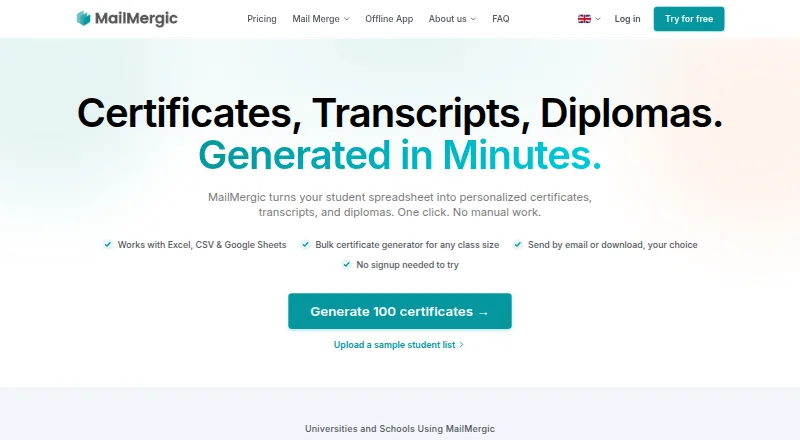
What MailMergic is
MailMergic turns spreadsheet data into personalized certificates, transcripts, diplomas, and other documents that users can download or email. For education workflows, it accepts PDF or Word templates and student information from Excel, CSV, or Google Sheets, then creates one PDF per student. It can process thousands of rows in one run, and its AI checks merge data for missing values, formatting problems, and mismatches before generation. Users can email documents to spreadsheet recipients and track delivery, opens, and bounces in a dashboard. Student information systems can provide CSV or Excel exports without an API connection; Pro and Enterprise also list Zapier and a public REST API. The online service says it encrypts data in transit and at rest, hosts it in the EU, and uses access controls. MailMergic lists a free plan with 25 documents per month and watermarks. Pro is $39 a year, billed yearly; Enterprise is $66 a year, billed yearly. An offline app is listed at $107 a year, billed annually, for macOS and Windows.
Good
- Creates one PDF for each student.
- Processes thousands of rows in one run.
- Checks merge data before generation.
- Tracks email delivery, opens, and bounces.
- Online service uses EU-based hosting and encryption.
Watch out
- Free plan adds watermarks.
- Free plan is limited to 25 documents monthly.
- Offline license activates on one computer.
- Offline app excludes cloud AI features.
Who it suits
It suits registrars, school administrators, course providers, and training teams that need to generate documents from student or participant data. Organizations seeking local processing can consider the macOS and Windows offline app.
Verdict
MailMergic combines bulk document creation, data checks, and email tracking for education workflows. Review the plan limits and whether you need online or local processing before choosing.
Plans and prices
From MailMergic's own pricing page, checked 29 Sep 2026.
| Plan | Price | What it gives you |
|---|---|---|
| Always-Free | Free | 25 docs / mo · 1 user · Watermarks |
| Pro | $39 a year | 1,000 docs / mo · 1 user · No watermarks · Send emails · Dedicated account manager · Zapier integration · Public API · Billed yearly · Save 4 months! |
| Enterprise | $66 a year | 10,000 docs / mo · 5 users · No watermarks · Send emails · Dedicated account manager · Zapier integration · Public API · Custom SMTP server · Billed yearly · Save 4 months! |
| Offline App | $1,284 a year | Unlimited documents · 1 computer per license · macOS and Windows · Offline processing · All online features except cloud AI · Billed annually · Equivalent billed once a year $1,284 /yr |
The facts
Each one read from MailMergic's own pages, with the date it was checked.
What it does
- Bulk generation
- MailMergic generates one PDF per student and says its education workflow can handle thousands of rows in a single run.checked 29 Sep 2026
- Data checks
- The education page says its AI scans merge data for missing values, formatting issues, and mismatches before generation.checked 29 Sep 2026
- Education privacy
- The education page describes the service as GDPR and CCPA compliant, with FERPA-compatible workflows and a FERPA addendum available for U.S. institutions.checked 29 Sep 2026
- Email delivery
- Users can send personalized documents to recipients from their spreadsheet and track delivery, opens, and bounces from a dashboard.checked 29 Sep 2026
- Integrations
- The pricing page lists Zapier and a RESTful public API on Pro and Enterprise, while the education page says student information systems can supply CSV or Excel exports without an API integration.checked 29 Sep 2026
- Intended users
- The education page names registrars and admin offices, online course providers, training and professional development teams, and K-12 schools and language institutes.checked 29 Sep 2026
- Offline limits
- Each offline license activates on one computer, the app is offered for macOS and Windows, and it excludes cloud AI features.checked 29 Sep 2026
- Offline processing
- The offline app processes documents on the user's device, and MailMergic says document content is not sent to it or third parties during local processing.checked 29 Sep 2026
- Online security
- MailMergic says the online service uses encryption in transit and at rest, EU-based hosting, and access controls, and that customer data is not used for advertising or AI training.checked 29 Sep 2026
- Purpose
- MailMergic turns spreadsheets into personalized certificates, transcripts, diplomas, and other documents, which users can download or send by email.checked 29 Sep 2026
- Support
- MailMergic lists support by email and says its contact hours are Monday through Sunday, 8am to 9pm UTC.checked 29 Sep 2026
- Templates and data
- The education page says users can upload PDF or Word templates and use student data from Excel, CSV, or Google Sheets.checked 29 Sep 2026
The company
- Company history
- MailMergic's about page lists company formation in June 2019 and identifies Lennart Guth as founder.checked 29 Sep 2026
- Founded
- 2019checked 28 Sep 2026
- Headquarters
- Eschborn, Germanychecked 28 Sep 2026
The full review of MailMergic
MailMergic turns spreadsheet data into personalized certificates and other student documents, making it a strong fit for education teams with recurring bulk workflows. Its data checks and email tracking add useful controls, but the plan limits and choice between cloud and local processing deserve close attention.
Overview
Upload a PDF or Word template and student data from Excel, CSV, or Google Sheets; MailMergic creates an individual PDF for each student, for download or email delivery. Its education workflow is designed to process thousands of rows in a run, which can save administrative teams from preparing documents one by one.
Before generation, the service says its AI checks merge data for missing values, formatting problems, and mismatches. That can help catch errors before they become incorrect certificates or transcripts, though the workflow still depends on the quality of the underlying student data. For systems that export data as CSV or Excel, an API connection is not required.
Key features
Bulk documents and delivery
MailMergic supports personalized certificates, transcripts, diplomas, and other documents. It can email recipients using spreadsheet data, then track delivery, opens, and bounces in a dashboard. This combination is useful when teams need both document production and a view of what reached recipients; the 1,000-recipient limit on the entry paid plan may constrain larger monthly campaigns.
Integrations and privacy
Pro and Enterprise include Zapier and a RESTful public API. Online, MailMergic says it encrypts data in transit and at rest, hosts it in the EU, applies access controls, and does not use customer data for advertising or AI training. It describes its service as GDPR- and CCPA-compliant, with FERPA-compatible workflows and a FERPA addendum for U.S. institutions.
The Offline App instead processes documents on the user's computer, with document content not sent to MailMergic or third parties during local processing. That is a meaningful option for institutions prioritizing local handling, but it excludes cloud AI features and each license activates on only one computer.
Pricing
MailMergic is freemium, with a free plan and a free trial. Its paid online plans start at $39/mo (annual). The plan prices below are shown with their billing terms; the price labels and annual billing descriptions should be checked carefully before purchase.
| Plan | Price and terms | What it includes |
|---|---|---|
| Always-Free | free | 25 documents per month, one user, and watermarks. |
| Pro | $39 a year; billed yearly | 1,000 documents per month, one user, no watermarks, email sending, a dedicated account manager, Zapier, and public API. |
| Enterprise | $66 a year; billed yearly | 10,000 documents per month, five users, no watermarks, email sending, a dedicated account manager, Zapier, public API, and a custom SMTP server. |
| Offline App | $107 a year; billed annually, equivalent to $1,284 /yr billed once a year | Unlimited documents, one computer per license, macOS and Windows support, offline processing, and all online features except cloud AI. |
The free tier is suitable for occasional, low-volume work if watermarks and a 25-document monthly cap are acceptable. Pro removes watermarks and adds delivery and integrations, but keeps the account to one user and caps monthly output at 1,000 documents. Enterprise is the more practical online choice for a small team or higher volume, with five users and 10,000 documents monthly; custom SMTP is another reason to consider it. The Offline App suits users who need local processing and unlimited documents, but one-computer licensing and the exclusion of cloud AI make it a different trade-off rather than a straightforward upgrade.
Platforms
MailMergic is offered for web, macOS, Windows, and through an API. The Offline App specifically supports macOS and Windows. Support is by email, with contact hours Monday through Sunday, 8am to 9pm UTC.
Who it's for
MailMergic is aimed at registrars and administrative offices, online course providers, training and professional-development teams, K-12 schools, and language institutes. It is best suited to organizations that repeatedly generate personalized student documents from spreadsheet exports and want built-in checking or delivery tracking. It is less compelling for a single user who needs only a handful of unwatermarked documents, or for teams that need more than five online seats.
Pros and cons
- Pros: Bulk generation from common spreadsheet sources supports recurring education workflows without requiring an SIS API.
- Pros: Pre-generation data checks and email status tracking address two practical points of failure: bad merge data and uncertain delivery.
- Pros: Online privacy commitments and a separate local-processing app give institutions a choice of handling model.
- Cons: The free plan's 25-document cap and watermarks make it a limited fit for routine issuance.
- Cons: Pro and Enterprise have monthly document caps, and Pro is restricted to one user; larger teams may need a different arrangement.
- Cons: Offline processing is limited to one computer per license and omits cloud AI, so it sacrifices some online capabilities.
Alternatives
For a broader certificate-software shortlist, see Certificate Maker Software.
- Clever Certificates may suit readers comparing paid certificate tools with unlimited issuing and no per-certificate fees on its Issuer plan.
- EZdoc AI Certificate Maker is another freemium option, with a free tier for 25 copies per month and CSV or XLSX uploads.
- Berlvis Credentials is a web-based option with a free, watermarked Studio tier and a paid ID-card plan.
- Certhive is a free-trial, freemium web option described by its maker as a side project.
- CertificatesMaker is a free web option with a free-forever plan.
- Certifier is a freemium API and web alternative with a free Starter plan capped at 250 credentials per year.
- Certopus is a freemium web, API, and self-hosted alternative with a free starter tier that includes 250 credentials.
- Sertifier is a freemium API and web option whose free plan allows up to 25 recipients and unlimited credentials.
Verdict
Choose MailMergic if your education team regularly turns spreadsheet exports into personalized documents and values data checks, email tracking, and a choice of online or local processing. Its free tier is useful for small trials, while higher-volume or multi-user work points toward Enterprise. Look elsewhere if you need a generous unwatermarked free plan, more than five online users, or local processing with cloud AI.
Getting started
- Visit the MailMergic education website.
- Choose the free plan or a paid plan, or select the offline app.
- For online use, upload a PDF or Word template and provide student data from Excel, CSV, or Google Sheets.
- Review the data checks, then generate individual PDFs.
- Send documents to spreadsheet recipients or download them.
Limits worth knowing
The Always-Free plan allows 25 documents per month for one user and adds watermarks. Pro allows 1,000 documents per month for one user; Enterprise allows 10,000 documents per month for five users. The offline app is limited to one computer per license and excludes cloud AI features.
Questions
Is MailMergic free?
Yes. Its Always-Free plan costs nothing and includes 25 documents per month for one user, with watermarks.
How much do the paid plans cost?
Pro is listed at $39 a year, billed yearly, and Enterprise at $66 a year, billed yearly.
Which platforms does MailMergic support?
The listed platforms are API, macOS, web, and Windows. The offline app is offered for macOS and Windows.
Can documents be processed offline?
Yes. The offline app processes documents on the user's device, and document content is not sent to MailMergic or third parties during local processing.
What integrations are available?
Pro and Enterprise list Zapier and a RESTful public API. Student information systems can also supply CSV or Excel exports without an API integration.
Who makes MailMergic?
MailMergic was founded in 2019, and its about page identifies Lennart Guth as founder.
Alternatives to MailMergic
- 1

DesignCap
Free planWebLinuxmacOSWindows8.1From $59.88 a year - 2

SimpleCert
Free planWebAPImacOSWindows7.7From $19 a month - 3

Certifier
Free planWebAPI7.4From $49 a month - 4

CertifyMe
Free planWebAPI6.8Free plan - 5

QRCertificates
Free planWebAPI6.8From $49 a month - 6
Sertifier
Free planWebAPI6.8From $750 a year