
EZdoc AI Certificate Maker
EZdoc AI Certificate Maker turns a plain-language description into a certificate, with the product page saying a print-ready PDF takes about 30 seconds to ge…
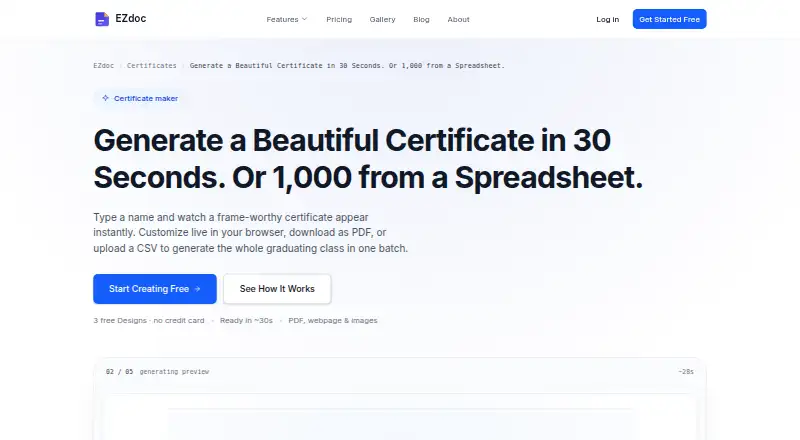
What EZdoc AI Certificate Maker is
EZdoc AI Certificate Maker turns a plain-language description into a certificate, with the product page saying a print-ready PDF takes about 30 seconds to generate. Users can edit fields in the browser and see the preview update. For batch creation, a CSV roster can supply recipient details. The certificate page lists 14 templates and AI variations for occasions including graduation, completion, achievement, training, internship, and volunteer recognition. Users can add a logo and specify school or brand colors, including by hex code. Downloads are described as PDFs, webpages, and images, formatted for standard letter or A4 landscape. Paid bulk workflows can use CSV, Excel, Google Sheets, or HubSpot data and deliver results by email or Google Drive; SFTP is available on Growth and Scale. The REST API is included on every paid plan. The free plan is free and includes 25 copies per month and three lifetime designs. One-time credits cost $3, paid once; monthly plans cost 19.00 USD, 49.00 USD, and 99.00 USD. The service states that it protects data in transit and at rest, and users control file retention from one hour to seven days.
Good
- Browser preview updates as certificate fields are edited.
- CSV rosters support batch personalization.
- Logo and brand or school colors can be added.
- Downloads include PDF, webpage, and image formats.
- REST API is included on paid plans.
Watch out
- Free use offers three generations with no credit card.
- Free plan includes 25 copies per month and three lifetime designs.
- One-time credits cost $3, paid once.
- SFTP delivery is limited to Growth and Scale.
Who it suits
It suits schools, training programs, HR and compliance teams, course creators, bootcamps, and nonprofits that need certificates. Batch creation and paid integrations may suit users handling recipient lists or recurring workflows.
Verdict
EZdoc supports individual certificate creation as well as batch workflows, with editable previews and several output formats. The free plan has defined copy and design limits; paid options include one-time credits and monthly plans.
Plans and prices
From EZdoc AI Certificate Maker's own pricing page, checked 3 Oct 2026.
| Plan | Price | What it gives you |
|---|---|---|
| Free | Free | 25 Copies / mo · 3 Designs (lifetime) · CSV & XLSX upload · Create, preview, edit & refine · $0 /forever |
| One-time credits | $3, paid once | Unlock downloads once · credits never expire · $3 |
| Starter | $19 a month | 1,000 Copies / mo · 8 Designs / mo · 260+ template library · REST API access · Google Sheets + recipient email delivery · $19 /mo |
| Growth | $49 a month | 5,000 Copies / mo · 18 Designs / mo · SFTP delivery · 5,000 API requests/hr · $49 /mo |
| Scale | $99 a month | 20,000 Copies / mo · 40 Designs / mo · Custom branding · 10,000 API requests/hr · $99 /mo |
The facts
Each one read from EZdoc AI Certificate Maker's own pages, with the date it was checked.
What it does
- API
- The product page says the REST API is included on every paid plan.checked 3 Oct 2026
- Audience
- The certificate page describes use cases for training program managers, schools and registrars, HR and compliance teams, course creators and bootcamps, and nonprofits and volunteer coordinators.checked 3 Oct 2026
- Branding
- Users can upload an SVG or image logo and specify school or brand colors, including by hex code.checked 3 Oct 2026
- Bulk generation
- Users can upload a CSV roster to generate personalized certificates in one batch.checked 3 Oct 2026
- Certificate generation
- Users describe a certificate in plain language and EZdoc says it generates a print-ready PDF in about 30 seconds.checked 3 Oct 2026
- Data use
- EZdoc says it does not share or sell user data or train AI on it.checked 3 Oct 2026
- Integrations
- EZdoc says paid bulk workflows can use CSV, Excel, Google Sheets, or HubSpot data and deliver results by email or Google Drive, with SFTP on Growth and Scale.checked 3 Oct 2026
- Live editing
- The certificate preview updates as users edit fields in the browser.checked 3 Oct 2026
- Output formats
- The certificate page describes downloads as PDF, webpage, and images, and says certificates are formatted for standard letter or A4 landscape.checked 3 Oct 2026
- Security
- EZdoc states that data is protected with TLS in transit and AES-256 at rest, and that users control generated-file retention from 1 hour to 7 days.checked 3 Oct 2026
- Support
- The About page says support emails go directly to founder Jason Dorn, who says he is the company's only employee.checked 3 Oct 2026
- Templates
- The certificate page lists 14 ready-made templates and AI variations for occasions including graduation, completion, achievement, training, internship, and volunteer recognition.checked 3 Oct 2026
Money
- Free usage limit
- The certificate page offers three free generations with no credit card, and says no subscription is required to try it.checked 3 Oct 2026
The full review of EZdoc AI Certificate Maker
Overview
EZdoc AI Certificate Maker turns a plain-language description into a certificate that can be edited in a browser or produced in batches. It is best suited to organizations issuing branded certificates from recipient lists, rather than people who need only a one-off design. Its strongest case is the combination of batch workflows and a paid-plan API; the free plan is useful for trying the process but tightly capped for ongoing use.
Key features
EZdoc says it can create a print-ready PDF in about 30 seconds from a plain-language prompt. The live preview changes as fields are edited, giving users a chance to refine the certificate before downloading. Fourteen templates and AI variations cover occasions such as graduation, training, achievement, internships and volunteer recognition. That is a reasonable starting selection, though users who want a much larger catalog need Starter or above, which includes a 260+ template library.
For batch creation, users can upload a CSV roster; paid workflows also accept Excel, Google Sheets or HubSpot data. Results can go by email or Google Drive, while SFTP delivery is limited to Growth and Scale. These options make EZdoc a stronger fit for repeat issuance within an existing process than for occasional manual certificate making. Paid plans include REST API access, with higher hourly request limits on Growth and Scale.
Users can add an SVG or image logo and specify brand colors, including by hex code. Downloads are described as PDF, webpage and image formats, with standard letter or A4 landscape layouts. The certificate page offers QR code support. EZdoc states that it uses TLS in transit and AES-256 at rest, lets users choose generated-file retention from one hour to seven days, and does not sell or share user data or train AI on it. Support emails go directly to founder Jason Dorn, who says he is the company's only employee.
Pricing
The Free plan costs nothing, billed $0 /forever. It allows 25 copies per month, three designs over the lifetime of the plan, and CSV and XLSX upload, with creation, previewing, editing and refinement. The certificate page also offers three free generations without a credit card. This is enough to assess the workflow, but the lifetime design cap and small stated recipient limit of 10 recipients make it a poor choice for a sustained program.
One-time credits cost $3, paid once, billed $3. They unlock downloads once and never expire, making them the lower-commitment route for occasional use; they do not provide the recurring quotas or integrations of a monthly plan.
Starter costs $19 a month, billed $19 /mo, and includes 1,000 copies per month, eight designs per month, the 260+ template library, REST API access, Google Sheets and recipient email delivery. It suits smaller recurring programs that need an API or spreadsheet-based workflow. Growth is $49 a month, billed $49 /mo, for 5,000 copies and 18 designs per month, SFTP delivery and 5,000 API requests per hour. Scale costs $99 a month, billed $99 /mo, and raises those quotas to 20,000 copies and 40 designs per month, with custom branding and 10,000 API requests per hour. Those higher tiers make sense when volume or delivery requirements justify the added monthly cost; occasional issuers are better served by the free plan or one-time credits.
Platforms
EZdoc is available on the web and through an API. Browser editing is part of the certificate workflow, while the REST API is included with paid plans.
Who it's for
Training program managers, schools and registrars, HR and compliance teams, course creators, bootcamps, nonprofits and volunteer coordinators are natural fits when they need to issue personalized certificates repeatedly. Individuals or small groups can use it for a limited run, but the free design cap and paid monthly copy quotas are less attractive for sporadic needs.
Pros and cons
- Pros: Batch generation and spreadsheet or CRM inputs on paid plans reduce manual work for recurring certificate runs.
- Pros: Live editing, brand assets and multiple output formats allow teams to refine and distribute certificates without relying on a single PDF download path.
- Pros: Paid API access and SFTP on higher tiers give teams options for connecting issuance to existing workflows.
- Cons: The free plan's three lifetime designs and 25 monthly copies are restrictive for ongoing programs.
- Cons: SFTP is reserved for Growth and Scale, so teams needing that delivery method must pay at least $49 a month.
- Cons: Starter's 1,000-copy and eight-design monthly quotas may not suit larger programs.
Alternatives
MailMergic is worth considering when document mail merge across macOS or Windows matters; its Always-Free plan allows 25 documents per month for one user but adds watermarks, while Pro costs $39 a year for 1,000 documents per month.
Berlvis Credentials is a web-based alternative with a free watermarked studio plan and a paid ID Cards plan at 5,000 NGN a month that includes unlimited ID card templates and generation.
Certhive is another web-based certificate option, described by its maker as a side project.
CertificatesMaker is a web-based option advertised as free forever with no limitations and no credit card requirement.
Certifier may suit teams looking for a credentials platform with a free starter tier of up to 250 credentials per year, one user, five templates and three forms.
CertifyLink is a web alternative whose free plan allows up to four certificates and two events, with QR code verification and bulk generation.
Certopus is an option for organizations considering self-hosted or API access, with a free starter tier of 250 credentials, two events and one limited seat.
Sertifier may be a better fit for teams prioritizing a free allowance of up to 25 recipients, unlimited credentials and core integrations.
Compare more options in Certificate Maker Software.
Verdict
Choose EZdoc if your organization needs editable, branded certificates at recurring volume and values CSV-based batch creation, paid API access or multiple delivery routes. The free plan is a sensible way to try it, but its lifetime design cap is not a durable production tier. Look elsewhere if you need a no-cost long-term tool, or if your volume and integrations do not justify a monthly plan.
Getting started
- Open https://ezdoc.app/ai-certificate-maker in a web browser.
- Describe the certificate you want in plain language.
- Edit the fields in the browser and review the changing preview.
- Choose a listed template or AI variation and add a logo or brand colors.
- Use the free offer of three generations without a credit card, or choose one-time credits or a monthly plan for paid features.
- Upload a CSV roster to create certificates in a batch.
Limits worth knowing
The Free plan costs nothing and includes 25 copies per month and three designs for life. One-time credits cost $3, paid once and unlock downloads once; credits never expire. Monthly plans start with Starter at $19 a month, which includes 1,000 copies per month and eight designs per month.
Questions
Is there a free plan?
Yes. The Free plan is free and includes 25 copies per month, three lifetime designs, and CSV and XLSX upload. The certificate page also offers three free generations with no credit card.
What do paid plans cost?
One-time credits cost $3, paid once. Monthly plans are Starter at $19 a month, Growth at $49 a month, and Scale at $99 a month.
Which platforms are supported?
The listed platforms are web and API.
What files can certificates be downloaded as?
The certificate page describes downloads as PDF, webpage, and images, formatted for standard letter or A4 landscape.
What integrations and delivery options are available?
Paid bulk workflows can use CSV, Excel, Google Sheets, or HubSpot data, with delivery by email or Google Drive. SFTP is available on Growth and Scale.
Does every paid plan include API access?
Yes. The REST API is included on every paid plan.
Alternatives to EZdoc AI Certificate Maker
- 1

DesignCap
Free planWebLinuxmacOSWindows8.1From $59.88 a year - 2

SimpleCert
Free planWebAPImacOSWindows7.7From $19 a month - 3

Certifier
Free planWebAPI7.4From $49 a month - 4

MailMergic
Free planWebAPImacOSWindows7.0From $39 a year - 5

CertifyMe
Free planWebAPI6.8Free plan - 6
QRCertificates
Free planWebAPI6.8From $49 a month