
DesignCap
DesignCap is a web-based graphic design tool for making posters, flyers, infographics, and other materials.
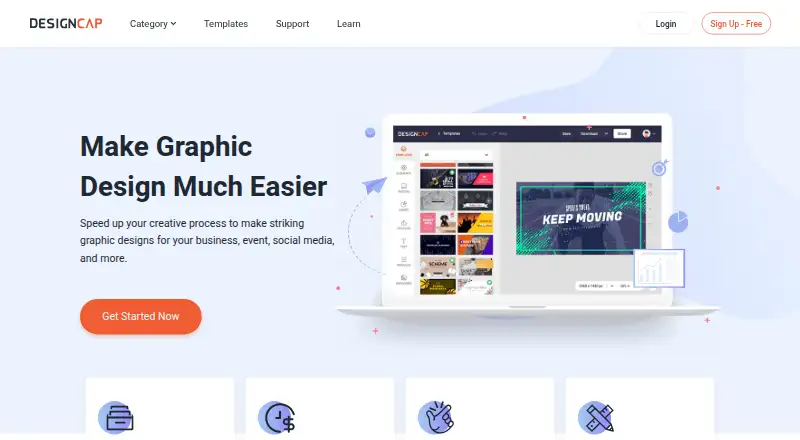
What DesignCap is
DesignCap is a web-based graphic design tool for making posters, flyers, infographics, and other materials. Its design options also include presentations, reports, charts, brochures, menus, cards, invitations, and social media graphics. A template library offers thousands of starting points, alongside illustrations, shapes, fonts, stock photos, and icons.
The workflow is to choose a template, customize it, then export the result to a computer or share it online. You can upload photos from a local library, import Facebook photos, or search the Internet. DesignCap works in popular browsers on Mac, Windows, and Linux. Its free plan allows five image uploads and saves up to five designs, with JPG exports; paid options add capacity and, in specified plans, unlimited templates, stock icons, and modules plus high-resolution PNG and PDF exports. The service says its provided resources may be used commercially, provided you have appropriate rights to any content you upload.
Good
- Thousands of templates are available.
- Supports posters, infographics, presentations, and social graphics.
- Includes illustrations, shapes, fonts, stock photos, and icons.
- Works in browsers on Mac, Windows, and Linux.
- Artwork can be shared to Facebook, Twitter, Tumblr, or email.
Watch out
- Free limits uploads to five images and saved designs to five.
- Free exports are JPG.
- Free includes limited templates and stock media choices.
Who it suits
DesignCap suits people who want to create common graphic materials in a browser using templates and built-in design assets. Its free plan can suit small projects, while paid plans offer larger image-upload and saved-design allowances.
Verdict
Choose DesignCap if you want a browser-based template workflow for presentations, illustrations, or other listed design types. The Free plan is capped at five uploads and five saved designs; consider a paid plan if you need larger quotas or high-resolution PNG and PDF exports.
Plans and prices
From DesignCap's own pricing page, checked 15 Oct 2026.
| Plan | Price | What it gives you |
|---|---|---|
| Free | Free | limited templates · limited stock media · 5 image uploads · 5 saved designs · JPG exports |
| Basic | $8.99 a month | unlimited templates · unlimited stock icons/modules · high-resolution PNG/PDF · 100 uploads · 100 saved designs · $8.99 USD/month billed monthly |
| Basic — monthly | $8.99 a month | Unlimited templates · Unlimited stock icons · Unlimited modules · High-res PNG & PDF exports · 100 image uploads · Save up to 100 designs · Billed Monthly |
| Plus — monthly | $12.99 a month | Unlimited templates · Unlimited stock icons · Unlimited modules · High-res PNG & PDF exports · 1,000 image uploads · Save up to 1,000 designs · Billed Monthly |
| Plus | $12.99 a month | unlimited templates · unlimited stock icons/modules · high-resolution PNG/PDF · 1,000 uploads · 1,000 saved designs · font uploads · $12.99 USD/month billed monthly |
| Basic | $59.88 a year | unlimited templates · unlimited stock icons/modules · high-resolution PNG/PDF · 100 uploads · 100 saved designs · $4.99 USD/month, $59.88 USD/year billed annually |
| Basic — annual | $59.88 a year | Unlimited templates · Unlimited stock icons · Unlimited modules · High-res PNG & PDF exports · 100 image uploads · Save up to 100 designs · Billed Annually $4.99 USD/month = $59.88 USD/year, saving 50% |
| Plus | $71.88 a year | unlimited templates · unlimited stock icons/modules · high-resolution PNG/PDF · 1,000 uploads · 1,000 saved designs · font uploads · $5.99 USD/month, $71.88 USD/year billed annually |
| Plus — annual | $71.88 a year | Unlimited templates · Unlimited stock icons · Unlimited modules · High-res PNG & PDF exports · 1,000 image uploads · Save up to 1,000 designs · Billed Annually $5.99 USD/month = $71.88 USD/year, saving 50% |
The facts
Each one read from DesignCap's own pages, with the date it was checked.
What it does
- Account requirement
- Basic features can be used without an account, while some features require registration.checked 15 Oct 2026
- Chart types
- Official chart pages list bar, pie, flow, Venn, line, table and map visualizations, among others.checked 15 Oct 2026
- Commercial use
- The FAQ allows commercial use of artworks containing DesignCap resources, subject to the user having rights to uploaded content.checked 15 Oct 2026
- Data handling
- The privacy policy says DesignCap may collect account, usage, and user content information and may use third-party services such as Facebook, Pinterest, Google Analytics, and AdMob.checked 8 Oct 2026
- Data transfer limitation
- The privacy policy states that data may be transmitted internationally and that absolute security cannot be guaranteed.checked 15 Oct 2026
- Design formats
- The maker lists infographics, charts, posters, flyers, logos, business cards, brochures, presentations, reports, resumes, schedules and social-media graphics.checked 15 Oct 2026
- Design types
- Listed design types include infographics, presentations, reports, charts, posters, flyers, brochures, menus, cards, invitations, and social media graphics.checked 8 Oct 2026
- Editing controls
- The tutorial documents text movement, resizing, rotation, font, color, alignment, opacity, layer ordering, duplication and deletion.checked 15 Oct 2026
- Feature availability limitation
- Terms reserve PearlMountain’s right to add, change, suspend or remove service features and templates.checked 15 Oct 2026
- Illustration tools
- Yeschecked 20 Sep 2026
- Integrations
- The terms identify integrations with The Noun Project for icons and Pixabay for images and videos.checked 15 Oct 2026
- Integrations and sharing
- The FAQ says users can sign up with Facebook or Google and share artwork to Facebook, Twitter, Tumblr, or email.checked 8 Oct 2026
- Limit: asset variety
- G2 reviewers report fewer usable images than comparable tools.checked 15 Oct 2026
- Limit: export and template problems
- Trustpilot reviewers report missing text in downloads, inability to obtain needed PDF output and template text reverting.checked 15 Oct 2026
- Limit: poster sizing
- Better Posters reported that custom sizing accepted pixels only, capped dimensions at 4,000 pixels and was unsuitable for conference posters.checked 15 Oct 2026
- Limit: reliability
- Individual G2 reviewers report occasional freezing and cases where the service does not work as expected.checked 15 Oct 2026
Where it runs
- Browser requirements
- The FAQ says DesignCap works in popular browsers on Mac, Windows and Linux and recommends Chrome 14+, Internet Explorer 10+, Firefox 10+ and Safari 7+.checked 15 Oct 2026
The company
- Company founding
- LinkedIn says PearlMountain has focused on graphics and multimedia software since 2006.checked 15 Oct 2026
- Company size
- LinkedIn lists PearlMountain as a privately held software company with 51–200 employees.checked 15 Oct 2026
- Headquarters
- LinkedIn lists PearlMountain’s headquarters in Hong Kong.checked 15 Oct 2026
- Limit: advanced and team work
- Thrivelance reports a smaller, less polished template library, limited advanced customization, restricted free exports and weak support for teams or brand consistency.checked 15 Oct 2026
Money
- Free plan
- Yeschecked 20 Sep 2026
- Limit: billing and saving complaints
- A 2025 Trustpilot reviewer reported save errors, missing resize functions, plan reversion and unresolved refund or billing problems.checked 15 Oct 2026
- Limit: free export size
- Better Posters reported that its tested free tier allowed only five saved designs, five uploads, small JPG export and no PNG or PDF export.checked 15 Oct 2026
The full review of DesignCap
DesignCap is a browser-based design tool for creating presentations, infographics, print materials, and social graphics from templates. It is best for people who need a range of everyday design formats in one place. Its free tier is useful for occasional projects, but its tight upload and saved-design caps make a paid plan more suitable for regular work.
Overview
DesignCap covers infographics, presentations, reports, charts, posters, flyers, brochures, menus, cards, invitations, and social media graphics. Its template-first process—select a layout, customize it, then export or share—works best when adapting a prepared design is preferable to starting from a blank canvas. The range is useful for users producing varied materials; those focused on a specialized output may prefer a dedicated tool.
The library contains thousands of templates plus illustrations, shapes, fonts, stock photos, and icons. This offers a broad pool of starting points, though Free users get limited template and stock-media choices, so the library's breadth is more compelling on a paid plan.
Key features
DesignCap supports photo uploads from a local library, Facebook photo imports, and Internet search. Finished work can be shared to Facebook, Twitter, Tumblr, or email, and users can sign up with Facebook or Google. DesignCap says its supplied resources may be used commercially, provided users have the necessary rights to any content they upload.
Created visuals and uploaded assets are private by default unless shared publicly or with specific team members. The privacy policy says the service may collect account, usage, and user-content information and use third-party services including Facebook, Pinterest, Google Analytics, and AdMob. Payment details are encrypted and passed to a third-party processor rather than stored on DesignCap's servers, though absolute security is not guaranteed. GDPR requests and account or personal-data deletion can be directed to [email protected].
Pricing
Free costs nothing and includes limited templates and stock media, five image uploads, storage for up to five designs, and JPG exports. That is enough to try the workflow or complete a small number of projects, but the low caps and JPG-only export make it restrictive for ongoing work or users needing high-resolution output.
Paid plans add unlimited templates, stock icons, and modules, plus high-resolution PNG and PDF exports. Basic allows 100 image uploads and 100 saved designs; Plus raises both quotas to 1,000. The Basic and Plus plans without a stated term have no listed price, so the priced monthly and annual options are the clearest choices.
- Basic — annual: $4.99 a year, billed annually at $4.99 USD/month = $59.88 USD/year, with 50% savings. It includes 100 uploads and 100 saved designs, suited to regular users with moderate project volume who can commit annually.
- Plus — annual: $5.99 a year, billed annually at $5.99 USD/month = $71.88 USD/year, with 50% savings. It raises the quotas to 1,000 uploads and saved designs, fitting heavier use at a modest annual premium over Basic.
- Basic — monthly: $8.99 a month, billed monthly, with 100 uploads and saved designs. It avoids an annual commitment but costs more over time than the annual Basic price.
- Plus — monthly: $12.99 a month, billed monthly, with 1,000 uploads and saved designs. It suits high-volume users who need monthly flexibility, though it is the priciest listed option.
Choose Basic when 100-item quotas are sufficient; Plus is for users likely to exceed them. The annual plans lower the effective monthly charge in exchange for annual billing.
Platforms
DesignCap runs in popular browsers on Mac, Windows, and Linux. It recommends Chrome 14 or higher, Internet Explorer 10 or higher, Firefox 10 or higher, and Safari 7 or higher. A browser-based workflow suits users who want to work across these desktop systems without choosing a platform-specific design app.
Who it's for
DesignCap makes sense for individuals and small teams who create several kinds of routine graphics and prefer to customize templates rather than build every layout from scratch. Free is a reasonable starting point for occasional work; paid plans are the practical choice for people who need more saved projects, uploads, or high-resolution exports. It is less suitable for users who need an unrestricted free tier or a tool dedicated to one design category.
Pros and cons
- Pro: A wide mix of print, presentation, infographic, and social formats lets users handle varied everyday projects in one service.
- Pro: The paid plans pair high-resolution PNG and PDF exports with expanded upload and saved-design quotas.
- Con: Free limits users to five uploads and five saved designs, with JPG exports and reduced template and stock-media choices.
- Con: The Basic and Plus options without a stated term have custom pricing, while the lower priced Basic tier has much smaller quotas than Plus.
Alternatives
For focused certificate work, MailMergic offers an Always-Free plan with 25 documents per month, one user, and watermarks, or a Pro plan at $39 a year with 1,000 documents per month. EZdoc AI Certificate Maker is another certificate-focused option, with a free plan capped at 25 copies per month and three lifetime designs. SimpleCert may suit users who want certificate credits and API integration; its free plan includes 50 introductory credits, social sharing, and custom SMTP settings.
SuTan Certificate Platform is an alternative for certificate workflows, with Starter at ₹499 a month and two team members. Berlvis Credentials offers a free plan with watermarked exports. Certhive is an e-certificate service being built as a side project. CertificatesMaker offers a free-forever plan with no limitations. Certifier is another credential-focused alternative, with a free Starter plan covering up to 250 credentials per year, one user, five credential templates, and three forms.
For category-specific browsing, see Certificate Maker Software, Social Media Post Maker Software, Infographic Software, Poster Maker Software, Print Design Template Libraries, and Video Thumbnail Makers.
Verdict
DesignCap is a sensible pick for users who want one template-led browser tool for a broad range of everyday graphics. Its variety and paid export options are useful, but the Free plan's five-upload and five-design limits are severe for repeat use. Choose a paid tier if those quotas or JPG-only exports are holding work back; look elsewhere if you need a specialized workflow or generous free capacity.
Getting started
- Visit https://www.designcap.com/.
- Sign up with Facebook or Google.
- Choose a template or design type.
- Customize it with text, photos, and built-in assets.
- Export the design to your computer or share it online.
Limits worth knowing
Free allows five image uploads, up to five saved designs, and JPG exports, with limited templates and stock media choices. Basic and Plus paid plans have larger upload and saved-design quotas; the listed paid options include high-resolution PNG and PDF exports.
Questions
Does DesignCap have a free plan?
Yes. Free includes five image uploads, up to five saved designs, and JPG exports.
How much do the paid plans cost?
Basic is $8.99 a month or $4.99 a year. Plus is $12.99 a month or $5.99 a year.
Which platforms does DesignCap support?
It is web-based and works in popular browsers on Mac, Windows, and Linux.
What kinds of designs can I make?
Listed types include infographics, presentations, reports, charts, posters, flyers, brochures, menus, cards, invitations, and social media graphics.
Can I use DesignCap resources commercially?
DesignCap says its provided resources may be used commercially, subject to having appropriate rights to content you upload.
Alternatives to DesignCap
- 1

SimpleCert
Free planWebAPImacOSWindows7.7From $19 a month - 2

Certifier
Free planWebAPI7.4From $49 a month - 3

MailMergic
Free planWebAPImacOSWindows7.0From $39 a year - 4

CertifyMe
Free planWebAPI6.8Free plan - 5

QRCertificates
Free planWebAPI6.8From $49 a month - 6
Sertifier
Free planWebAPI6.8From $750 a year