
Lucid Train
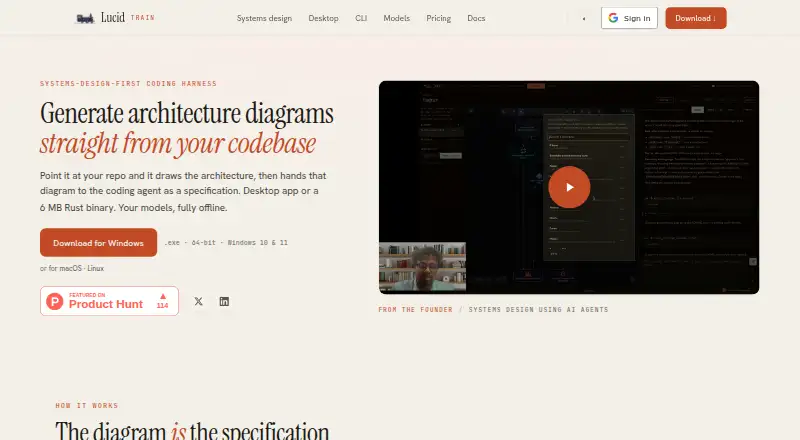
Lucid Train is a desktop coding harness that draws architecture diagrams from a codebase and gives the diagram to a coding agent as a specification.
What Lucid Train is
Lucid Train is a desktop coding harness that draws architecture diagrams from a codebase and gives the diagram to a coding agent as a specification. The agent emits a semantic graph; the ELK layout engine calculates positions and routes edges. Diagrams use Excalidraw scenes and can be exported as SVG or PNG, or turned into Markdown specifications. Mermaid support and diagram import are also listed.
The agent presents edits as diffs and uses risk tiers for commands, refusing catastrophic commands. It supports local Ollama models, OpenRouter, other OpenAI-compatible endpoints, and hosted cloud models. Repository files are processed locally; prompts and code go to the chosen model provider, or nowhere when local models are used. The maker says it collects no telemetry, analytics, prompts, code, or usage data from local or bring-your-own-key sessions. API keys are stored locally in its configuration directory or the OS keychain. Connectors list GitHub, Vercel, Railway, and Grafana, and arbitrary stdio MCP servers can be installed. MCP connections are limited to stdio; remote HTTP and SSE servers cannot connect directly. The free CLI needs no account; the desktop license covers up to three machines and requires desktop sign-in.
Good
- Exports diagrams to SVG, PNG, and Markdown.
- Presents agent edits as diffs.
- Supports local Ollama models.
- API keys stay in local storage.
Watch out
- MCP connections support stdio only.
- Desktop license covers up to three machines.
- Desktop sign-in is required for licensing.
Who it suits
Lucid Train may suit developers who want to map a repository’s architecture before using a coding agent. It offers local model options and local repository processing, with a desktop app and free CLI.
Verdict
Lucid Train links repository diagrams to a coding-agent workflow and provides local model options. Check the stdio-only MCP limit and the three-machine desktop license cap before choosing the desktop app.
Plans and prices
From Lucid Train's own pricing page, checked 5 Oct 2026.
| Plan | Price | What it gives you |
|---|---|---|
| CLI | Free | Full agent · local models or your own API keys · open source · no account needed · Free · forever |
| Lucid Train | $2.50 a month | Everything in the CLI in a native app · Design, Diagram, Audit and Dashboards · local models or your own API keys · 7-day free trial · no card up front · billed $30 a year |
The facts
Each one read from Lucid Train's own pages, with the date it was checked.
What it does
- Agent workflow
- Edits are presented as diffs, and commands use risk tiers with catastrophic commands refused.checked 5 Oct 2026
- Architecture diagrams
- The agent emits a semantic graph and the ELK layout engine computes diagram positions and orthogonal edge routing.checked 5 Oct 2026
- Credentials
- API keys are stored locally in the Lucid Train configuration directory or OS keychain and are not sent to the maker.checked 5 Oct 2026
- Data handling
- The software processes repository files locally, and prompts and code go directly to the chosen model provider or nowhere when local models are used.checked 5 Oct 2026
- Desktop license limit
- A desktop license covers up to three machines, and desktop sign-in is required for licensing.checked 5 Oct 2026
- Diagram exports
- Diagrams are Excalidraw scenes that export to SVG and PNG and can also be turned into a Markdown specification.checked 5 Oct 2026
- Integrations
- The Connectors tab lists GitHub, Vercel, Railway and Grafana and can install arbitrary stdio MCP servers.checked 5 Oct 2026
- Intended users
- The product is described as a systems-design-first coding harness for people who want to map a repository and use that diagram to guide a coding agent.checked 5 Oct 2026
- MCP limitation
- MCP connections use stdio only; remote HTTP and SSE servers cannot be connected directly.checked 5 Oct 2026
- Model support
- Lucid Train supports local Ollama models, OpenRouter and other OpenAI-compatible endpoints, plus hosted cloud models.checked 5 Oct 2026
- Product
- Lucid Train draws architecture diagrams from a codebase and hands the diagram to a coding agent as a specification.checked 5 Oct 2026
- Support
- The maker lists [email protected] for questions about its terms and privacy policy.checked 5 Oct 2026
- Telemetry
- The maker says it does not collect telemetry, analytics, prompts, code or usage data from local or bring-your-own-key sessions.checked 5 Oct 2026
The full review of Lucid Train
Lucid Train is a systems-design-first coding harness that turns a repository into an architecture diagram and gives that diagram to a coding agent as a specification. It suits developers who want architecture to shape implementation and who are comfortable choosing local or hosted model providers. The free CLI is the practical starting point, while the paid desktop tier is aimed at users who need a native interface and broader design tooling.
Overview
Lucid Train connects repository mapping with code changes instead of treating diagrams as static documentation. Its agent emits a semantic graph, then the ELK layout engine calculates positions and orthogonal edge routes. That approach is useful when the structure of an existing codebase should inform planned work, particularly for larger systems where a visual map clarifies dependencies.
Proposed edits are shown as diffs, and commands are assigned risk tiers; catastrophic commands are refused. These controls make agent activity easier to review and reduce the chance of an obviously destructive action, but developers still need to assess the diff and approve appropriate changes.
Key features
- Architecture-to-agent workflow: A generated diagram can be handed to a coding agent as a specification, keeping system design and implementation in the same workflow. Mermaid support and diagram import also help when the starting point is an existing diagram rather than a freshly scanned repository.
- Portable diagram outputs: Diagrams are Excalidraw scenes that export to SVG and PNG, or can become Markdown specifications. SVG and PNG suit visual sharing; Markdown provides a text-based handoff that can sit alongside project documentation.
- Model flexibility: Local Ollama models, OpenRouter, other OpenAI-compatible endpoints and hosted cloud models are supported. This gives privacy-conscious users a local route and lets others keep an existing provider relationship.
- Connector ecosystem: The Connectors tab includes GitHub, Vercel, Railway and Grafana, and can install arbitrary stdio MCP servers. The important boundary is that MCP connections are stdio-only: remote HTTP and SSE servers cannot connect directly.
- Local handling and credentials: Repository files are processed locally, while prompts and code go to the selected provider—or nowhere for local models. The maker says it collects no telemetry, analytics, prompts, code or usage data from local or bring-your-own-key sessions. API keys remain in the Lucid Train configuration directory or OS keychain rather than being sent to the maker.
Pricing
| Plan | Price | What you get |
|---|---|---|
| CLI | Free forever | Full agent, local models or your own API keys, open source, and no account requirement |
| Lucid Train | $2.50 per month, billed $30 a year | Everything in CLI plus a native app, Design, Diagram, Audit and Dashboards; 7-day trial with no card up front |
The CLI is the strong value choice for developers who mainly want repository-aware agent work and are happy with a command-line workflow. It gives up the native desktop experience and the additional Design, Diagram, Audit and Dashboards tools. The paid plan fits users who want those tools in one desktop application; its annual billing is inexpensive, but the seven-day trial is brief for evaluating a broader workflow. A desktop license covers up to three machines, and desktop sign-in is required for licensing.
Platforms
Lucid Train runs on Linux, macOS and Windows. The CLI is open source and needs no account, while the desktop application uses sign-in for licensing. That combination suits mixed-device developers, although anyone needing a web-only workflow or remote HTTP/SSE MCP connectivity should look elsewhere.
Who it's for
This is a good fit for developers and architects who want a repository map to guide an agent, especially teams balancing local models, bring-your-own API keys and hosted services. It is less suitable as a general collaborative whiteboard, a purely hosted diagram service, or a setup centered on remote MCP servers that expose HTTP or SSE endpoints.
Pros and cons
Pros
- Connects semantic repository diagrams directly to agent specifications, making architecture useful during implementation.
- Diff-based edits and risk tiers improve reviewability and refuse catastrophic commands.
- Supports local and multiple remote model routes, with local processing and locally stored credentials.
- Exports to Excalidraw, SVG, PNG and Markdown, covering visual and text workflows.
- Free CLI has the full agent and no-account access for experimentation.
Cons
- MCP is limited to stdio, excluding direct HTTP and SSE connections.
- The desktop license is capped at three machines and requires sign-in.
- The paid plan is billed annually at $30, so the low monthly equivalent is not a month-to-month term.
- The product is specialized around coding-agent and repository architecture work rather than broad diagram collaboration.
Alternatives
For a broader canvas with web, desktop, API and self-hosted options, consider Creately; its free plan includes unlimited canvases and collaborators but limits each canvas to 45 items. Nimbalyst is the better choice when MIT-licensed desktop and iOS apps and no feature limits on its Individual plan matter more than an architecture-to-agent workflow.
Choose OpenCharts if a web or macOS project workspace with 500K free AI credits, exports and Drive storage is the priority. InfraSketch suits users seeking a free infrastructure-diagram product across Linux, macOS, web and Windows. ArchitectureDiagram.ai is a simpler web/API option, though its free plan allows two diagrams per month and watermarked exports.
ClearWork is for paid, web-based workspace management with read-only users, rather than a free coding harness. Archway is worth choosing for hosted AI diagram generation with seven diagram types and a free monthly allowance. Capci fits teams that want API and MCP access alongside a free lifetime generation allowance.
For category browsing, see AI Diagram Generators and AI Wireframe Generators.
Verdict
Choose Lucid Train if you want repository architecture to become an actionable specification for a coding agent, with model-provider flexibility and a genuinely useful free CLI. Look elsewhere if you need direct HTTP or SSE MCP servers, a browser-first collaboration suite, or desktop licensing beyond three machines.
Alternatives to Lucid Train
- 1

Creately
Free planWebAPILinuxmacOS8.1Free plan - 2

Eraser
Free planWebAPIExtensionSelf-hosted7.5From $15 a month - 3
OpenCharts
Free planWebAPImacOSWindows7.4From $9.99 a month - 4
Capci
Free planWebAPISelf-hosted7.3From ₹375 a month - 5
AI Diagram Maker
Free planWebAPIExtension7.2From $10 a month - 6

Archflow
Free planWeb7.2From $5 a month