
Archway
Archway is a diagramming platform for software and system architecture, available on the web, through an API, and as a self-hosted deployment.
What Archway is
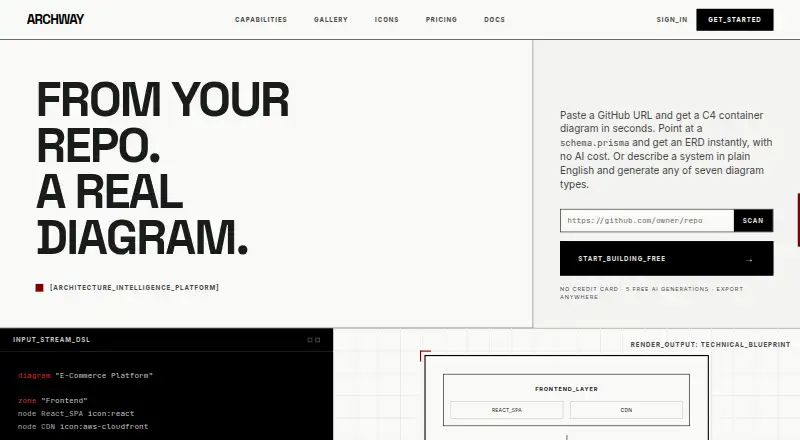
Archway is a diagramming platform for software and system architecture, available on the web, through an API, and as a self-hosted deployment. It can scan a GitHub repository to produce a multi-system C4 container diagram, or turn Prisma, Drizzle, and SQL DDL schemas into ERDs without using AI. Its diagram types include cloud architecture, sequence, ERD, data flow, flowchart, C4, and network topology. Exports include Mermaid, PlantUML, D2, Draw.io XML, SVG, PNG, PDF, and Terraform HCL. Teams can edit together with synchronized changes and attach markdown notes to diagrams. Docker Compose is available for deployment on customer infrastructure. Archway offers a free plan with five AI generations per month and three diagrams. Pro costs $12 a month, billed monthly; Team costs $35 per user per month, and Team Pro is $40 per user per month. AI diagram prompts are sent to Anthropic Claude and are not kept beyond the generation session. Archway runs on SOC 2 Type II certified infrastructure, but the product itself is not SOC 2 certified.
Good
- Scans GitHub repositories into C4 container diagrams
- Parses Prisma, Drizzle, or SQL DDL into ERDs
- Supports seven diagram types
- Exports to Mermaid, PlantUML, D2, and more
- Offers Docker Compose self-hosting
Watch out
- Free plan allows three diagrams
- Free plan includes five AI generations monthly
- Product itself is not SOC 2 certified
- AI prompts are sent to Anthropic Claude
Who it suits
Archway suits developers and teams who need to create architecture diagrams from repositories or database schemas, collaborate on diagrams, or export them to multiple formats. Its free tier may suit lighter use; paid plans add higher generation limits and collaboration features.
Verdict
Archway combines repository and schema-based diagram creation with a broad set of diagram types and export formats. Check its plan limits and SOC 2 status if those matter to your workflow.
Plans and prices
From Archway's own pricing page, checked 1 Oct 2026.
| Plan | Price | What it gives you |
|---|---|---|
| FREE | Free | 5 AI generations / month · 3 diagrams · all 7 diagram types · PNG + SVG export · forever |
| PRO | $12 a month | 50 AI generations / month · unlimited diagrams · markdown notes and embed codes · all export formats · version history · template library · priority support · monthly |
| TEAM | $35 a month | 200 AI generations / user · real-time collaboration · team workspaces · admin controls · template library · everything in Pro · per user |
| TEAM_PRO | $40 a month | 300 AI generations / user · audit logs · advanced permissions · dedicated onboarding · priority support SLA · everything in Team · per user |
| ENTERPRISE | Priced on request | Unlimited AI generations · SAML SSO · self-hosted deployment option · consolidated ACH / wire / PO invoice · custom SLA · dedicated support |
The facts
Each one read from Archway's own pages, with the date it was checked.
What it does
- AI provider
- AI-generated diagrams send prompts to Anthropic Claude, and prompts are not stored beyond the generation session.checked 1 Oct 2026
- API
- The REST API is under /api/v1 and supports session-cookie or Bearer API-key authentication.checked 1 Oct 2026
- Authentication integrations
- Archway supports OAuth 2.0 through GitHub and Google.checked 1 Oct 2026
- Cloud integrations
- Its icon library covers AWS, Azure, Google Cloud, and Kubernetes, with 1,900+ icons.checked 1 Oct 2026
- Collaboration
- It provides simultaneous editing with CRDT-powered sync and markdown notes attached to diagrams.checked 1 Oct 2026
- Compliance status
- Archway runs on SOC 2 Type II certified infrastructure but is not itself SOC 2 certified.checked 1 Oct 2026
- Diagram types
- The platform supports cloud architecture, sequence, ERD, data flow, flowchart, C4 model, and network topology diagrams.checked 1 Oct 2026
- Encryption
- Connections use TLS 1.3 and MongoDB Atlas data is encrypted at rest with AES-256.checked 1 Oct 2026
- Exports
- Archway exports diagrams to Mermaid, PlantUML, D2, Draw.io XML, SVG, and PNG.checked 1 Oct 2026
- Repo scanning
- Archway scans a GitHub repository and produces a multi-system C4 container diagram.checked 1 Oct 2026
- Schema ERD
- It parses Prisma, Drizzle, or SQL DDL schemas into an ERD in under a second without an AI call or quota cost.checked 1 Oct 2026
- Self hosting
- Archway can be deployed on a customer's infrastructure with Docker Compose.checked 1 Oct 2026
- Service limit
- The API documentation lists per-minute request limits of 5 for free, 40 for Pro, 100 for Team, 150 for Team Pro, and 500 for Enterprise.checked 1 Oct 2026
- Support
- Pro includes priority support, Team Pro includes a priority support SLA, and Enterprise includes dedicated support.checked 1 Oct 2026
The company
- Data ownership
- Users retain ownership of diagrams, DSL source code, and content created using Archway.checked 1 Oct 2026
The full review of Archway
Archway is a diagramming platform that can turn a GitHub repository into a multi-system C4 container diagram and parse database schemas into ERDs. It suits developers and teams who want diagrams alongside source code, flexible exports, or self-hosting. Its broad format and diagram support is compelling, but AI quotas and the gap between infrastructure and product-level SOC 2 certification deserve attention.
Overview
Archway covers architecture, sequence, ERD, data flow, flowchart, C4, and network topology diagrams. Its repository scanning and schema parsing give it a developer-oriented edge: it can map a repository into a multi-system C4 view, or turn Prisma, Drizzle, and SQL DDL schemas into ERDs in under a second without an AI call or quota cost.
Diagrams can be exported to Mermaid, PlantUML, D2, Draw.io XML, SVG, PNG, PDF, and Terraform HCL. Simultaneous editing uses CRDT-powered sync, and markdown notes can be attached to diagrams. Users retain ownership of diagrams, DSL source code, and other content created with Archway.
Key features
Developer workflows and integrations
GitHub repository scanning and schema-to-ERD conversion are particularly useful when architecture and database models need to stay close to implementation. The REST API, under /api/v1, accepts session-cookie or Bearer API-key authentication; OAuth 2.0 sign-in is supported through GitHub and Google. Per-minute API limits range from 5 requests on Free to 500 on Enterprise, with Pro at 40, Team at 100, and Team Pro at 150.
Collaboration, deployment, and security
CRDT-powered real-time editing and shared workspaces make Archway a better fit for team diagramming than a strictly individual tool. Docker Compose deployment is available for customers who want to run it on their own infrastructure, though self-hosting is an Enterprise option. Connections use TLS 1.3, and MongoDB Atlas data is encrypted at rest with AES-256. Archway runs on SOC 2 Type II certified infrastructure, but Archway itself is not SOC 2 certified. AI-generated diagram prompts go to Anthropic Claude and are not stored beyond the generation session.
Pricing
Free costs nothing, billed forever. It allows 5 AI generations per month and 3 diagrams, with all seven diagram types and PNG and SVG export. That is enough to explore the core formats, but the diagram cap and limited exports constrain ongoing work.
Pro costs $12 a month, billed monthly. It raises the AI allowance to 50 generations per month and removes the diagram cap, while adding markdown notes, embed codes, all export formats, version history, a template library, and priority support. For an individual who needs dependable exports and room to grow beyond three diagrams, this is the clearest upgrade.
Team costs $35 a month, billed per user. It includes 200 AI generations per user, real-time collaboration, team workspaces, admin controls, the template library, and everything in Pro. Team Pro costs $40 a month, billed per user, and increases the allowance to 300 generations per user while adding audit logs, advanced permissions, dedicated onboarding, and a priority support SLA. Those higher tiers make sense when collaboration and governance justify a per-seat charge.
Enterprise has custom pricing and includes unlimited AI generations, SAML SSO, a self-hosted deployment option, consolidated ACH, wire, or PO invoicing, a custom SLA, and dedicated support. The Enterprise self-hosting option and support commitments suit organizations with deployment or service requirements beyond the lower tiers.
Platforms
Archway is available on the web, through an API, and as a self-hosted deployment. Its cloud icon library covers AWS, Azure, Google Cloud, and Kubernetes, with more than 1,900 icons. The Free plan exports PNG and SVG; paid plans add the other supported formats, including Mermaid, PlantUML, D2, Draw.io XML, PDF, and Terraform HCL.
Who it's for
Archway is strongest for developers and technical teams creating architecture or data diagrams from repositories and schemas, especially when they need source-friendly exports or collaborative editing. Teams that need self-hosting, SAML SSO, or unlimited AI generations will need Enterprise. It is less compelling for light or occasional use if three diagrams and five monthly AI generations are too restrictive, or for organizations that require Archway itself to hold SOC 2 certification.
Pros and cons
- Pro: Repository scanning and fast, quota-free schema parsing connect diagrams to existing code and database definitions.
- Pro: Eight export formats, plus PDF and Terraform HCL, support a range of documentation and workflow needs.
- Pro: Real-time collaboration, team workspaces, and Docker Compose deployment support shared and self-managed workflows.
- Con: Free is limited to 3 diagrams and 5 AI generations per month, with only PNG and SVG export.
- Con: Team pricing is per user, so collaboration features add a seat-based cost.
- Con: SOC 2 Type II applies to the infrastructure, not Archway itself; that distinction matters for compliance reviews.
Alternatives
For a wider view of the category, browse AI Diagram Generators.
- Eraser is another freemium option with API, extension, self-hosted, and web platforms; its Free plan allows 3 files, 3 AI diagrams, 7-day version history, and unlimited guests.
- LetDraw has API, self-hosted, and web access; its Free plan includes 3 documents, 1 workspace, 5 comments per document, and 3 AI prompts.
- sysdraw offers a Free plan with 10 scenes, 5 AI generations per month, and PNG export, and a Pro plan at $6 a month.
- Mermaid Chart is worth considering for Mermaid-focused workflows; its Basic plan includes 3 diagrams, limited AI, and 1 team and project.
- Creately is an alternative with web and desktop platforms and a Free plan that allows unlimited canvases and collaborators, with 45 items per canvas.
- ArchitectureDiagram.ai is another freemium diagramming option, with a Free plan offering 2 diagrams per month and watermarked exports.
- Nimbalyst is an open-source desktop and iOS alternative; its apps are MIT licensed.
- OpenFlowKit is free with unlimited diagrams and projects and full access to its core engine; AI generation requires your own key.
Verdict
Choose Archway if you want a developer-focused diagramming platform that can turn repositories and schemas into diagrams, then carry those diagrams into a team workflow or multiple export formats. Its main trade-offs are the tight Free cap, per-user team pricing, and the fact that the product itself is not SOC 2 certified. If those limits fit your workflow, Pro is a practical solo starting point; teams with deployment and governance requirements should weigh Enterprise.
Alternatives to Archway
- 1

Creately
Free planWebAPILinuxmacOS8.1Free plan - 2

Eraser
Free planWebAPIExtensionSelf-hosted7.5From $15 a month - 3
OpenCharts
Free planWebAPImacOSWindows7.4From $9.99 a month - 4
Capci
Free planWebAPISelf-hosted7.3From ₹375 a month - 5
AI Diagram Maker
Free planWebAPIExtension7.2From $10 a month - 6

Archflow
Free planWeb7.2From $5 a month