OpenCharts
OpenCharts is an AI workspace for creating and managing flowcharts, presentations, notes, code, video, and agents.
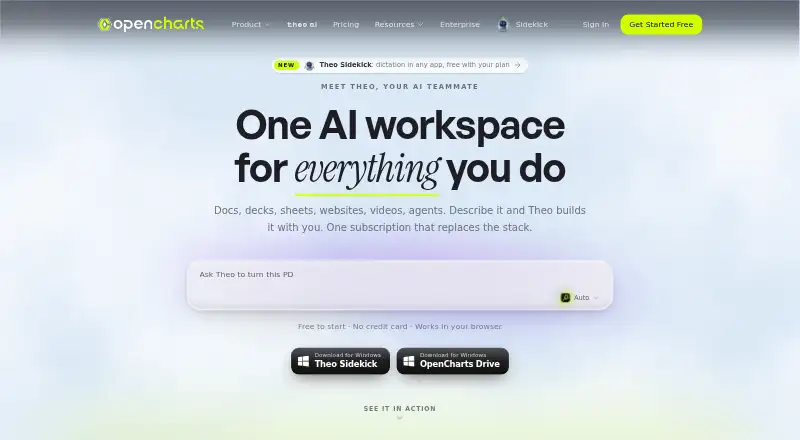
What OpenCharts is
OpenCharts is an AI workspace for creating and managing flowcharts, presentations, notes, code, video, and agents. Its Theo AI turns plain-language descriptions into these materials. Flowcharts use process, decision, data, and terminal nodes on an infinite canvas, with automatic layout and export tools. Presentation features include editable slides, speaker notes, transitions, rehearsal coaching, web publishing, and PPTX export. Theo Agents can start on schedules, webhooks, monitoring triggers, or manually, and can use connectors, approval gates, and generated deliverables. The listed connectors include services such as Stripe, Slack, Google Sheets, Notion, and GitHub. OpenCharts also offers a REST API for managing its project types and a Theo MCP server with tools and readable resources. Accounts begin with 10 GB of Drive storage, including the free tier. Paid plans are Starter at $9.99 per month, Pro at $24.99 per month, and Teams at $14.99 per month with a three-user minimum. OpenCharts says it encrypts data and does not use customer data to train AI models.
Good
- Free plan includes 500K AI credits.
- Includes 10 GB of Drive storage at no cost.
- Supports PPTX export and web publishing.
- Agents support triggers and approval gates.
- Desktop app syncs with Drive on Windows and macOS.
Watch out
- Teams plan requires at least three users.
- Starter limits flowcharts to 10.
- Desktop app requires macOS 13+ or Windows 10+.
Who it suits
OpenCharts suits people who want AI-assisted tools for visual planning, presentations, notes, code, and automated agents. Its stated focus on healthcare, insurance, and regulated industries may appeal to teams in those fields.
Verdict
OpenCharts brings several creation surfaces and agent workflows into one AI workspace, with both a free plan and paid tiers. Check project limits and plan-specific capabilities before choosing a tier.
Plans and prices
From OpenCharts's own pricing page, checked 30 Sep 2026.
| Plan | Price | What it gives you |
|---|---|---|
| Free Forever | Free | 500K AI credits · 1 of each project type · 1 Code Canvas project · 10 GB Drive storage · all export formats |
| Starter | $9.99 a month | 1M AI credits · 10 flowcharts · 3–5 of each other surface · 25 GB Drive storage · 5 Theo Agents + Theo Claw workers · custom domain publishing · PNG + JSON export · Billed monthly |
| Pro | $24.99 a month | 5M AI credits · unlimited projects · 100 GB Drive storage · Theo Personas + Director Mode · custom domains · zero branding · every export format · API access · Billed monthly |
| Teams | $14.99 a month | 2M AI credits/user · unlimited projects · 100 GB shared Drive storage · real-time collaboration · team chat · organization workspace · admin dashboard · Theo Personas + Director Mode · Minimum 3 users, billed monthly |
The facts
Each one read from OpenCharts's own pages, with the date it was checked.
What it does
- Agents
- Theo Agents support schedules, webhooks, monitor triggers, manual starts, external connectors, human approval gates, and generated deliverables.checked 30 Sep 2026
- AI assistance
- Yeschecked 20 Sep 2026
- AI data use
- OpenCharts says it does not use customer data to train or fine-tune AI models.checked 30 Sep 2026
- Compliance
- OpenCharts says it uses GDPR-aligned data handling and is working toward SOC 2 Type II and ISO 27001 certification.checked 30 Sep 2026
- Flowcharts
- Flowcharts use terminal, process, decision, and data nodes on an infinite canvas with auto layout and export tools.checked 30 Sep 2026
- Integrations
- Listed connectors include Stripe, HubSpot, Slack, Google Sheets, Discord, Airtable, Calendly, Apollo, Typeform, Monday, Gmail, Notion, GitHub, Linear, and others.checked 30 Sep 2026
- MCP server
- Theo MCP provides 113 tools, five readable resources, a hosted Streamable HTTP endpoint, and 120 requests per minute per key.checked 30 Sep 2026
- PowerPoint export
- Yeschecked 20 Sep 2026
- Presentations
- The presentation editor supports editable slides, speaker notes, transitions, AI generation, rehearsal coaching, web publishing, and PPTX export.checked 30 Sep 2026
- Presenter mode
- Yeschecked 20 Sep 2026
- Product scope
- OpenCharts is an AI workspace for flowcharts, decks, notes, code, video, and agents.checked 30 Sep 2026
- Real-time collaboration
- Yeschecked 20 Sep 2026
- REST API
- The OpenCharts REST API can create and manage flowcharts, whiteboards, notes, presentations, sheets, boards, personas, and agents.checked 30 Sep 2026
- Security
- OpenCharts states that data is protected with TLS 1.2+ in transit, AES-256 at rest, SSO/SAML, RBAC, row-level security, and two-factor authentication.checked 30 Sep 2026
- Storage
- Every account starts with 10 GB of Drive storage at no cost, including the free plan.checked 30 Sep 2026
- Target users
- TheoVex describes OpenCharts as built first for healthcare and insurance and for highly regulated industries.checked 30 Sep 2026
- Theo AI
- Theo creates flowcharts, whiteboards, notes, presentations, podcasts, videos, code, and images from plain-language descriptions.checked 30 Sep 2026
Where it runs
- Desktop app
- OpenCharts Desktop provides two-way Drive sync on macOS 13 or later and Windows 10 or later.checked 30 Sep 2026
- Supported platforms
- web,windows,macos,chrome_extensionchecked 20 Sep 2026
Money
- Free plan
- Yeschecked 20 Sep 2026
The full review of OpenCharts
Overview
OpenCharts is an AI workspace for creating diagrams, presentations, notes, code, video, and agent-driven workflows. It is best suited to people and teams that want several of those jobs in one place, particularly in healthcare, insurance, and other regulated industries. Its breadth is the draw; the main trade-off is choosing among project caps, AI-credit allowances, and collaboration features across its plans.
Key features
Theo turns plain-language descriptions into flowcharts, whiteboards, notes, presentations, podcasts, videos, code, and images. That range is useful when work crosses formats, but may be more workspace than someone seeking only a slide or diagram tool needs. Flowcharts use terminal, process, decision, and data nodes on an infinite canvas, with automatic layout and export tools.
The presentation editor combines editable slides with speaker notes, transitions, AI generation, rehearsal coaching, web publishing, and PPTX export. That supports both building and presenting a deck, rather than stopping at a first draft. Real-time collaboration is included in the Teams plan, so solo users and organizations should distinguish presentation features from team features when comparing tiers.
Theo Agents can start on a schedule, webhook, monitor trigger, or manual request. External connectors, human approval gates, and generated deliverables make the agent workflow relevant to teams that need automation with review points. Connectors include Stripe, HubSpot, Slack, Google Sheets, Discord, Airtable, Calendly, Apollo, Typeform, Monday, Gmail, Notion, GitHub, and Linear.
Developers can use the REST API to create and manage flowcharts, whiteboards, notes, presentations, sheets, boards, personas, and agents. Theo MCP offers 113 tools, five readable resources, a hosted Streamable HTTP endpoint, and a limit of 120 requests per minute per key. Desktop apps provide two-way Drive sync on macOS 13 or later and Windows 10 or later. Every account starts with 10 GB of Drive storage, including free accounts.
OpenCharts states that it protects data with TLS 1.2 or higher in transit, AES-256 at rest, SSO/SAML, role-based access control, row-level security, and two-factor authentication. It says customer data is not used to train or fine-tune AI models, and describes its data handling as GDPR-aligned while working toward SOC 2 Type II and ISO 27001 certification. These measures make it a more relevant candidate for regulated teams to assess, though they do not replace an organization’s own compliance review.
Pricing
The Free Forever plan costs nothing. It includes 500K AI credits, one of each project type, one Code Canvas project, 10 GB of Drive storage, and all export formats. It is a useful way to try the breadth of the workspace, but one project per type and one Code Canvas project will constrain ongoing work.
Starter costs $9.99 a month, billed monthly. It raises the allowance to 1M AI credits, 10 flowcharts, 3–5 of each other surface, and 25 GB of Drive storage; it also includes five Theo Agents plus Theo Claw workers, custom-domain publishing, and PNG and JSON exports. This tier suits modest use of several surfaces, but its project caps and narrower export formats are meaningful compromises.
Pro costs $24.99 a month, billed monthly. It includes 5M AI credits, unlimited projects, 100 GB of Drive storage, Theo Personas and Director Mode, custom domains, zero branding, every export format, and API access. It is the stronger fit for an individual or operation that needs scale, API access, and full exports; those needs are the justification over Starter.
Teams costs $14.99 a month, with a minimum of three users and monthly billing. It provides 2M AI credits per user, unlimited projects, 100 GB of shared Drive storage, real-time collaboration, team chat, an organization workspace, an admin dashboard, Theo Personas, and Director Mode. The minimum seat count makes the effective starting commitment $44.97 a month. Teams is the clear choice for shared work, but its 100 GB is shared rather than per user.
Platforms
OpenCharts supports the web, Windows, macOS, and a Chrome extension, with API access also part of its platform offering. Desktop two-way Drive sync requires macOS 13 or later or Windows 10 or later. The combination covers browser, desktop, and programmatic workflows, while the desktop sync requirement rules out older operating systems.
Who it's for
OpenCharts fits users who want AI-assisted creation across multiple formats, or teams that need agent workflows, shared projects, and a broad connector set. Its stated focus on healthcare, insurance, and regulated industries may make it worth evaluating for those environments, especially given its security controls and AI data-use position. A focused presentation or diagram workflow may be better served by a specialist, and the one-project free limits are a poor fit for a growing portfolio.
Pros and cons
- Pro: Theo spans diagrams, decks, notes, code, video, and images, reducing the need to split work across format-specific creation tools.
- Pro: Agents support multiple triggers, connectors, and human approval gates, giving teams a way to automate work without removing review.
- Pro: The free plan includes 10 GB of storage and all export formats, making it possible to assess core output options without a paid plan.
- Con: Free limits projects to one of each type and one Code Canvas project, so it is restrictive for sustained multi-project work.
- Con: Starter limits flowcharts to 10 and other surfaces to 3–5 each, and does not include every export format.
- Con: Teams requires at least three seats, while its 100 GB storage allowance is shared across the organization.
Alternatives
For a broader comparison of tools centered on AI-generated decks, browse AI Presentation Makers. If diagram creation is the priority, compare options in AI Diagram Generators. Readers comparing presentation products more generally can also use AI Presentation Software or Presentation software.
Pitch is another freemium option for presentation work, with web, desktop, and mobile platforms; its free plan includes five members, two external guests, and 10GB total storage. Choose it when those collaboration and device needs matter more than OpenCharts’ wider creation and agent scope.
arg.ai offers a free tier with 1 GB storage, unlimited workspaces, custom apps and integrations, prepaid AI credits, and API access, across a broader set of platforms including self-hosting. Consider it when those workspace, integration, or deployment options are the deciding factors.
ChatSlide has a web-only free plan with 100 credits and PDF export. It may suit someone who wants a narrower, credit-based presentation workflow rather than OpenCharts’ multi-surface workspace.
Gamma has a free plan capped at 10 cards per prompt, making it an alternative to consider for card-based presentation creation.
MiriCanvas offers a free web and mobile plan with more than 50,000 templates, 350,000-plus photos and graphics, and 1 GB of storage. Choose it when template and asset breadth is more important than OpenCharts’ agents, APIs, and cross-format workspace.
Presentations.AI has a free Starter plan with 100 credits and 20 slides, while its Pro plan costs $20 a month billed annually and includes 5,000 credits. It is worth comparing for a slide-focused workflow with a defined slide and credit allowance.
SlidesAI offers a free Basic plan capped at 12 presentations per year, 1,000 characters per presentation, and 120 AI credits per year. It may suit occasional, tightly bounded presentation generation.
Slaide is another alternative.
Verdict
Choose OpenCharts if you want AI creation across diagrams, presentations, and other formats, with agent workflows and an API available as your needs grow. Its free plan is a practical entry point, while Pro and Teams serve different needs: individual scale and API access versus shared collaboration. Look elsewhere if you need only a presentation or diagram specialist, or if the free and Starter project limits would interrupt the way you work.
Getting started
- Open the OpenCharts website
- Choose Free Forever, Starter, Pro, or Teams
- Use the web app or install OpenCharts Desktop on macOS 13+ or Windows 10+
- Create projects with Theo AI or the available workspace tools
- Connect supported services or use the REST API and Theo MCP where needed
Limits worth knowing
Free Forever includes 500K AI credits, one of each project type, one Code Canvas project, and 10 GB of Drive storage. Starter provides 1M AI credits, 10 flowcharts, 3–5 of each other surface, five Theo Agents plus Theo Claw workers, and 25 GB of storage.
Questions
Is OpenCharts free?
Yes. Free Forever costs nothing and includes 500K AI credits, one of each project type, one Code Canvas project, 10 GB storage, and all export formats.
What do paid plans cost?
Starter is $9.99 a month, Pro is $24.99 a month, and Teams is $14.99 a month with a minimum of three users.
Which platforms support OpenCharts?
The listed platforms are web, macOS, Windows, API, and Chrome extension. Desktop sync supports macOS 13 or later and Windows 10 or later.
Does OpenCharts provide integrations and an API?
Yes. Connectors include services such as Stripe, Slack, Google Sheets, Notion, GitHub, and others. The REST API manages several workspace objects, and Theo MCP provides 113 tools.
Does OpenCharts use customer data to train AI models?
OpenCharts states that it does not use customer data to train or fine-tune AI models.
Alternatives to OpenCharts
- 1

Pitch
Free planAndroidiOSWebAPI9.1From €10 a month - 2

AiPPT
Free planAndroidiOSWebAPI8.5From $60 a year - 3
Genspark AI Slides
Free planAndroidiOSWebExtension8.4From $24.99 a month - 4

SlideEgg
Free planAndroidiOSWeb8.4Free plan - 5
Slaide
Free planiOSWebLinuxmacOS8.4From $6.90 a month - 6

Replit
Free planAndroidiOSWebLinux8.4From $18 a month