
Gamma
Gamma is a visual communication platform from Gamma Tech, Inc., based in San Francisco.
What Gamma is
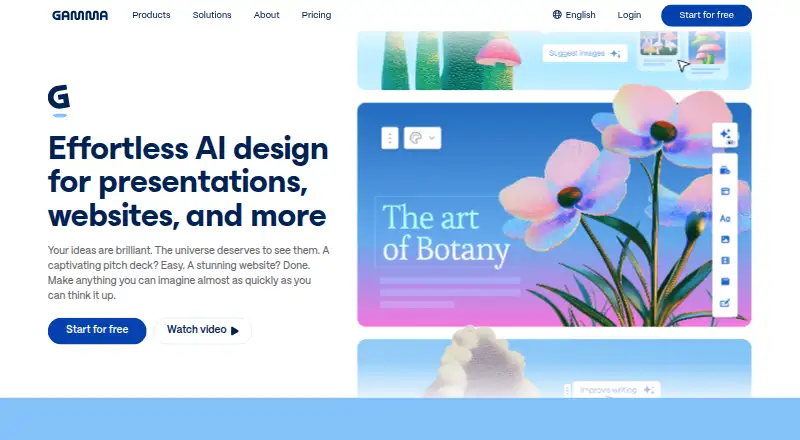
Gamma is a visual communication platform from Gamma Tech, Inc., based in San Francisco. It supports presentations, documents, websites, social media and graphics through an AI agent, while also providing presentation design, templates, illustration tools and brand-kit controls. You can begin with a prompt, outline or file, then refine the result with AI or manual editing. For presentations, Gamma turns text into layouts with templates, custom themes and AI-generated visuals. PDF and PowerPoint files can be imported, and finished work can be exported to PDF, PowerPoint, PNG or Google Slides. Projects are private by default and can be shared with selected people, a team or the public, with real-time collaboration available. Shared workspaces, templates, brand controls and custom instructions support teams; Enterprise adds SSO, SCIM, permissions and administration controls. Gamma offers web and API access plus a mobile app, but no desktop app. Its API supports custom integrations and presentation creation at scale. Listed integrations include Claude, ChatGPT, Atlassian Rovo, Superhuman Go, Profound, Glean, n8n, Make and Zapier. Gamma states SOC 2 Type II compliance. The service has a free plan, with paid Plus, Pro and Ultra tiers.
Good
- Starts from prompts, outlines or files
- Imports PDF and PowerPoint files
- Exports to PDF, PowerPoint, PNG and Google Slides
- Real-time collaboration with sharing controls
- Mobile app plus web and API access
- Template, illustration and brand-kit tools
Watch out
- Free plan allows up to 10 slides per prompt
- No desktop app
Who it suits
Gamma suits consultants, marketers, sales teams and educators who need presentation and visual communication tools. It also fits teams needing shared workspaces, brand controls, collaboration or API-based presentation creation.
Verdict
Pick Gamma if you want AI-assisted presentations and broader visual communication in one platform, with templates, branding and collaboration. Look elsewhere if a desktop application is essential or if you need a plan with a listed paid price.
Plans and prices
From Gamma's own pricing page, checked 11 Oct 2026.
| Plan | Price | What it gives you |
|---|---|---|
| Free | Free | Up to 10 slides per prompt · Import PDF and PPTX · Export PDF, PPTX, PNG, Google Slides |
| Plus | — | Up to 100 slides per prompt · Remove Gamma branding · Advanced AI image models |
| Pro | — | Premium AI image models · Custom branding · Analytics and advanced sharing · Up to 10 custom domains · API access |
| Ultra | — | 20× more AI usage · Advanced text, image, and video models · Up to 100 custom domains · Early access to features |
The facts
Each one read from Gamma's own pages, with the date it was checked.
What it does
- AI training
- Gamma says Business and Enterprise workspace content is automatically excluded from AI training; individual workspace users can opt out in account settings.checked 11 Oct 2026
- API
- Gamma describes its API as a way to build custom integrations and create presentations at scale from applications.checked 11 Oct 2026
- Brand kit
- Yeschecked 20 Sep 2026
- Creation
- Users can start with a prompt, outline, or file and refine results with AI or manual editing.checked 11 Oct 2026
- Illustration tools
- Yeschecked 20 Sep 2026
- Import and export
- Gamma says users can import PDF and PowerPoint files and export to PDF, PowerPoint, PNG, and Google Slides.checked 11 Oct 2026
- Integrations
- The integration gallery lists Claude, ChatGPT, Atlassian Rovo, Superhuman Go, Profound, Glean, Gamma API, n8n, Make, and Zapier.checked 11 Oct 2026
- Intended users
- Gamma presents use cases for consultants, marketers, sales teams, and educators.checked 11 Oct 2026
- Presentation design
- Yeschecked 20 Sep 2026
- Presentation features
- Gamma says it can turn text into presentations and offers smart layouts, templates, custom themes, and AI-generated visuals.checked 11 Oct 2026
- Product
- Gamma describes itself as a visual communication platform for presentations, documents, websites, social media, and graphics, with an AI agent.checked 11 Oct 2026
- Real-time collaboration
- Yeschecked 20 Sep 2026
- Security
- Gamma states that it is a SOC 2 Type II compliant organization.checked 11 Oct 2026
- Sharing
- Gamma says projects are private by default and can be shared with selected people, a team, or publicly, with real-time collaboration.checked 11 Oct 2026
- Support
- Gamma lists [email protected] as its support contact.checked 11 Oct 2026
- Template library
- Yeschecked 20 Sep 2026
The company
- Company
- The site identifies the company as Gamma Tech, Inc. and says it is proudly built in San Francisco.checked 11 Oct 2026
- Headquarters
- San Franciscochecked 23 Sep 2026
- Teams
- Gamma says teams can use shared workspaces, templates, brand controls, and custom instructions; Enterprise includes SSO, SCIM, permissions, and admin controls.checked 11 Oct 2026
Where it runs
- Desktop app
- Nochecked 20 Sep 2026
- Mobile app
- Yeschecked 20 Sep 2026
Money
- Free plan
- Yeschecked 20 Sep 2026
- Free plan limit
- The Free plan allows up to 10 slides per prompt.checked 11 Oct 2026
- Paid plan limits
- The Pro plan lists publishing up to 10 custom domains, while Ultra lists up to 100 custom domains.checked 11 Oct 2026
The full review of Gamma
Overview
Gamma is an AI-assisted visual communication platform for building presentations, documents, websites, social posts, and graphics. It fits consultants, marketers, sales teams, educators, and other users who need editable visual content from prompts, outlines, or existing files. Its broad, collaborative workspace is more compelling than a traditional slide-only tool, but users who require a desktop application should choose elsewhere.
Gamma combines presentation creation with illustration tools, branding, sharing, and automation. The Free plan makes the workflow easy to try, although its 10-slide-per-prompt ceiling limits substantial decks.
Key features
A project can start from a prompt, outline, or file, then be refined through AI or manual editing. Smart layouts, templates, custom themes, and AI-generated visuals speed up presentation design, while the template library and illustration tools extend the platform to other visual formats. That range benefits people producing campaigns, proposals, lessons, and social material; buyers who only need conventional slides may find the wider toolset unnecessary.
Gamma imports PDF and PowerPoint files and exports to PDF, PowerPoint, PNG, and Google Slides. Those formats make it practical to bring existing work in and hand finished material to recipients using different software. Real-time collaboration supports simultaneous work, and projects can remain private or be shared with selected people, a team, or the public.
Shared workspaces, reusable templates, brand controls, and custom instructions give teams a consistent production process. Enterprise adds SSO, SCIM, permissions, and administrative controls. Gamma says Business and Enterprise workspace content is automatically excluded from AI training; individual-workspace users can opt out in account settings. The company is SOC 2 Type II compliant.
Integrations include Claude, ChatGPT, Atlassian Rovo, Superhuman Go, Profound, Glean, n8n, Make, and Zapier. The Gamma API is intended for custom integrations and creating presentations at scale from other applications, making it a stronger candidate for automated content operations than a standalone editor.
Pricing
Gamma uses a freemium model. Free costs nothing and includes up to 10 slides per prompt, PDF and PPTX import, and export to PDF, PPTX, PNG, and Google Slides. It is a sensible way to learn the workflow or produce short presentations, but longer prompts must be split into multiple generations.
Plus has custom pricing. It raises generation capacity to 100 slides per prompt, removes Gamma branding, and adds advanced AI image models. This is the practical step up for individuals who outgrow the Free cap or need unbranded output without the broader commercial controls of Pro.
Pro has custom pricing. It includes premium AI image models, custom branding, analytics, advanced sharing, up to 10 custom domains, and API access. Those additions suit professionals and teams publishing branded work, measuring engagement, or connecting Gamma to an application; users who do not need domains, analytics, or automation may not justify the upgrade.
Ultra has custom pricing and allows 75 cards per prompt plus up to 100 custom domains. Its higher domain allowance is aimed at organizations managing many published properties, while the 75-card prompt limit is lower than Plus's stated 100-slide allowance and should be considered when choosing a plan.
Platforms
Gamma runs on the web and offers an API, with a mobile app for on-the-go access. There is no desktop app, so it is a poor fit for workflows that depend on an installed Windows or macOS client. The web-first model is better suited to distributed teams and browser-based sharing.
Who it's for
Consultants can turn outlines into client-ready decks, marketers can move between presentations and social graphics, sales teams can apply shared branding and collaborate on proposals, and educators can create visual teaching material from source files. Teams that need enterprise identity, provisioning, and permissions should evaluate Enterprise. Individuals making occasional short decks can stay on Free; frequent creators should consider Plus or Pro based on branding and automation needs.
Pros and cons
- Pro: Prompt, outline, and file-based creation offers several efficient starting points.
- Pro: Presentation, illustration, template, and brand tools cover more than slide production.
- Pro: Imports, four export destinations, real-time collaboration, and sharing controls support mixed-tool teams.
- Pro: API and automation integrations enable presentation generation at scale.
- Con: The Free plan allows only 10 slides per prompt, restricting larger decks.
- Con: Plus, Pro, and Ultra use custom pricing, making cost comparison difficult.
- Con: No desktop application is available for users who require installed software.
Alternatives
For a focused survey of presentation options, browse AI Presentation Makers, Presentation software, and AI Presentation Software. If your priority is social publishing, AI Social Media Post Generators is the more relevant category. Choose AI Website Builders or Graphic Design Software when those formats, rather than presentations, lead the job.
Content Drifter suits users wanting freemium social content across Android, iOS, Linux, macOS, web, and Windows, with 8 AI posts and 8 AI images per month on Free. PostMimic is a paid social tool with a Free tier of five one-time cloud AI posts, one profile, four platforms, and basic analytics. 1INAI is a freemium API and web option combining limited daily image generation with video and audio allowances. SocialCTL offers a free workspace, 150 signup credits, and a six-day full trial, with paid access required for continued AI generation. TryMyPost YouTube Thumbnail Generator is aimed specifically at thumbnail creation, with 20 AI credits per month on Free. Brandlyre provides free early-access brand workspaces and starting AI credits. Noryn offers three free generations per month for text, URL, or YouTube inputs. Postology is another freemium web option for AI-assisted social posting.
Verdict
Choose Gamma if you want one collaborative, AI-assisted workspace that stretches from presentations into broader visual communication, with imports, exports, branding, and an API. Its main reasons to look elsewhere are the Free plan's 10-slide prompt limit, custom-priced paid tiers, and the absence of a desktop app.
Getting started
- Open https://gamma.app/
- Start with a prompt, outline or file
- Use the free plan or select Plus, Pro or Ultra
- Import a PDF or PowerPoint file if needed
- Refine with AI or manual editing
- Share privately, with a team, selected people or publicly
Limits worth knowing
The Free plan costs nothing and allows up to 10 slides per prompt. Plus allows up to 100 slides per prompt; Pro lists up to 10 custom domains, while Ultra lists 75 cards per prompt and up to 100 custom domains.
Questions
Is Gamma free?
Yes. The Free plan costs nothing and includes up to 10 slides per prompt, PDF and PPTX import, and export to PDF, PPTX, PNG and Google Slides.
Which platforms does Gamma support?
Gamma supports web and API access and offers a mobile app. It does not offer a desktop app.
Can Gamma import and export presentations?
Yes. It imports PDF and PowerPoint files and exports to PDF, PowerPoint, PNG and Google Slides.
Does Gamma support team collaboration?
Yes. Projects can be shared with selected people, a team or publicly, and real-time collaboration is available. Teams can use shared workspaces, templates, brand controls and custom instructions.
What integrations are listed?
The integration gallery lists Claude, ChatGPT, Atlassian Rovo, Superhuman Go, Profound, Glean, Gamma API, n8n, Make and Zapier.
Who makes Gamma?
Gamma Tech, Inc. makes Gamma and identifies its headquarters as San Francisco.
Alternatives to Gamma
- 1

Pitch
Free planAndroidiOSWebAPI9.1From €10 a month - 2

AiPPT
Free planAndroidiOSWebAPI8.5From $60 a year - 3
Genspark AI Slides
Free planAndroidiOSWebExtension8.4From $24.99 a month - 4

SlideEgg
Free planAndroidiOSWeb8.4Free plan - 5
Slaide
Free planiOSWebLinuxmacOS8.4From $6.90 a month - 6

Replit
Free planAndroidiOSWebLinux8.4From $18 a month