Content Drifter
Content Drifter generates, schedules, and auto-publishes AI-assisted social media content, then uses engagement analytics to inform later content batches.
What Content Drifter is
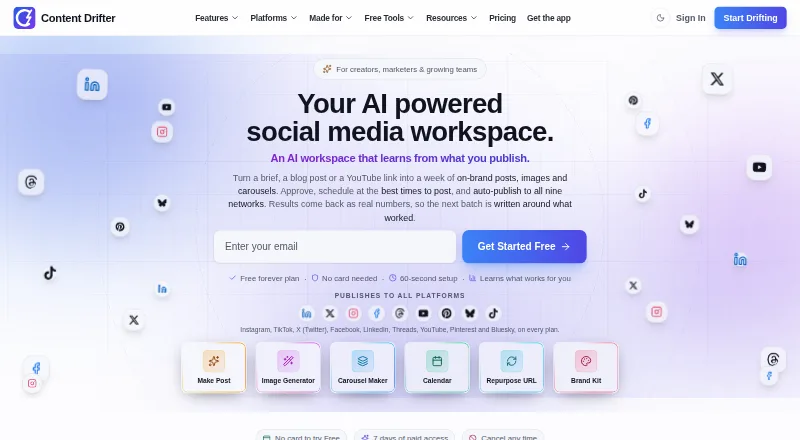
Content Drifter generates, schedules, and auto-publishes AI-assisted social media content, then uses engagement analytics to inform later content batches. It supports Instagram, TikTok, X, Facebook, LinkedIn, Threads, YouTube, Pinterest, and Bluesky. Its Brand Kit can apply a user's logo, colors, fonts, and overlay templates; Starter and higher plans can populate the kit from a website URL. Those plans also include repurposing that makes 1, 3, or 5 posts from different points in a blog post or YouTube link. Free includes industry-standard best-time recommendations, while paid plans offer AI scheduling and Pro and Agency add Auto-Pilot scheduling. An approval workflow holds posts until approved. Starter costs $14.00 per month, with annual billing listed at $171/year or $228/year at the monthly rate. Content Drifter supports team collaboration and runs on Android, iOS, Linux, macOS, web, and Windows. The maker says the app can be installed from a browser on those devices without an app store or separate download.
Good
- Publishes to nine named social networks.
- Approval workflow holds posts until approved.
- Brand Kit supports logos, colors, fonts, and templates.
- Free plan includes 8 AI posts monthly.
Watch out
- Free plan includes only 10 publishes per month.
- Repurposing requires Starter or a higher plan.
- Auto-Pilot scheduling is limited to Pro and Agency.
Who it suits
Content Drifter suits creators, marketers, small businesses, agencies, and other teams publishing to social networks. It may also suit users who want a post approval step or to repurpose blog and video content.
Verdict
Content Drifter combines content creation, scheduling, publishing, and engagement feedback across nine social networks. The free plan has monthly post and publishing limits, while repurposing and Auto-Pilot scheduling require specified paid tiers.
Plans and prices
From Content Drifter's own pricing page, checked 14 Oct 2026.
| Plan | Price | What it gives you |
|---|---|---|
| Free | Free | 8 AI posts/month · 8 AI images/month · 10 publishes/month · 1 workspace · 7 of 9 social platforms · free forever |
| Starter | $25 a month | 150 AI posts/month · 50 AI images/month · 500 publishes/month · 2 workspaces · 2 GB storage · $300/year billed annually or $360/year at monthly rate |
| Pro | $50 a month | 300 AI posts/month · 120 AI images/month · 1,000 publishes/month · 5 workspaces · 3 team members · 10 GB storage · $600/year billed annually or $720/year at monthly rate |
| Agency | $165.83 a month | 1,000 AI posts/month · 360 AI images/month · 3,600 publishes/month · 15 workspaces · 10 team members · 50 GB storage · white-label reports · $1,990/year billed annually or $2,388/year at monthly rate |
| Lite | $12.50 a month | 60 AI posts/month · 25 AI images/month · 250 publishes/month · 1 workspace · all 9 platforms · 1 GB storage · $150/year billed annually or $180/year at monthly rate |
| Business | $100 a month | 600 AI posts/month · 240 AI images/month · 2,000 publishes/month · 8 workspaces · 5 team members · 25 GB storage · $1,200/year billed annually or $1,440/year at monthly rate |
| Custom / Enterprise | Priced on request | For needs exceeding 10 brands, 7 seats, or 900 posts/month · Let's talk |
The facts
Each one read from Content Drifter's own pages, with the date it was checked.
What it does
- AI image generation
- The image studio creates branded photos and graphics with editable layouts and brand-kit styling.checked 14 Oct 2026
- AI writing
- The AI Post Maker creates platform-specific drafts using a saved brand voice and live character counts.checked 14 Oct 2026
- API limitation
- The documented MCP API has no delete endpoint and no analytics-read endpoint.checked 14 Oct 2026
- API limits
- MCP read tools are limited to 100 requests per minute per key and write tools to 30 per minute.checked 14 Oct 2026
- Auto-Pilot
- Pro and higher plans can automatically choose times, avoid blackout windows and re-optimize the calendar.checked 14 Oct 2026
- Brand Kit
- A Brand Kit stores logo, colors, voice and topics and can be filled from a website URL.checked 14 Oct 2026
- Brand tools
- Brand Kit can apply a user's logo, colors, fonts, and overlay templates, and Starter-and-up can fill it from a website URL.checked 28 Sep 2026
- Closed-loop analytics
- Engagement metrics from published posts are fed into later content batches to tune future generation.checked 14 Oct 2026
- Content repurposing
- The Starter-and-up repurposing engine turns a blog post or YouTube link into 1, 3, or 5 posts based on different points from the source.checked 28 Sep 2026
- Data retention
- Per-post engagement metrics are retained for 90 days for the feedback system.checked 14 Oct 2026
- Documentation
- The help center documents onboarding, nine platform connections, supported post types and connection failure fixes.checked 14 Oct 2026
- Encryption
- Traffic uses TLS, database data is encrypted at rest and OAuth tokens are encrypted server-side.checked 14 Oct 2026
- Independent review availability
- Software Advice labels the product 'No reviews yet' and provides no user rating breakdown.checked 14 Oct 2026
- Installation
- The product installs as a browser progressive web app on Windows, macOS, Linux, iPhone, iPad and Android without an app-store download.checked 14 Oct 2026
- Integrations
- Native OAuth connections are offered for nine social networks, with platform-specific media and formatting rules.checked 14 Oct 2026
- Intended users
- The maker describes the product as built for creators, founders, small businesses, marketers, agencies, coaches, ecommerce businesses, and SaaS teams.checked 28 Sep 2026
Where it runs
- Approvals
- The approval workflow adds a per-post gate, and the site says posts do not go live without approval.checked 28 Sep 2026
- Approval workflow
- Posts remain blocked from publishing until a final review is completed.checked 14 Oct 2026
- GetApp listing
- GetApp lists web, Android and iPhone/iPad support plus email/help desk, knowledge base, chat and training options.checked 14 Oct 2026
- Installable app
- The maker says the app can be installed from the browser on iPhone, Android, Windows, Mac, and Linux, without an app store or separate download.checked 28 Sep 2026
The company
- Carousel maker
- Pro and higher plans can create five-slide Instagram and LinkedIn carousels with brand colors applied.checked 14 Oct 2026
- Headquarters
- 1021 E Lincolnway Suite 9859, Cheyenne, WY 82001, United Stateschecked 23 Sep 2026
Money
- Free plan
- Yeschecked 19 Sep 2026
- Limit: plan caps
- Free usage is capped at 8 AI posts, 8 images and 10 publishes per month.checked 14 Oct 2026
The full review of Content Drifter
Content Drifter is an AI-assisted tool for creating, scheduling, and publishing social posts, with performance feedback built into its workflow. It suits creators and teams managing several social accounts; its strongest case is combining publishing with repurposing and scheduling, though those capabilities are concentrated in paid plans.
Overview
Content Drifter connects to Instagram, TikTok, X, Facebook, LinkedIn, Threads, YouTube, Pinterest, and Bluesky. Analytics feed engagement results into future content batches, making it more than a post composer: it aims to carry performance signals into subsequent work. Team collaboration is supported, and each social connection uses OAuth.
The product runs on Android, iOS, Linux, macOS, web, and Windows. Its installable browser app avoids a separate download or app-store installation. The maker says it uses TLS in transit, encrypts data at rest in its managed Postgres database, and keeps OAuth tokens encrypted server-side rather than sending them to the browser. It says it does not request access to direct messages, follower lists, or account settings, and does not train a shared cross-customer model on customer posts or engagement. Engagement metrics are retained for 90 days; account data remains while the account is active.
Key features
Repurposing and brand consistency
Starter and higher plans can turn a blog post or YouTube link into one, three, or five posts drawn from different points in the source. That is useful for extending existing material across social channels, but it is a paid-plan capability. The Brand Kit applies a logo, colors, fonts, and overlay templates; Starter and above can populate it from a website URL. Social templates and resizing round out the design tools.
Scheduling and approvals
Free offers industry-standard best-time recommendations. Paid plans add AI scheduling, while Pro and Agency include Auto-Pilot scheduling. The tier split matters: users who want scheduling assistance can start with Starter, but hands-off Auto-Pilot requires a higher subscription. An approval workflow adds a per-post gate, and the maker says posts will not publish without approval—useful for teams that need a review step before content goes live.
Starter and higher plans also support AI agent access through MCP. Help documentation is provided on Free, while paid plans include email support. Security reports can be sent to the maker and are acknowledged within two business days.
Pricing
Content Drifter is freemium, with paid plans from $14/mo and a 7-day free trial on Starter. The Free plan costs nothing, forever, and includes 8 AI posts, 10 publishes, and 8 AI images per month, one workspace, and all nine social networks. Those caps make it suitable for trying the workflow or maintaining a light posting cadence, but not for a busy account.
- Starter: $14 a month, billed $171/year annually or $228/year at the monthly rate. It provides 100 AI posts, 400 publishes, 40 AI images per month, and two workspaces. This is the entry point for repurposing, website-based Brand Kit setup, and MCP access.
- Pro: $37 a month, billed $441/year annually or $588/year at the monthly rate. The monthly allowances rise to 300 AI posts, 1,200 publishes, and 120 AI images, with five workspaces and three team members. It is the practical step up for a small team that needs Auto-Pilot scheduling and more capacity.
- Agency: $112 a month, billed $1341/year annually or $1788/year at the monthly rate. It includes 900 AI posts, 3,600 publishes, 360 AI images, 10 client workspaces, and seven team members, making it the clearest fit for managing multiple client brands.
- Custom / Enterprise: custom pricing for needs exceeding 10 brands, seven seats, or 900 posts per month.
The annual terms reduce the stated total compared with paying the monthly rate for a year, but require annual billing. Checkout is handled by Paddle, which the maker identifies as its PCI DSS Level 1 payment provider and merchant of record; Content Drifter says it does not store full card numbers.
Platforms
Content Drifter supports Android, iOS, Linux, macOS, web, and Windows. The maker says its browser-installable app works on phones and computers without an app-store install or separate download.
Who it's for
Creators, founders, small businesses, marketers, coaches, ecommerce businesses, and SaaS teams can use the combination of content generation, scheduling, and publishing. Starter is the sensible entry for solo users who need repurposing; Pro suits smaller collaborative teams; Agency is aimed at client work across several brands. The Free caps make it a constrained option for anyone publishing frequently.
Pros and cons
- Pro: Nine social networks are supported on every plan, including Free, so a user can start across channels without upgrading for network access.
- Pro: Engagement feedback informs future content batches, bringing performance signals into the creation workflow.
- Pro: Per-post approvals provide a clear publishing gate for teams.
- Con: Free is limited to 8 AI posts, 10 publishes, and 8 AI images monthly, and excludes repurposing and AI scheduling.
- Con: Auto-Pilot scheduling is reserved for Pro and Agency, so Starter does not provide the most automated scheduling option.
- Con: Agency includes seven team members and 10 client workspaces; teams exceeding those or the plan's post capacity need custom pricing.
Alternatives
For a broader design-first choice, consider Canva: its free plan offers a core design editor, templates, and a content library, while Content Drifter focuses on social publishing and engagement feedback. FotoJet is a more focused fit for basic editing, templates, and online collages, with a free tier and Plus at $6.99 a month. For a template-heavy graphics workflow, Poster App Lab offers a free plan with 10,000+ templates and PNG, JPG, PDF, and SVG export.
Unfold is another freemium option for sharing a story. Adobe Express Video may suit users seeking a free video-oriented option with 25 monthly generative credits, 155,000+ templates, and 5 GB storage. Desygner offers a free plan with three users, 100 projects, 20 AI credits per month, and 5GB storage; its Business plan is $19 a month. Mojo offers free templates and royalty-free music, photos, and videos for social sharing. Simplified has a free plan with 1GB storage and a Starter plan at $79 a month.
Browse Social Media Design Software, Social Media Template Libraries, AI Social Media Post Generators, and AI Writing Tools for more options by category.
Verdict
Content Drifter is a strong fit for creators and small teams that want social publishing, repurposing, and engagement feedback in one workflow. Its broad network support and approval gate are meaningful strengths, but Free is tightly capped and Auto-Pilot starts at Pro. Choose it when coordinated publishing matters more than a generous free allowance; look elsewhere if design or templates are the main need.
Getting started
- Visit https://www.contentdrifter.com/.
- Choose Free or a paid plan; Starter includes a 7-day free trial.
- Open the app in a browser on a supported device and install it from the browser if desired.
- Connect social networks through their OAuth flows.
- Set up a Brand Kit, or on Starter and higher fill it from a website URL.
Limits worth knowing
Free includes 8 AI posts, 10 publishes, and 8 AI images per month in one workspace. Starter raises those limits to 100 AI posts, 400 publishes, and 40 AI images per month across two workspaces.
Questions
Is Content Drifter free?
Yes. Free is listed as forever and includes 8 AI posts, 10 publishes, and 8 AI images per month in one workspace.
What does Starter cost?
Starter is $14.00 per month and includes a 7-day free trial. Annual billing is listed at $171/year, or $228/year at the monthly rate.
Which social networks can it publish to?
It supports Instagram, TikTok, X, Facebook, LinkedIn, Threads, YouTube, Pinterest, and Bluesky.
Which platforms does it support?
The listed platforms are Android, iOS, Linux, macOS, web, and Windows. The maker says it can be installed from a browser without an app store or separate download.
Can it repurpose blog posts or YouTube links?
Yes, on Starter and higher plans. The repurposing engine makes 1, 3, or 5 posts from different points in a source.
How are social accounts connected?
The product connects to the nine social networks through their OAuth flows.