Poster App Lab
Poster App Lab is a design platform for posters, social media graphics, flyers, and marketing materials, with availability listed for Android, iOS, macOS, an…
What Poster App Lab is
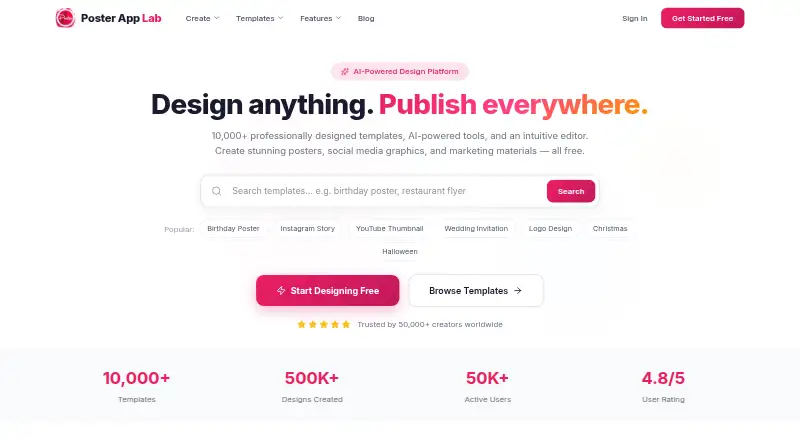
Poster App Lab is a design platform for posters, social media graphics, flyers, and marketing materials, with availability listed for Android, iOS, macOS, and web. It advertises more than 10,000 templates and an AI feature that turns a description of a design idea into a layout. Its drag-and-drop editor is described as offering layers, alignment tools, text controls, filters, and a canvas. Designs can be resized for destinations such as Instagram, Facebook, YouTube, and LinkedIn, then exported as PNG, JPG, PDF, or SVG, with print-ready 300 DPI or web-optimized output. A Brand Kit keeps colors, fonts, and logos together for applying a brand identity, and designs can be shared directly to social media. The free plan costs nothing and includes templates and the listed export formats. One important qualification: the browser editor page says the editor is coming soon while its performance and asset library are being polished. The terms limit the license to personal, non-commercial use, with premium features for paid users.
Good
- More than 10,000 advertised templates
- AI layouts start from a design description
- Exports include PNG, JPG, PDF, and SVG
- Print-ready output is 300 DPI
- Free plan includes listed export formats
Watch out
- Browser editor is listed as coming soon
- License is limited to personal, non-commercial use
- Premium features are for paid users
Who it suits
It may suit people making promotional or social graphics who want templates, resizing, and print-ready exports. The personal, non-commercial license makes it unsuitable for commercial use under the listed terms.
Verdict
Poster App Lab brings templates, AI-generated layouts, resizing, and multiple export formats together for design work. Check the browser editor’s stated availability and the non-commercial license terms before relying on it for a project.
Plans and prices
From Poster App Lab's own pricing page, checked 14 Oct 2026.
| Plan | Price | What it gives you |
|---|---|---|
| Free | Free | 10,000+ templates · PNG/JPG/PDF/SVG export · 300-DPI print-ready output · Free forever |
The facts
Each one read from Poster App Lab's own pages, with the date it was checked.
What it does
- Account requirement
- Signup is optional for basic use, but accounts are required for multi-device access and subscriptions.checked 14 Oct 2026
- AI design
- Its AI-powered design feature generates professional layouts from a description of the user’s vision.checked 30 Sep 2026
- AI design generator
- The AI generator is intended to turn a text description into a layout with selected typography, imagery and colour, but the feature page says it is coming soon.checked 14 Oct 2026
- API and developer documentation
- The opened maker site exposes product, template, feature and blog pages but no public API reference, SDK documentation or developer portal.checked 14 Oct 2026
- Auto-resize
- The home page says designs can be adapted for Instagram, Facebook, YouTube, LinkedIn and other destinations.checked 14 Oct 2026
- Backup behavior
- The terms say server backup may require registration; otherwise designs are stored locally and are deleted if the app is removed.checked 14 Oct 2026
- Brand kit
- The planned Brand Kit stores logos, colour palettes and fonts and applies them to designs, but the page says asset uploading and cross-design synchronization are unfinished.checked 14 Oct 2026
- Data collected
- The privacy policy says designs may include images and entered text, while usage data can include crash reports, device details, UUID, location, language and app activity.checked 14 Oct 2026
- Data storage
- The cookie policy says localStorage, sessionStorage, and IndexedDB are used for editor state, drafts, and preferences, while performance technologies do not carry payment details, raw design content, or uploaded images.checked 30 Sep 2026
- Editor
- The planned browser editor includes layers, alignment guides, text controls, filters and export tools, but its page says it is still coming soon.checked 14 Oct 2026
- Editor status
- The browser editor page says the editor is coming soon while performance and the asset library are being polished.checked 30 Sep 2026
- Export
- Designs can be downloaded as PNG, JPG, PDF, or SVG files, with print-ready output at 300 DPI or web-optimized output.checked 30 Sep 2026
- Export formats
- The service advertises PNG, JPG, PDF and SVG downloads, including 300-DPI print-ready output.checked 14 Oct 2026
- Instagram Post templates
- The home page lists more than 1,200 Instagram Post templates.checked 14 Oct 2026
- Instagram Story templates
- The home page lists more than 1,800 Instagram Story templates.checked 14 Oct 2026
- Integrations
- The Google Play description names sharing to Instagram, Facebook, WhatsApp and LinkedIn.checked 14 Oct 2026
- Invitation templates
- The home page lists more than 800 invitation templates.checked 14 Oct 2026
- Legal entity
- ZaubaCorp lists POSTER APP LLP as an active Indian limited-liability partnership with LLPIN AAQ-7505.checked 14 Oct 2026
- Licence
- The terms grant a revocable, non-exclusive, non-transferable licence for personal, non-commercial use and prohibit commercial exploitation or reverse engineering.checked 14 Oct 2026
- License limit
- The terms grant a revocable, non-exclusive, non-transferable license for personal, non-commercial use and say premium features are available to paid users.checked 30 Sep 2026
Where it runs
- Android requirements and distribution
- The Android listing shows an Everyone content rating, 100K+ downloads and an update dated 9 October 2026.checked 14 Oct 2026
The company
- Company ownership
- ZaubaCorp names Jagwinder Singh, Manwinder Singh and Jagmeet Singh as designated partners.checked 14 Oct 2026
- Founded/incorporated
- ZaubaCorp records the LLP incorporation date as 9 October 2019.checked 14 Oct 2026
- Headquarters
- The Google Play developer listing gives Poster App LLP's address in Mohali, Punjab, India.checked 14 Oct 2026
The full review of Poster App Lab
Overview
Poster App Lab is a design platform for making posters, social graphics, flyers, and marketing materials. It is best suited to people who want a template-led starting point and several export formats without paying upfront. Its personal, non-commercial license and the browser editor’s coming-soon status are important constraints, especially for client work or a web-first workflow.
Key features
Templates and AI layouts
The service advertises more than 10,000 templates and an AI feature that generates layouts from a description of the user’s vision. Together, they offer two routes into a design: start from an existing composition or describe an idea. That breadth is promising for routine posters and social graphics, though the available feature set does not establish how much refinement AI layouts need.
Editing, resizing, and branding
The advertised drag-and-drop editor includes layers, smart alignment, text tools, filters, and a canvas. Auto-resize adapts designs for Instagram, Facebook, YouTube, LinkedIn, and other destinations, which can reduce repetitive reformatting when one design needs several versions. The Brand Kit stores colors, fonts, and logos for one-click application, a practical aid to consistency across repeated materials.
Export and sharing
Poster App Lab supports PNG, JPG, PDF, and SVG downloads, with 300 DPI print-ready output as well as web-optimized output. It also advertises one-click sharing to social media. The combination covers common print and digital handoffs, although the terms’ personal, non-commercial-use restriction makes this a poor fit for business or client deliverables unless the license terms change.
Availability and privacy
The browser editor page says the editor is coming soon while performance and the asset library are being polished. That makes the web listing a weak basis for choosing it today if browser editing is essential. The cookie policy says localStorage, sessionStorage, and IndexedDB hold editor state, drafts, and preferences; it also says performance technologies do not carry payment details, raw design content, or uploaded images. The privacy policy says saved designs may contain images and text, and analytics may include usage, crash, device, UUID, location, and language data. Readers handling sensitive material should weigh that data collection before saving designs.
Pricing
Poster App Lab uses a freemium model. Its Free plan costs nothing and is free forever; it includes 10,000+ templates, PNG, JPG, PDF, and SVG export, and 300 DPI print-ready output. That is a substantial starting package for personal projects, but the terms say premium features are for paid users and limit the license to personal, non-commercial use. Paid access is therefore relevant both to premium features and to anyone whose intended use falls outside that license; paid access alone should not be taken as permission for commercial use.
Platforms
Poster App Lab is listed for Android, iOS, macOS, and web, and it has a mobile app. Custom dimensions are supported. The browser editor remains a caveat: its page says it is coming soon, so users choosing a platform should not assume web editing is ready.
Who it's for
It suits individuals making personal posters, social posts, or flyers who value a broad template library, print-ready exports, and convenient resizing. It is less suitable for commercial designers because its stated license is non-commercial, or for anyone who needs a functioning browser editor immediately.
Pros and cons
- Pro: The free-forever plan includes four export formats and 300 DPI output, giving personal users both web and print options without an upfront charge.
- Pro: Auto-resize and a Brand Kit address repeated work across social destinations and consistent brand styling.
- Con: The browser editor is still described as coming soon, undermining the web platform option for now.
- Con: The license is limited to personal, non-commercial use, ruling it out for many professional deliverables.
- Con: Analytics may include device, UUID, location, and language data, a consideration for privacy-conscious users.
Alternatives
PosterMyWall is worth considering for users who want a free plan that explicitly includes downloads, publishing to one social account, a content planner, and signup forms; it also offers a free trial.
Visme may suit project-based work better when its free Basic plan’s 500MB storage and 50 slides or pages per project fit the job.
Adobe Express Video offers a free plan with 25 generative credits per month, 155,000+ templates, and 5 GB of storage for users who prioritize those stated allowances.
Desygner is an alternative for small teams: its free plan includes three users, 100 projects, 20 AI credits per month, and 5GB storage.
Easil may appeal to web users seeking a free plan with 2,500+ templates and a free trial.
Piktochart is a web-only option for users who prefer a free allowance of one to four team members, two downloads, 1 GB storage, and 60 AI credits.
Simplified has a free plan with 1GB storage for users comparing another freemium option across web and mobile.
CapCut is another freemium option with free templates, mobile-focused editing, and cloud storage on its Standard plan.
For broader browsing, see Poster Maker Software, Social Media Design Software, and Poster Design Software.
Verdict
Poster App Lab is a reasonable free choice for personal, non-commercial design work when template variety, multiple export formats, and print-ready output matter. Its main advantages are the generous-sounding free toolkit and practical resizing and brand features. Choose another tool if you need commercial rights or a browser editor now; those limitations outweigh the feature breadth for many working designers.
Getting started
- Open the Poster App Lab website
- Choose Android, iOS, macOS, or web access
- Start with the Free plan at no cost
Limits worth knowing
The Free plan includes the advertised templates, PNG, JPG, PDF, and SVG exports, and 300 DPI print-ready output. Premium features are available only to paid users, and the terms restrict the license to personal, non-commercial use.
Questions
What does Poster App Lab cost?
The Free plan is listed as free. The service uses a freemium model, with premium features for paid users.
Which platforms are supported?
Poster App Lab lists Android, iOS, macOS, and web platforms.
What file formats can I export?
Designs can be downloaded as PNG, JPG, PDF, or SVG files.
Does it provide print-ready output?
Yes. The Free plan lists 300 DPI print-ready output.
Can I create branded designs?
The Brand Kit stores brand colors, fonts, and logos and applies that identity in one click.
Can designs be shared socially?
Designs can be exported or shared directly to social media with one click.
Alternatives to Poster App Lab
- 1

Adobe Express Video
Free planAndroidiOSWebAPI8.4Free plan - 2
Content Drifter
Free planAndroidiOSWebAPI8.3From $12.50 a month - 3

Desygner
Free planAndroidiOSWebAPI8.3From $19 a month - 4

Simplified
Free planAndroidiOSWebAPI8.3From $19 a month - 5
FotoJet
Free planWebExtensionLinuxmacOS8.0From $39.99 a year - 6
Canva Video
Free planAndroidiOSWebmacOS7.9Free plan