
SlideEgg
SlideEgg is a web-based presentation tool that can generate decks from prompts and export them as PPTX files.
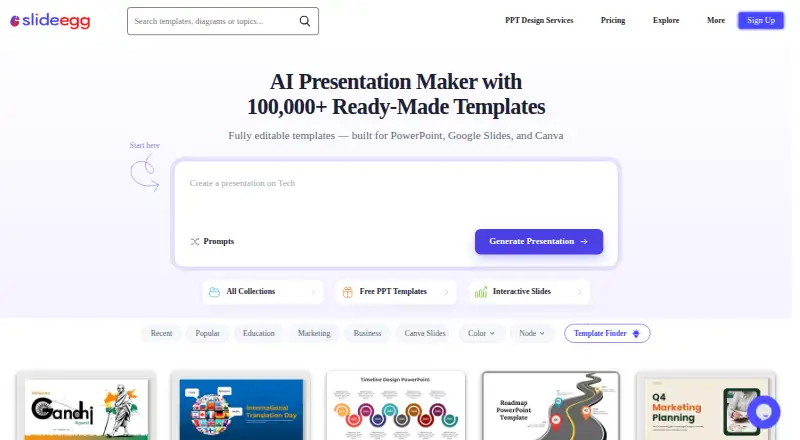
What SlideEgg is
SlideEgg is a web-based presentation tool that can generate decks from prompts and export them as PPTX files. It also includes brand controls and AI tools, with plan limits that vary by tier. The free plan costs nothing, requires no credit card, and allows three downloads per day, 200 AI credits, two AI tools, and five quiz questions. It also specifies participant limits of 50 per session and 250 per month. The Quarterly Basic plan is $16 a month, billed quarterly, and raises the allowance to 1,000 downloads and 1,000 AI credits per month, with six AI tools. The Yearly Pro plan is $12 a month, billed annually, and includes unlimited downloads, 2,000 AI credits per month, and 15+ AI tools. A one-time Lifetime payment is $240 a month as listed, with 75,000 AI credits and unlimited downloads. Teams is $18 a month, billed annually, and includes 4,000 AI credits per month and unlimited AI creation.
Good
- Generates presentation decks from prompts.
- Exports presentations as PPTX files.
- Brand controls are available.
- Free plan requires no credit card.
- Web platform.
Watch out
- Free plan allows three downloads per day.
- Free plan includes only two AI tools.
- Quarterly Basic costs $16 a month, billed quarterly.
- Lifetime plan is listed at $240 a month.
Who it suits
SlideEgg may suit people who want to create presentations from prompts in a web browser, with PPTX export and brand controls. Its free plan offers a way to start with limited downloads and AI credits.
Verdict
SlideEgg combines prompt-based deck creation with PPTX export and brand controls. Compare the free plan’s daily download and AI-tool limits with the allowances and billing terms of its paid plans.
Plans and prices
From SlideEgg's own pricing page, checked 7 Oct 2026.
| Plan | Price | What it gives you |
|---|---|---|
| Free | Free | 25,000+ templates · 3 downloads/day · 200 AI credits · 2 AI tools · 50 participants/session · 250 participants/month · 3 offline surveys/month |
| Quarterly (Basic) | $24 a month | 100,000+ premium templates · 1,000 downloads/month · 1,000 AI credits/month · 6 AI tools · 100 participants/session · 1,000 participants/month · Zoom integration · chat support · $24 billed quarterly; page also shows “$8 $16 /user/month” |
| Teams | $14 | License-based pricing · 4,000 monthly AI credits · unlimited participants · SSO · SCIM · dedicated private cloud · white labeling · dedicated account manager · billed annually; page shows “$14 $18 /users/month” |
| Yearly (Pro) | $72 a year | Unlimited templates and downloads · 2,000 AI credits/month · 15+ AI tools · unlimited participants and imports · custom branding · team workspace · priority support · $72 billed annually; page also shows “$6 $12 /user/month” |
| Lifetime | $120, paid once | Unlimited templates and downloads · 75,000 AI credits · 15+ AI tools · unlimited participants · SSO · SCIM · dedicated onboarding · account manager · one-time payment; page also shows “$120 $240” |
The facts
Each one read from SlideEgg's own pages, with the date it was checked.
The company
- AI presentation maker
- SlideEgg says its AI turns a prompt into a structured, editable slide deck with text, layouts, and visuals.checked 7 Oct 2026
- Company identity
- The website is operated by Deckzi Solutions Private Limited, incorporated in India with its registered office in Chennai, Tamil Nadu.checked 7 Oct 2026
- Founded
- 2018checked 28 Sep 2026
- Headquarters
- Chennai, Tamil Nadu, Indiachecked 28 Sep 2026
What it does
- Audience access
- Audience members can join through a QR code or link in a browser without installing an app or creating an account.checked 7 Oct 2026
- Brand controls
- Yeschecked 20 Sep 2026
- Exports
- Generated decks can be downloaded to PowerPoint or opened for editing in Google Slides or Canva.checked 7 Oct 2026
- GDPR policy
- SlideEgg says it uses technical and organizational measures for personal-data security and allows data access, correction, and deletion requests under its GDPR policy.checked 7 Oct 2026
- Integrations
- SlideEgg lists PowerPoint, Google Slides, Zoom, Microsoft Teams, and ChatGPT among the tools it works with.checked 7 Oct 2026
- Intended users
- SlideEgg describes the product for teachers, trainers, speakers, businesses, and event hosts who want to create or present interactive slide decks.checked 7 Oct 2026
- Interactive slides
- SlideEgg supports live polls, quizzes, word clouds, open-ended responses, and Q&A for presentations.checked 7 Oct 2026
- Paid from
- 12checked 20 Sep 2026
- PPTX export
- Yeschecked 20 Sep 2026
- Privacy and security
- Its privacy policy describes SSL encryption and says transaction information is stored in compliance with PCI DSS requirements.checked 7 Oct 2026
- Prompt-to-deck generation
- Yeschecked 20 Sep 2026
- Support
- Support varies by tier: the free plan has community support, Quarterly has chat support, Yearly has priority support, and Lifetime has dedicated onboarding and an account manager.checked 7 Oct 2026
- Template library
- The site advertises more than 100,000 editable presentation templates.checked 7 Oct 2026
- Usage caps
- The free tier includes 200 AI credits, 3 template downloads per day, up to 50 participants per session, and 250 participants per month.checked 7 Oct 2026
Where it runs
- Browser and mobile
- SlideEgg says it runs in a web browser and can be used on desktop, tablet, or mobile devices.checked 7 Oct 2026
Money
- Free plan
- Yeschecked 20 Sep 2026
- Trial terms
- SlideEgg's refund policy says certain plans may offer a 15-day free trial that converts to a paid subscription unless canceled before the trial ends.checked 7 Oct 2026
The full review of SlideEgg
Overview
SlideEgg combines AI-assisted slide creation with tools for audience participation during live presentations. It is a strong fit for teachers, trainers, speakers, and event hosts who want to build a deck and involve an audience in the same service. The breadth of its creation and interaction tools is appealing, though free usage is capped and some paid-plan billing labels are difficult to reconcile.
Key features
Give SlideEgg a prompt and it produces an editable deck with text, layouts, and visuals. That can provide a useful first draft, but users should expect to refine it rather than treat generated slides as finished. Brand controls help tailor decks, and users can export to PowerPoint or open a deck for editing in Google Slides or Canva. The advertised template library exceeds 100,000 editable templates; the free plan's three-download daily cap makes that breadth less useful to anyone who needs to source many slides at once.
For live sessions, SlideEgg supports polls, quizzes, word clouds, open-ended responses, and Q&A. Attendees can join using a QR code or browser link without installing an app or creating an account, a practical advantage for mixed-device audiences. SlideEgg lists PowerPoint, Google Slides, Zoom, Microsoft Teams, and ChatGPT among its integrations, while Zoom is specifically included with Quarterly.
The service runs in a browser and is usable on desktop, tablet, and mobile; its stated platforms also include Android and iOS. SlideEgg's privacy policy describes SSL encryption and PCI DSS-compliant handling of transaction information. Its GDPR policy describes security measures and allows people to request access to, correction of, or deletion of personal data.
Pricing
The Free plan costs nothing. It includes 25,000+ templates, three downloads per day, 200 AI credits, two AI tools, up to 50 participants per session and 250 per month, plus three offline surveys per month. Community support is the trade-off. This is a reasonable way to try the core workflow, but the download and audience limits may constrain regular classes or events.
Quarterly (Basic) is shown as $24 a month, billed $24 billed quarterly; the page also shows “$8 $16 /user/month.” It raises the allowance to 100,000+ premium templates, 1,000 downloads and 1,000 AI credits per month, six AI tools, 100 participants per session and 1,000 per month. It adds Zoom integration and chat support. This suits a presenter who needs moderate monthly volume and Zoom, but the conflicting price display makes the billing amount worth confirming before subscribing.
Yearly (Pro) is $12 a month, billed annually. It provides unlimited monthly downloads, 2,000 AI credits per month, 15+ AI tools, unlimited participants per session and month, and unlimited offline surveys, with priority support. It is the clearer fit for frequent, larger presentations, provided annual billing works for the buyer.
Lifetime is shown as $240 a month with a one-time payment. It includes 75,000 AI credits, 15+ AI tools, unlimited downloads, unlimited participants per session and month, and unlimited offline surveys, plus dedicated onboarding and an account manager. The monthly price label sits awkwardly beside a one-time-payment term, so confirm the amount and payment structure before choosing it.
Teams is $18 a month, billed annually, with 4,000 AI credits per month, unlimited participants, and unlimited AI creation. It may suit teams prioritizing those allowances, though the stated plan details do not give a seat count or support tier. Certain plans may offer a 15-day free trial that converts to a paid subscription unless canceled before it ends; do not assume every plan includes that trial.
Platforms
SlideEgg works in a web browser and can be used on desktop, tablet, or mobile; Android and iOS are also named platforms. Audience members can participate through a browser without installing an app or creating an account.
Who it's for
SlideEgg is best for educators, trainers, speakers, businesses, and event hosts who need both editable slides and live audience input. It is less compelling for occasional users who need more than three downloads a day or for buyers who want unambiguous billing terms before committing.
Pros and cons
- Pro: Prompt-based editable decks, brand controls, and PowerPoint, Google Slides, and Canva editing routes support creation and refinement in one workflow.
- Pro: Polls, quizzes, word clouds, open responses, and Q&A give presenters several ways to involve attendees, who can join without an app or account.
- Con: The free plan limits downloads to three per day and participants to 50 per session and 250 per month, restricting heavier use.
- Con: Quarterly's price display gives multiple monthly figures alongside a quarterly billing amount, and Lifetime pairs a monthly label with a one-time payment; both warrant clarification.
Alternatives
For a broader comparison of tools, see AI Presentation Makers, AI Presentation Software, and Presentation Template Libraries.
SlideUpLift is another freemium option, with a free tier offering two AI credits, inline editing, and free template downloads; its platforms include Linux, macOS, Windows, Android, iOS, and web. SketchBubble may suit users who want a free allowance of 10 template downloads per month and 75 signup AI credits, with five credits charged per slide; it has no free trial. HiSlide offers a free plan with 300+ free slides, unlimited downloads, and PowerPoint and Google Slides add-ons. PoweredTemplate gives free users 10 downloads per day and 400 AI credits at signup, but requires attribution and excludes premium assets.
PPT Design offers a free plan with five template downloads, capped at one per day, 64 free themes, and PowerPoint and Google Slides add-ins for one user. SlideGeeks is a paid option with a Monthly plan at $29.99 a month for one user, five AI presentations, and 10 AI images. PitchDeck.net is web-only and offers 10 decks per month on its free plan; its Pro plan is $29 a month with unlimited decks and AI scoring and gap analysis. SlideKit Templates offers a $4.99 a month Basic plan with 25 downloads per month and access to its library.
Verdict
Choose SlideEgg if you want prompt-assisted, editable decks alongside practical live-participation tools, especially for teaching, training, or events. Its free tier is useful for a limited trial, and Pro's stated unlimited audience and download allowances suit regular presenters. Look elsewhere if download caps are a problem or if you need clearer pricing terms before paying.
Getting started
- Open SlideEgg in a web browser
- Choose the Free plan or a paid plan from $12/user/mo billed annually
- Enter a prompt to generate a structured slide deck
- Edit the deck and apply brand controls
- Export to PowerPoint or open it in Google Slides or Canva
- Share a QR code or browser link for audience participation
Limits worth knowing
The Free plan costs nothing and includes 200 AI credits, three template downloads per day, 50 participants per session, and 250 participants per month. Paid plans increase or remove these limits depending on the plan.
Questions
What does SlideEgg cost?
SlideEgg has a free plan.
Which platforms can run SlideEgg?
SlideEgg runs in a web browser and lists Android, iOS, and web platforms. It can be used on desktop, tablet, or mobile devices.
Can SlideEgg export presentations?
Yes. Generated decks can be downloaded to PowerPoint as PPTX files or opened for editing in Google Slides or Canva.
Which integrations does SlideEgg list?
Listed integrations include PowerPoint, Google Slides, Zoom, Microsoft Teams, and ChatGPT.
Who makes SlideEgg?
The maker is SlideEgg. The website is operated by Deckzi Solutions Private Limited, incorporated in India with a registered office in Chennai, Tamil Nadu.
Alternatives to SlideEgg
- 1

PPT Design
Free planWebAPIExtensionmacOS7.6From $7 a month - 2

SlideUpLift
Free planAndroidiOSWebLinux7.3From $149.99 a year - 3
SketchBubble
Free planAndroidiOSWebmacOS7.2From $15 a month - 4
HiSlide
Free planWebExtensionmacOSWindows7.0From $9 a month - 5
PoweredTemplate
Free planWebmacOSWindows7.0From $8.48 a month - 6
Slidesgo AI Presentation Maker
Free planWeb7.0From $35.99 a year