
SlideUpLift
SlideUpLift offers editable presentation templates and Creatos AI, an editor that can rewrite, refine, and restructure slide content.
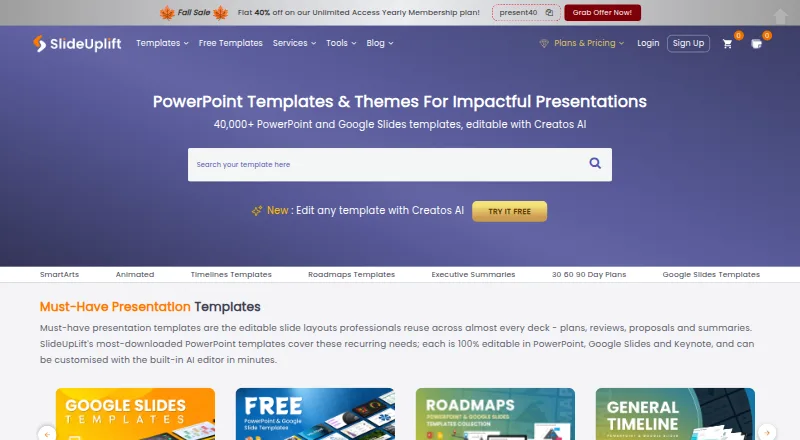
What SlideUpLift is
SlideUpLift offers editable presentation templates and Creatos AI, an editor that can rewrite, refine, and restructure slide content. Its library has more than 40,000 templates spanning business, marketing, project work, pitch decks, roadmaps, timelines, SWOT analyses, and 30-60-90 day plans. Creatos AI can apply uploaded brand assets, colors, fonts, and themes, and export to PowerPoint or Google Slides. The maker says its templates also work in Keynote. More than 10,000 free PowerPoint templates can be downloaded without membership, with a new free template published every Friday. Browser tools include a Gantt chart maker, PowerPoint merge and split utilities, and image tools. A PowerPoint add-in allows template searching and browsing, and requires PowerPoint version 16. Free accounts include two AI credits; the Access Lite plan allows five downloads per month. Access Lite costs $18.99 per month.
Good
- More than 40,000 editable templates.
- Over 10,000 free PowerPoint templates without membership.
- Creatos AI can apply uploaded brand assets and themes.
- Templates work in PowerPoint, Google Slides, and Keynote.
- Plans include 24/7 customer support.
Watch out
- Free accounts include only 2 AI credits.
- Access Lite allows 5 downloads per month.
- Free Merge PPT and Split PPT files are limited to 2 MB.
- PowerPoint add-in requires version 16.
Who it suits
SlideUpLift may suit people creating presentations for business, marketing, project work, or pitches, as well as teams that want to apply brand assets. Its listed audiences include corporate teams, students and educators, and event organizers.
Verdict
SlideUpLift pairs a broad template library with AI editing and browser utilities. Check the download and AI-credit limits if you plan to use the free or Access Lite tier.
Plans and prices
From SlideUpLift's own pricing page, checked 29 Sep 2026.
| Plan | Price | What it gives you |
|---|---|---|
| Free Access Plan | Free | 2 free AI credits · inline editing · free template downloads |
| Access Lite | $18.99 a month | 5 downloads / month · 2 free AI credits · Billed monthly |
| Unlimited Monthly | $24.99 a month | Unlimited downloads · 10 AI credits · Billed monthly |
| Unlimited Yearly | $149.99 a year | Unlimited downloads · 120 AI credits · $12.50/mo · billed yearly |
| Team Pro + | $173.87 a year | Unlimited downloads · 120 AI credits per person · add seats at $1.99/mo · Billed yearly · 2 seats |
The facts
Each one read from SlideUpLift's own pages, with the date it was checked.
What it does
- AI editing
- Creatos AI can rewrite, refine, and restructure slide content and apply uploaded brand assets, colors, fonts, and themes.checked 29 Sep 2026
- Audience
- The maker describes its online tools for corporate teams, students and educators, and event organizers.checked 29 Sep 2026
- Exports and compatibility
- The maker says templates work in PowerPoint, Google Slides, and Keynote, and Creatos AI can export to PowerPoint or Google Slides.checked 29 Sep 2026
- Integrations
- A PowerPoint add-in lets users search and browse SlideUpLift’s template library from within PowerPoint; the maker says it requires PowerPoint version 16.checked 29 Sep 2026
- Online tools
- Browser-based tools include Creatos AI, a Gantt chart maker, PowerPoint merge and split tools, and image utilities.checked 29 Sep 2026
- Privacy and security
- The privacy policy says SlideUpLift uses security measures to protect personal data but does not guarantee that unauthorized access, data loss, or breaches will never occur.checked 29 Sep 2026
- Product
- SlideUpLift offers a library of more than 40,000 editable presentation templates and an AI presentation editor called Creatos AI.checked 29 Sep 2026
- Support
- The membership page lists 24/7 customer support as included with its plans.checked 29 Sep 2026
- Upload handling
- SlideUpLift says online-tool uploads are transferred over SSL and deleted automatically within 24 hours or immediately when users remove them.checked 29 Sep 2026
- Usage limits
- Free accounts include 2 AI credits, Access Lite allows 5 downloads per month, and Merge PPT and Split PPT have a 2 MB per-file limit on the free tier.checked 29 Sep 2026
- Use cases
- Its templates cover business, marketing, project work, pitch decks, roadmaps, timelines, SWOT analyses, and 30-60-90 day plans.checked 29 Sep 2026
Money
- Free library
- More than 10,000 free PowerPoint templates are available to download without a membership, with a new free template published every Friday.checked 29 Sep 2026
The full review of SlideUpLift
SlideUpLift is a presentation-template library with an AI editor and browser-based utilities. It is best suited to people who build business or planning decks in PowerPoint, Google Slides, or Keynote and want editable starting points alongside slide-writing tools. Its free library makes it easy to begin without a membership; frequent downloads or AI editing require a closer look at the plan limits.
Overview
The library contains more than 40,000 editable templates spanning business, marketing, project work, pitch decks, roadmaps, timelines, SWOT analyses, and 30-60-90 day plans. More than 10,000 PowerPoint templates can be downloaded free without membership, with a new free template published every Friday. That gives occasional users a meaningful way to source layouts before paying, though the free account's AI allowance is only two credits.
Templates work with PowerPoint, Google Slides, and Keynote, and downloads are in PPTX format. Creatos AI exports to PowerPoint or Google Slides, so Keynote users can use the templates but should not expect the AI export path to target Keynote. See our Presentation Template Libraries list for other options.
Key features
- Editable template collection: The breadth of formats suits routine business decks as well as pitch and planning presentations. Commercial use and team sharing are supported, making the collection relevant beyond personal or classroom work.
- Creatos AI: It can rewrite, refine, and restructure slide content, and apply uploaded brand assets, colors, fonts, and themes. That combines copy revision with visual branding, but the free account's two credits make it a limited way to judge ongoing AI use.
- Browser utilities: The online tools include a Gantt chart maker, PowerPoint merge and split functions, and image utilities in addition to Creatos AI. On the free tier, Merge PPT and Split PPT accept files only up to 2 MB each, which may constrain larger decks.
- PowerPoint add-in: The add-in lets users search and browse the library from within PowerPoint, but requires version 16 or later.
- Upload handling: SlideUpLift says online-tool uploads travel over SSL and are deleted automatically within 24 hours, or immediately if the user removes them. Its privacy policy also says security measures do not guarantee that unauthorized access, data loss, or breaches will never occur; users handling sensitive material should weigh that caveat.
Pricing
The Free Access Plan costs nothing and includes two free AI credits, inline editing, and free template downloads. The large pool of downloadable free templates is useful for occasional deck work, but two credits are a small allowance for anyone relying on AI revisions.
Access Lite costs $18.99 a month, billed monthly, and includes five downloads per month plus two free AI credits. It is a fit for someone who needs only a handful of paid downloads; the monthly cap makes it a poor match for regular presentation production. Unlimited Monthly costs $24.99 a month, billed monthly, with unlimited downloads and 10 AI credits, a more suitable option for frequent template use.
Unlimited Yearly costs $149.99 a year, billed yearly at $12.50/mo, and includes unlimited downloads and 120 AI credits. It lowers the monthly equivalent relative to Unlimited Monthly, but requires a yearly billing commitment. Team Pro + costs $173.87 a year, billed yearly, for two seats, unlimited downloads, and 120 AI credits per person; additional seats cost $1.99/mo. This is the clearest fit for a small team that will use the shared library, while solo users do not need to pay for the second seat. Membership plans include 24/7 customer support.
Platforms
SlideUpLift is available on Android, iOS, Linux, macOS, the web, and Windows. Templates are compatible with PowerPoint, Google Slides, and Keynote; Creatos AI exports to PowerPoint or Google Slides. The PowerPoint add-in offers an in-app route to browse templates for users on version 16 or later.
Who it's for
SlideUpLift suits professionals, students and educators, and event organizers who need presentation layouts or browser-based tools, especially when business and project formats recur in their work. The free downloads work for occasional use, while the paid unlimited plans make more sense for people producing decks regularly. It is less compelling for someone who needs only a few monthly downloads and expects to use AI heavily, since Access Lite caps downloads at five and includes only two free AI credits.
Pros and cons
- Pro: More than 10,000 free PowerPoint templates can be downloaded without a membership, so occasional users can source layouts without taking on a subscription.
- Pro: Creatos AI handles both slide-content revision and brand styling, reducing the need to switch between separate writing and theme tasks.
- Pro: Commercial use and team sharing are supported, with a two-seat annual plan and per-person AI credits for small teams.
- Con: The free account includes just two AI credits, limiting its usefulness for sustained AI-assisted editing.
- Con: Access Lite allows only five downloads each month, so regular users may find the jump to an unlimited plan necessary.
- Con: Free-tier PowerPoint merge and split uploads are capped at 2 MB per file, and the add-in requires PowerPoint version 16.
Alternatives
SketchBubble is worth considering if its free plan's 10 monthly template downloads and 75 signup AI credits better suit a modest download routine and a larger initial AI allowance.
HiSlide offers a free plan with 300+ slides and unlimited downloads, so it may suit readers who prioritize uncapped free slide downloads.
PoweredTemplate may appeal to users who want 10 free downloads per day and 400 signup AI credits, provided attribution and the free plan's lack of premium assets are acceptable.
PPT Design is another freemium option for readers who want PowerPoint and Google Slides add-ins on its free plan.
SlideGeeks is a paid alternative with a Monthly plan at $29.99 a month for one user, 10 ready-made products, five AI presentations, and 10 AI images.
SlideKit Templates may suit readers who want a free trial or a lower-cost paid entry point: its Basic plan is $4.99 a month for 25 monthly downloads.
SlideEgg is a web-based option whose free plan includes three downloads per day and 200 AI credits.
PresenterMedia is another freemium presentation option, with a One Month plan at $39.95 a month that includes unlimited downloads and 250 daily AI credits.
Verdict
Choose SlideUpLift if you want a broad, editable presentation library plus AI tools for revising slide text and applying brand styling, especially if you produce decks often enough to use unlimited downloads. Its free templates are a strong starting point, but the two-credit free AI allowance and five-download Access Lite cap are real constraints. Readers who need sustained AI use on a free tier or only a small number of paid downloads each month should compare alternatives before committing.
Getting started
- Open slideuplift.com in a browser.
- Download free PowerPoint templates without creating a membership.
- Create a free account for two AI credits and inline editing.
- Use Creatos AI or the browser-based presentation tools.
- For more downloads, choose Access Lite, Unlimited Monthly, Unlimited Yearly, or Team Pro +.
- To browse templates inside PowerPoint, install the add-in; it requires PowerPoint version 16.
Limits worth knowing
The free plan includes two AI credits, while Access Lite allows five downloads per month. On the free tier, Merge PPT and Split PPT have a 2 MB per-file limit.
Questions
Is SlideUpLift free?
Yes. Its Free Access Plan costs nothing and includes two AI credits, inline editing, and free template downloads. More than 10,000 free PowerPoint templates can be downloaded without membership.
How much do paid plans cost?
Access Lite is $18.99 a month, Unlimited Monthly is $24.99 a month, Unlimited Yearly is $149.99 a year, and Team Pro + is $173.87 a year.
Which presentation platforms are supported?
Templates work in PowerPoint, Google Slides, and Keynote. Creatos AI exports to PowerPoint or Google Slides.
Can teams use SlideUpLift commercially?
Commercial use and team sharing are supported. Team Pro + includes two seats, with additional seats at $1.99/mo.
Does SlideUpLift have a PowerPoint add-in?
Yes. It lets users search and browse the template library from within PowerPoint and requires PowerPoint version 16.
What does the free plan limit?
Free accounts include two AI credits. The free tier's Merge PPT and Split PPT tools allow files up to 2 MB each.
Alternatives to SlideUpLift
- 1

SlideEgg
Free planAndroidiOSWeb7.7Free plan - 2

PPT Design
Free planWebAPIExtensionmacOS7.6From $7 a month - 3
SketchBubble
Free planAndroidiOSWebmacOS7.2From $15 a month - 4
HiSlide
Free planWebExtensionmacOSWindows7.0From $9 a month - 5
PoweredTemplate
Free planWebmacOSWindows7.0From $8.48 a month - 6
Slidesgo AI Presentation Maker
Free planWeb7.0From $35.99 a year