SlideGeeks
SlideGeeks provides editable PowerPoint templates, presentations, slide bundles, diagrams, maps, icons, and research and design services.
What SlideGeeks is
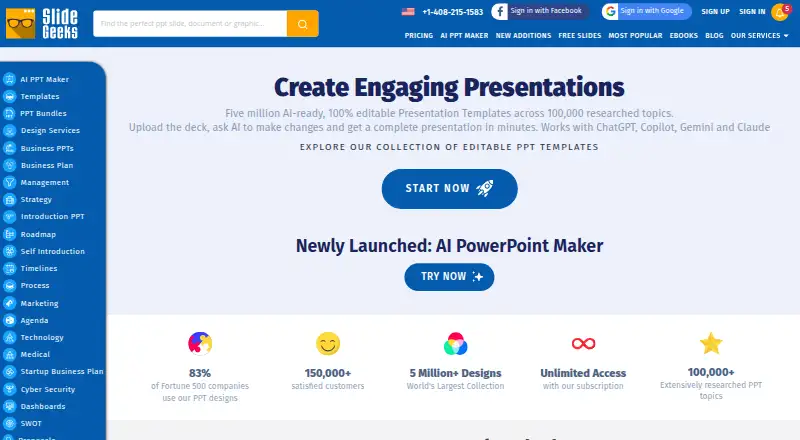
SlideGeeks provides editable PowerPoint templates, presentations, slide bundles, diagrams, maps, icons, and research and design services. Its subscription library advertises more than 5 million ready-made presentations, templates, and slide bundles. The pricing page also promotes AI presentation creation and image generation, including images and icons that can be edited in PowerPoint. Slides use vector graphics, so users can adjust color, size, and shading. SlideGeeks says its content works with PowerPoint 2007 and later, including PowerPoint for Mac, and it offers a free section of downloadable templates. Subscription options cover individuals, business teams, and education teams. Plans range from a monthly option at $29.99 a month for one user with 10 ready-made products, five AI presentations, and 10 AI images, to annual and multi-user options. Support is advertised around the clock by chat, phone, and email. The FAQ describes a conditional seven-day refund, subject to download and custom-slide restrictions, and says unlimited downloads are subject to reasonable use.
Good
- Library advertises more than 5 million ready-made items.
- Vector slide elements can be edited in PowerPoint.
- Works with PowerPoint 2007 and later, including Mac.
- Free section offers downloadable templates.
Watch out
- Monthly plan includes 10 ready-made products for one user.
- Unlimited downloads are subject to reasonable use.
- Refunds are conditional and limited by usage.
Who it suits
SlideGeeks is aimed at individuals and teams in business or education who create presentations and documents. It may suit PowerPoint users looking for editable slide materials or AI-assisted presentation creation.
Verdict
SlideGeeks offers a broad presentation library, editable vector content, and AI creation tools, with individual and team subscription options. Review plan allowances and the refund and download conditions before subscribing.
Plans and prices
From SlideGeeks's own pricing page, checked 3 Oct 2026.
| Plan | Price | What it gives you |
|---|---|---|
| Monthly | $29.99 a month | 10 ready-made products · 1 user · 5 AI presentations · 10 AI images · Monthly |
| Semi Annual | $79.99, paid once | Unlimited ready-made products · 1 user · unlimited AI presentations · unlimited AI images · Semi Annual |
| Annual | $119.99 a year | Unlimited ready-made products · 1 user · unlimited AI presentations · unlimited AI images · Annual |
| Annual + Custom Design | $149.99 a year | Unlimited ready-made products · 1 user · unlimited AI presentations · unlimited AI images · 10 custom slides included · Annual |
| Annual 4-User License | $199.99 a year | Unlimited ready-made products · 4 users · unlimited AI presentations · unlimited AI images · 15 custom slides per team · Annual |
| Annual 20-User License | $249.99 a year | Unlimited ready-made products · 20 users · unlimited AI presentations · unlimited AI images · 20 custom slides per subscription · Annual |
| Annual Company-Wide Unlimited-User License | $299.99 a year | Unlimited ready-made products · unlimited users · unlimited AI presentations · unlimited AI images · 25 custom slides per subscription · Annual |
The facts
Each one read from SlideGeeks's own pages, with the date it was checked.
What it does
- AI features
- The pricing page advertises AI-powered presentation creation and AI image generation, including icons and images editable in PowerPoint.checked 3 Oct 2026
- Audience
- The site offers individual, business team, and education team subscriptions for people and organizations creating presentations and documents.checked 3 Oct 2026
- Compatibility
- SlideGeeks says its content is compatible with PowerPoint 2007 and above and that it works with PowerPoint for Mac.checked 3 Oct 2026
- Editable content
- The FAQ says slides use vector graphics that can be edited in PowerPoint, including their color, size, and shading.checked 3 Oct 2026
- Integrations
- The privacy policy lists Facebook and Google account access and authentication, plus Google, Facebook, LinkedIn, and Twitter social widgets.checked 3 Oct 2026
- Library
- The subscription page advertises more than 5 million ready-made presentations, templates, and slide bundles.checked 3 Oct 2026
- Payment security
- The FAQ says payments are handled by PayPal and Stripe and that SlideGeeks does not store or access credit card information.checked 3 Oct 2026
- Privacy
- The privacy policy says it applies generally accepted industry standards to protect personal information in transmission and after receipt.checked 3 Oct 2026
- Product
- SlideGeeks offers editable PowerPoint templates, presentations, slide bundles, diagrams, maps, icons, and related research and design services.checked 3 Oct 2026
- Refund terms
- The FAQ describes a conditional seven-day refund if the customer cancels and requests it, limited to accounts that have downloaded no more than five products and have not used custom design slides.checked 3 Oct 2026
- Support
- The pricing page advertises 24/7 customer support over chat, phone, and email.checked 3 Oct 2026
- Usage limits
- The FAQ says unlimited downloads are subject to reasonable use and prohibits downloading the entire collection for archival purposes.checked 3 Oct 2026
Money
- Free content
- The site provides a Free PPT Templates section with downloadable templates.checked 3 Oct 2026
The company
- Headquarters
- Indiachecked 28 Sep 2026
The full review of SlideGeeks
SlideGeeks is a presentation library and creation service for people who build decks and documents in PowerPoint. It suits individuals and teams that want editable slide assets alongside AI presentation and image tools. Its broad library and generous higher-tier allowances are balanced by a tightly capped entry plan and a personal-use license.
Overview
SlideGeeks combines ready-made presentations, templates, slide bundles, diagrams, maps, icons, and research and design services. Its subscription page advertises more than five million ready-made assets, while a separate free-template section gives non-subscribers a way to download templates. The appeal is breadth: users can draw on a large catalog rather than assemble every visual from scratch.
Key features
Slides use vector graphics that can be adjusted in PowerPoint, including color, size, and shading. That makes the library more useful than a set of fixed screenshots when a deck needs to match a particular visual style. Content is compatible with PowerPoint 2007 and later, including PowerPoint for Mac; editing platforms also include Google Slides.
The pricing page promotes AI-powered presentation creation and image generation, with generated icons and images editable in PowerPoint. AI allowances vary sharply by plan: the monthly tier offers five presentations and ten images, while the higher tiers include unlimited AI presentations and images. Downloads are described as unlimited on qualifying subscriptions, subject to reasonable use; downloading the entire collection for archiving is prohibited.
Support is advertised around the clock by chat, phone, and email. Payments are handled through PayPal and Stripe, and SlideGeeks says it does not store or access card details.
Pricing
SlideGeeks has a free template section but no free trial. Paid subscriptions start at $29.99 a month. The Monthly plan costs $29.99 a month for one user, ten ready-made products, five AI presentations, and ten AI images. It is best for a short-term or light user; the ten-product cap makes it a poor fit for anyone who expects to build a deck library through frequent downloads.
The Semi Annual plan is $79.99, paid once, and the Annual plan is $119.99 a year. Both cover one user with unlimited ready-made products, AI presentations, and AI images. For an individual who uses the service regularly, either removes the monthly plan’s tight quotas; the annual plan is the longer commitment, while the semi-annual option costs less upfront.
The Annual + Custom Design plan is $149.99 a year for one user, unlimited ready-made products and AI tools, plus ten custom slides. For teams, the Annual 4-User License is $199.99 a year and includes 15 custom slides per team; the Annual 20-User License is $249.99 a year with 20 custom slides per subscription. The Annual Company-Wide Unlimited-User License costs $299.99 a year and includes 25 custom slides per subscription. These are the relevant choices when seats and custom design work matter, though custom-slide allowances remain finite even on the broadest license.
The license scope is personal, and commercial use is not included, so businesses should check that restriction against their intended work before subscribing. Refunds are conditional: a customer must cancel and request a refund within seven days, have downloaded no more than five products, and not have used custom design slides.
Platforms
SlideGeeks lists Android, iOS, macOS, web, and Windows platforms. Its content is delivered in PowerPoint format, with editing supported in PowerPoint and Google Slides.
Who it's for
SlideGeeks is a strong fit for individuals, business teams, and education teams that produce presentation-heavy work and value editable vector assets. The free templates are a low-commitment starting point. The monthly plan suits modest or temporary use; recurring creators get more room from the semi-annual or annual individual tiers. Teams can choose licenses sized to four users, twenty users, or an unlimited number of users, but the personal-use license makes it unsuitable when commercial rights are required.
Pros and cons
- Pros: A catalog advertised at more than five million assets gives presentation makers substantial breadth across templates, diagrams, maps, icons, and slide bundles.
- Pros: Editable vector graphics let users tune color, size, and shading instead of settling for static artwork.
- Pros: Higher tiers combine unlimited ready-made downloads and AI generation, with team licenses and defined custom-slide allowances.
- Cons: The 29.99 USD monthly plan limits a solo user to ten ready-made products, five AI presentations, and ten AI images.
- Cons: Commercial use is excluded by the personal license, a material constraint for professional client or business work.
- Cons: The refund window is conditional and the download cap is low: more than five downloaded products or use of custom design slides disqualifies an account.
Alternatives
Compare other options in Presentation Template Libraries. Choose SlideUpLift if a freemium service with a free plan and two free AI credits is a better starting point. SlideKit Templates is another freemium option, with a free trial and a Basic plan at $4.99 a month for 25 downloads per month and access to its entire library.
SketchBubble offers a free plan with ten template downloads per month and 75 AI credits on signup, making it worth considering for users who want a defined free allowance. PresenterMedia has a freemium plan and a one-month option at $39.95 a month with unlimited downloads, an AI presentation maker with 250 daily credits, and a commercial license; that license makes it a more suitable alternative when commercial use is essential.
SlideModel offers a freemium plan and a one-day option at $24.90, paid once for five downloads, 24-hour access, and an AI presentation maker, which may suit a brief, defined need. PoweredTemplate has a free access plan with ten downloads per day and 400 AI credits at signup, but requires attribution and excludes premium assets.
SlideEgg is a freemium, web-based alternative. HiSlide has a free plan and supports web, Windows, and macOS.
Verdict
Choose SlideGeeks if you regularly create presentations, want a large pool of editable PowerPoint assets, and can use a personal-use license. Its annual individual and team plans pair broad library access with unlimited AI allowances. Look elsewhere if you need commercial rights or only occasional downloads: the monthly tier’s quotas and the license restriction are significant limits.
Alternatives to SlideGeeks
- 1

SlideEgg
Free planAndroidiOSWeb7.7Free plan - 2

PPT Design
Free planWebAPIExtensionmacOS7.6From $7 a month - 3

SlideUpLift
Free planAndroidiOSWebLinux7.3From $149.99 a year - 4
SketchBubble
Free planAndroidiOSWebmacOS7.2From $15 a month - 5
HiSlide
Free planWebExtensionmacOSWindows7.0From $9 a month - 6
PoweredTemplate
Free planWebmacOSWindows7.0From $8.48 a month