
ChatSlide
ChatSlide turns documents, topics, and research into presentations using AI generation and summarization.
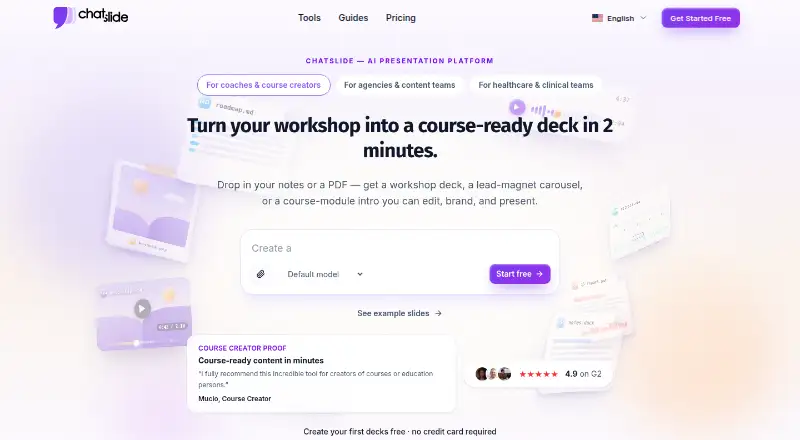
What ChatSlide is
ChatSlide turns documents, topics, and research into presentations using AI generation and summarization. Upload notes or files, bring in material from supported sources, or enter a topic; the platform organizes content into slides with layouts, images, and speaker notes. Its 19 editing tools can add examples, rewrite content by grade level, and refine slides. Uploads include PDF, DOCX, PPTX, TXT, and image formats; supported content sources also include URLs, YouTube, PubMed, OpenAlex, and ClinicalTrials.gov. Decks can be exported as PowerPoint, PDF, or Keynote, and PPTX files remain editable in PowerPoint and Google Slides. You can also render decks as narrated videos with AI voiceover in more than 30 languages. The free tier includes 100 credits and PDF export, and starting does not require a credit card; PowerPoint export is paid. Paid plans list project limits from 30 to 60 slides. Presentations are private by default, and free-plan uploads may be deleted after up to 30 days.
Good
- Accepts documents, images, URLs, and research sources.
- Offers 19 tools for refining slide content.
- Exports PowerPoint, PDF, and Keynote.
- Free tier includes 100 credits and PDF export.
Watch out
- PowerPoint export is not included in the free tier.
- Free uploads may be deleted after up to 30 days.
- Direct Google Classroom and Canvas integrations are on the roadmap.
Who it suits
ChatSlide suits people who want to turn documents, research, or a topic into a presentation, including students using the free tier. It may also suit users who want narrated video output or editable PPTX files.
Verdict
ChatSlide brings document conversion, slide editing, and narrated video output into a web platform. Review the free tier's export and retention limits before choosing a plan.
Plans and prices
From ChatSlide's own pricing page, checked 28 Sep 2026.
| Plan | Price | What it gives you |
|---|---|---|
| Free | Free | DeepSeek V4 · basic features |
| Plus | $99 a year | 500 credits/month · 30 slides/project · 5 resources · 20 pages/resource · 20MB · PDF/PPTX export · Billed $99 yearly |
| Pro | $179 a year | 2,500 credits/month · 40 slides/project · 10 resources · 40 pages/resource · 50MB · PDF/PPTX/KEY export · 1 voice profile · Billed $179 yearly |
| Ultimate | $399 a year | Unlimited credits · 60 slides/project · 20 resources · 60 pages/resource · 100MB · PDF/PPTX/KEY export · 500+ avatars · 5 voice profiles · Billed $399 yearly |
The facts
Each one read from ChatSlide's own pages, with the date it was checked.
What it does
- AI Avatar Library
- The platform offers more than 500 talking-head AI avatars.checked 27 Sep 2026
- AI Image Models
- The subscription includes access to more than 25 AI image models.checked 27 Sep 2026
- API and support
- ChatSlide does not yet have a public API, is working on one for enterprise customers, and offers direct support on paid plans.checked 28 Sep 2026
- Brand controls
- Yeschecked 20 Sep 2026
- Branding Controls
- Paid plans include customized branding and logo controls.checked 27 Sep 2026
- Collaboration level
- realtimechecked 20 Sep 2026
- Compliance Options
- The pricing page states GDPR compliance and HIPAA options for Enterprise.checked 27 Sep 2026
- Content Integrations
- Content can be imported from URLs, YouTube, PubMed, OpenAlex, and ClinicalTrials.gov.checked 27 Sep 2026
- Core workflow
- Users can upload notes, PDFs, Word documents, or type a topic; the AI organizes the material into slides with layouts, images, and speaker notes.checked 28 Sep 2026
- Customer Support
- Pro and Ultimate include direct customer support.checked 27 Sep 2026
- Document Conversion
- Documents can be turned into slides, videos, avatars, posters, and charts.checked 27 Sep 2026
- Document-to-deck generation
- Yeschecked 20 Sep 2026
- Editing
- ChatSlide provides 19 editing tools for adding examples, rewriting content by grade level, and refining slides.checked 28 Sep 2026
- Education use
- The free tier is suitable for student projects, and .edu users receive 40% off yearly plans with the EDU40 code.checked 28 Sep 2026
- Exports
- The product exports presentations as PowerPoint, PDF, or Keynote, and standard PPTX files remain editable in PowerPoint and Google Slides.checked 28 Sep 2026
- Import and research sources
- ChatSlide supports PDF, DOCX, PPTX, TXT, image uploads, URLs, YouTube videos, PubMed, OpenAlex, and ClinicalTrials.gov content.checked 28 Sep 2026
- LMS integrations
- Direct Google Classroom and Canvas integrations are on the roadmap; current workflows use exported Google Slides or PowerPoint, links, or embeds in Canvas and Google Sites.checked 28 Sep 2026
- Maximum slides
- 30checked 20 Sep 2026
The company
- Company Location
- The company says it was created with love from San Francisco.checked 27 Sep 2026
Money
- Free plan
- Yeschecked 20 Sep 2026
- Free Tier Credits
- The free tier includes 100 credits.checked 27 Sep 2026
- Free Tier Export
- The free tier includes PDF export; PowerPoint export is paid.checked 27 Sep 2026
- Free Trial Payment
- Users can start free without a credit card.checked 27 Sep 2026
Where it runs
- Output Platforms
- PPTX files work with PowerPoint, Google Slides, Keynote, and LibreOffice Impress.checked 27 Sep 2026
The full review of ChatSlide
Overview
ChatSlide is a web app for turning documents, research and prompts into editable presentations, with additional tools for making narrated videos and other content. It suits people who need to move quickly from source material to a shareable deck, especially students and research-focused users. The free tier makes it possible to try the workflow without a card, but its credit, export and file-retention limits make it a starting point rather than a full-time workspace.
The core appeal is breadth: ChatSlide can organize uploaded material into slides with layouts, images and speaker notes, then help refine the result. It also converts documents into videos, avatars, posters and charts. That range is useful when a presentation is one part of a larger content task; readers who only need a conventional slide editor may not need it.
Key features
Generation and editing
Start with a typed topic or upload PDF, DOCX, PPTX, TXT or image files. ChatSlide also imports content from URLs, YouTube, PubMed, OpenAlex and ClinicalTrials.gov, making it a practical fit for turning research or reference material into a first draft. Nineteen editing tools can add examples, rewrite content for different grade levels and refine slides. These tools give users options beyond accepting the initial AI-generated structure, though the supplied material does not establish how much manual cleanup a particular deck will need.
Exports and presentation formats
Presentations can be exported as PDF, PPTX or Keynote. Standard PPTX files remain editable in PowerPoint and Google Slides, and also work with Keynote and LibreOffice Impress. PDF export is included on Free, while PowerPoint export requires a paid plan; that distinction matters if recipients need to edit the deck rather than simply view it. Brand and logo controls are included with paid plans.
Video and voice
ChatSlide can render a deck as a narrated video, using speaker notes as the script and AI voiceover in more than 30 languages. It also offers over 500 talking-head AI avatars and voice cloning from a 30-second voice sample. These features extend a deck into narrated material without requiring a separate format workflow, but users who only need slides should weigh them against the plan's credit and project limits.
Privacy and integrations
Presentations are private by default, with sharing controlled through explicit public links. Uploads are encrypted in transit and at rest, and ChatSlide says customer content is not used to train AI models. Free-plan uploads may be permanently deleted after storage of up to 30 days; paid plans have extended storage. The pricing page states GDPR compliance and offers HIPAA options for Enterprise. Direct Google Classroom and Canvas integrations are on the roadmap; current workflows rely on exported files, links or embeds.
Pricing
ChatSlide is freemium. Free access requires no credit card and includes 100 credits and PDF export, but not PowerPoint export. It is suitable for trying the service or completing a modest student project; the 30-day file-retention window is a meaningful constraint for anyone expecting to return to old uploads.
Paid plans begin at $8.25 /user/mo. The plan prices below are monthly, with annual-billing discounts stated separately:
| Plan | Price and included limits | Best fit |
|---|---|---|
| Plus | $8.25 a month; 500 credits/month, 20 slides per project, 5 resources, 20 pages per resource and 20MB file size. 45% off annual billing. | Individuals with lighter, bounded projects who need paid-plan capabilities. |
| Pro | $14.92 a month; 2,500 credits/month, 40 slides per project, 10 resources, 40 pages per resource and 50MB file size. 25% off annual billing. Includes direct customer support. | Regular users handling larger source sets or longer decks. |
| Ultimate | $33.25 a month; unlimited credits, 60 slides per project, 20 resources, 40 pages per resource and 100MB file size. 44% off annual billing. HIPAA compliance is available on request, and direct customer support is included. | Heavy users who need the largest stated project limits or HIPAA options. |
Paid plans also include private projects and customized branding and logo controls. Plus costs less but caps credits, project length, resources and file size more tightly than Pro; Ultimate removes the credit cap but still limits projects to 60 slides and 20 resources. A 14-day refund policy is stated for purchases. Pro and Ultimate include direct support; no public API is available yet, though work on an enterprise API is underway.
Platforms
ChatSlide runs on the web. Its exported PPTX files can be used with PowerPoint, Google Slides, Keynote and LibreOffice Impress, so recipients are not tied to ChatSlide to open or edit standard PowerPoint output.
Who it's for
ChatSlide is a strong candidate for students, educators and professionals who regularly convert documents or research into decks and may also want narrated video output. The free tier can serve student projects, while eligible .edu users receive 40% off yearly plans with the EDU40 code. Users who need longer-lived free uploads, unrestricted project size, direct classroom integrations today or a public API should look elsewhere.
Pros and cons
- Pros: Accepts common document and image uploads as well as research sources such as PubMed and ClinicalTrials.gov, which helps users build a deck from material they already have.
- Pros: Paid PPTX output stays editable in major presentation apps, while Free includes PDF export for readers who only need a viewable document.
- Pros: Narrated video, multilingual voiceover, a large avatar library and voice cloning extend the workflow beyond static slides.
- Cons: Free users cannot export PowerPoint files, and uploaded files may be deleted after 30 days, limiting the free plan for ongoing work.
- Cons: Every paid tier still has project slide, resource and file-size caps; users making particularly large decks need to plan around them.
- Cons: Google Classroom and Canvas integrations are not available yet, and there is no public API.
Alternatives
For a broader look at this category, browse AI Presentation Makers, AI Presentation Software or Presentation Management Software.
- Shufflrr is worth considering if a PowerPoint add-in, OneDrive and SharePoint access, or Dynamics 365 live data is more important than ChatSlide's document-to-deck and narrated-video workflow; its free add-in supports up to four users.
- HummingDeck is an alternative for users who want a free forever tier centered on documents, links and deal rooms, rather than AI-generated presentations.
- DeckForge suits readers who want a free self-hosted option with no license fee or seat limits.
- Decky offers a free way to create a first presentation using personal materials and a brand system, with editable output.
- SlideVault is another freemium option for Windows, macOS and Linux.
- SlideSource Library is a freemium web option.
- TeamSlide may suit teams seeking slide-library management; its Slide Management plan is $29 a month on an annual subscription, with a three-user minimum.
- DeckLinks is another freemium web alternative.
Verdict
Choose ChatSlide if your main job is turning documents, topics or research into editable decks and you value the option to produce narrated videos from the same material. The free tier is a low-friction way to begin, but paid export, credit and project limits, and the free plan's short retention window are the key trade-offs. Look elsewhere if your work depends on long-term free storage, current LMS integration or a public API.
Getting started
- Visit https://www.chatslide.ai/ in a web browser.
- Start with the Free plan; a credit card is not required.
- Upload notes or a supported document, import content from a listed source, or type a topic.
- Use the editor to refine the generated slides.
- Export the deck as a PDF on the Free plan, or use a paid plan for PowerPoint export.
Limits worth knowing
The Free plan includes 100 credits and PDF export; PowerPoint export is paid. Free-plan uploaded files are stored for up to 30 days and may then be permanently deleted.
Questions
What does ChatSlide cost?
The Free plan costs nothing. Plus is $8.25 a month, Pro is $14.92 a month, and Ultimate is $33.25 a month.
Can I use ChatSlide without paying?
Yes. The Free plan includes 100 credits and PDF export, and starting does not require a credit card.
Which files and sources can I import?
Supported uploads include PDF, DOCX, PPTX, TXT, and image formats. ChatSlide also imports content from URLs, YouTube, PubMed, OpenAlex, and ClinicalTrials.gov.
Can I export to PowerPoint?
Yes, on a paid plan. The free tier includes PDF export, while paid plans include PowerPoint export.
Does ChatSlide have Google Classroom or Canvas integrations?
Direct integrations with Google Classroom and Canvas are on the roadmap. Current workflows use exported Google Slides or PowerPoint, links, or embeds in Canvas and Google Sites.
Does ChatSlide have a public API?
No public API is available yet. ChatSlide says it is working on an API for enterprise customers.
Alternatives to ChatSlide
- 1

Pitch
Free planAndroidiOSWebAPI9.1From €10 a month - 2
AiPPT
Free planAndroidiOSWebAPI8.5From $60 a year - 3
Genspark AI Slides
Free planAndroidiOSWebExtension8.4From $24.99 a month - 4

SlideEgg
Free planAndroidiOSWeb8.4Free plan - 5
Slaide
Free planiOSWebLinuxmacOS8.4From $6.90 a month - 6

Replit
Free planAndroidiOSWebLinux8.4From $18 a month