
ArchitectureDiagram.ai
ArchitectureDiagram.ai generates architecture diagrams from natural-language descriptions, then lets users refine them through chat-based editing.
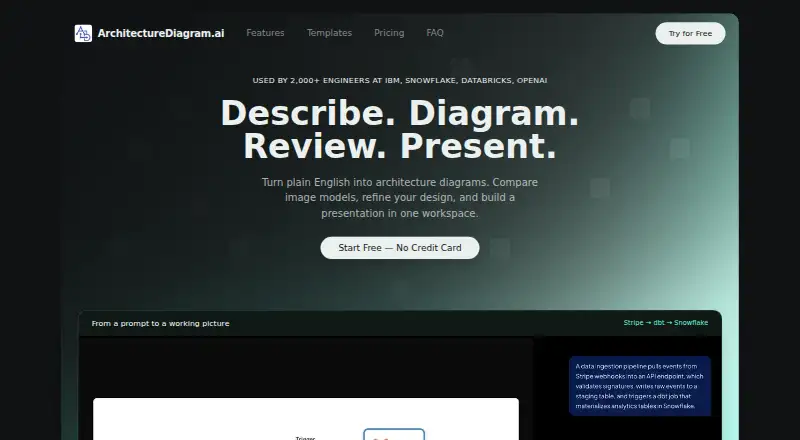
What ArchitectureDiagram.ai is
ArchitectureDiagram.ai generates architecture diagrams from natural-language descriptions, then lets users refine them through chat-based editing. It supports Mermaid flowcharts, draw.io diagrams, Excalidraw sketches, and AI-generated images, with 24 templates for patterns such as microservices, serverless, Kubernetes, and RAG pipelines. For image output, Party Mode creates candidates from multiple models in parallel for comparison. Users can download PNGs, copy diagrams, share public read-only links, or embed them in supported wikis. The Present view creates .pptx and .pdf decks with speaker notes on Hacker and higher plans. Expert Chat for architecture feedback is also on Hacker and higher; Free and Builder users receive three review messages total across diagrams. Generation history is automatically saved for up to 50 items. Its API uses bearer keys to produce Mermaid text or rendered PNG images, with listed generation costs of $0.05 and $0.20 respectively.
Good
- Creates several diagram types from text prompts.
- Includes 24 ready-to-use templates.
- Chat editing can refine diagrams.
- Public links and embeds support sharing.
- Free tier includes two diagrams per month.
Watch out
- Free plan limits output to two diagrams monthly.
- Free plan exports are watermarked.
- Expert Chat is not included on Free or Builder.
- No real-time collaboration.
Who it suits
It suits software engineers, solutions architects, and technical leaders creating system-design diagrams, documentation, cloud visualizations, data pipelines, reviews, or onboarding materials. Users who need presentations or Expert Chat should note those features start at Hacker.
Verdict
ArchitectureDiagram.ai combines prompt-based diagram generation with multiple output formats, editing, and sharing options. The free tier is limited, so check the plan details if you need presentation tools, Expert Chat, API access, or more generation credits.
Plans and prices
From ArchitectureDiagram.ai's own pricing page, checked 4 Oct 2026.
| Plan | Price | What it gives you |
|---|---|---|
| Free | Free | 2 diagrams per month · watermarked exports · all export formats · public sharing and embeds |
| Builder | $4.99 a month | 10 credits per month · no watermarks · standard generation speed · community support |
| Hacker | $7.99 a month | 20 credits per month · priority generation · chat editing · Expert Chat · Present view (.pptx + .pdf) |
| Designer | $14.99 a month | 40 credits per month · higher resolution exports · diagram version history · Expert Chat |
| Pro | $19.99 a month | 50 credits per month · max resolution exports · early access to features · Expert Chat |
| Enterprise | $49.99 a month | Unlimited credits · API access · custom branding · dedicated account support |
The facts
Each one read from ArchitectureDiagram.ai's own pages, with the date it was checked.
What it does
- API
- The API uses bearer keys and can generate Mermaid text synchronously or rendered PNG images asynchronously; the API page lists generation costs of $0.05 and $0.20 respectively.checked 4 Oct 2026
- Diagram formats
- It supports Mermaid flowcharts, draw.io diagrams, Excalidraw sketches, and AI-generated images.checked 4 Oct 2026
- Editing
- Users can refine diagrams through chat-based editing.checked 4 Oct 2026
- Expert Chat
- Hacker and higher plans include Expert Chat for architecture feedback; Free and Builder users receive three review messages total across diagrams.checked 4 Oct 2026
- Export and sharing
- Diagrams can be downloaded as PNG, copied to the clipboard, shared by public read-only link, or embedded with an iframe.checked 4 Oct 2026
- Integrations
- Public diagram links and embeds are described for use in Notion, Confluence, GitHub READMEs, and other iframe-supporting wikis.checked 4 Oct 2026
- Intended users
- The maker describes software engineers, solutions architects, and technical leaders as users for system design preparation, architecture documentation, cloud visualization, data pipelines, design reviews, and onboarding.checked 4 Oct 2026
- Limits
- The FAQ says generation history is automatically saved for up to 50 items.checked 4 Oct 2026
- Party Mode
- For image output, Party Mode generates candidates from multiple models in parallel for comparison.checked 4 Oct 2026
- Payment handling
- Payments are processed by Stripe, and the privacy policy says ArchitectureDiagram.ai does not see or store card details.checked 4 Oct 2026
- Presentation Builder
- The Present view creates .pptx and .pdf decks with speaker notes and is available on Hacker and above.checked 4 Oct 2026
- Product
- ArchitectureDiagram.ai generates architecture diagrams from natural-language descriptions.checked 4 Oct 2026
- Security and data
- The privacy policy says data is stored with Supabase hosted on AWS, protected by row-level security, and encrypted in transit and at rest; prompts and generated outputs are retained to improve generation.checked 4 Oct 2026
- Support
- The Builder plan includes community support, while Enterprise includes dedicated account support.checked 4 Oct 2026
- Templates
- The product advertises 24 ready-to-use templates, including microservices, serverless, Kubernetes, and RAG pipeline blueprints.checked 4 Oct 2026
The company
- Maker
- The product was built by Ryan Klapper, a Senior AI Engineer with experience at IBM and Hakkoda.checked 4 Oct 2026
The full review of ArchitectureDiagram.ai
Overview
ArchitectureDiagram.ai converts plain-language system descriptions into architecture diagrams in a browser-based workspace. It is aimed at software engineers, solutions architects, and technical leaders preparing designs, documentation, reviews, or onboarding material. Its broad format support is the main attraction; teams needing simultaneous editing should look elsewhere because real-time collaboration is not included.
You can start from one of 24 templates covering patterns such as microservices, serverless, Kubernetes, and RAG pipelines, then refine the result through chat. Generation history is saved automatically for up to 50 items, a useful safety net that still requires housekeeping for heavy users.
Key features
The generator produces Mermaid flowcharts, draw.io diagrams, Excalidraw sketches, and AI-generated images. That range lets a technical specification stay as code, move into a diagram editor, or become a more illustrative visual. Chat-based editing is suited to iterative changes without rebuilding a diagram manually. For image output, Party Mode creates candidates from multiple models in parallel, making visual comparison more practical.
Exports include PNG, SVG, Mermaid code, draw.io XML, PPTX, and PDF. Diagrams can be copied to the clipboard, published as public read-only links, or embedded with an iframe in Notion, Confluence, GitHub READMEs, and other compatible wikis. These options work well for documentation and handoffs, but public links and embeds do not provide shared editing.
Present view builds PPTX and PDF decks with speaker notes, which is valuable for design reviews and briefings but restricted to Hacker and higher. Expert Chat supplies architecture feedback on Hacker, Designer, Pro, and Enterprise; Free and Builder users receive three review messages total across diagrams. Diagram import is supported, while real-time collaboration is not.
Pricing
The free plan costs nothing and allows two diagrams per month. It includes all export formats plus public sharing and embeds, but exports are watermarked. It is suitable for occasional drafts or evaluating the workflow, not for regular documentation.
Builder costs $4.99 a month and provides 10 credits, watermark-free exports, standard generation speed, and community support. It is the sensible low-cost choice for individual users who can work without priority processing, chat editing, Present view, or more than the three free review messages.
Hacker is $7.99 a month for 20 credits, priority generation, chat editing, Expert Chat, and Present view with PPTX and PDF. It is the best fit for professionals who turn diagrams into reviewed designs or presentations. Designer costs $14.99 a month for 40 credits, higher-resolution exports, version history, and Expert Chat. Pro costs $19.99 a month for 50 credits, maximum-resolution exports, early feature access, and Expert Chat; choose it when output quality and capacity matter more than presentation tools.
Enterprise is $49.99 a month with unlimited credits, API access, custom branding, and dedicated account support. It targets organizations that need automation and account-level assistance. The API uses bearer keys and costs $0.05 per Mermaid generation synchronously or $0.20 per rendered PNG asynchronously. Prompts and generated outputs are retained to improve generation. Data is stored with Supabase on AWS, protected by row-level security and encryption in transit and at rest; Stripe handles payments without ArchitectureDiagram.ai seeing or storing card details.
Platforms
ArchitectureDiagram.ai is available on the web and through an API. The API supports automated Mermaid text generation and asynchronous PNG rendering, making it more useful in build or documentation pipelines than a web-only diagram tool. Mermaid, draw.io XML, SVG, PNG, PPTX, and PDF export cover both developer and presentation workflows.
Who it's for
This is a strong match for engineers and architects who need to move quickly from an idea to a documented system, especially when the same work must serve code repositories, wikis, and slide decks. It also suits technical leaders who want architecture feedback through Expert Chat. The free tier fits light experimentation. Collaborative teams editing one canvas together, or users requiring unlimited history, should choose a different product.
Pros and cons
- Pros: Four diagram styles and extensive export options accommodate both technical and visual deliverables.
- Pros: Templates for common cloud and software patterns reduce setup time.
- Pros: Public links, embeds, Present view, and API access connect diagrams to documentation and presentation workflows.
- Cons: The free plan permits only two diagrams monthly and adds watermarks.
- Cons: Expert Chat and presentation creation are paywalled, while Free and Builder share only three review messages.
- Cons: No real-time collaboration, and saved history tops out at 50 items.
Alternatives
Consider Creately if you need a free plan with unlimited canvases and collaborators across web, desktop, self-hosted, and API deployments. Nimbalyst is a better fit for users wanting MIT-licensed desktop and iOS apps with no feature limits on its Individual plan. Choose OpenCharts for a free plan with 500K AI credits, multiple project types, 10 GB of storage, and all export formats.
InfraSketch is an alternative for a free, cross-platform architecture diagram tool. Lucid Train suits users who prefer an open-source CLI with local models or their own API keys. ClearWork is aimed at paid teams with read-only users and core-user plans. Archway offers a free tier with five AI generations per month, three diagrams, seven diagram types, and PNG/SVG export. Capci is a paid platform with a free allowance of 50 lifetime generations shared across posts, diagrams, and animations.
For a broader comparison, see AI Diagram Generators.
Verdict
ArchitectureDiagram.ai is a good choice for technical professionals who want prompt-driven architecture drafts that can become code-friendly diagrams, documentation embeds, or presentation decks. Choose Hacker for the strongest balance of credits, editing, feedback, and Present view. Look elsewhere if simultaneous collaboration, a larger free allowance, or a longer generation history is essential.
Alternatives to ArchitectureDiagram.ai
- 1

Creately
Free planWebAPILinuxmacOS8.1Free plan - 2

Eraser
Free planWebAPIExtensionSelf-hosted7.5From $15 a month - 3
OpenCharts
Free planWebAPImacOSWindows7.4From $9.99 a month - 4
Capci
Free planWebAPISelf-hosted7.3From ₹375 a month - 5

AI Diagram Maker
Free planWebAPIExtension7.2From $10 a month - 6

Archflow
Free planWeb7.2From $5 a month