LiveNBTEditor
LiveNBTEditor edits Minecraft NBT data in a running game, applying changes on the next game tick rather than requiring file editing or a world reload.
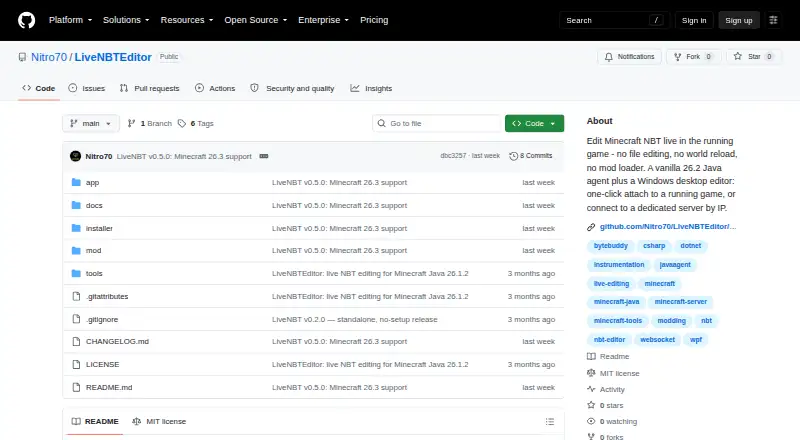
What LiveNBTEditor is
LiveNBTEditor edits Minecraft NBT data in a running game, applying changes on the next game tick rather than requiring file editing or a world reload. Its Java agent runs a WebSocket server and connects to a Windows desktop editor; the agent can run where Minecraft runs, including Linux dedicated servers. It works with vanilla Minecraft without a mod loader. The editor can change player data and world settings such as gamerules, time, weather, spawn, world border and difficulty. It supports all 41 player inventory slots, with searchable item and enchantment pickers based on the bundled Minecraft 26.3 registry. Other tools include live watches, deep search, SNBT editing and clipboard support, keyboard shortcuts, and undo and redo. SNBT copy and paste can round-trip with NBT Studio. The project specifies Minecraft Java 26.3 and says other versions are unsupported. It is free and MIT-licensed. The agent binds to loopback by default and requires a per-install token, but the WebSocket connection is unencrypted; the project advises using a firewall or SSH tunnel for remote connections. Live edits can corrupt data, so the README recommends backing up important worlds.
Good
- Edits apply on the next game tick.
- Works with vanilla Minecraft without a mod loader.
- Includes undo and redo.
- Can edit player data and world settings.
- Free and MIT-licensed.
Watch out
- Supports Minecraft Java 26.3 only.
- Editor requires Windows.
- WebSocket connection is unencrypted.
- Live edits can corrupt world data.
Who it suits
LiveNBTEditor is intended for people editing their own single-player Minecraft game or a server they control. It suits users who need live NBT changes and can use the required Windows editor.
Verdict
LiveNBTEditor offers live NBT editing with inventory, player and world-setting tools, but its stated game-version support is narrow. Back up important worlds and take care with remote connections.
Plans and prices
From LiveNBTEditor's own pricing page, checked 8 Oct 2026.
| Plan | Price | What it gives you |
|---|---|---|
| LiveNBT | Free | MIT-licensed software · Minecraft Java 26.3 only · Windows editor required |
The facts
Each one read from LiveNBTEditor's own pages, with the date it was checked.
What it does
- Compatibility limit
- The README specifies Minecraft Java 26.3 and says other versions are unsupported.checked 7 Oct 2026
- Components
- The product pairs a Java agent that runs a WebSocket server with a Windows desktop editor.checked 8 Oct 2026
- Connection security
- The agent binds to loopback by default and requires a per-install token; the project advises using a firewall or SSH tunnel for remote connections because the WebSocket connection is unencrypted.checked 8 Oct 2026
- Download
- The v0.5.0 release offers a standalone Windows app, a Windows installer, and a Java agent JAR for dedicated servers; the executables are unsigned and may prompt a SmartScreen warning.checked 8 Oct 2026
- Editor features
- The editor includes live watches, deep search, undo and redo, SNBT editing, and inventory editing.checked 7 Oct 2026
- Editor tools
- Features include live watches, deep search, SNBT editing and clipboard support, keyboard shortcuts, and undo and redo.checked 8 Oct 2026
- Input validation
- The project says edits are checked against the real NBT type and invalid values are rejected before being written to the save.checked 8 Oct 2026
- Integration
- SNBT copy and paste can round-trip with NBT Studio.checked 7 Oct 2026
- Integrations
- SNBT copy and paste round-trips with NBT Studio, and the agent works with vanilla Minecraft without Fabric, Forge, or another mod loader.checked 8 Oct 2026
- Intended users
- The project describes itself as a tool for editing your own single-player game or a server you control and recommends backing up important worlds.checked 8 Oct 2026
- Inventory
- It can edit a player's 41 inventory slots and provides searchable item and enchantment pickers from the bundled Minecraft 26.3 registry.checked 7 Oct 2026
- Inventory editing
- It supports editing all 41 player inventory slots and includes searchable item and enchantment pickers backed by the Minecraft 26.3 registry.checked 8 Oct 2026
- License
- The repository identifies the software as MIT licensed.checked 8 Oct 2026
- Live editing
- Edits are validated against the NBT type and applied on the next game tick.checked 7 Oct 2026
- Player and world editing
- The editor can change player data and world settings such as gamerules, time, weather, spawn, world border, and difficulty.checked 8 Oct 2026
- Purpose
- LiveNBT edits Minecraft NBT in a running game, with changes applied on the next tick.checked 8 Oct 2026
- Security
- The agent binds to loopback by default and requires a per-install token; the maker advises LAN-only use because the WebSocket connection is unencrypted.checked 7 Oct 2026
- Support and risk
- The README warns that live NBT editing can corrupt data and recommends backing up important worlds.checked 7 Oct 2026
- Supported environments
- The editor runs on Windows, while the Java agent can run where Minecraft runs, including Linux dedicated servers.checked 8 Oct 2026
- Supported game version
- The project supports Minecraft Java 26.3 and states that other versions are unsupported.checked 8 Oct 2026
Where it runs
- Platforms
- The editor is a Windows desktop app; its Java agent can run on Linux dedicated servers.checked 7 Oct 2026
The full review of LiveNBTEditor
LiveNBTEditor is a free utility for changing Minecraft Java NBT while the game is running, aimed at Windows players and operators of servers they control. Its type-aware live edits and broad player/world controls make it a focused maintenance tool, but the single supported game version and cautious networking requirements narrow its audience.
Overview
LiveNBTEditor combines a Windows desktop editor with a Java agent that provides a WebSocket server wherever Minecraft runs. The agent works with unmodified vanilla Minecraft, so you do not need Fabric, Forge, or another mod loader. Changes are checked against the actual NBT type and applied on the next game tick; values that fail validation are rejected before being written.
This workflow avoids file editing and a world reload, which is valuable for targeted fixes, experimentation, and administrative changes in a running world. It is still a high-risk operation: live NBT changes can corrupt data, so important worlds should be backed up before editing. The project is MIT-licensed.
Key features
Player and world controls cover gamerules, time, weather, spawn, world border, and difficulty. Inventory editing reaches all 41 player slots and includes searchable item and enchantment pickers built from the Minecraft 26.3 registry. That is a practical combination for correcting equipment or changing server state without shutting down the session, although it is not a region-editing tool.
Live watches and deep search help locate values in complex data. SNBT editing, clipboard support, keyboard shortcuts, and undo and redo provide both direct structured editing and a way to recover from recent mistakes. SNBT copy and paste can round-trip with NBT Studio, which is useful when moving structured data between tools.
The Java agent can run on Linux dedicated servers while the editor remains on Windows, extending the tool to common hosted-server setups. The agent binds to loopback by default and uses a per-install token. Remote use needs a firewall or SSH tunnel because the WebSocket connection is unencrypted; the maker recommends LAN-only operation. Release executables are unsigned, so Windows SmartScreen may display a warning.
Pricing
| Plan | Price | Includes |
|---|---|---|
| LiveNBT | free | MIT-licensed software; Minecraft Java 26.3 only; Windows editor required |
There is no paid tier, trial period, seat charge, or quota to weigh. The trade-off for the zero price is operational rather than commercial: you need a Windows editor, and the supported game version is restricted to Java 26.3. Anyone running another version should not choose it expecting compatibility.
Platforms
The editor runs on Windows. The Java agent runs where Minecraft runs, including Linux dedicated servers, and the product is categorized for API, Linux, and Windows environments. Minecraft support is for the Java edition; other game versions are unsupported.
Who it's for
Choose LiveNBTEditor if you manage your own single-player world or a server you control and need precise changes while the game remains active. It suits Windows users who want inventory, player-data, or world-setting controls, as well as teams whose Minecraft server runs on Linux. It is a poor fit for Bedrock players, users who need broad region operations, or anyone unwilling to manage backups and secure a remote connection.
Pros and cons
Pros
- Edits take effect on the next game tick, avoiding file edits and world reloads.
- NBT-type validation rejects invalid values before they are written.
- All 41 inventory slots, searchable item and enchantment pickers, and player/world controls cover common maintenance jobs.
- Runs with vanilla Minecraft and can pair a Windows editor with a Linux server agent.
- Live watches, deep search, SNBT tools, clipboard support, and undo/redo support careful work.
- Free and MIT-licensed, with SNBT exchange compatible with NBT Studio.
Cons
- Support is limited to Minecraft Java 26.3; other versions are unsupported.
- The editor requires Windows even when the game server runs elsewhere.
- The WebSocket link is unencrypted, so remote connections require LAN use or added firewall/SSH protection.
- Live edits can corrupt worlds, making backups essential.
- Unsigned downloads may trigger a SmartScreen warning.
Alternatives
For a wider set of Minecraft editing options, browse Minecraft World Editors.
- MCBE Inventory Editor is the better direction for Bedrock inventory work and offers Linux, macOS, web, self-hosted, and Windows access.
- Chunker is a free, MIT-licensed open-source option when cross-platform world conversion or modding workflows matter more than live NBT changes.
- Bedrock NBT Editor suits Bedrock users who want a free, no-sign-up tool on Android, iOS, or the web.
- biomed is a free MIT-licensed alternative for users seeking a general Minecraft data utility across Linux, macOS, and Windows.
- MCA JSON fits command-line or JavaScript workflows for MCA/Anvil and NBT files.
- MCA Selector is preferable when downloadable Windows, macOS, Linux, or universal-JAR builds are the priority.
- McpeTool is another free, MIT-licensed choice with API, desktop, and self-hosted platform coverage.
- Minecraft Region Fixer is the alternative for GPL-3.0-licensed region repair using Python 3.x.
Verdict
LiveNBTEditor is a strong specialist choice for Windows users who control a Minecraft Java 26.3 world or server and want validated, immediate edits to inventories, player data, and world settings without a reload. Look elsewhere if you need Bedrock support, another Java version, region editing, or encrypted remote communication by default.
Alternatives to LiveNBTEditor
- 1

Chunker
Free planOpen sourceWebAPILinuxmacOS7.6Free plan - 2
MCBE Inventory Editor
Free planOpen sourceWebLinuxmacOSSelf-hosted7.4Free plan - 3
Minecraft Region Fixer
Free planOpen sourceLinuxmacOSSelf-hostedWindows7.2Free plan - 4

Amulet Map Editor
APILinuxmacOSSelf-hosted6.9From £7 a year - 5

Bedrock NBT Editor
Free planAndroidiOSWeb6.6Free plan - 6

Universal Minecraft Tool
Free planWindows6.5From $60 a year