MCBE Inventory Editor
MCBE Inventory Editor is a free local web editor for selected Minecraft Bedrock player data.
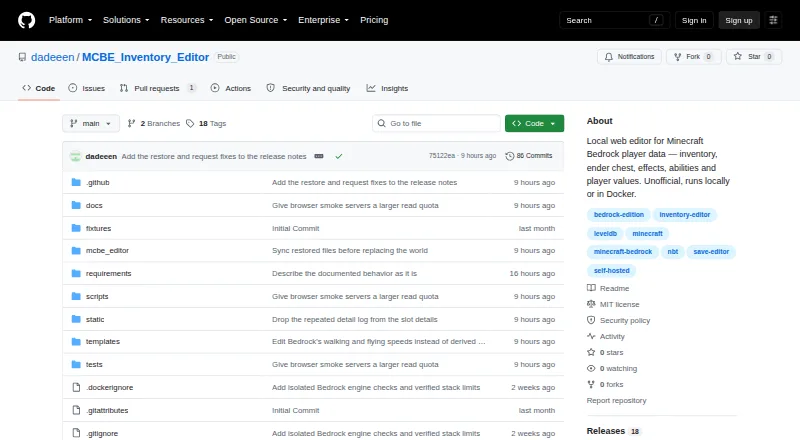
What MCBE Inventory Editor is
MCBE Inventory Editor is a free local web editor for selected Minecraft Bedrock player data. It can edit hotbar, backpack, armor, and offhand inventory, as well as ender chests, effects, abilities, and values such as health, game mode, XP, hunger, position, and movement speeds. Inventory actions include moving, copying, and bulk operations. The editor supports versioned local-to-multiplayer player migration and complete `.mcbe-player.zip` imports and exports. It runs locally or in Docker and provides a browser interface intended for use on the same network from a laptop, tablet, or phone. Editing works offline; internet access is used only for user-triggered item database and vanilla icon updates. Actual writes create a backup, and the project lists restore and revision checks, write gates, and world locks. Minecraft or the Bedrock server must be stopped before editing a world, and the project recommends keeping an independent world copy until verification. It is not a public hosting service or unrestricted raw NBT editor; add-ons, opaque NBT, and unusual LevelDB structures may be outside its scope.
Good
- Edits inventory, effects, abilities, and player values.
- Supports `.mcbe-player.zip` import and export.
- Works offline for world editing.
- Creates a backup before actual writes.
- Runs locally or in Docker.
Watch out
- Minecraft or the server must be stopped for edits.
- Not an unrestricted raw NBT editor.
- Unusual LevelDB structures may be outside its design.
- Docker/LAN use requires a password decision.
Who it suits
It suits Bedrock players who want to edit selected player data locally through a browser, including from another device on the same network. Users should be prepared to stop Minecraft or the server while making world edits.
Verdict
MCBE Inventory Editor focuses on selected Bedrock player data, with backup controls and local browser access. Its scope is not a fit for public hosting or unrestricted NBT editing.
Plans and prices
From MCBE Inventory Editor's own pricing page, checked 29 Sep 2026.
| Plan | Price | What it gives you |
|---|---|---|
| MCBE Inventory Editor | Free | No pricing or paid plan stated on the project page |
The facts
Each one read from MCBE Inventory Editor's own pages, with the date it was checked.
What it does
- Community footprint
- The GitHub repository page showed 0 stars, 0 forks and 155 commits when opened.checked 19 Oct 2026
- Deployment
- Docker images are published under ghcr.io/dadeeen/mcbe-inventory-editor and a Compose example mounts worlds at /worlds and persistent data at /data.checked 19 Oct 2026
- Developer documentation
- Contributor documentation covers the Waitress server, release checks, runtime ZIP creation and CI publication rules.checked 19 Oct 2026
- Diagnostics
- The application includes world-status checks, runtime checks, reports and private raw-player export.checked 19 Oct 2026
- Docker identity
- The container runs as unprivileged UID/GID 10001, so mounted world directories must grant that identity access.checked 19 Oct 2026
- Ender chest
- It can view and edit Ender Chests and transfer items between visible areas.checked 19 Oct 2026
- Icons and resources
- It supports downloading vanilla icons and using local resource packs, .mcpack, .zip, and custom icon folders.checked 29 Sep 2026
- Icon sources
- Icons can come from Vanilla data, active world packs, .mcpack files, .zip files and custom icon folders.checked 19 Oct 2026
- Independent alternative
- A separate Bedrock Scripts Editor site exposes version loading, file naming, copying, downloading, installation and restart controls.checked 19 Oct 2026
- Independent demand
- A Reddit Minecraft thread asked whether an inventory editor existed for Minecraft Bedrock on Windows 10/11.checked 19 Oct 2026
- Independent ecosystem
- GitHub's Bedrock Edition topic described Minecraft Bedrock as the edition for mobile devices, consoles and Windows devices.checked 19 Oct 2026
- Independent historical limit
- A Minecraft Forum thread for an older MCPE inventory editor says its block list was outdated and users requested broader item and level.dat support.checked 19 Oct 2026
- Independent limitation
- A Reddit discussion described Universal Minecraft Editor as unable to change inventories for players other than the local player.checked 19 Oct 2026
- Independent tooling context
- RepoLens advertises repository analysis covering lines of code, language breakdown, commit history and contributor statistics.checked 19 Oct 2026
- Installation
- Windows installation uses a runtime ZIP, setup.bat and start.bat, with hash-checked prebuilt wheels and no global Python packages.checked 19 Oct 2026
- Inventory editing
- It edits hotbar, backpack, armor and offhand slots, with moving, copying and bulk actions.checked 19 Oct 2026
- Inventory features
- It supports hotbar, backpack, armor, offhand, moving, copying, and bulk inventory actions.checked 29 Sep 2026
- Languages
- The interface supports English and German, with browser language detection for German.checked 19 Oct 2026
- Layouts
- The interface offers Classic, Studio and Focus layouts, with layout, theme and language preferences kept separately.checked 19 Oct 2026
- Licence
- The repository is licensed under the MIT License, including permission to use, copy, modify, publish, distribute, sublicense and sell the software.checked 19 Oct 2026
- License
- The project's code is MIT licensed, while its amulet_leveldb dependency uses the Amulet Team License with PolyForm Shield and Noncommercial terms and a limited educational commercial-use exception.checked 29 Sep 2026
- Limit: compatibility
- Project validation notes say tests do not cover every Minecraft version, gameplay action or add-on.checked 19 Oct 2026
- Limit: icons
- Custom block models, dynamic rendering and the Minecraft client's global pack settings are outside the supported icon handling.checked 19 Oct 2026
- Limit: mounts
- Release notes repeatedly describe mount creation as experimental and require verification of edited world copies in Minecraft.checked 19 Oct 2026
The full review of MCBE Inventory Editor
MCBE Inventory Editor is a local browser-based tool for editing selected data in Minecraft Bedrock worlds and player files. It suits players who need to adjust inventory or player values on their own device; its safeguards and offline operation are useful, but its scope is deliberately narrow.
Overview
The editor works with Minecraft Bedrock LevelDB world folders and .mcbe-player.zip exports. It covers inventory, ender chest, effects, abilities, selected player values, and experimental mounts—not the full range of world data. That focus makes it a practical fit for targeted player edits, rather than terrain work, public server management, or unrestricted NBT changes.
Edits must be made with Minecraft or the Bedrock server stopped. Actual writes create a backup, and restore checks, revision checks, write gates, and world locks add safeguards. Those controls reduce risk, but do not replace keeping an independent complete copy of the world until you have verified the result.
Key features
Inventory and player data
Inventory tools cover the hotbar, backpack, armor, and offhand, with moving, copying, and bulk actions. You can also edit health, game mode, XP, hunger, saturation, position, effects, and walking and flying speeds. This is a useful range for focused character adjustments, though it does not make the editor a general-purpose world or raw NBT editor.
Player transfers and icons
Versioned local-to-multiplayer migration and complete .mcbe-player.zip import and export give players a way to carry player data between supported contexts. The editor can download vanilla icons and use local resource packs, .mcpack files, .zip files, and custom icon folders.
Local operation and safeguards
The editor runs locally or in Docker, with a browser interface intended for access on the same network from a laptop, tablet, or phone. Editing works offline; HTTPS connections are used only when you request Item DB or vanilla icon updates. Local Mode binds to 127.0.0.1 by default. Docker or LAN access calls for a password decision, and the project advises against exposing the app to the public internet.
Pricing
MCBE Inventory Editor is free: the MCBE Inventory Editor plan is free. There is no free trial, and no paid plan is stated. That makes it straightforward for an individual with a compatible Bedrock world; there are no stated seat counts or quotas to weigh.
The code is MIT licensed, but the amulet_leveldb dependency uses the Amulet Team License with PolyForm Shield and Noncommercial terms, including a limited educational commercial-use exception. Users considering commercial use should account for that dependency rather than treating the code license as the only relevant term.
Platforms
The project supports Windows, macOS, and Linux, as well as self-hosted deployment and a web interface. The browser interface is intended for same-network use, not public hosting. On Windows, Local Mode supports Python 3.12–3.14; the runtime ZIP supports x64 with bundled LevelDB wheels for Python 3.13 or 3.14 and also supports Python 3.12.
Who it's for
Choose it if you want offline, local access to selected Bedrock player data and value backups before writes. It is less suitable if you need terrain or region editing, public hosting, server administration, or dependable access to add-ons, opaque NBT, and unusual LevelDB structures; those fall outside its stated design.
Pros and cons
Pros
- Broad inventory actions and a useful set of editable player values make targeted character changes possible without requiring a public service.
- Backups, restore checks, revision checks, write gates, and world locks provide several layers of protection around writes.
- Offline editing, local deployment, and same-network browser access allow use from more than one kind of device while keeping the workflow local.
- Versioned migration and complete player-file import and export support moving player data between contexts.
Cons
- World edits require Minecraft or the server to be stopped, interrupting play or server operation.
- Its selected-data focus excludes region and terrain editing and does not promise coverage of add-ons, opaque NBT, or unusual LevelDB structures.
- Docker or LAN use requires a considered password setup, and public internet exposure is discouraged.
- The dependency's noncommercial terms may matter to commercial users despite the MIT license on the project code.
Alternatives
For other approaches, browse Minecraft World Editors. Chunker is a free, open-source option for Windows, macOS, Linux, and web users. biomed is another free option for Windows, macOS, and Linux, with an MIT-licensed plan. MCA Selector is free under the MIT License and offers Windows, macOS, Linux, and universal JAR builds. Minecraft Region Fixer is a free GPL-3.0 option for Windows, macOS, and Linux that requires Python 3.x. Minecraft World Trimmer is free for Windows, macOS, and Linux, provided as-is with no warranty. WorldPainter is free and open source under GPL version 3 for Windows, macOS, and Linux. ChunkCleaner is free and supports Windows and Linux. If you need a Windows-only freemium option with a free NBT Editor and world-settings editing, consider Universal Minecraft Tool; its free tier excludes the full access offered by its paid plans.
Verdict
MCBE Inventory Editor is a strong fit for Bedrock players who need focused, local edits to inventory or player values, with backups and offline use as meaningful safeguards. Choose it for that narrow job; look elsewhere for region or terrain work, public server administration, or broader NBT coverage.
Getting started
- Choose a local installation or Docker deployment.
- For Windows Local Mode, use Python 3.12–3.14; the Windows runtime ZIP supports x64 and includes bundled LevelDB wheels for Python 3.13 or 3.14, and also supports Python 3.12.
- Open the browser interface locally or from a device on the same network.
- Stop Minecraft or the Bedrock server before editing a world.
- Keep an independent complete world copy until you have verified the changes.
Limits worth knowing
The free editor is scoped to selected Bedrock player data and is not a region editor, terrain editor, server administration panel, or unrestricted raw NBT editor. Add-ons, opaque NBT, and unusual LevelDB structures may fall outside its design.
Questions
How much does MCBE Inventory Editor cost?
The listed plan is free at no cost. No paid plan is stated.
Which Minecraft edition and world formats does it support?
It supports Minecraft Bedrock LevelDB world folders and .mcbe-player.zip player exports.
Which platforms can I use it on?
The listed platforms are Linux, macOS, self-hosted, web, and Windows. Local Mode and Docker are deployment options.
Can I use it offline?
World editing works fully offline. Outbound HTTPS is used for user-triggered item database and vanilla icon updates.
Is it open source?
The project code is MIT licensed. Its amulet_leveldb dependency uses the Amulet Team License with PolyForm Shield and Noncommercial terms, with a limited educational commercial-use exception.
What should I know before editing a world?
Minecraft or the Bedrock server must be stopped. The project recommends keeping an independent complete world copy until you verify the changes.
Alternatives to MCBE Inventory Editor
- 1

Chunker
Free planOpen sourceWebAPILinuxmacOS7.6Free plan - 2
Minecraft Region Fixer
Free planOpen sourceLinuxmacOSSelf-hostedWindows7.2Free plan - 3

Amulet Map Editor
APILinuxmacOSSelf-hosted6.9From £7 a year - 4

Bedrock NBT Editor
Free planAndroidiOSWeb6.6Free plan - 5

Universal Minecraft Tool
Free planWindows6.5From $60 a year - 6
LiveNBTEditor
Free planAPILinuxWindows6.4Free plan