
Universal Minecraft Tool
Universal Minecraft Tool combines an NBT editor, world converter and world pruner for Minecraft saves.
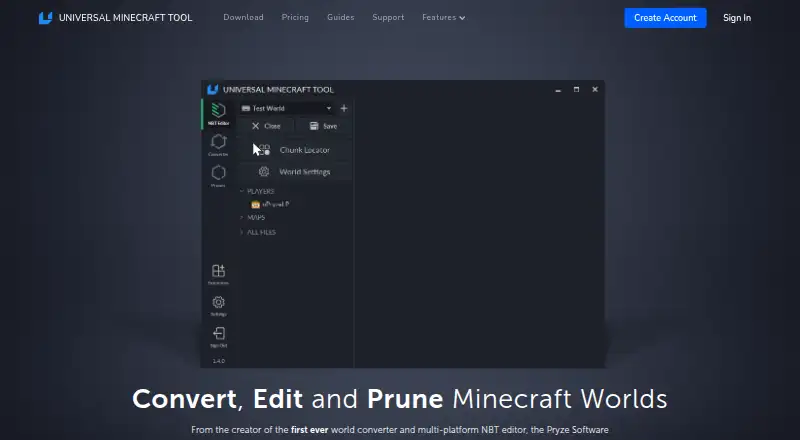
What Universal Minecraft Tool is
Universal Minecraft Tool combines an NBT editor, world converter and world pruner for Minecraft saves. The editor changes saved world data and includes undo and redo, search, a hex editor and a visual chunk locator. The converter handles worlds between editions and versions, including terrain, items, containers, mobs and biomes. The pruner selects chunks for removal from Java, Bedrock and Legacy Console worlds, working on a copy until the user saves. The app runs only on Windows, and account verification needs an internet connection. Java, Bedrock and Legacy Console worlds must be transferred to the Windows computer; Minecraft Marketplace worlds cannot be opened. Conversions are designed for vanilla worlds: mods and texture packs do not convert, player data does not transfer between editions, and some invisible structure metadata may not carry over. The free plan edits world settings; full access is available for $15 a month or $5 a year, billed as $60 annually. The annual plan permits two local sessions at once.
Good
- NBT editor includes undo, redo and search.
- Converts worlds across editions and versions.
- Pruner works on a copy until saved.
- Worlds are not uploaded to company servers.
- Free plan includes NBT editing for world settings.
Watch out
- Runs only on Windows.
- Account verification requires an internet connection.
- Marketplace worlds cannot be opened.
- Mods, texture packs and player data do not convert.
Who it suits
This tool suits Minecraft players who want to edit, convert or prune supported world saves on a Windows computer. It is less suited to users relying on Marketplace worlds, mods or texture packs in conversions.
Verdict
Universal Minecraft Tool brings several world-editing tasks into one Windows application. Review its conversion caveats and supported-world requirements before choosing it.
Plans and prices
From Universal Minecraft Tool's own pricing page, checked 3 Oct 2026.
| Plan | Price | What it gives you |
|---|---|---|
| Free | Free | NBT Editor · Edit world settings only · No ads · Free |
| Monthly | $15 a month | Full access to all apps · Cancel any time · $15 billed monthly |
| Yearly | $60 a year | Full access to all apps · 2 local sessions at once · Cancel any time · $60 billed annually |
The facts
Each one read from Universal Minecraft Tool's own pages, with the date it was checked.
What it does
- Conversion caveat
- The product says conversions cannot be completely perfect across editions and notes that some invisible structure metadata does not convert.checked 3 Oct 2026
- Conversion limit
- The converter is designed for vanilla worlds; mods and texture packs do not convert, and player data does not transfer between editions.checked 3 Oct 2026
- Extensions
- The tool supports official and community-built extensions, and its NBT editor extensions can style tags and process the data being viewed.checked 3 Oct 2026
- Marketplace restriction
- Minecraft Marketplace worlds cannot be opened with the Universal Minecraft Tool.checked 3 Oct 2026
- NBT editing
- The NBT editor can change saved world data and includes undo and redo, search, a hex editor, and a visual chunk locator.checked 3 Oct 2026
- Privacy
- The home page says users’ worlds are never uploaded to the company’s servers.checked 3 Oct 2026
- Pruning
- The pruner selects and removes chunks from Java, Bedrock, and Legacy Console worlds and automatically works on a copy until the user saves.checked 3 Oct 2026
- Purpose
- The Universal Minecraft Tool combines an NBT editor, a world converter, and a world pruner.checked 3 Oct 2026
- Support
- The support page offers email support and says responses are typically sent within the same day.checked 3 Oct 2026
- Supported worlds
- The product can open Java, Bedrock, and Legacy Console worlds, which must be transferred to the Windows computer running the app.checked 3 Oct 2026
- World conversion
- The converter converts worlds between Minecraft editions and versions, including terrain, items, containers, mobs, and biomes.checked 3 Oct 2026
Where it runs
- Platform requirement
- The application runs only on Windows computers and requires an internet connection to verify the account.checked 3 Oct 2026
The full review of Universal Minecraft Tool
Overview
Universal Minecraft Tool is a Windows application for editing saved world data, converting worlds between Minecraft editions and versions, and removing selected chunks. It suits players who want those jobs in one place and are comfortable transferring their worlds to a Windows PC. Its breadth is useful, but conversion limits and the Marketplace restriction make it a poor fit for every world.
Key features
The NBT editor combines practical ways to inspect and change saved world data: search, a hex editor, undo and redo, and a visual chunk locator. Extensions can style tags and process the data being viewed, giving technically inclined users more room to tailor the editor. The free plan narrows this to editing world settings, so deeper editing requires a paid plan.
The converter handles terrain, items, containers, mobs, and biomes across editions and versions. That can make it useful when moving a vanilla world, but it is not a complete migration: mods and texture packs do not convert, player data does not transfer between editions, and some invisible structure metadata is lost. The product cautions that conversions cannot be perfectly faithful across editions.
The pruner can select and remove chunks from Java, Bedrock, and Legacy Console worlds. It works on a copy until the user saves, a sensible safeguard for destructive edits. Region, terrain, entity, and batch editing are supported, but Marketplace worlds cannot be opened.
Pricing
The Free plan costs nothing and includes the NBT Editor, world-settings editing, and no ads. It is a limited way to handle settings rather than a substitute for full access to the apps.
The Yearly plan is $5 a year, billed $60 billed annually. It includes full access to all apps, two local sessions at once, and cancellation at any time. The Monthly plan is $15 a month, billed $15 billed monthly, with full access to all apps and cancellation at any time. Annual billing lowers the effective monthly cost, but commits the reader to an annual bill; monthly billing costs more over a year and avoids that upfront term. There is no free trial.
Platforms
The tool runs only on Windows and needs an internet connection to verify the account. Java, Bedrock, and Legacy Console worlds must first be transferred to that computer. Supported formats include Java and Bedrock world folders and .mcworld files; Minecraft Marketplace worlds are excluded. The home page says worlds are never uploaded to the company’s servers.
Who it's for
Choose it if you want NBT editing, chunk pruning, and vanilla-world conversion together, and your worlds are accessible on Windows. It is less suitable for modded or texture-pack worlds, cross-edition moves where player data must follow, Marketplace content, or anyone who needs a macOS or Linux app. Email support is offered, with responses typically sent within the same day.
Pros and cons
- Pros: One app covers NBT editing, conversion, and pruning, reducing the need to switch tools for those tasks.
- Pros: Undo and redo, search, a hex editor, and a visual chunk locator offer several ways to work with saved data.
- Pros: Pruning works on a copy until saved, reducing the risk of accidental permanent chunk removal.
- Cons: Windows-only operation and account verification over the internet rule it out for other desktop platforms and offline account checks.
- Cons: Conversion skips mods and texture packs, does not transfer player data between editions, and can lose invisible structure metadata.
- Cons: Marketplace worlds cannot be opened, and the free plan limits editing to world settings.
Alternatives
For a broader comparison, browse Minecraft World Editors or Minecraft World Converters.
- Bedrock Toolchest is a free alternative for readers who want a Windows or Linux option without paywalls, subscriptions, or an account.
- WorldPainter is a free, open-source option for readers who need support across Windows, macOS, and Linux.
- MCA Selector is a free choice for readers who value cross-platform builds and an MIT license.
- MCBE Inventory Editor is a free alternative for readers seeking an option spanning web, self-hosted, and desktop platforms.
- Voxelier is a free alternative for readers who want a web or Windows option with no account.
- Minecraft Region Fixer is a free, GPL-3.0-licensed choice for readers comfortable with Python 3.x on Windows, macOS, or Linux.
- Amulet Map Editor is a paid alternative for Windows, macOS, or Linux users.
- World Repair Studio is a free alternative for Windows, macOS, or Linux.
Verdict
Universal Minecraft Tool is a strong fit for Windows users who want one paid toolkit for NBT edits, chunk pruning, and vanilla-world conversion. Its grouped capabilities are the clearest reason to choose it; look elsewhere if you need another desktop platform, Marketplace access, or a conversion that preserves modded content and player data across editions.
Alternatives to Universal Minecraft Tool
- 1

Chunker
Free planOpen sourceWebAPILinuxmacOS7.6Free plan - 2
MCBE Inventory Editor
Free planOpen sourceWebLinuxmacOSSelf-hosted7.4Free plan - 3
Minecraft Region Fixer
Free planOpen sourceLinuxmacOSSelf-hostedWindows7.2Free plan - 4

Amulet Map Editor
APILinuxmacOSSelf-hosted6.9From £7 a year - 5

Bedrock NBT Editor
Free planAndroidiOSWeb6.6Free plan - 6
LiveNBTEditor
Free planAPILinuxWindows6.4Free plan