Chunker
Chunker converts Minecraft worlds between Java Edition and Bedrock Edition, processing them locally on your machine.
What Chunker is
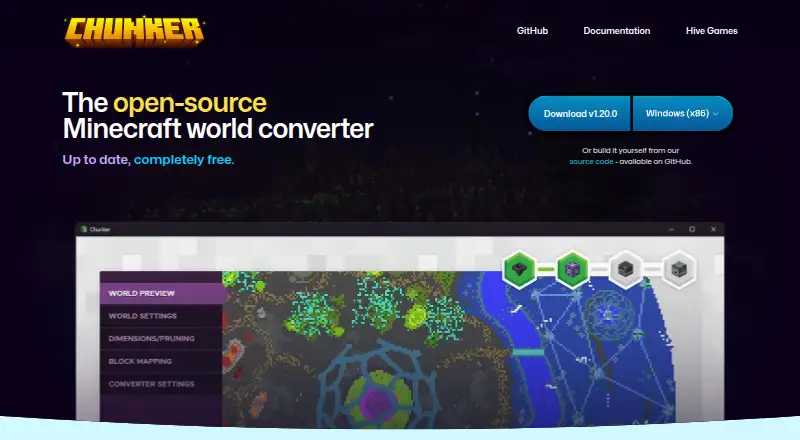
Chunker converts Minecraft worlds between Java Edition and Bedrock Edition, processing them locally on your machine. It can transfer level settings, blocks, biomes, tile entities, multiple dimensions, containers, items, and in-game maps, and can upgrade or downgrade worlds across supported game versions. You can provide a world folder, ZIP archive, or MCWORLD file, including by drag and drop. Conversion and export settings are adjustable and can be saved for later. Chunker also includes a command-line interface for conversion and workflow integration; using the CLI requires Java 17 or higher. It does not convert entities or player inventories, and structure data such as villages and strongholds is listed as unsupported or limited. The software is free and open source under the MIT license. It is available for Windows, macOS, Linux, and through a web interface. The supported game versions vary by edition, so check compatibility before converting a world.
Good
- Converts worlds between Java and Bedrock editions
- Processes world data locally
- Accepts folders, ZIP archives, and MCWORLD files
- Can upgrade and downgrade supported world versions
- Free and open source under the MIT license
Watch out
- Entities are not converted
- Player inventories are not converted
- Structure data is unsupported or limited
- CLI requires Java 17 or higher
Who it suits
Chunker suits Minecraft players who need to move worlds between Java and Bedrock editions or adjust worlds between supported versions. It also fits users who want local processing or a command-line workflow.
Verdict
Chunker covers many world elements and supports both editions, with local processing and command-line use as options. Keep its entity, inventory, and structure-data limitations in mind before converting.
Plans and prices
From Chunker's own pricing page, checked 19 Oct 2026.
| Plan | Price | What it gives you |
|---|---|---|
| Free | Free | Java↔Bedrock conversion · desktop app and CLI · supported Minecraft versions |
The facts
Each one read from Chunker's own pages, with the date it was checked.
What it does
- Advanced settings
- Users can adjust conversion settings and export settings for reuse in later conversions.checked 3 Oct 2026
- Build requirements
- Building from source requires Git and Java 17 or newer, with Gradle optional.checked 19 Oct 2026
- CLI
- Chunker includes a command-line interface that can be used for conversion and workflow integration.checked 3 Oct 2026
- CLI requirement
- The CLI requires Java 17 or higher.checked 3 Oct 2026
- CLI runtime
- The CLI requires Java 17 or newer.checked 19 Oct 2026
- Command line
- Chunker includes ChunkerCLI for workflow integration.checked 19 Oct 2026
- Conversion speed
- The homepage says a world can be converted in about 30 seconds.checked 19 Oct 2026
- Converted data
- Supported conversion data includes level settings, blocks, biomes, tile entities, multiple dimensions, containers, items and in-game maps.checked 19 Oct 2026
- Current release
- The GitHub releases page lists version 1.21.0, released October 2, 2026.checked 3 Oct 2026
- Entity limitation
- Entities and player inventories generally are not converted between editions.checked 19 Oct 2026
- Extensibility
- CLI parameters support block, biome, dimension, world-setting, pruning and converter-mapping JSON inputs.checked 19 Oct 2026
- Funding
- The repository states that Chunker receives funding from Mojang Studios.checked 19 Oct 2026
- Independent review
- James A. Chambers praised the easy world and version conversion workflow but documented upload limits, queues and missing entities and inventories.checked 19 Oct 2026
- Input formats
- The application accepts a world folder, ZIP archive or MCWORLD file, including drag and drop.checked 19 Oct 2026
- Inputs
- The app accepts world folders, ZIP archives and MCWORLD files, and can also accept drag-and-drop inputs.checked 3 Oct 2026
- Latest release
- Version 1.21.0 was released on 2 October 2026 with Bedrock 1.26.60 support, custom-block NBT handling and reduced memory use for large worlds.checked 19 Oct 2026
- Legal entity
- Companies House identifies the maker as active private company HIVE GAMES LIMITED, company number 08451891, incorporated on 19 March 2013.checked 19 Oct 2026
- License
- The repository is released under the MIT license.checked 19 Oct 2026
- Limit: conversion defects
- A Reddit MinecraftHelp report described deleted slabs, lighting problems and absent mobs after conversion, alongside a file-size limit.checked 19 Oct 2026
- Limit: large worlds
- A Reddit commenter said a roughly 3 GB world exceeded an approximately 1.5 GB limit and failed to convert.checked 19 Oct 2026
The company
- Company founding
- LinkedIn lists Hive Games as founded in 2013.checked 19 Oct 2026
- Company size
- LinkedIn lists Hive Games as a privately held company with 11–50 employees.checked 19 Oct 2026
Where it runs
- Desktop platforms
- Microsoft documents standalone versions for Windows, macOS and Linux, alongside the command-line version.checked 19 Oct 2026
- Legacy web app
- The 2024 announcement said the legacy web application would be available only until the end of 2024 and encouraged migration to the open-source release.checked 19 Oct 2026
The full review of Chunker
Overview
Chunker is a free tool for converting Minecraft worlds between Java and Bedrock editions, best suited to players and creators who need to move or update a world. Its broad data support and local processing are compelling, but missing entities, player inventories and some structure data can rule it out for worlds that rely on them.
Key features
Edition and version conversion
Chunker converts in either direction between Java and Bedrock and can upgrade or downgrade worlds within supported game versions. It supports Bedrock 1.12.0–1.26.50 and Java 1.8.8–1.21.11 and 26.1–26.3. That range accommodates many older worlds and version changes, but check that both the source and intended target are covered before committing a conversion.
World data, inputs and settings
Conversions can carry level settings, blocks, biomes, tile entities, multiple dimensions, containers, items and in-game maps. You can open a world folder, ZIP archive or MCWORLD file, or drag and drop an input. Processing stays on your machine, a practical advantage for users who do not want to send world files elsewhere.
The significant caveat is data loss: entities and player inventories are not converted, while structure data such as villages and strongholds is unsupported or limited. Worlds that depend on those elements are a poor fit unless you can handle them separately. Conversion and export settings can be adjusted and saved for later use, which is useful for repeat workflows.
CLI and licensing
A command-line interface supports conversion and workflow integration, making Chunker more suitable than a web-only converter for repeat or automated tasks. The CLI requires Java 17 or higher. Chunker is open source under the MIT license, with code available on GitHub. Hive Games describes it as an internal tool offered free to Minecraft partners and the public under an exclusive licensing deal with Microsoft.
Pricing
Chunker's Free plan costs nothing and includes Java and Bedrock world conversion. There is no free trial because the product is free, and no paid tier is needed for the stated conversion capability. This makes it a straightforward option for occasional conversions as well as ongoing use, though the data limitations apply regardless of price.
Platforms
Chunker supports Windows, macOS and Linux, a web interface, and a Java command-line interface. The desktop and web options suit users who prefer a graphical workflow; CLI use requires Java 17 or higher. Archive extraction is supported, and the tool handles world folders, ZIP archives and MCWORLD files.
Who it's for
Choose Chunker if you need to move a Minecraft world between Java and Bedrock, change its supported game version, or repeat conversions with saved settings. Local processing, multiple input formats and a CLI give it range across personal and workflow use. Look elsewhere if preserving entities, player inventories or unsupported structure data is essential.
Pros and cons
- Pros: Converts between both Minecraft editions and supports version upgrades and downgrades across its stated ranges.
- Pros: Works locally and accepts folders, ZIP archives and MCWORLD files, including drag-and-drop input.
- Pros: Reusable conversion and export settings, plus a CLI for workflow integration.
- Cons: Entities and player inventories are not converted, and structure data such as villages and strongholds is unsupported or limited.
- Cons: CLI users need Java 17 or higher.
Alternatives
For a focused inventory-editing option, consider MCBE Inventory Editor, a free tool available on Linux, macOS, Windows, web and self-hosted platforms. biomed is free MIT-licensed software for users seeking that alternative. MCA Selector is another free MIT-licensed option with Windows, macOS, Linux and universal JAR builds. Minecraft Region Fixer is free, GPL-3.0 licensed and requires Python 3.x. Minecraft World Trimmer is free MIT-licensed software provided as-is without warranty. WorldPainter is free and open source under GPL version 3. Bedrock Toolchest is free, with no paywalls, subscriptions or account requirement, and supports Linux and Windows. Universal Minecraft Tool offers a free Windows plan with an NBT editor and world-settings editing, plus a Yearly plan at $5 a year for full access to all apps.
Browse Minecraft World Converters for more conversion options, Minecraft World Editors for editing tools, or Game Modding Tools for broader modding software.
Verdict
Chunker is the right pick for Minecraft players and creators who want a free, local way to convert Java and Bedrock worlds or shift between supported versions. Its broad format and data coverage, saved settings and CLI make it a capable choice without a price barrier. Choose another route if your world must retain entities, player inventories or structure data that Chunker does not reliably convert.
Getting started
- Open the Chunker website or use its Windows, macOS, or Linux version.
- Provide a world folder, ZIP archive, or MCWORLD file; drag-and-drop input is supported.
- Adjust conversion and export settings as needed.
- For command-line conversion, use the CLI with Java 17 or higher.
Limits worth knowing
Chunker does not convert entities or player inventories. Structure data such as villages and strongholds is unsupported or limited.
Questions
How much does Chunker cost?
The plan is free. It is completely free for Java and Bedrock world conversion.
Which platforms does it support?
Chunker has a web interface and versions for Windows, macOS, and Linux. Its command-line interface requires Java 17 or higher.
Is Chunker open source?
Yes. It is open source under the MIT license, and its code is available on GitHub.
Which Minecraft versions are supported?
The listed formats cover Bedrock 1.12.0–1.26.50 and Java 1.8.8–1.21.11 and 26.1–26.3.
What world data does Chunker convert?
It can convert level settings, blocks, biomes, tile entities, multiple dimensions, containers, items, and in-game maps. Entities and player inventories are not converted.
Who makes Chunker?
Hive Games describes Chunker as an internal tool it offers to Minecraft partners and the public under an exclusive licensing deal with Microsoft.
Alternatives to Chunker
- 1
MCBE Inventory Editor
Free planOpen sourceWebLinuxmacOSSelf-hosted7.4Free plan - 2
Minecraft Region Fixer
Free planOpen sourceLinuxmacOSSelf-hostedWindows7.2Free plan - 3

Amulet Map Editor
APILinuxmacOSSelf-hosted6.9From £7 a year - 4

Bedrock NBT Editor
Free planAndroidiOSWeb6.6Free plan - 5

Universal Minecraft Tool
Free planWindows6.5From $60 a year - 6
LiveNBTEditor
Free planAPILinuxWindows6.4Free plan