Bedrock NBT Editor
Bedrock NBT Editor is a free browser-based tool for editing Minecraft Bedrock Edition and Java Edition NBT files.
What Bedrock NBT Editor is
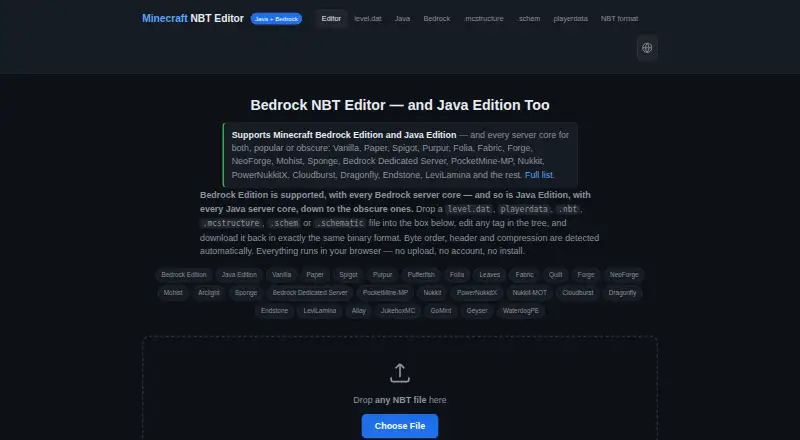
Bedrock NBT Editor is a free browser-based tool for editing Minecraft Bedrock Edition and Java Edition NBT files. It accepts formats such as level.dat, playerdata, .nbt, .mcstructure, .schem, and .schematic, and automatically detects byte order, headers, and compression across five NBT encodings. Users can search tags, add or remove them, edit values, and download the result, or export the edited tree as SNBT text. It can convert Bedrock files to Java big-endian gzip format and convert in the reverse direction. For large files, typed arrays and lazy tree rendering display 200 entries at a time; BigInt preserves 64-bit TAG_Long values such as world seeds and UUID halves. Files are parsed locally, with no upload endpoint, and the editor continues working offline after the page loads. Android users can select a world file from a file manager; iOS users must first place it in Files. The editor is open source under the MIT license.
Good
- Works with Bedrock and Java Edition files.
- Detects five NBT encodings automatically.
- Converts between Bedrock and Java formats.
- Files are parsed locally with no upload endpoint.
- Continues working offline after the page loads.
Watch out
- iOS users must first place files in Files.
- It runs in a browser rather than as a listed desktop app.
Who it suits
This editor suits Minecraft players and server users who need to inspect or change NBT files in a browser. Its local parsing may appeal to people who do not want to upload files.
Verdict
Bedrock NBT Editor covers common NBT editing and conversion tasks without sending files to an upload endpoint. Check the mobile file-selection steps if you plan to use it on iOS.
Plans and prices
From Bedrock NBT Editor's own pricing page, checked 11 Oct 2026.
| Plan | Price | What it gives you |
|---|---|---|
| Free | Free | No paid tier · no sign-up · no upload quota |
The facts
Each one read from Bedrock NBT Editor's own pages, with the date it was checked.
What it does
- Affiliation
- The maker states that the editor is not affiliated with Mojang Studios or Microsoft.checked 11 Oct 2026
- Compatibility
- The page lists support for Java and Bedrock server software, including Paper, Fabric, Forge, PocketMine-MP, Nukkit, and Bedrock Dedicated Server.checked 11 Oct 2026
- Editing
- Users can search tags, add or remove tags, edit values, and save the result for download.checked 11 Oct 2026
- File types
- It accepts files including level.dat, playerdata, .nbt, .mcstructure, .schem, and .schematic.checked 11 Oct 2026
- Format conversion
- It can read Bedrock files and write Java big-endian gzip format, or convert in the reverse direction.checked 11 Oct 2026
- Format detection
- It detects byte order, headers, and compression automatically across five NBT encodings.checked 11 Oct 2026
- Large files
- Typed arrays and lazy tree rendering display 200 entries at a time to keep large files responsive.checked 11 Oct 2026
- License
- The editor is open source under the MIT license.checked 11 Oct 2026
- Long values
- TAG_Long values use BigInt to preserve 64-bit values such as world seeds and UUID halves.checked 11 Oct 2026
- Mobile support
- The maker says Android users can choose a world file from a file manager, while iOS users must first place it in the Files app.checked 11 Oct 2026
- Offline use
- The editor continues to work after the page loads if the device disconnects from the network.checked 11 Oct 2026
- Privacy
- Files are read and parsed locally in the browser, and the page states that no upload endpoint exists.checked 11 Oct 2026
- Purpose
- Edits Minecraft Bedrock Edition and Java Edition NBT files in a browser.checked 11 Oct 2026
- Scriptable engine
- The page exposes its parser and writer through window.NBT for use in the browser console or a userscript.checked 11 Oct 2026
- SNBT export
- The editor can export the edited tree as SNBT text.checked 11 Oct 2026
The full review of Bedrock NBT Editor
Overview
Bedrock NBT Editor is a browser tool for inspecting, editing, and converting Minecraft Bedrock and Java Edition NBT data. It suits players and server operators who need to make targeted changes across world files without installing a desktop editor. Its local processing and broad format support make it a practical free choice, provided iOS users are prepared to move files into the Files app first.
Key features
The editor accepts level.dat, .dat, .nbt, .mcstructure, .schem, and .schematic files, as well as extracted chunk payloads and packet dumps. It detects byte order, headers, and compression across five NBT encodings automatically. That takes format guesswork out of routine work and makes the tool useful across Bedrock and Java data, though its focus is structured NBT rather than broader world-map editing.
Tag search, value editing, and adding or removing tags cover the main editing jobs. Changes can be downloaded, or the edited tree can be exported as SNBT text when a text representation is more useful. The editor can read Bedrock files and write Java big-endian gzip format, and convert in the other direction, which is a clear advantage for moving data between editions.
Large files get typed arrays and lazy tree rendering, which displays 200 entries at a time to help keep the interface responsive. TAG_Long values use BigInt, preserving 64-bit values such as world seeds and UUID halves. Those safeguards matter when a mistaken conversion or truncated number could compromise an edit.
Files are parsed locally in the browser, with no upload endpoint, and the editor continues working after the page has loaded if the device goes offline. That combination suits private or unreliable-network workflows. The browser page also exposes its parser and writer through window.NBT, giving technically inclined users a way to use the engine from the console or a userscript. The editor is open source under the MIT license; its maker says it is not affiliated with Mojang Studios or Microsoft.
Pricing
Bedrock NBT Editor is free at no cost. The Free plan has no paid tier, requires no sign-up, and has no upload quota; there is no free trial because there is no paid plan to trial. That removes cost and account friction for occasional edits as well as regular use, with no quota forcing users to ration files.
Platforms
The editor runs on the web and supports Android and iOS devices. Android users can select a world file from a file manager, while iOS users need to put the file in the Files app before opening it. That extra step makes the mobile workflow less direct on iOS. Once loaded, the page works offline, which is useful when editing away from a reliable connection.
Compatibility includes Java and Bedrock server software such as Paper, Fabric, Forge, PocketMine-MP, Nukkit, and Bedrock Dedicated Server. This is a good fit for operators handling data across those environments, while the editor's central job remains NBT editing and conversion.
Who it's for
Choose Bedrock NBT Editor if you need a free way to inspect or change Minecraft world data in a browser, especially when you work across Bedrock and Java formats or want files to stay on your device. Its format detection, tag tools, SNBT export, and conversion cover a substantial range of targeted NBT tasks. It is less suitable if you want a broader world-editing environment or need to open files on iOS without first preparing them in Files.
Pros and cons
- Pros: Local parsing with no upload endpoint keeps files on the device, and offline operation helps when the network drops after the page loads.
- Pros: Automatic detection across five NBT encodings and conversion in both Bedrock-to-Java directions reduce manual format work.
- Pros: BigInt handling preserves 64-bit values, while lazy rendering limits the displayed tree to 200 entries at a time for large files.
- Cons: iOS users must place files in the Files app before selecting them, adding a preparation step to mobile editing.
- Cons: Its tools center on NBT data, so users seeking broader world editing should consider another kind of editor.
Alternatives
Minecraft World Editors is the broader category to browse when you want to compare world-editing tools beyond a focused NBT editor.
MCBE Inventory Editor is another free option, with Linux, macOS, Windows, web, and self-hosted platforms. Consider it if those environments suit your setup better.
Chunker is a free, open-source option for Linux, macOS, Windows, and web. Its MIT license and GitHub-hosted code may appeal if open-source availability is a deciding factor.
biomed is free MIT-licensed software for Linux, macOS, and Windows, making it an alternative for desktop users who prefer those platforms.
LiveNBTEditor is a free MIT-licensed option for Minecraft Java 26.3, with a Windows editor required. Choose it if that version-specific setup matches your needs.
MCA JSON offers free open-source command-line tools and a JavaScript library for MCA/Anvil and NBT files. It suits users who prefer those interfaces to a browser editor.
MCA Selector is free under the MIT License, with downloadable Windows, macOS, Linux, and universal JAR builds. It is an option for users who want a downloadable desktop build.
McpeTool is free MIT-licensed software available for API, Linux, macOS, self-hosted, and Windows use.
Minecraft Region Fixer is free GPL-3.0 software for Linux, macOS, and Windows that requires Python 3.x.
Verdict
Bedrock NBT Editor is the right pick for players and server operators who want a free, browser-based way to edit and convert Bedrock and Java NBT files while keeping parsing local. Its wide format support and careful handling of large files and 64-bit values make it more capable than a basic tag viewer. Look elsewhere if you need broader world editing, or if the iOS Files-app step is a deal-breaker.
Getting started
- Open the editor website in a browser.
- Load a supported NBT or world file; on Android, choose it through a file manager, or on iOS, place it in Files first.
- Search tags or add, remove, and edit values.
- Save the result for download or export the tree as SNBT text.
Limits worth knowing
The free plan costs nothing and has no paid tier, sign-up requirement, or upload quota. There is no free-trial period because the plan is free.
Questions
How much does Bedrock NBT Editor cost?
Its Free plan costs nothing. There is no paid tier.
Does it support both Minecraft editions?
Yes. It edits NBT files for Minecraft Bedrock Edition and Java Edition.
Which platforms are supported?
The listed platforms are Android, iOS, and web. Android users can select a world file from a file manager; iOS users must first put it in Files.
Does it upload files?
The page says files are read and parsed locally in the browser and that no upload endpoint exists.
Can it work offline?
Yes. Once the page has loaded, the editor continues to work if the device disconnects from the network.
Is the editor open source?
Yes. It is open source under the MIT license.
Alternatives to Bedrock NBT Editor
- 1
Chunker
Free planOpen sourceWebAPILinuxmacOS7.6Free plan - 2
MCBE Inventory Editor
Free planOpen sourceWebLinuxmacOSSelf-hosted7.4Free plan - 3
Minecraft Region Fixer
Free planOpen sourceLinuxmacOSSelf-hostedWindows7.2Free plan - 4

Amulet Map Editor
APILinuxmacOSSelf-hosted6.9From £7 a year - 5

Universal Minecraft Tool
Free planWindows6.5From $60 a year - 6
LiveNBTEditor
Free planAPILinuxWindows6.4Free plan