
Legend
Legend brings documents, notes, to-do lists, email, files, outlines, and projects into one productivity interface.
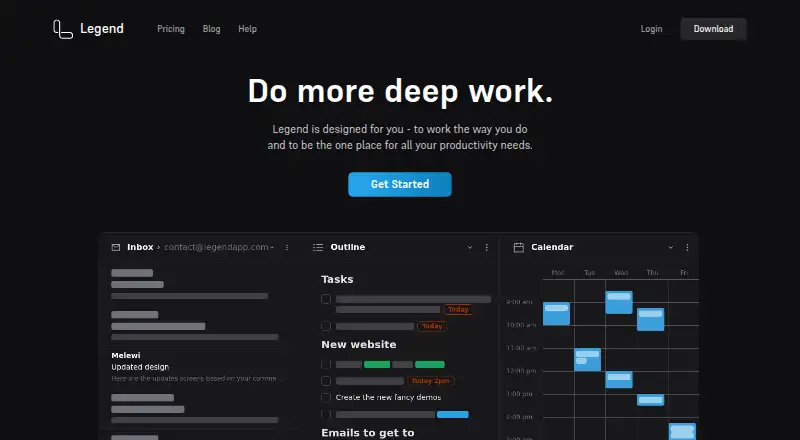
What Legend is
Legend brings documents, notes, to-do lists, email, files, outlines, and projects into one productivity interface. Work is arranged in Boards with multiple Panes, so users can separate areas and switch contexts. Panes support Outline, grouped, List, and Calendar views, with filters based on prefixes, item contents, words, or tags. Writing features include Markdown, formatting hotkeys, backlinks, and mirrors that connect notes and tasks. The Agenda sorts tasks by priority and date. Legend says it syncs in real time across devices and collaborators, works offline, and resolves changes after devices reconnect. Its privacy policy describes client-side encryption before item data syncs to Firebase, with optional user-password and document-password encryption. The free plan offers 10 Panes, one plugin sync account, and unlimited documents and items. The Browser Pane is unavailable in the mobile app, though saved links open in a browser.
Good
- Free plan includes unlimited documents and items.
- Supports Markdown, backlinks, and task-linked mirrors.
- Works offline and syncs in real time.
- Offers Outline, List, Calendar, and grouped views.
- Item data is encrypted client-side before syncing.
Watch out
- Free plan is limited to 10 Panes.
- Free plan includes one plugin sync account.
- Browser Pane is unavailable in the mobile app.
- Free trial is not offered.
Who it suits
Legend suits people who want notes, tasks, email, files, and projects organized in one interface. Its described workflows include home use and roles such as sales, project management, HR, founders, and developers.
Verdict
Legend combines outlining, task planning, and document organization with offline access and collaboration. Mobile users should note that the Browser Pane is not available in the app.
Plans and prices
From Legend's own pricing page, checked 2 Oct 2026.
| Plan | Price | What it gives you |
|---|---|---|
| Free | Free | 10 Panes · 1 plugin sync account · Unlimited documents and items · per month, paid annually |
| Basic | $5 a month | 20 Panes · 3 plugin sync accounts · Notifications · Advanced filtering · per month, paid annually |
| Pro | $9 a month | Unlimited Panes · Unlimited plugin sync accounts · Board Folders · Pane naming · Advanced display settings · Agenda customization · Custom hotkeys · per month, paid annually |
| Lifetime | $299, paid once | All future features forever · Promotional Price · One time payment; page also shows $399 |
The facts
Each one read from Legend's own pages, with the date it was checked.
What it does
- Audience
- Legend describes workflows for home use and roles including sales, project management, HR, founders, and developers.checked 2 Oct 2026
- Encryption
- The privacy policy says item data is encrypted client-side before syncing to Firebase and describes optional user-password and document-password encryption.checked 2 Oct 2026
- Google data handling
- The privacy policy says Gmail, Drive, and Calendar integrations operate client-side and that email or file contents are not saved on Legend servers.checked 2 Oct 2026
- Integrations
- The Browser Pane can open websites and web apps within Legend, with plugins listed for Gmail, Outlook, Office 365, GitHub, Shortwave, Jira, and ChatGPT.checked 2 Oct 2026
- Mobile limitation
- The maker says the Browser Pane is not technically possible in its mobile app, while saved links still open in the browser.checked 2 Oct 2026
- Organization
- Users can create Boards with multiple Panes for different work areas and switch between contexts.checked 2 Oct 2026
- Purpose
- Legend brings documents, notes, to-do lists, email, files, outlines, and projects into one productivity interface.checked 2 Oct 2026
- Support
- Legend offers email support and directs users to its forum for bug reports and feature requests.checked 2 Oct 2026
- Sync and offline
- Legend says it syncs in real time across devices and collaborators, works offline, and resolves changes when devices reconnect.checked 2 Oct 2026
- Views and filters
- Panes support Outline, grouped, List, and Calendar views, and filters can use prefixes, item contents, words, or tags.checked 2 Oct 2026
- Writing and outlining
- Legend supports Markdown or formatting hotkeys, an outliner, backlinks, and mirrors connecting notes and tasks.checked 2 Oct 2026
The company
- Company identity
- The privacy policy identifies the company as Moo.do LLC.checked 2 Oct 2026
Money
- Free tier limits
- The Free plan includes 10 Panes and one plugin sync account, with unlimited documents and items.checked 2 Oct 2026
- Task planning
- Its Agenda view sorts tasks by priority and date.checked 2 Oct 2026
The full review of Legend
Overview
Legend is a cross-platform workspace for people who want to shape ideas into outlines, connect them to tasks, and keep related documents in one place. Its strongest case is the bridge between flexible notes and practical planning; its main compromise is that mobile users lose its built-in Browser Pane.
Boards divide work into Panes, which can each hold a different view or work area. That structure suits users juggling projects and reference material, though readers seeking a narrowly focused task list may find the broader workspace unnecessary. For category context, see Outliner Software and Outlining Software.
Key features
Outlining, writing, and links
Legend supports Markdown and formatting hotkeys, with an outliner for developing ideas and backlinks and mirrors for connecting notes with tasks. This is useful when a plan needs to remain tied to the thinking or reference behind it, rather than living in a disconnected checklist. It is less compelling if all you need is a simple, linear task queue.
Views and task planning
Panes can show Outline, grouped, List, or Calendar views, while filters can narrow items by prefixes, contents, words, or tags. The Agenda sorts tasks by priority and date. Together, these options let users move between exploratory notes and date-oriented planning without abandoning the same workspace; the trade-off is that the range of structure and filtering may be more than a minimal workflow needs.
Browser Pane, sync, and privacy
The Browser Pane opens websites and web apps inside Legend, with plugins for services including Gmail, Outlook, Office 365, GitHub, Shortwave, Jira, and ChatGPT. That can keep web-based work near relevant notes, but the maker says the pane is not technically possible in its mobile app; saved links still open in the device browser.
Legend says it syncs in real time across devices and collaborators, works offline, and resolves changes after devices reconnect. Its privacy policy says item data is encrypted client-side before syncing to Firebase, with optional user-password and document-password encryption. It also says Gmail, Drive, and Calendar integrations operate client-side and that email or file contents are not saved on Legend servers. These protections are relevant to privacy-conscious users, though they do not remove the need to consider whether a cloud-synced workspace fits their requirements.
Export formats include HTML, Plain Text, Markdown, OPML, and JSON, giving users several ways to take their material elsewhere. Legend offers email support and directs bug reports and feature requests to its forum.
Pricing
Legend has a free plan and no free trial on its paid plans. The free tier costs nothing and includes 10 Panes, one plugin sync account, and unlimited documents and items. It is a generous starting point for organizing substantial material, but the Pane and plugin-account limits matter for users building multiple work areas or connecting several services.
Basic costs $5 a month, billed per month and paid annually. It raises the allowance to 20 Panes and three plugin sync accounts, and adds notifications and advanced filtering. It fits users who have outgrown the free caps but do not need unlimited work areas or the customization tools in Pro.
Pro costs $9 a month, billed per month and paid annually. It includes unlimited Panes and plugin sync accounts, Board Folders, Pane naming, advanced display settings, Agenda customization, and custom hotkeys. It is the more suitable paid tier for people who need extensive organization and workflow control; those features are difficult to justify if the free limits already fit.
Lifetime is a one-time payment of 299.00 USD; the page also shows $399 and calls the price promotional. It includes all future features forever. The upfront cost favors readers who expect sustained use, while Basic and Pro have lower initial costs. The free plan remains the lowest-commitment option, with its explicit Pane and plugin-account caps.
Platforms
Legend is available on web, Windows, macOS, Linux, iOS, and Android. Offline access and real-time collaboration support work across devices, but the missing mobile Browser Pane makes the mobile experience less complete for users who rely on embedded web apps.
Who it's for
Legend is a strong fit for people who want outlines, notes, projects, and tasks to relate to one another, including home users and people working in sales, project management, HR, as founders, or as developers. Its flexible views and integrations suit varied workflows, while users who need the Browser Pane on a phone or prefer a dedicated, uncomplicated task manager should look elsewhere.
Pros and cons
- Pros: Backlinks and mirrors connect notes and tasks, keeping planning tied to supporting material.
- Pros: Offline access, real-time syncing, and collaboration support work across devices and teams.
- Pros: Free includes unlimited documents and items, so the 10-Pane cap does not limit the size of the underlying collection.
- Pros: Multiple views, filters, and export formats support different ways of organizing and reusing work.
- Cons: The mobile app cannot host the Browser Pane, so embedded web-app workflows are limited to other platforms.
- Cons: Free allows only one plugin sync account, and Basic still caps users at three.
- Cons: Pro is needed for unlimited Panes and plugin sync accounts, plus several customization features.
Alternatives
Choose Workflowy if its free tier's 100 nodes per month and 100mb file uploads suit your needs, or if you want its free trial.
Dynalist is another freemium option, with a free plan offering unlimited items and documents and five bookmarks; consider it if those allowances suit your outlining workflow.
Indenta is a free option designed and maintained by one software engineer in Japan as a personal project.
Logseq offers a free plan for personal use; consider it if that scope matches your needs.
outl is a free, MIT-licensed option with no paid tier.
Checkvist offers a free plan with unlimited hierarchical lists and sharing and collaboration, making it worth considering if those are the priorities.
Tine is a free, independently built option.
Cloud Outliner is limited to macOS and iOS; consider it if those are the platforms you use.
Verdict
Legend is best for users who want one adaptable place to write, outline, organize projects, and plan tasks, with offline access and collaboration alongside connected notes and tasks. Its free tier makes that combination accessible, and paid plans raise the Pane and integration limits. Look elsewhere if embedded web apps are essential on mobile or if you want a more focused task tool without Legend’s broader organizational structure.
Getting started
- Visit https://legendapp.com/.
- Choose the Free plan or a paid plan; the paid plans are billed annually.
- Create a Board and add Panes for separate work areas.
- Organize Pane contents with a view and filters, and use Markdown or formatting hotkeys for writing.
- Install or open Legend on web, desktop or mobile; connect plugins if needed.
Limits worth knowing
The Free plan includes 10 Panes and one plugin sync account, alongside unlimited documents and items. Basic costs $5.00 per month billed annually and includes 20 Panes and three plugin sync accounts.
Questions
Does Legend have a free plan or trial?
Yes, there is a Free plan. Legend does not offer a free trial.
How much do paid plans cost?
Basic is $5.00 per month billed annually, and Pro is $9.00 per month billed annually. A Lifetime option is listed at $299.00 per once; the page also shows $399.
Which devices support Legend?
Legend lists web, Windows, macOS, Linux, iOS and Android.
Does Legend work offline?
Yes. Legend says it works offline and resolves changes when devices reconnect.
How does Legend describe its privacy protections?
Its privacy policy describes client-side encryption of item data before syncing to Firebase, with optional user-password and document-password encryption. It also says Gmail, Drive and Calendar integrations run client-side and email or file contents are not saved on Legend servers.
Which integrations and exports are listed?
Plugins are listed for Gmail, Outlook, Office 365, GitHub, Shortwave, Jira and ChatGPT. Export formats include HTML, Plain Text, Markdown, OPML and JSON.
Alternatives to Legend
- 1

Dynalist
Free planAndroidiOSWebAPI8.1From $95.88 a year - 2

outl
Free planOpen sourceAndroidiOSAPILinux7.9Free plan - 3

Workflowy
Free planAndroidiOSWebAPI7.8From $6.99 a month - 4
Cloud Outliner
Free planiOSmacOS7.7$4.99 one-time - 5

Logseq
Free planAndroidiOSWebLinux7.7From $5 a month - 6

Checkvist
Free planAndroidiOSWebAPI7.4From $3.90 a month