
Dynalist
Dynalist is an outlining app for capturing ideas and developing them into plans, projects, brainstorms or notes.
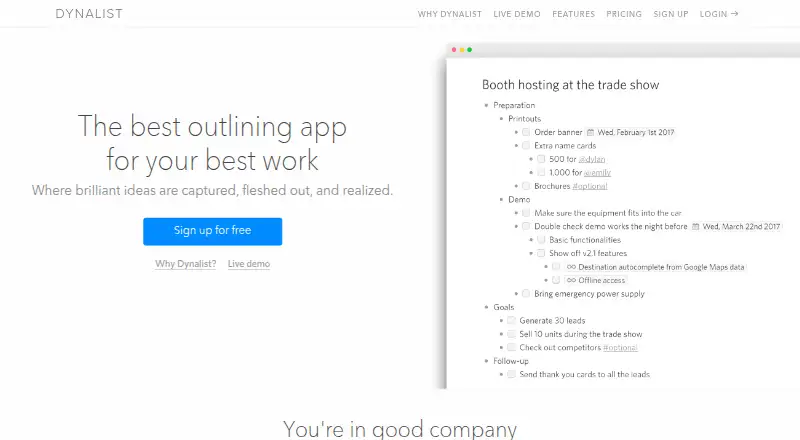
What Dynalist is
Dynalist is an outlining app for capturing ideas and developing them into plans, projects, brainstorms or notes. Users can nest outline items and documents without a stated depth limit, turn lists into checklists, and add dates that can be filtered by date and time. Tags, sorting and links between items help organize content; search, flat search, item finder, bookmarks and folding provide navigation options. Dynalist supports Markdown, backlinks and real-time collaboration, and exports content as formatted HTML, plain text or OPML. File attachments can be up to 50 MB. Offline work is available through the desktop app. The Free plan includes unlimited items and documents, five bookmarks and community support. Pro adds unlimited bookmarks, Google Calendar integration, daily backups to Dropbox or Google Drive and priority email support. The pricing note lists a 14-day trial and an annual starting rate of $7.99/user/mo; Pro is also listed at $9.99 a month billed monthly. Dynalist runs on web, Windows, macOS, Linux, iOS and Android. Its privacy policy says passwords and data transmissions are encrypted and that users own their data.
Good
- Nested outlines have no stated depth limit.
- Supports Markdown and real-time collaboration.
- Exports to HTML, plain text and OPML.
- Desktop app supports offline work.
- Available on web, desktop and mobile platforms.
Watch out
- Free plan includes only five bookmarks.
- Pro is listed at $9.99 a month billed monthly.
- File attachments are limited to 50 MB each.
Who it suits
Dynalist suits people organizing notes, projects, plans or brainstorming in nested outlines. Its checklist dates, collaboration and offline desktop use may also suit task-focused users.
Verdict
Dynalist combines flexible outlining with task dates, collaboration and several export formats. Compare the Free bookmark limit with Pro’s listed integrations and support if you need more organization tools.
Plans and prices
From Dynalist's own pricing page, checked 15 Oct 2026.
| Plan | Price | What it gives you |
|---|---|---|
| Free | Free | Unlimited items & documents · move item · internal linking · Markdown · dates · tags · checklist · sharing/collaboration · import/export · 5 bookmarks · community support |
| Pro | $9.99 a month | Includes everything in Free · Google Calendar integration · Unlimited bookmarks · Priority email support · billed monthly |
| Pro monthly | $9.99 a month | Everything in Free · Google Calendar · inbox capture · tag pane · recurring dates · unlimited bookmarks · attachments · version history · daily Dropbox/Google Drive backup · item finder · custom shortcuts · custom mobile toolbar · custom CSS · custom date format · priority email support · $9.99 billed monthly |
| Pro annual | $95.88 a year | Everything in Free · Google Calendar · inbox capture · tag pane · recurring dates · unlimited bookmarks · attachments · version history · daily Dropbox/Google Drive backup · item finder · custom shortcuts · custom mobile toolbar · custom CSS · custom date format · priority email support · $95.88 per year ($7.99/month), billed annually |
The facts
Each one read from Dynalist's own pages, with the date it was checked.
What it does
- API
- The public API uses JSON POST requests with a secret token and includes file listing, document reading/editing, inbox capture, preferences and uploads.checked 15 Oct 2026
- API limits
- API documentation specifies endpoint rate limits, including 30 requests per minute for document reads and 2 per minute for uploads.checked 15 Oct 2026
- API upload restriction
- File-upload API access is Pro-only and has quota-exceeded and rate-limit errors.checked 15 Oct 2026
- Attachments
- Files up to 50 MB can be uploaded to a list.checked 15 Oct 2026
- Checklists
- Any list can be converted into a checklist.checked 15 Oct 2026
- Collaboration
- Documents support collaborative access with configurable permissions and public links that visitors can view without accounts.checked 15 Oct 2026
- Documentation and support
- The help center lists guides for getting started, lists, sharing, import/export, accounts, customization, productivity, Pro, privacy/security and troubleshooting.checked 15 Oct 2026
- Due dates
- Items can receive dates and be filtered by date and time.checked 15 Oct 2026
- Export and backups
- Documents export to OPML, plain text or formatted text, and Pro can send daily backups to Dropbox or Google Drive.checked 15 Oct 2026
- Export formats
- Dynalist supports exporting content as formatted HTML, plain text, or OPML.checked 29 Sep 2026
- File attachments
- The features page says users can upload file attachments up to 50 MB in size.checked 29 Sep 2026
- Formatting
- Markdown formatting supports bold, italics, code, images, links and LaTeX.checked 15 Oct 2026
- Google Calendar
- Dates in Dynalist can synchronize with Google Calendar.checked 15 Oct 2026
- Hierarchical outlines
- Dynalist lets users nest outline items and documents without a stated depth limit.checked 29 Sep 2026
- Infinite nesting
- Lists can be nested without a stated depth limit, allowing large structures to fit in one outline.checked 15 Oct 2026
- Integrations
- The Pro plan includes Google Calendar integration, and Pro users can back up daily to Dropbox or Google Drive.checked 29 Sep 2026
- Intended uses
- Dynalist describes use cases including getting things done, managing projects, planning and brainstorming, and taking notes.checked 29 Sep 2026
- Limit: collaboration and mobile
- Capterra reviewers report that collaboration/sharing could be stronger, image handling is limited, reminders are missing and the iPad sidebar is inadequate.checked 15 Oct 2026
- Limit: reminders and headings
- G2 reviewers request reminders/notifications, better backup/restore and more heading-style options.checked 15 Oct 2026
Where it runs
- Browser extension
- Dynalist provides a browser clipper for capturing web content into Dynalist.checked 15 Oct 2026
The company
- Company facts
- Crunchbase lists Dynalist as a private Toronto, Ontario company with 11–50 employees and founders Erica Xu and Shida Li.checked 15 Oct 2026
- Data ownership
- The privacy policy states that users own the data they put into Dynalist.checked 15 Oct 2026
- Founded
- Independent company directories identify Dynalist as founded in 2015 and headquartered in Toronto, Ontario, Canada.checked 15 Oct 2026
Money
- Free-plan limit
- The Free plan includes five bookmarks; Pro includes unlimited bookmarks.checked 29 Sep 2026
The full review of Dynalist
Overview
Dynalist is a flexible outlining workspace that turns nested lists into working notes, plans, and task lists. It is best suited to people who want to develop ideas in a hierarchy and keep related items connected, rather than those looking for a narrowly focused task manager.
Its strengths are the depth of its outlining and the range of ways to revisit information; the main trade-off is that the Free plan limits bookmarks to five, while several organization tools are reserved for Pro.
Key features
Items and documents can be nested without a stated depth limit, so Dynalist can accommodate both short checklists and elaborate project structures. Lists can become checklists, and dated items can be filtered by date and time. That makes the outline useful for tracking work as well as collecting it, although the date tools are most compelling for people who already think in lists.
Tags, sorting, links between items, and backlinks help connect and retrieve material. Search, flat search, item finder, folding, and bookmarks offer different routes through a large outline. Together, these tools give the app more organizational range than a basic nested-list editor, but Free users get only five bookmarks.
Markdown and real-time collaboration broaden its use for shared notes and planning. Content can be exported as formatted HTML, plain text, or OPML, giving users several ways to take material elsewhere. File attachments can be up to 50 MB. Pro adds Google Calendar integration and daily backups to Dropbox or Google Drive, useful additions for people who want Dynalist connected to their calendar or included in a regular backup routine.
Dynalist supports offline work through its desktop app, including the Windows app. Its privacy policy says users own their data, passwords are protected by encryption, and transmissions use SSL encryption. Free users receive community support; Pro includes priority email support.
Pricing
Dynalist is freemium, with a 14-day trial. The Free plan costs nothing and includes unlimited items and documents, five bookmarks, and community support. It is a capable starting point for personal outlines and task lists, but the bookmark cap can constrain people who rely on saved navigation points across a large workspace.
Pro costs $9.99 a month, billed monthly, and includes everything in Free plus Google Calendar integration, unlimited bookmarks, and priority email support. It suits users who need those specific tools or faster email help; the monthly plan removes the bookmark ceiling but costs more over a year than the annual entry price.
Paid access starts at $7.99/user/mo (annual). For readers comfortable with an annual term, that is the lower stated monthly rate; the monthly Pro plan costs $9.99 a month. Compare the billing terms as well as the feature difference before choosing.
Platforms
Dynalist is available on the web, Windows, macOS, Linux, iOS, and Android. The platform range is broad, while offline work is described through the desktop app. An API and browser extension are also listed among its platforms.
Who it's for
Dynalist is a strong fit for people who plan projects, brainstorm, take notes, or manage tasks by breaking information into nested pieces. It is especially useful when the same workspace needs checklists, dated items, and links between related ideas. Its unlimited items and documents on Free make it approachable for extensive outlining, while five bookmarks may be a drawback for users who navigate by saved entry points.
Choose Pro if unlimited bookmarks, Google Calendar integration, daily cloud backups, or priority email support would change how you work. If you need none of those, Free retains the core outline, checklist, date, and export capabilities.
Pros and cons
- Pros: Outlines have no stated nesting-depth limit, supporting detailed structures without forcing users to split ideas into shallow lists.
- Pros: Checklists, date filtering, tags, links, and multiple navigation modes let users manage and retrieve work within the outline.
- Pros: HTML, plain-text, and OPML exports provide several practical ways to reuse content elsewhere.
- Cons: Free bookmarks stop at five, which can make a large or frequently revisited workspace less convenient to navigate.
- Cons: Google Calendar integration, unlimited bookmarks, and priority email support require Pro.
- Cons: Offline work is described for the desktop app, so it is not a stated capability across every platform.
Alternatives
Workflowy is worth considering if its free plan’s 100 nodes per month and 100 MB file uploads fit your needs; it also offers a free plan and trial. Legend is another freemium option, with a Free plan that includes 10 Panes, one plugin sync account, and unlimited documents and items. Pick it if those limits suit your workflow better.
Checkvist is a freemium alternative with a free plan and trial, available on Android, iOS, and the web, among other platforms. Indenta is free and available across desktop, mobile, and web platforms; its maker describes it as a personal project maintained by one software engineer in Japan. Tine is another free option spanning Android, iOS, Linux, macOS, web, and Windows.
Logseq is free for personal use, with a paid Sync Backer plan at $5 a month described as a recurring donation with sync beta access. outl is a free, MIT-licensed option with no paid tier. Zavala is free for Mac, iPhone, and iPad, and requires Apple platforms.
For more choices, browse Outliner Software and Outlining Software.
Verdict
Choose Dynalist if you want a deeply nestable outline that can also handle checklists, dated tasks, linked notes, and exports. Its Free plan covers substantial outlining, but the five-bookmark ceiling is a real constraint for navigation-heavy use. Go Pro when unlimited bookmarks, calendar integration, daily backups, or priority email support justify the price; otherwise, the free tier is the more sensible starting point.
Getting started
- Visit https://dynalist.io/.
- Choose the Free plan or review Pro, which has a 14-day trial and an annual starting rate of $7.99/user/mo.
- Open Dynalist on the web or use its Windows, macOS, Linux, iOS, or Android platform.
- Create nested outline items or documents, then add checklists, dates, tags, or links as needed.
- Use the desktop app for offline work, and export content as HTML, plain text, or OPML when needed.
Limits worth knowing
The Free plan includes five bookmarks; Pro provides unlimited bookmarks. Google Calendar integration, daily backups to Dropbox or Google Drive, and priority email support are Pro features.
Questions
Does Dynalist have a free plan?
Yes. Free includes unlimited items and documents, five bookmarks, and community support.
How much does Dynalist Pro cost?
The pricing note gives an annual starting rate of $7.99/user/mo. Pro is also listed at $9.99 a month billed monthly.
Is there a free trial?
Yes. Dynalist lists a 14-day trial.
Which platforms does Dynalist support?
It is available on web, Windows, macOS, Linux, iOS, and Android.
What does Pro add?
Pro includes everything in Free, Google Calendar integration, unlimited bookmarks, and priority email support. Pro users can also back up daily to Dropbox or Google Drive.
Can Dynalist be used offline?
Offline work is available through the desktop app. The Windows desktop app is specifically described as usable offline.
Alternatives to Dynalist
- 1

outl
Free planOpen sourceAndroidiOSAPILinux7.9Free plan - 2

Workflowy
Free planAndroidiOSWebAPI7.8From $6.99 a month - 3
Cloud Outliner
Free planiOSmacOS7.7$4.99 one-time - 4

Logseq
Free planAndroidiOSWebLinux7.7From $5 a month - 5

Legend
Free planAndroidiOSWebLinux7.5From $5 a month - 6

Checkvist
Free planAndroidiOSWebAPI7.4From $3.90 a month