
KioskCore
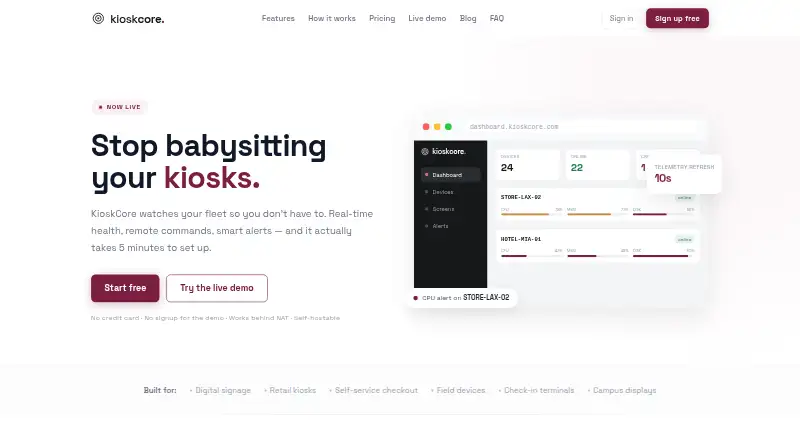
KioskCore monitors kiosk fleets with live device health information, remote controls, and alerts.
What KioskCore is
KioskCore monitors kiosk fleets with live device health information, remote controls, and alerts. Its dashboard shows CPU, memory, disk, and network metrics, with charts and history for each device. Operators can reboot devices, restart apps, upload logs, or schedule commands from a browser. Alerts can go to email, Slack, webhooks, or mobile push, with configurable thresholds and optional automatic restarts. Screen captures can be requested or scheduled, and a fleet screen wall lets operators view kiosk displays together. When connectivity is lost, commands and telemetry queue locally and sync after reconnection. KioskCore's iOS and Android app displays device status, alerts, and captures, sends push notifications, and supports remote commands. The agent connects outbound over HTTPS with token authentication; screen capture is off by default, and the site says keystrokes are not logged. Its .NET backend can be self-hosted behind an operator's reverse proxy or tunnel. The Free plan is free and covers up to two devices, with seven-day metric history and on-demand captures retained for 24 hours.
Good
- Displays CPU, memory, disk, and network metrics.
- Supports remote reboot and app restart.
- Alerts can use email, Slack, webhooks, or mobile push.
- Queues commands and telemetry while offline.
- Free plan covers up to two devices.
Watch out
- Free plan limits metric history to seven days.
- Free plan screen captures are on-demand only.
- Screen capture is off by default.
- Browser and app lockdown are not available.
Who it suits
KioskCore may suit operators managing kiosk fleets who need device metrics, remote commands, alerts, and screen captures. It offers a self-hosting option and mobile apps for iOS and Android.
Verdict
KioskCore combines fleet monitoring with remote actions, alerting, and screen visibility, including local queuing during connectivity loss. The free tier is limited to two devices and short history and capture retention; longer retention and added capabilities vary by paid plan.
Plans and prices
From KioskCore's own pricing page, checked 30 Sep 2026.
| Plan | Price | What it gives you |
|---|---|---|
| Free | Free | Up to 2 devices · 7-day metric history · on-demand screen capture (24h retention) · 3 email alerts/device/day · community support |
| Starter | €4 a month | 30-day metric history · scheduled capture (14-day retention) · 1 GB images/device · unlimited email, Slack & webhook alerts · mobile app + push notifications · email support · billed annually · €48/device/yr |
| Pro | €7 a month | 90-day metric history · 30-day screenshot retention · 3 GB images/device · wrong-app detection · fleet screen wall · uptime CSV reports · priority email support · billed annually · €84/device/yr |
| Business | €10 a month | 1-year metric history · 90-day screenshot retention · 10 GB images/device · audit log export · priority support · billed annually · €120/device/yr |
| Enterprise | Priced on request | Volume pricing from €3/device · custom retention and image storage · SSO/SAML and on-premise option (roadmap) · dedicated support and SLA |
The facts
Each one read from KioskCore's own pages, with the date it was checked.
What it does
- Agent
- The agent is described as a lightweight Electron process with a SQLite buffer.checked 30 Sep 2026
- Alerts
- Alerts support email, Slack, webhooks, and mobile push, with configurable thresholds and optional auto-restart.checked 30 Sep 2026
- Offline operation
- Commands and telemetry queue locally and sync when connectivity returns.checked 30 Sep 2026
- Purpose
- KioskCore monitors kiosk fleets with real-time health information, remote commands, and alerts.checked 30 Sep 2026
- Remote actions
- Operators can reboot devices, restart apps, upload logs, and schedule commands from a browser.checked 30 Sep 2026
- Screen monitoring
- Operators can capture screens on demand or on a schedule, and use a fleet screen wall to view kiosk displays.checked 30 Sep 2026
- Security and privacy
- The agent connects outbound over HTTPS with token authentication; screen capture is off by default, and the site says it does not log keystrokes.checked 30 Sep 2026
- Self-hosting
- The .NET backend can be self-hosted behind the operator’s own reverse proxy or tunnel.checked 30 Sep 2026
- Setup
- The maker says a device can be connected by installing the agent and entering a dashboard pairing code, with setup taking about five minutes.checked 30 Sep 2026
- Support
- The Free plan includes community support, Starter includes email support, and higher tiers list priority or dedicated support.checked 30 Sep 2026
- Telemetry
- It displays CPU, memory, disk, and network metrics with per-device charts and history.checked 30 Sep 2026
Where it runs
- Mobile app
- The iOS and Android app shows device status, alerts, and screen captures, sends push notifications, and supports remote commands.checked 30 Sep 2026
Money
- Planned features
- AI insights, teams and role-based access, OTA updates, a public API, and SSO/SAML are listed as coming soon or roadmap items.checked 30 Sep 2026
The full review of KioskCore
KioskCore is a monitoring and remote-operations service for kiosk fleets, best suited to operators who need device visibility without kiosk lockdown. Its strongest case is combining health data, alerts, screen views, and queued commands; it is not a substitute for software that restricts kiosk use.
Overview
CPU, memory, disk, and network readings appear in per-device charts and history, giving operators a way to spot problems across a fleet. From a browser they can reboot devices, restart apps, upload logs, or schedule commands. Alerts can go to email, Slack, webhooks, and mobile push, with configurable thresholds and optional auto-restart.
Screen captures can be taken on demand or on a schedule, and a fleet screen wall brings kiosk displays together. The distinction between visibility and control matters: KioskCore supports remote reboot and configuration, but offers neither browser nor app lockdown. Commands and telemetry queue locally during an outage and sync after connectivity returns, a useful safeguard for intermittent networks.
Key features
- Fleet telemetry and history: Metric charts help diagnose device health, while paid tiers extend how far back operators can review.
- Remote actions and alerting: Browser-based commands reduce the need to visit devices; configurable alerts and optional auto-restart can surface or address issues.
- Screen visibility: Scheduled capture and the screen wall suit teams that need to inspect displays remotely, though storage and retention depend on plan.
- Mobile access: Android and iOS apps show status, alerts, and captures, deliver push notifications, and support remote commands.
- Security and deployment: The agent connects outbound over HTTPS with token authentication. Capture is off by default, and the site says keystrokes are not logged. The .NET backend can be self-hosted behind an operator’s reverse proxy or tunnel.
- Setup: The maker describes connecting a device by installing the agent and entering a dashboard pairing code, with setup taking about five minutes. The agent is described as an Electron process with a SQLite buffer.
Pricing
The free tier costs nothing and is capped at two devices, seven-day metric history, on-demand captures retained for 24 hours, and three email alerts per device per day. Community support is included. It is a credible small-fleet starting point, but short history and the absence of scheduled captures make it a poor fit for ongoing fleet oversight.
Starter costs €4 a month (billed annually; €48/device/yr). It adds 30-day history, scheduled capture with 14-day retention, 1 GB of images per device, unlimited email, Slack, and webhook alerts, the mobile app and push notifications, and email support. This is the practical step up for operators who need routine capture and broader alerting without longer retention.
Pro costs €7 a month (billed annually; €84/device/yr). Its 90-day metric history, 30-day screenshot retention, 3 GB of images per device, wrong-app detection, screen wall, uptime CSV reports, and priority email support make it the more capable monitoring tier. Business costs €10 a month (billed annually; €120/device/yr) and extends history to one year, screenshot retention to 90 days, and image storage to 10 GB per device, while adding audit log export and priority support. That extra spend is most defensible when longer records or audit exports matter.
Enterprise has custom pricing, with volume pricing from €3/device, custom retention and image storage, and dedicated support and an SLA. SSO/SAML and an on-premise option are identified as roadmap items, not current capabilities. Team and role-based access, OTA updates, a public API, and AI insights are also planned rather than present features.
Platforms
KioskCore covers Windows and is also offered through web and iOS and Android apps; self-hosting is supported. Deployment is hybrid. Its broad access options do not change the central limitation: it monitors and manages devices but does not lock down browsers or apps.
Who it's for
Choose KioskCore if you operate a kiosk fleet and value remote health checks, alerts, screen visibility, and action-taking—especially where connectivity can be unreliable. The free tier suits a two-device evaluation or very small deployment; Starter, Pro, and Business scale the history, capture, reporting, and support needs. Look elsewhere if kiosk lockdown is essential, or if your platform requirements extend beyond Windows for the managed device.
Pros and cons
Pros
- Local queuing and later sync preserve commands and telemetry through connectivity loss.
- Alerts span email, Slack, webhooks, and push, with optional auto-restart for configured conditions.
- Self-hosting and outbound HTTPS connections offer deployment and network choices for operators.
- Paid plans clearly expand history and capture retention, with a screen wall and uptime reports in Pro.
Cons
- No browser or app lockdown, so it cannot enforce a kiosk’s user-facing restrictions.
- The free plan’s two-device cap, short history, 24-hour capture retention, and daily email limit constrain production use.
- Enterprise SSO/SAML and on-premise options are roadmap items, while team roles, OTA updates, and a public API are also still planned.
Alternatives
Kiosk Management Software is the category list for comparing options. Consider SureAsset instead if free asset lifecycle management, hardware and software license tracking, API access, and automation are the priority; its free plan spans Android, macOS, Linux, web, Windows, and iOS.
KioskSide is another paid option for Android, Linux, web, and Windows. Quantem Kiosk Software may suit a buyer seeking a paid product with a free trial across Android, iOS, Linux, macOS, web, and Windows; its Essential plan includes QR enrollment, one private app with a 50 MB limit, three console users, and five scheduled repo.
Trio Kiosk Management is worth comparing if a trial matters: Essentials is $5 a month per device, begins with 20 devices, and includes a 14-day free trial. Moki is a paid option with a trial for Android, API, iOS, and web; its Moki MDM plan caps API calls at 500 per hour per account and users at 10, with additional users billed $15 per user per month.
Kiosker offers a free plan and trial for Android and iOS, with a 7-day trial for its 6.99 USD monthly and 24.99 USD yearly subscription versions. FrontFace is a paid Android and Windows option with a trial, including a subscription that covers one player and updates, support, and cloud publishing. KioWare is another paid option with a trial across Android, API, Linux, self-hosted, and Windows; its Starter plan includes OS lockdown and startup on boot, basic web access control, and limited UI customization.
Verdict
KioskCore is a strong fit for Windows kiosk operators who need fleet health, remote actions, alerts, and screen visibility, with offline queuing as a meaningful operational advantage. Choose it for monitoring and response, but look to a lockdown-focused product if controlling what users can access at the kiosk is the priority.
Getting started
- Open kioskcore.com
- Install the lightweight Electron agent on a device
- Enter the dashboard pairing code
- Use the browser dashboard or mobile app to view status and issue commands
- Configure alert thresholds and notification channels
- Enable scheduled captures or other plan-supported features
Limits worth knowing
The Free plan costs nothing and allows up to two devices, seven-day metric history, on-demand captures retained 24 hours, and three email alerts per device daily. Starter costs €4 a month when billed annually and adds 30-day history, scheduled captures with 14-day retention, and 1 GB of images per device.
Questions
What platforms does KioskCore support?
Listed platforms are Android, iOS, self-hosted, web, and Windows.
Is there a free plan?
Yes. Free costs nothing and covers up to two devices.
Can KioskCore be self-hosted?
Yes. Its .NET backend can run behind your own reverse proxy or tunnel.
How does the agent connect?
The agent connects outbound over HTTPS using token authentication.
Does KioskCore offer mobile apps?
iOS and Android apps provide status, alerts, screen captures, push notifications, and remote commands.
What support comes with each tier?
Free includes community support; Starter includes email support; higher tiers list priority or dedicated support.
Alternatives to KioskCore
- 1
Kiosk
Free planOpen sourceAndroidiOSWebExtension8.0Free plan - 2

Canopy
AndroidiOSWebAPI7.2From $2,500 a month - 3
Kiosk Browser
AndroidWebAPI7.2From $1.60 a month - 4

Quantem Kiosk Software
AndroidiOSWebLinux6.9From $24 a year - 5
SiteKiosk
AndroidWebSelf-hostedWindows6.9From $239 a year - 6
Trio Kiosk Management
AndroidiOSWebLinux6.9From $5 a month