KioskSide
KioskSide pairs kiosk applications with a cloud dashboard for publishing content, configuring devices, and monitoring their status.
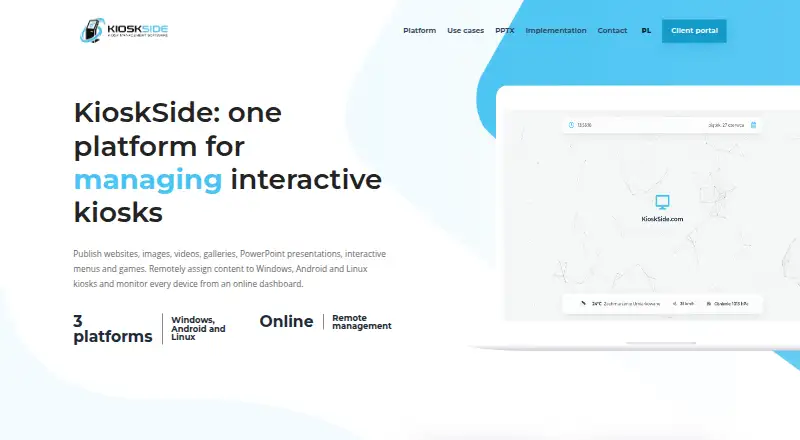
What KioskSide is
KioskSide pairs kiosk applications with a cloud dashboard for publishing content, configuring devices, and monitoring their status. Administrators can upload assets and assign them to individual kiosks or share a view across a fleet, with updates sent to connected devices. Supported content includes websites, HTML ZIP packages, images, galleries, video, interactive PowerPoint presentations, button menus, and touch games. The applications support Windows, Android, and Linux terminals; the Android app uses an embedded browser engine and does not require Google Chrome. Controls include autostart, restricted navigation, trusted domains, scheduled refresh, browser and app lockdown, remote commands, reboot, and configuration. Availability varies by operating system, permissions, and hardware. The dashboard shows connectivity, and supported Linux devices can report system and hardware information. Supported applications may provide diagnostics and authorised screen previews. Compatibility depends on the device and its setup, so the company recommends testing the exact device. Pricing is available on request.
Good
- Content can be assigned remotely to selected kiosks.
- Supports Windows, Android, and Linux terminals.
- Includes remote configuration and reboot.
- Dashboard displays device connectivity.
Watch out
- Pricing is available only on request.
- Controls vary by operating system, permissions, and hardware.
- Compatibility depends on device model, drivers, and content.
- Some advanced PowerPoint effects may need adjustment.
Who it suits
KioskSide is aimed at organizations such as schools, public institutions, retail businesses, hotels, offices, showrooms, and exhibition operators. It suits teams managing kiosk content or settings across individual devices or fleets.
Verdict
KioskSide brings publishing, device settings, and monitoring together in a cloud dashboard. Confirm compatibility on the target hardware and request pricing and an implementation proposal for your project.
The facts
Each one read from KioskSide's own pages, with the date it was checked.
Where it runs
- Android requirement
- The Android app uses an embedded browser engine and does not require Google Chrome to be installed.checked 3 Oct 2026
- Device management
- Kiosks can be configured individually or assigned a shared view, and connected devices show their online status in the dashboard.checked 3 Oct 2026
- Kiosk controls
- Features include autostart, controlled navigation, trusted domains, scheduled refresh, and remote commands, with controls varying by operating system, permissions, and hardware.checked 2 Oct 2026
- Linux monitoring
- Supported Linux hardware can report system load, memory, temperatures, storage health, network information and service status.checked 3 Oct 2026
- Platforms
- KioskSide supports Windows, Android, and Linux terminals.checked 2 Oct 2026
The company
- Company
- The site identifies IQ CORPORATION P.S.A. as the controller of personal data submitted through its enquiry form.checked 2 Oct 2026
- Maker
- The site identifies IQ CORPORATION P.S.A. as the controller of personal data submitted through its enquiry form.checked 3 Oct 2026
What it does
- Compatibility limit
- Compatibility depends on the device model, operating-system version, hardware, drivers, and content, and the maker recommends testing on the target device.checked 2 Oct 2026
- Content formats
- It supports websites, HTML ZIP projects, images, galleries, video, PowerPoint presentations converted to interactive HTML, menus and touch games.checked 3 Oct 2026
- Hardware compatibility
- Compatibility depends on the operating system, hardware, drivers and content, so KioskSide recommends testing the exact device before rollout.checked 3 Oct 2026
- Integrations
- The Linux page describes a peripheral-ready architecture for potential printer and sensor integrations, subject to driver and workflow testing.checked 2 Oct 2026
- Intended users
- KioskSide describes use cases including government and public institutions, schools, showrooms, retail, hotels, offices and exhibitions.checked 3 Oct 2026
- Monitoring
- The dashboard shows device connectivity, and supported Linux devices can report system and hardware telemetry such as temperatures, storage, and network quality.checked 2 Oct 2026
- PowerPoint limitation
- Some advanced PowerPoint effects may need adjustment because browser conversion does not necessarily reproduce desktop PowerPoint exactly.checked 3 Oct 2026
- Product
- KioskSide combines kiosk applications with an online dashboard for publishing content, managing settings and monitoring devices.checked 3 Oct 2026
- Remote diagnostics
- Supported applications can accept remote commands, report diagnostic data and provide an authorised screen preview, depending on platform version and device permissions.checked 3 Oct 2026
- Remote management
- Administrators can assign content per device or share a view across a fleet, with dashboard updates delivered to connected kiosks.checked 2 Oct 2026
- Remote publishing
- Users can upload assets to a dashboard and assign them to selected kiosks without manually copying files at each location.checked 3 Oct 2026
- Remote support
- Supported applications can provide remote screen preview, diagnostics, and selected service commands, subject to platform version and device permissions.checked 2 Oct 2026
- Security
- The security guidance recommends trusted-domain lists, PIN-protected maintenance actions, restricted accounts, and operating-system and physical security measures.checked 2 Oct 2026
- Security controls
- Kiosk protection includes trusted-domain restrictions, PIN-protected settings or exit actions, and role-based operator permissions.checked 3 Oct 2026
- Support and deployment
- The company asks prospective customers to provide device count, operating system, model, resolution and content so it can recommend a device test or implementation scope.checked 3 Oct 2026
- Support and sales
- The maker asks prospective customers to provide device and project details to discuss a test or implementation proposal; it lists [email protected].checked 2 Oct 2026
- Supported operating systems
- KioskSide states that its kiosk applications support Windows, Android and Linux terminals.checked 3 Oct 2026
The full review of KioskSide
KioskSide is a cloud-managed kiosk platform for publishing content, locking down terminals, and overseeing devices from one dashboard. It is aimed at organizations running displays or interactive stations across multiple locations, particularly those that need Linux telemetry and remote intervention. Its broad format support is useful, but deployment should be planned around the exact hardware and operating-system combination.
Overview
KioskSide combines kiosk applications with an online control plane. Administrators upload assets once, assign them to a particular kiosk or a shared fleet view, and push changes to connected devices instead of copying files at every site. That workflow fits public institutions, schools, showrooms, retailers, hotels, offices, and exhibitions where content changes and device administration are recurring tasks.
The cloud model makes centralized publishing practical for a distributed estate, while device connectivity indicators provide a quick operational view. It is less suitable as a blind, hardware-agnostic rollout: operating-system versions, drivers, permissions, device models, and the content itself determine which functions work. The maker asks customers to provide device count, operating system, model, resolution, and content so a device test or implementation scope can be proposed.
Key features
Supported content includes websites, HTML ZIP packages, images, galleries, video, interactive PowerPoint presentations, button menus, and touch games. That mix covers signage, guided interfaces, presentations, and touch-based experiences without forcing every project into a single media type. Advanced PowerPoint effects may need alteration because browser conversion does not always reproduce desktop PowerPoint exactly.
Kiosk controls include autostart, controlled navigation, trusted-domain lists, scheduled refresh, and remote commands. Browser and app lockdown, remote configuration, and remote reboot are also supported. These controls can reduce on-site intervention and keep a station focused on its intended task, but their availability varies with operating system, hardware, permissions, and application version.
Security guidance calls for trusted-domain restrictions, PIN-protected maintenance or exit actions, restricted accounts, role-based operator permissions, and appropriate operating-system and physical safeguards. This is a sensible layered approach; the dashboard alone is not a substitute for securing the underlying terminal.
The dashboard shows whether devices are connected. Supported Linux hardware can report load, memory, temperatures, storage health, network information, and service status, giving technical teams more useful signals than an online/offline flag. Supported applications can provide a remote screen preview, diagnostics, and selected service commands, subject to platform version and device permissions. Linux also has a peripheral-ready architecture for possible printer and sensor integrations, although each driver and workflow requires testing.
Pricing
KioskSide uses paid, custom pricing rather than published self-service tiers. Prospective customers should provide project and device details to discuss a test or implementation proposal. This suits organizations that need a scoped deployment, but it gives smaller teams no public price for quick comparison and makes budgeting dependent on a sales conversation.
Platforms
KioskSide states support for Android, Linux, and Windows terminals, with the service delivered through a cloud deployment and web dashboard. The Android application uses an embedded browser engine and does not require Google Chrome. Linux offers the richest documented monitoring, while controls on any platform remain conditional on the operating system, hardware, drivers, content, and permissions. Testing the exact device before rollout is therefore a practical requirement, not an optional polish step.
Who it's for
KioskSide is a strong fit for government and public-sector deployments, schools, retail and hospitality sites, showrooms, offices, and exhibitions that need centralized publishing across several kiosks. It is especially compelling when remote reboot, lockdown, diagnostics, and Linux hardware telemetry can reduce site visits. A single display with no need for fleet administration, or a project that demands guaranteed feature parity across unknown hardware, should look elsewhere.
Pros and cons
Pros
- Central publishing: assign uploaded assets to individual kiosks or a shared fleet view without manual file copying.
- Broad media support: websites, HTML packages, galleries, video, PowerPoint presentations, menus, and touch games cover varied installations.
- Operational control: autostart, lockdown, scheduled refresh, remote commands, configuration, and reboot support centralized administration.
- Linux visibility: supported devices can expose detailed system, hardware, network, and service telemetry.
Cons
- Custom pricing: no public tiers or published cost makes initial comparison and budgeting harder.
- Hardware dependence: capabilities change with device model, OS version, drivers, permissions, and content, requiring pre-rollout testing.
- PowerPoint caveat: advanced desktop effects may not survive browser conversion unchanged.
- Conditional remote support: screen preview, diagnostics, and service commands depend on supported application and platform conditions.
Alternatives
Kiosk is a free, open-source PDF reader with Android, iOS, Linux, macOS, web, Windows, and self-hosted options; choose it when document viewing matters more than fleet publishing and diagnostics.
SureAsset offers a free plan for asset lifecycle management, license tracking, and API automation across major platforms; it is the better choice for inventory governance rather than kiosk content delivery.
KioskCore has a free tier for up to two devices with seven-day metrics, screen capture, alerts, and community support; pick it for a small pilot with explicit low-cost limits.
OpenKiosk is free and open source for Linux, macOS, and Windows, making it a straightforward choice when you want a self-managed kiosk without a paid cloud service.
Libki is a free open-source kiosk management system for Linux, self-hosted, web, and Windows deployments; choose it when freely installable management is the priority.
Quantem Kiosk Software starts at $2.40 per device per month with a free trial and QR enrollment; it suits teams seeking transparent per-device pricing.
Canopy starts at $2,500 a month for 500 devices with a 12-month minimum, aimed at large managed estates.
Trio Kiosk Management offers paid per-device plans from $5 a month and a 14-day trial, useful when published pricing and trial access matter.
Verdict
Choose KioskSide for a multi-site kiosk estate that needs centralized content, lockdown, remote recovery, and, on supported Linux hardware, meaningful telemetry. Look elsewhere if you need a public price list, broad guaranteed compatibility without device testing, or a lightweight single-device kiosk.
Alternatives to KioskSide
- 1
Kiosk
Free planOpen sourceAndroidiOSWebExtension8.0Free plan - 2

KioskCore
Free planAndroidiOSWebSelf-hosted7.3From €4 a month - 3

Canopy
AndroidiOSWebAPI7.2From $2,500 a month - 4
Kiosk Browser
AndroidWebAPI7.2From $1.60 a month - 5

Quantem Kiosk Software
AndroidiOSWebLinux6.9From $24 a year - 6
SiteKiosk
AndroidWebSelf-hostedWindows6.9From $239 a year