SiteKiosk
SiteKiosk provides software to secure and manage kiosks and public terminals, and to create digital signage and interactive applications.
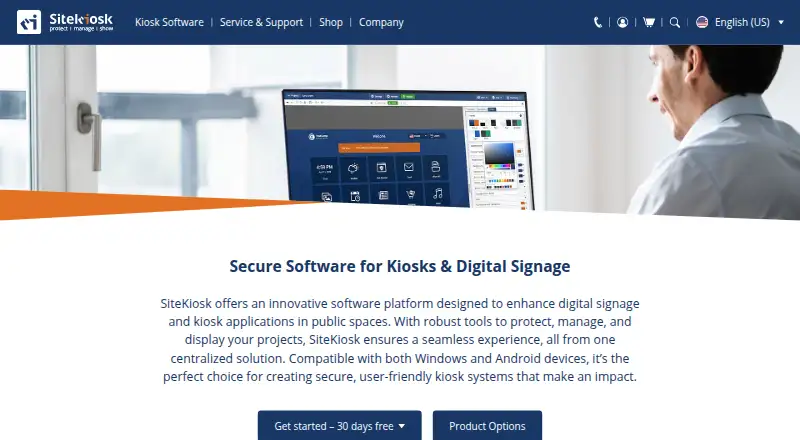
What SiteKiosk is
SiteKiosk provides software to secure and manage kiosks and public terminals, and to create digital signage and interactive applications. Its content system handles PDFs, videos, images, and text, with passive or touch-based experiences and scheduled displays. Security tools include a hardened Chromium browser, session-data clearing, emergency mode, and controls over apps, programs, and websites. SiteKiosk Online adds live device monitoring, remote access through built-in Ultra VNC, analytics, and reporting. Integrations include Microsoft Entra ID sign-in, LDAP, Active Directory, third-party web app SSO, and interfaces for sensors and other devices. Supported peripherals include accessibility inputs and payment devices using ccTalk. The software supports Windows and Android with hybrid deployment; Online also offers on-premise hosting. SiteKiosk Online Cloud has a 30-day trial, while Classic for Windows can be tried for 30 days with limited functionality. Classic licenses are available until December 31, 2029, and discontinuation is scheduled for December 31, 2030, with security updates stated to continue until then.
Good
- CMS supports scheduled displays and touch applications.
- Online includes remote monitoring and reporting.
- Supports Windows and Android.
- Cloud and Classic trials last 30 days.
Watch out
- Unlicensed Classic blocks input for 30 seconds every five minutes.
- Classic licenses are available only until December 31, 2029.
- Classic is scheduled for discontinuation on December 31, 2030.
Who it suits
SiteKiosk may suit organizations operating public self-service kiosks or employee terminals, especially those needing centralized device oversight and managed interactive content. Its maker describes SiteKiosk Online as intended for enterprise-level applications.
Verdict
SiteKiosk combines kiosk security, content management, and remote oversight, with both cloud and on-premise options. Organizations considering Classic should factor in its license availability and discontinuation dates.
Plans and prices
From SiteKiosk's own pricing page, checked 30 Sep 2026.
| Plan | Price | What it gives you |
|---|---|---|
| Annual Maintenance Renewal (SK Classic for Windows) | $100 a year | per device · 12 months of support and updates · available only for licenses whose support has not expired |
| SiteKiosk Online Cloud - Annual Plan | $239 a year | per device · 12 months · not automatically renewed · bulk rates: $215.00 each for 10–24; $203.00 each for 25–49 · $ 19.92 /month, billed annually |
| SiteKiosk Classic for Windows | $240 a year | per device · 1 year support and updates included · new licenses available until December 31, 2029 · discontinued December 31, 2030 · bulk rates: $216.00 each for 10–24; $204.00 each for 25–49 |
| SiteKiosk Online On-Premise Server | Priced on request | annual subscription · own server and network · request trial version |
The facts
Each one read from SiteKiosk's own pages, with the date it was checked.
What it does
- Classic end of life
- SiteKiosk Classic for Windows will be discontinued on December 31, 2030, and security updates are stated to continue until that date.checked 30 Sep 2026
- Cloud security and hosting
- SiteKiosk says Online data is stored on GDPR-compliant servers managed by GoDaddy and PlusServer GmbH in Arizona and Cologne, with an on-premise deployment option.checked 30 Sep 2026
- Content
- Its CMS supports content such as PDFs, videos, images and text, along with passive and touch applications and scheduled displays.checked 30 Sep 2026
- Integrations
- The maker lists Microsoft Entra ID sign-in, LDAP and Active Directory support, third-party web app SSO, and interfaces for external sensors and devices.checked 30 Sep 2026
- Intended users
- The maker describes SiteKiosk Online as tailored for enterprise-level applications and cites use across industries, including public self-service and employee terminals.checked 30 Sep 2026
- Peripheral support
- Listed supported integrations include Nexmosphere sensors and controls, accessibility input devices, and payment devices via the ccTalk interface.checked 30 Sep 2026
- Product
- SiteKiosk provides software to secure and manage kiosks and public terminals and to create digital signage and interactive applications.checked 30 Sep 2026
- Remote management
- SiteKiosk Online offers real-time device monitoring, remote access using built-in Ultra VNC, analytics and reporting.checked 30 Sep 2026
- Security
- Listed security capabilities include a hardened browser, session data clearing, emergency mode, and controls over apps, programs and websites.checked 30 Sep 2026
- Support
- The company says it provides ongoing support and training as needed after implementation; Online Cloud includes free support and regular updates.checked 30 Sep 2026
The company
- Founded
- 1996checked 23 Sep 2026
- Headquarters
- Miami, USAchecked 23 Sep 2026
Money
- Trial
- SiteKiosk Online Cloud offers a 30-day free trial, while Classic for Windows can be tested free for 30 days with limited functionality.checked 30 Sep 2026
- Trial limitations
- Unlicensed Classic displays a registration reminder every five minutes that blocks input for 30 seconds and restricts some security settings.checked 30 Sep 2026
The full review of SiteKiosk
Overview
SiteKiosk is a kiosk security and content-management product for organizations running shared public or employee terminals. It suits teams that need to control device use while also publishing signage or interactive content. Its breadth is a strength, though Classic has a defined sunset date and Online’s cloud plan is priced per device.
Founded in 1996 and headquartered in Miami, the company offers Classic for Windows and SiteKiosk Online, including cloud and on-premise deployment options.
For category comparisons, see Kiosk Management Software and Kiosk Browsers.
Key features
Security and shared sessions
SiteKiosk combines a hardened Chromium browser with URL allowlisting, controls over applications, programs and websites, session-data clearing, and an emergency mode. Those controls are useful where devices are shared with the public: administrators can narrow access and clear a session before the next person uses the terminal. The emphasis is on managed kiosk use rather than unrestricted general-purpose computing.
Content and signage
The CMS handles PDFs, videos, images and text, and supports both passive displays and touch applications with scheduled content. That makes SiteKiosk a plausible fit for operators who want signage and interactive terminal experiences under one management umbrella, rather than a kiosk browser alone.
Remote oversight and integrations
SiteKiosk Online provides real-time device monitoring, remote access through built-in Ultra VNC, analytics and reporting. Sign-in and integration options include Microsoft Entra ID, LDAP, Active Directory, third-party web-app SSO, and interfaces for external sensors and devices. Supported peripheral integrations include Nexmosphere sensors and controls, accessibility input devices, and payment devices through the ccTalk interface. These connections are relevant to deployments that rely on identity systems or specialized terminal hardware; buyers with simpler browser-only needs may not need this breadth.
Hosting and security
SiteKiosk says Online data is stored on GDPR-compliant servers managed by GoDaddy and PlusServer GmbH in Arizona and Cologne, and offers an on-premise deployment option. The choice can suit organizations weighing cloud hosting against running the server on their own network.
Pricing
SiteKiosk is paid software with no free plan. The SiteKiosk Online Cloud annual plan costs $239 a year per device, billed $ 19.92 /month and billed annually. It covers 12 months, is not automatically renewed, and offers bulk rates of $215.00 each for 10–24 devices and $203.00 each for 25–49. It includes free support and regular updates, making it the clearest fit for organizations choosing the cloud service and budgeting by device.
SiteKiosk Classic for Windows costs $240 a year per device, with one year of support and updates included. Bulk rates are $216.00 each for 10–24 devices and $204.00 each for 25–49. New licenses are available only until December 31, 2029; the product will be discontinued on December 31, 2030, with security updates stated to continue until then. That makes Classic a time-bounded option, not a long-term choice for new deployments.
Annual Maintenance Renewal for SK Classic for Windows costs $100 a year and provides 12 months of support and updates. It is available only for licenses whose support has not expired, so it is a renewal path rather than a way to buy a new Classic license.
SiteKiosk Online On-Premise Server uses an annual subscription with custom pricing. It is intended for an organization using its own server and network, and a trial version can be requested.
SiteKiosk Online Cloud offers a 30-day free trial. Classic can also be tried free for 30 days, but its unlicensed version shows a registration reminder every five minutes that blocks input for 30 seconds and restricts some security settings. That makes the Classic trial less suitable for uninterrupted evaluation on a live terminal.
Platforms
SiteKiosk supports Windows and Android, with web and self-hosted options also reflected in its platform coverage. Its deployment mode is hybrid. The combination is useful for organizations managing more than one kiosk environment, while teams committed to other operating systems should compare platform-specific alternatives.
Who it's for
SiteKiosk Online is tailored to enterprise-level applications, including public self-service and employee terminals across industries. It is best suited to organizations that need kiosk lockdown, content delivery and remote oversight together, especially where identity, sensor or payment-device integrations matter. A small operation seeking only a basic single-purpose browser may find the management and content scope more than it needs.
Pros and cons
- Pros: Security controls, session clearing and emergency mode address the risks of shared terminals.
- Pros: Mixed-media CMS, scheduled displays and touch applications support both signage and interactive use.
- Pros: Online combines monitoring, remote access, analytics and reporting, with cloud and on-premise approaches.
- Cons: Cloud pricing is per device, so costs scale with deployment size.
- Cons: Classic is nearing its discontinuation date, and its trial interrupts input every five minutes.
Alternatives
Choose KioWare if you want a paid kiosk option with Android, Linux, Windows and self-hosted platform coverage; its Starter plan includes OS lockdown, startup on boot and basic web access control.
Hexnode Kiosk Browser is worth comparing if its per-month plans and stated 15-device, two-technician starting setup match your deployment. Choose Fully Kiosk Browser if Android, API or web coverage and a one-time per-device license are a better fit.
Kiosk Browser offers remote management priced per device per month, with tiered rates by device count, so it is an option to compare for a remotely managed fleet. Kiosker has a free plan as well as paid monthly and yearly plans, which may suit readers who want a freemium option.
Kiosk Pro is an iOS-only alternative with per-device plans. WebFrame Pro Kiosk is another option for readers focused on an iOS or Android kiosk app. Porteus Kiosk is a paid option for Linux.
Verdict
SiteKiosk is a strong choice for organizations that need to secure shared terminals while managing signage or interactive content and overseeing devices remotely. Its security, CMS and integration breadth are the main reasons to choose it. Look elsewhere if you need a lightweight browser-only tool, or if a long runway for a new Windows deployment matters more than Classic’s current license and support terms.
Alternatives to SiteKiosk
- 1
Square Online
Free planWeb7.1From $49 a month - 2
Kiosk Pro
iOS6.5From $5 a month - 3
QikServe Pay at Table
AndroidiOSWeb6.5 - 4
Porteus Kiosk
APILinuxSelf-hosted6.4From €26 a year - 5

KioWare
AndroidAPILinuxSelf-hosted6.2 - 6
Phreesia VoiceAI
AndroidiOSWeb6.1