Kiosk
Kiosk is a free, open-source PDF reader for web, desktop, mobile, and browser extensions.
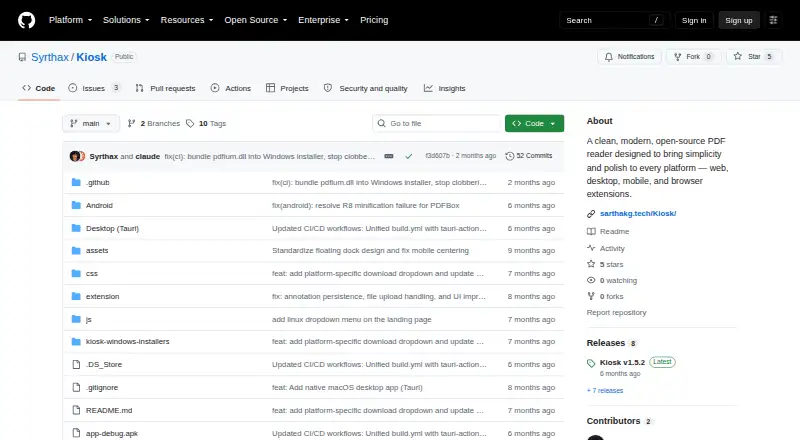
What Kiosk is
Kiosk is a free, open-source PDF reader for web, desktop, mobile, and browser extensions. It renders PDFs and includes full-text search with highlighted results, page thumbnails, smooth zoom, and light, dark, and night display modes. The Chrome extension adds annotation tools for highlighting, underlining, strikethrough, drawing, shapes, and text.
Kiosk supports Android, iOS, Linux, macOS, Windows, web, and extensions. The project says PDFs are processed on the device, with no telemetry, cloud processing, or account requirement. The Android app works offline after installation, and the extension release notes state that offline use is supported. The web app can be served locally or deployed through GitHub Pages as a self-hosted instance. Desktop apps can open PDFs directly and associate Kiosk with PDF files; the extension can intercept PDFs opened in Chrome.
The extension supports Chrome 88+, Edge 88+, and Brave, and the README says it is incompatible with Firefox and Safari. The project is released under the MIT License and has no paid plans or prices stated. The Android release is an early alpha, with some features and performance optimizations still in progress. The macOS app is ad-hoc signed and not notarized, so Gatekeeper may show a warning on first launch.
Good
- Free and released under the MIT License.
- Searches PDF text and highlights results.
- Offers light, dark, and night display modes.
- Processes PDFs on-device, with no telemetry or cloud processing.
- Supports offline use on Android after installation.
- Chrome extension includes highlighting, drawing, shapes, and text annotations.
Watch out
- The Android release is an early alpha.
- The extension is incompatible with Firefox and Safari.
- The macOS app is not notarized, so Gatekeeper may warn on first launch.
Who it suits
Kiosk suits readers who want a free PDF app across desktop, mobile, web, or a supported browser, with search and display options. It also fits people who want on-device PDF processing and annotation tools in the Chrome extension.
Verdict
Choose Kiosk if you want a free, open-source PDF reader with search, display options, and on-device processing across its supported platforms. Look elsewhere if you need a Firefox or Safari extension, or if an early-alpha Android release is unsuitable for you.
Plans and prices
From Kiosk's own pricing page, checked 15 Oct 2026.
| Plan | Price | What it gives you |
|---|---|---|
| Free | Free | open-source PDF reader · no paid plans stated |
| Kiosk | Free | Open-source PDF reader; no paid plans or prices stated |
The facts
Each one read from Kiosk's own pages, with the date it was checked.
Where it runs
- Android offline use
- The Android app is described as requiring no internet connection after installation.checked 15 Oct 2026
- Android requirements
- The Android build requires Android 8.0 or later and about 30 MB of storage.checked 15 Oct 2026
- Android technical limit
- The diagnosis reports crashes or blank pages during fast scrolling and rapid zoom, linked to bitmap lifecycle and render-job races.checked 15 Oct 2026
- Browser compatibility
- The extension supports Chrome 88 or newer, Edge 88 or newer and Brave, while Firefox and Safari are listed as incompatible.checked 15 Oct 2026
- Browser support
- The extension supports Chrome 88+, Edge 88+, and Brave, while the README says it is incompatible with Firefox and Safari.checked 7 Oct 2026
- macOS gestures
- The macOS build supports pinch-to-zoom and smooth trackpad scrolling.checked 15 Oct 2026
- macOS integration
- The macOS app supports direct PDF opening and file associations.checked 15 Oct 2026
- macOS requirements
- The macOS build requires macOS 10.15 or later, Apple Silicon or Intel hardware, and about 50 MB of storage.checked 15 Oct 2026
What it does
- Annotations
- The Chrome extension supports highlighting, underlining, strikethrough, drawing, shapes, and text annotations.checked 7 Oct 2026
- Annotation storage
- Extension annotations are stored persistently in Chrome storage.checked 15 Oct 2026
- Desktop technical limit
- The diagnosis reports that each desktop render reparses the full PDF and that a global mutex can serialize rendering and cause hangs under concurrent work.checked 15 Oct 2026
- Desktop technology
- The desktop application uses Tauri 2, a TypeScript/Vite frontend, Rust and PDFium through pdfium-render.checked 15 Oct 2026
- Display modes
- The interface offers light, dark and inverted night display modes.checked 15 Oct 2026
- Documentation depth
- Documentation is concentrated in the README, installation instructions, source tree and release notes rather than a separate help center.checked 15 Oct 2026
- Extension annotations
- The extension supports highlighting, underlining, strikethrough, freehand drawing, shapes and text annotations.checked 15 Oct 2026
- Extension file sources
- The extension is designed to work with web URLs, local files and data URLs.checked 15 Oct 2026
- Extension interception
- The Chrome extension can intercept PDFs and open them in Kiosk instead of Chrome's built-in viewer.checked 15 Oct 2026
- Extension update
- Extension version 1.5 added a thumbnail sidebar, adaptive rendering, file uploads, recent PDFs and more reliable annotation persistence.checked 15 Oct 2026
- Full-text search
- Kiosk provides full-text search and highlights matching results.checked 15 Oct 2026
- Integrations
- The desktop apps support opening PDFs directly and associating Kiosk with PDF files; the extension can intercept PDFs opened in Chrome.checked 7 Oct 2026
- Keyboard shortcuts
- Keyboard shortcuts are provided for opening files, zooming, searching, sidebar control and page movement.checked 15 Oct 2026
- License
- Kiosk is distributed under the MIT License.checked 15 Oct 2026
Money
- Free plan
- Yeschecked 24 Sep 2026
The company
- Maker
- The repository credits Sarthak Ghosh as the maker.checked 7 Oct 2026
The full review of Kiosk
Kiosk is a free, open-source PDF reader for web, desktop, mobile, and browser extensions. It is best suited to readers who want local document handling and Chrome users who need built-in markup. Its broad platform reach is appealing, though Android is still early alpha and Firefox and Safari are out.
Overview
Kiosk covers the essentials for reading and navigating PDFs: full-text search with highlighted matches, page thumbnails, smooth zoom, and light, dark, and night display modes. It processes PDFs on the device, with no telemetry, cloud processing, or account requirement. That makes it a good fit for readers who want to keep documents local; anyone who depends on a cloud-based workflow should look elsewhere.
Key features
- Reading and navigation: Search and thumbnails help readers move through long documents or find a passage quickly, while three display modes offer practical flexibility for different reading conditions.
- Annotations: The Chrome extension supports highlighting, underlining, strikethrough, drawing, shapes, and text annotations. That is a useful markup set for reviewing PDFs in Chrome, but the listed annotation tools are specific to the extension.
- Offline and self-hosted use: The Android app works without internet after installation, and the extension supports offline use. The web app can run locally or be deployed through GitHub Pages as a self-hosted instance, giving users options for keeping their reading setup close to home.
- Opening PDFs: Desktop apps can open PDFs directly and associate Kiosk with PDF files. The Chrome extension can intercept PDFs opened in Chrome, making it convenient for users who want Kiosk to handle those documents by default.
Pricing
Kiosk costs nothing. The free plan is the product: an open-source PDF reader with no paid plans stated. There is no free trial, because there is no paid tier to trial. The MIT License gives users permission to use the project under its terms, while the absence of a cloud service or account requirement suits readers who want a straightforward local reader rather than a managed document service.
Platforms
Kiosk is listed for Android, iOS, Linux, macOS, Windows, web, self-hosted use, and browser extensions. Extension support covers Chrome 88+, Edge 88+, and Brave; Firefox and Safari are incompatible. That leaves a substantial gap for readers who rely on either of those browsers. The macOS app is ad-hoc signed and not notarized, so Gatekeeper may warn on first launch. On Android, the early-alpha status means some features and performance improvements are still in progress, making it a less dependable choice for readers who need a mature mobile app.
Who it's for
Kiosk suits readers who want a free PDF reader with search, display choices, and on-device processing, especially those using Chrome or desktop apps. It also fits users who value offline reading or want to serve the web app locally. Readers who need Firefox or Safari support, or a polished Android release, should choose another PDF reader. Linux users who need help can report bugs by opening a GitHub issue.
Pros and cons
- Pros: Free and open-source under the MIT License, with no account requirement, telemetry, or cloud processing.
- Pros: Search, thumbnails, zoom, and three display modes cover useful everyday reading needs.
- Pros: Chrome annotations include text markup, drawing, and shapes, giving reviewers more than basic highlighting.
- Cons: Firefox and Safari are unsupported, limiting browser choice.
- Cons: The Android app is early alpha, with features and performance work still underway.
- Cons: macOS Gatekeeper may show a first-launch warning because the app is not notarized.
Alternatives
For broader PDF reader choices, browse PDF Readers. If the goal is managing locked-down devices rather than reading documents, Kiosk Management Software and Kiosk Browsers cover those categories; Webhook Management Software is a separate category.
SureAsset is the better fit for asset lifecycle management, hardware and software license tracking, and API access with automation; it is free and supports desktop, mobile, and web platforms.
KioskCore is a device management option with a free tier for up to two devices, seven-day metric history, on-demand screen captures retained for 24 hours, and three email alerts per device per day.
OpenKiosk is a free, open-source kiosk option for Linux, macOS, and Windows.
Libki is a free, open-source kiosk management system for Linux, Windows, web, and self-hosted use.
KioskSide is a paid option for Android, Linux, web, and Windows.
Quantem Kiosk Software is a paid alternative with a free trial; its Essential plan starts at $2.40 a month, billed per device per month, and includes QR enrollment, one private app, three console users, and five scheduled reports.
Canopy is a paid option whose Starter plan costs $2,500 a month, with a 12-month minimum contract and a 500-device starting point.
Trio Kiosk Management is another paid option with a free trial; its Essentials plan costs $5 a month per device and starts at 20 devices.
Verdict
Choose Kiosk for free, open-source PDF reading with on-device processing, practical navigation tools, and Chrome markup. It is a particularly sensible choice for desktop readers and Chrome users who want to avoid accounts and cloud handling. Look elsewhere if you need Firefox or Safari support or a stable Android app today.
Getting started
- Open the Kiosk GitHub repository.
- Choose the app for Android, iOS, Linux, macOS, Windows, web, or a supported browser extension.
- Install the Android app to use it offline after installation.
- Serve the web app locally or deploy it through GitHub Pages for a self-hosted instance.
- Associate the desktop app with PDF files, or use the extension to intercept PDFs opened in Chrome.
Limits worth knowing
The Android release is an early alpha, with some features and performance optimizations still in progress. The browser extension does not support Firefox or Safari.
Questions
How much does Kiosk cost?
Kiosk is free. No paid plans or prices are stated.
Does Kiosk require an account or send PDFs to the cloud?
No account is required. The project says PDFs are processed on-device, with no telemetry or cloud processing.
Which platforms does Kiosk support?
Listed platforms are Android, iOS, Linux, macOS, web, Windows, and extensions.
Which browsers support the extension?
It supports Chrome 88+, Edge 88+, and Brave. The README says it is incompatible with Firefox and Safari.
Is Kiosk open source?
Yes. The project says it is released under the MIT License.
Can Kiosk be used offline?
The Android app needs no internet after installation, and the extension release notes state that offline use is supported.
Alternatives to Kiosk
- 1
WebhookX
Free planOpen sourceWebAPILinuxmacOS8.0From $39 a month - 2
Svix
Free planOpen sourceWebAPILinuxSelf-hosted7.8From $20 a month - 3

Hookdeck
Free planWebAPILinuxmacOS7.7From $39 a month - 4
RelayHQ
Free planWebAPILinuxmacOS7.7From $29 a month - 5
Dispatch
Free planWebAPILinuxmacOS7.6From $39 a month - 6

Convoy
Free planWebAPILinuxSelf-hosted7.4From $999 a month