ITFlow
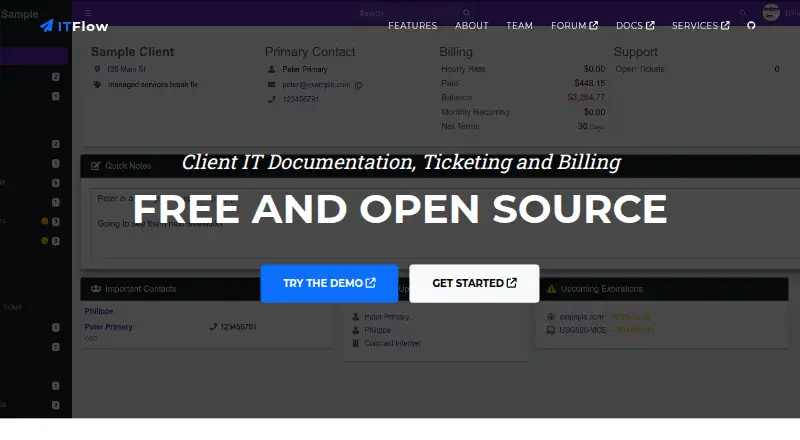
ITFlow is a free, open-source platform for client IT documentation, ticketing, and billing, aimed at small managed service providers.
What ITFlow is
ITFlow is a free, open-source platform for client IT documentation, ticketing, and billing, aimed at small managed service providers. It stores client details such as contacts, locations, vendors, computer assets, software licenses, domains, and documents. Teams can create, prioritize, and track support tickets, while billing tools cover recurring invoices, quotes, automated reminders, and client payments via Stripe. Other listed modules include accounting, bulk email, calendars, lead management, a client portal, and a password manager. Documentation also lists Ollama, OpenAI, and LocalAI integrations for rewording and summarizing tickets. The version 1 API covers modules including assets, clients, contacts, credentials, documents, invoices, and tickets, although some operations are partial or unavailable. Login passwords are encrypted at rest with AES 128-bit encryption; the documentation advises backing up the master key. ITFlow began in 2018 and moved to stable releases in January 2025. It is self-hosted: the recommended installation uses Debian, and manual Debian, HestiaCP, and community-supported Docker options are also documented. Windows installation is unsupported. Hosting and sponsor support are paid services.
Good
- Free, open-source software for self-hosting.
- Combines documentation, tickets, and billing.
- Supports recurring invoices, quotes, and Stripe payments.
- Includes a client portal and password manager.
- API covers clients, assets, invoices, and tickets.
Watch out
- Users must host ITFlow themselves.
- Windows installation is unsupported.
- Some API operations are partial or unavailable.
- Hosting and sponsor support are paid services.
Who it suits
ITFlow is aimed at small managed service providers that need client IT records, ticketing, and billing in one self-hosted platform. It suits teams prepared to manage their own hosting and installation.
Verdict
ITFlow brings client records, support tickets, and billing together for small MSPs, with several additional modules and AI integrations listed. Its self-hosted model and unsupported Windows installation are important constraints to weigh before choosing it.
Plans and prices
From ITFlow's own pricing page, checked 3 Oct 2026.
| Plan | Price | What it gives you |
|---|---|---|
| ITFlow (self-hosted) | Free | Free and open source; self-hosted; hosting and sponsor support are paid services |
The facts
Each one read from ITFlow's own pages, with the date it was checked.
What it does
- AI integrations
- The documentation lists Ollama, OpenAI, and LocalAI integrations for ticket rewording and summaries.checked 3 Oct 2026
- API
- The API is version 1 and supports modules including assets, clients, contacts, credentials, documents, invoices, and tickets, with some operations marked partial or unavailable.checked 3 Oct 2026
- Audience
- The official documentation describes ITFlow as a free ITGlue or Hudu alternative for small MSPs.checked 3 Oct 2026
- Documentation
- It stores client information including contacts, locations, vendors, computer assets, software licenses, domains, and documents.checked 3 Oct 2026
- Hosting
- Users must currently host ITFlow themselves; the FAQ says hosted service is planned but not yet available.checked 3 Oct 2026
- Installation
- The recommended installation method uses Debian; the documentation also lists manual Debian installation, HestiaCP, and community-supported Docker.checked 3 Oct 2026
- Other modules
- The site also lists accounting, bulk email, calendars, lead management, a client portal, and a password manager.checked 3 Oct 2026
- Password security
- The documentation says login passwords are encrypted at rest using AES 128-bit encryption and advises backing up the master key.checked 3 Oct 2026
- Product
- ITFlow describes itself as a free, open-source platform for client IT documentation, ticketing, and billing.checked 3 Oct 2026
- Support
- The forum is the stated place for product support, while sponsors may access private support.checked 3 Oct 2026
- Tickets
- The ticketing system supports creating, prioritizing, and tracking support tickets.checked 3 Oct 2026
Money
- Billing
- Billing features include recurring invoices, quotes, automated reminders, and client payments via Stripe.checked 3 Oct 2026
The company
- Company history
- The official site says ITFlow began in 2018 and moved to stable releases in January 2025.checked 3 Oct 2026
- Founded
- 2018checked 28 Sep 2026
Where it runs
- Windows support
- The documentation says Windows installation is unsupported and that it cannot offer support for it.checked 3 Oct 2026
The full review of ITFlow
ITFlow combines client IT records, support tickets, and billing for small managed service providers. It is a strong fit for teams that can operate their own installation and want those workflows in one open-source system. The trade-off is clear: there is no hosted service today, and Windows installation is unsupported.
Overview
ITFlow brings together client contacts, locations, vendors, computer assets, software licenses, domains, and documents. That breadth makes it more than a knowledge repository: support and billing can sit alongside the records MSPs use to understand each client. The project began in 2018 and moved to stable releases in January 2025.
Operating ITFlow is the user's responsibility. The recommended installation method uses Debian, with manual Debian installation and HestiaCP also documented; Docker is community-supported. A hosted service is planned but not yet available, so teams seeking vendor-managed hosting should choose another product.
Key features
Documentation, tickets, and API
Tickets can be created, prioritized, and tracked alongside client documentation, which suits small MSPs that want support work connected to client context. The version 1 API covers modules including assets, clients, contacts, credentials, documents, invoices, and tickets. Some operations are partial or unavailable, however, so integrations that rely on complete API coverage may need workarounds.
Billing and additional modules
Recurring invoices, quotes, automated reminders, and Stripe client payments give ITFlow a meaningful billing role as well as a documentation one. The site also lists accounting, bulk email, calendars, lead management, a client portal, and a password manager. This range may reduce the need to separate routine MSP functions across tools, though teams should weigh that breadth against the work of self-hosting.
AI and security
Documented integrations with Ollama, OpenAI, and LocalAI support ticket rewording and summaries. The documentation says login passwords are encrypted at rest with AES 128-bit encryption and advises backing up the master key. That backup advice is operationally important for anyone responsible for the installation.
Pricing
ITFlow (self-hosted) costs nothing. The free and open-source plan has no license charge, but hosting and sponsor support are paid services. The plan is therefore most attractive to teams able to provide their own hosting and support arrangements; it does not mean the service is hosted for free.
Single sign-on is supported. Product support is provided through the forum, while sponsors may access private support. Teams that require private support should account for that sponsorship distinction when deciding whether the no-cost license is sufficient.
Platforms
ITFlow supports API, Linux, self-hosted, and web. Debian is the recommended installation route, while Windows installation is explicitly unsupported and receives no support. The community-supported Docker route may suit teams already using containers, but it is not presented as the recommended method.
Who it's for
ITFlow is aimed at small MSPs looking for a free alternative to ITGlue or Hudu and willing to manage their own infrastructure. It is particularly relevant when client documentation, ticket handling, and billing belong in one operational system. It is a poor match for organizations that need hosted service, supported Windows deployment, or API operations that are complete across every module they use.
Pros and cons
- Pros: Free, open-source licensing removes per-seat license cost from the stated plan.
- Pros: Client records, ticketing, recurring billing, and additional modules span several common MSP workflows.
- Pros: Ollama, OpenAI, and LocalAI integrations offer options for ticket rewording and summaries.
- Cons: Self-hosting is required, so teams must take responsibility for deployment and operation.
- Cons: Windows installation is unsupported, narrowing its use for teams that require that platform.
- Cons: Some version 1 API operations are partial or unavailable, which can complicate integrations.
- Cons: Forum support is the standard route; private support is for sponsors.
Alternatives
CompassDocs is worth considering for teams that prioritize self-hosted documentation and want a community plan explicitly covering unlimited users and documents.
Rundeck may suit teams seeking a free community offering for small teams, with registration required.
Danbyte is another free, open-source self-hosted option, with all features included and no seat license or license expiry.
StackStorm is a free, open-source alternative when its project offers a better fit; it has no paid products.
FlowGuideAI may fit readers looking for a web-based option with a free tier capped at 15 pages per month, 2 GB of storage, and one user.
IT Dock is a web-based alternative whose free plan is capped at one technician, three clients, 25 AI questions per month, and five screenshot-to-documentation uses per month.
InfraDocs is a free, open-source self-hosted option for readers comparing Linux and web deployments.
Stepwright is a web and Windows alternative with a free plan capped at five guides.
Browse IT Documentation Software, Network Documentation Software, and IT Knowledge Base Software for more category options.
Verdict
Choose ITFlow if you are a small MSP that wants documentation, tickets, and billing together without a license fee and can handle self-hosting. Its breadth is the central reason to choose it; the operational burden, unsupported Windows installation, and incomplete API coverage are the reasons to look elsewhere.
Getting started
- Open the ITFlow website
- Prepare a Linux host, with Debian as the recommended option
- Install using the recommended Debian method or documented alternatives
- Use HestiaCP or community-supported Docker when appropriate
- Access the web application and configure your client records and modules
Limits worth knowing
The free software is self-hosted, so hosting is your responsibility; hosting and sponsor support are paid services. Windows installation is unsupported, and some version 1 API operations are partial or unavailable.
Questions
Is ITFlow free?
Yes. The listed self-hosted ITFlow plan costs nothing and is free and open source.
Which platforms does ITFlow support?
It is listed for API, Linux, self-hosted, and web use.
Can ITFlow be hosted by the provider?
Users must currently host ITFlow themselves. The FAQ says a hosted service is planned but not yet available.
What installation methods are documented?
The recommended method uses Debian. Manual Debian installation, HestiaCP, and community-supported Docker are also documented.
Does ITFlow support single sign-on?
Yes. SSO and single sign-on support are listed.
What does the API cover?
Version 1 includes modules such as assets, clients, contacts, credentials, documents, invoices, and tickets, with some operations partial or unavailable.
Alternatives to ITFlow
- 1

Scanopy
Free planOpen sourceWebAPILinuxmacOS8.3Free plan - 2
GestióIP
Free planOpen sourceWebAPILinuxSelf-hosted8.2From $400 a year - 3
i-doit
Open sourceAndroidiOSWebAPI8.1From €48.65 a month - 4
NinjaOne
AndroidiOSWebAPI7.9From $1.50 a month - 5

NetBox
Free planOpen sourceWebAPILinuxSelf-hosted7.6Free plan - 6

Danbyte
Free planOpen sourceWebAPILinuxSelf-hosted7.4Free plan