Incus
Incus is free software for managing system containers, application containers and virtual machines.
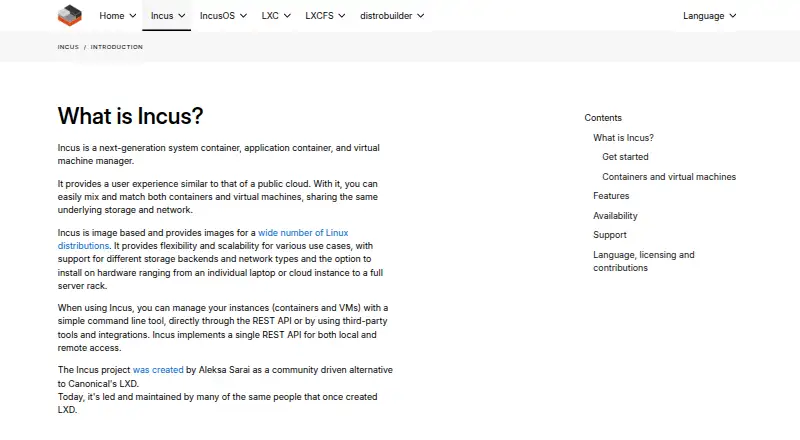
What Incus is
Incus is free software for managing system containers, application containers and virtual machines. Its instances can share storage and networking, and can be managed through a command-line tool, REST API or third-party tools and integrations. Incus supports snapshots, backup and recovery, instance migration, configurable storage pools and networks, and resource controls. The project describes the API as scaling from a laptop to clusters of thousands of compute nodes. Documented integrations include Terraform, OpenTofu, Ansible, Packer, Distrobuilder, GARM, Kubernetes Cluster API and Incant. The Incus daemon runs on Linux; client applications are available for Windows and macOS, and client packages are listed for FreeBSD. Upstream does not directly provide packages: installation is available through Linux distributions or third-party repositories, or from source. Incus is developed under the Apache 2 license. Local access to its Unix socket gives full control, so access should be limited to trusted users. The 6.0 LTS release is supported until June 2029; feature releases normally receive support until the next release.
Good
- Manages containers and virtual machines
- Instances can share storage and networking
- Supports snapshots, recovery and migration
- Offers REST API and third-party integrations
- Free software under the Apache 2 license
Watch out
- The daemon runs on Linux only
- Upstream does not directly provide packages
- Unix socket access grants full control
Who it suits
Incus suits developers and operators managing container or virtual-machine workloads who want shared storage and networking, API access and integration options. Its daemon requires Linux, even though client applications are available on other platforms.
Verdict
Incus offers a broad set of instance-management capabilities through command-line, API and integration-based workflows. Keep in mind that the daemon is Linux-only and that access to its Unix socket should be restricted to trusted users.
Plans and prices
From Incus's own pricing page, checked 3 Oct 2026.
| Plan | Price | What it gives you |
|---|---|---|
| Incus | Free | Free software · Apache 2 license |
The facts
Each one read from Incus's own pages, with the date it was checked.
What it does
- Access
- Instances can be managed through a command line tool, the REST API, or third-party tools and integrations.checked 3 Oct 2026
- Cloud-like management
- Incus lets users manage containers and virtual machines that share underlying storage and networking.checked 3 Oct 2026
- Commercial support
- The Incus project says commercial support is available from Zabbly.checked 3 Oct 2026
- Features
- Features include backups and recovery, snapshots, instance migration, configurable profiles, storage backends, network management, resource controls, and device passthrough.checked 3 Oct 2026
- Images
- Incus provides images for a wide range of Linux distributions, published daily.checked 3 Oct 2026
- Installation
- Incus upstream does not directly provide packages; packages are available through Linux distributions or third-party repositories, and it can also be installed from source.checked 3 Oct 2026
- Integrations
- The documentation links to third-party tools and documents storage drivers including Btrfs, LVM, ZFS, Ceph, LINSTOR, and TrueNAS.checked 3 Oct 2026
- License
- Incus is free software developed under the Apache 2 license.checked 2 Oct 2026
- License and audience
- Incus is free software under the Apache 2 license, and the project describes it as suitable for development and production workloads.checked 3 Oct 2026
- Local access limit
- Access to the Incus Unix socket grants full control of Incus, so the documentation advises giving it only to users trusted with root access.checked 3 Oct 2026
- Management
- Instances can be managed with a command line tool, the REST API, or third-party tools and integrations.checked 2 Oct 2026
- Purpose
- Incus is a system container, application container, and virtual machine manager.checked 2 Oct 2026
- Releases
- The Incus 6.0 LTS release is supported until June 2029, while feature releases are published about monthly and normally supported until the next release.checked 2 Oct 2026
- Release support
- Incus offers LTS and feature releases; its page states that Incus 6.0 LTS is supported until June 2029, while feature releases are normally supported for about a month.checked 3 Oct 2026
- Scale
- Incus is described as scaling from a single instance on one machine to a cluster in a full data center rack.checked 3 Oct 2026
- Security
- The project highlights unprivileged containers, resource restrictions, and authentication as security measures.checked 3 Oct 2026
- Security limitation
- Local access to the Incus Unix socket grants full control of Incus, so the guide recommends giving it only to trusted users.checked 2 Oct 2026
- Shared infrastructure
- Containers and virtual machines can share the same underlying storage and network.checked 2 Oct 2026
- Support
- Community support is available through the Linux Containers forum, and Zabbly provides commercial support for users of its Debian or Ubuntu packages.checked 2 Oct 2026
- Supported hosts
- The Incus daemon works on Linux; the client is available on most platforms, and the project specifically identifies Windows and macOS clients.checked 3 Oct 2026
- What it does
- Incus is a system container, application container, and virtual machine manager.checked 3 Oct 2026
Where it runs
- Client platforms
- The Incus client is available for Windows and macOS, and the installation guide also lists FreeBSD client packages.checked 2 Oct 2026
- Linux server
- The Incus daemon runs on Linux; builds for other operating systems include only the client.checked 2 Oct 2026
The company
- Founded
- 2023checked 28 Sep 2026
The full review of Incus
Incus is a free manager for system and application containers and virtual machines, suited to Linux operators who want shared infrastructure and several ways to automate instance management. Its breadth is a strength, but it is not a desktop virtualization app: the daemon runs on Linux, and socket access carries substantial authority.
Overview
Incus brings containers and virtual machines into one management model, letting them use the same underlying storage and networking. That makes it a practical fit for teams consolidating varied workloads, rather than a narrowly focused container runtime. Images for many Linux distributions are published daily, and the project positions Incus for both development and production.
Operators can manage instances with a command-line tool, the REST API, or third-party integrations. The project describes the API as scaling from a laptop to clusters of thousands of compute nodes; that ambition is useful for designs that may grow, though it does not remove the need to plan and operate Linux infrastructure.
Key features
Snapshots, backup and recovery, migration, configurable storage pools and networks, and resource controls cover many routine lifecycle needs. Sharing storage and networking between containers and virtual machines can simplify administration when both workload types belong in the same environment.
Integrations include Terraform, OpenTofu, Ansible, Packer, Distrobuilder, GARM, Kubernetes Cluster API, and Incant. This makes Incus more compelling for infrastructure-as-code and automation workflows than for users seeking a graphical, self-contained desktop experience.
Containers are unprivileged by default, a useful security baseline. But local access to the Unix socket grants full control of Incus, so it should be limited to trusted users. The security guide also recommends supported versions; the 6.0 LTS release is supported until June 2029, while feature releases arrive about monthly and are normally supported until the next release.
Pricing
Incus costs free. The free plan is free software under the Apache 2 license and includes the project’s instance-management capabilities; there are no paid tiers or seat caps in the plan described here. Commercial support is available from Zabbly for users of its Debian or Ubuntu packages, while community support is available through the Linux Containers forum.
Platforms
The Incus daemon runs on Linux, which is the key constraint for choosing it as an actual host. Windows and macOS builds provide the client only; the installation guide also lists FreeBSD client packages. Upstream does not directly provide packages: users install through Linux distributions or third-party repositories, or build from source. That gives experienced operators options, but makes package selection part of deployment planning.
Who it's for
Incus suits Linux administrators and development or operations teams that need to manage containers and virtual machines together, especially where API-driven automation, migration, and configurable infrastructure matter. Its free, open-source model also suits users who want to self-host without a subscription.
It is a poor fit for someone who needs the virtualization daemon itself on Windows or macOS, or who cannot tightly control privileged local access. Teams wanting vendor-backed assistance should account for the Zabbly support route and its Debian or Ubuntu package context.
Pros and cons
- Pros: Containers and virtual machines share storage and networking, supporting a unified operating model.
- Pros: Snapshots, backup and recovery, migration, resource controls, and a broad integration set support lifecycle automation.
- Pros: The Apache 2-licensed software is free, with an LTS release supported until June 2029.
- Cons: The daemon is Linux-only; Windows and macOS clients cannot make those systems Incus hosts.
- Cons: Unix socket access grants full control, so local access must be treated as root-level trust.
- Cons: Upstream does not provide packages directly, leaving installation to distro or third-party repositories or source builds.
Alternatives
For a desktop-oriented option with Linux, macOS, Windows, and web platforms, consider Docker Desktop; its free Personal plan is capped at one user, one Docker Scout-enabled repository, 100 Docker Hub pulls per hour, and one private Docker Hub repository.
Apptainer is another free, open-source container platform with commercial support through partners, but Incus is the choice when virtual machines and shared storage and networking are central.
Rancher Desktop is a free open-source desktop app from SUSE's Rancher Engineering group, a relevant alternative for readers seeking a desktop application.
LXD offers KVM-based virtual machines, system containers, and self-hosted deployment; consider it when that combination is the desired fit.
Colima is a free MIT-licensed option for container runtimes on macOS and Linux, making it a more focused alternative when virtual-machine management is not the goal.
crun is a free OCI container runtime with source builds and release binaries; choose it when a runtime rather than an instance manager is needed.
Podman is a free option for container, pod, and image management that includes Podman Desktop, for readers prioritizing those capabilities.
containerd is a free Apache 2-licensed container runtime and is the narrower alternative when runtime functionality is the requirement.
Verdict
Choose Incus if you operate Linux infrastructure and want one free, automation-ready manager for containers and virtual machines. Its breadth and shared-resource model are the strongest reasons to adopt it; look elsewhere if you need a non-Linux host daemon or cannot restrict socket access to trusted users.
Getting started
- Visit the Incus website
- Install packages through a Linux distribution or third-party repository, or build from source
- Run the Incus daemon on a Linux host
- Install a client on Windows, macOS, Linux, or another listed platform
- Manage instances through the CLI, REST API, or an integration
Limits worth knowing
The Incus daemon operates on Linux; Windows and macOS provide clients rather than hosts. Local Unix-socket access gives full control, so access must be restricted to trusted users.
Questions
Is Incus free?
The Incus plan is free. It is free software under the Apache 2 license.
What can Incus manage?
It manages system containers, application containers, and virtual machines with shared storage and networking.
Which platforms are supported?
The daemon runs on Linux. Clients are available for Windows and macOS, and FreeBSD client packages are listed.
How can instances be managed?
You can use the command-line tool, REST API, or documented third-party tools and integrations.
How is Incus installed?
Upstream does not directly provide packages; installation is through Linux distributions, third-party repositories, or source.
What support options exist?
Community support is available through the Linux Containers forum, and Zabbly offers commercial support for its Debian or Ubuntu packages.
Alternatives to Incus
- 1

LXD
Free planWebAPILinuxSelf-hosted7.0From $25 a year - 2
BuildKit
Free planAPILinuxmacOSSelf-hosted6.8Free plan - 3
Apptainer
Free planAPILinuxmacOSSelf-hosted6.7Free plan - 4
crun
Free planLinuxSelf-hosted6.5Free plan - 5

Buildah
Free planAPILinuxSelf-hosted6.4Free plan - 6

Podman
Free planAPILinuxmacOSSelf-hosted6.4Free plan