Docker Desktop
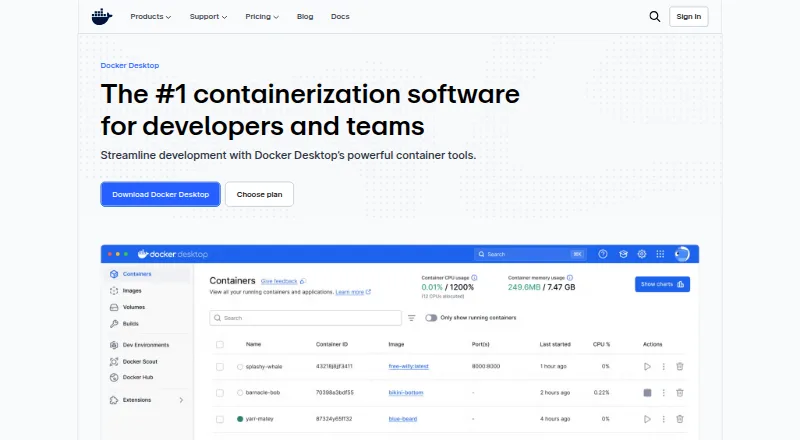
Docker Desktop is a containerization platform for developers and teams building and deploying containerized applications.
What Docker Desktop is
Docker Desktop is a containerization platform for developers and teams building and deploying containerized applications. It brings together Docker Engine, Docker CLI, Docker Compose, Docker Build, and Docker Kubernetes. Its built-in Kubernetes support lets users deploy, scale, test, and manage applications locally without an external cluster. Docker Debug supplies command-line diagnostics for containers and images, including slim containers, while Docker Extensions add third-party tools for tasks such as testing, security, and networking. Downloads are available for Mac with Apple Silicon or Intel, Windows with AMD64 or ARM64, and Linux. Docker Personal is free. Docker Pro costs $9 a month, Docker Team costs $15 a month, and Docker Business costs $24 a month. Business includes security controls such as Single Sign-On, SCIM provisioning, Image and Registry Access Management, and Enhanced Container Isolation, along with VDI support for Citrix, VMware Horizon, and AVD. Commercial use at a company with more than 250 employees or more than $10 million in annual revenue requires a paid Docker subscription. Support response targets vary by plan: five business days for Pro, two for Team, and one for Business.
Good
- Includes Docker Engine, CLI, Compose, Build, and Kubernetes.
- Local Kubernetes works without an external cluster.
- Available for Mac, Windows, and Linux.
- Extensions add third-party tools for testing, security, and networking.
Watch out
- Large companies require a paid subscription for commercial use.
- Docker Personal is limited to one user.
- Pro, Team, and Business have paid monthly plans.
Who it suits
Docker Desktop suits developers and teams who want container development tools and local Kubernetes support on Linux, macOS, or Windows. Companies meeting either stated size threshold for commercial use need a paid subscription.
Verdict
Docker Desktop combines core container tools with local Kubernetes and debugging features across three desktop operating systems. Review the plan limits and commercial-use requirement before selecting a tier.
Plans and prices
From Docker Desktop's own pricing page, checked 20 Sep 2026.
| Plan | Price | What it gives you |
|---|---|---|
| Personal | Free | Docker Desktop · Docker Engine and Kubernetes · Docker Hub · Docker Scout · Docker Debug · billed monthly |
| Pro | $9 a month | Docker Build Cloud · Testcontainers Cloud · Synchronized File Shares · Docker Scout health-score visibility · Five-business-day support response · billed annually |
| Team | $15 a month | Bulk user addition · Audit logs · Docker Hub role-based access control · Two-business-day support response · Up to 100 users · billed annually |
| Business | $24 a month | Hardened Docker Desktop · Single sign-on · SCIM user provisioning · Image and Registry Access Management · Enhanced Container Isolation · billed annually |
| Docker Personal | Free | 1 user · 1 Docker Scout-enabled repo · 100 Docker Hub pulls/hr · 1 private Docker Hub repo |
| Docker Pro | $9 a month | 1 user · 2 Docker Scout-enabled repos · unlimited Docker Hub pull rate · 200 Docker Build Cloud build minutes/month · 100 Testcontainers Cloud runtime minutes/month · $9 per user/month on annual plan; $11 per user/month on monthly plan |
| Docker Team | $15 a month | Up to 100 users · unlimited Docker Scout-enabled repos · unlimited private Docker Hub repos · 500 Docker Build Cloud build minutes/month · 500 Testcontainers Cloud runtime minutes/month · $15 per user/month on annual plan; $16 per user/month on monthly plan |
| Docker Business | $24 a month | No user cap · unlimited Docker Scout-enabled repos · unlimited private Docker Hub repos · 1,500 Docker Build Cloud build minutes/month · 1,500 Testcontainers Cloud runtime minutes/month · $24 per user/month |
The facts
Each one read from Docker Desktop's own pages, with the date it was checked.
What it does
- Commercial eligibility
- Commercial use at a company with more than 250 employees or more than $10 million in annual revenue requires a paid Docker subscription.checked 28 Sep 2026
- Compliance
- Docker says its current SOC 2 Type 2 audit scope includes Docker Desktop and that Docker has SOC 2 Type 2, ISO 27001, and ISO 27701 certifications.checked 28 Sep 2026
- Core tools
- Docker Desktop includes Docker Engine, Docker CLI, Docker Compose, Docker Build, and Docker Kubernetes.checked 28 Sep 2026
- Debugging
- Docker Debug provides CLI tools for diagnosing containers and images, including slim containers that would otherwise be difficult to debug.checked 28 Sep 2026
- Enterprise VDI
- Docker Desktop Business lists VDI support for Citrix, VMware Horizon, and AVD.checked 28 Sep 2026
- Extensions
- Docker Extensions let developers customize Desktop with third-party tools for functions such as debugging, testing, security, and networking.checked 28 Sep 2026
- Kubernetes
- Its built-in Kubernetes support allows users to deploy, scale, test, and manage containerized applications locally without an external cluster.checked 28 Sep 2026
- Purpose
- Docker Desktop is a containerization platform for developers and teams that streamlines container development and deployment.checked 28 Sep 2026
- Security controls
- The Business plan includes Hardened Docker Desktop, Single Sign-On, SCIM provisioning, Image and Registry Access Management, and Enhanced Container Isolation.checked 28 Sep 2026
- Supported systems
- Docker's download links offer Docker Desktop for Mac with Apple Silicon or Intel, Windows with AMD64 or ARM64, and Linux.checked 28 Sep 2026
- Support response
- Pricing lists support response targets of five business days for Pro, two business days for Team, and one business day for Business.checked 28 Sep 2026
The company
- Company
- The maker identifies itself as Docker and says it is trusted by more than 20 million developers.checked 28 Sep 2026
- Headquarters
- Palo Alto, California, United Stateschecked 28 Sep 2026
The full review of Docker Desktop
Overview
Docker Desktop brings container development and deployment tools together for individual developers and teams. It suits people who want Docker’s core workflow and local Kubernetes in one desktop environment, but larger companies must account for its commercial-use threshold and paid subscription requirement.
Key features
Development in one desktop environment
Docker Engine, Docker CLI, Docker Compose, and Docker Build cover the central container workflow, from composing multi-container applications to building images. IDE integration, resource controls, rootless mode, and persistent storage add useful breadth for day-to-day development. The trade-off is that Docker Desktop is a bundled environment rather than just a container runtime; users who want a narrower, free runtime may not need the full package.
Local Kubernetes and debugging
Built-in Kubernetes supports deploying, scaling, testing, and managing containerized applications locally, without relying on an external cluster. That makes it a practical option for developers who need to work against Kubernetes on their own machine. Docker Debug adds command-line diagnostics for containers and images, including slim containers that are otherwise difficult to inspect.
Extensions and security
Docker Extensions allow third-party additions for debugging, testing, security, and networking, so teams can tailor the desktop environment to their workflows. The Business plan adds Hardened Docker Desktop, Single Sign-On, SCIM provisioning, image and registry access management, and Enhanced Container Isolation. Those controls make Business the relevant tier for organizations that need managed access and stronger isolation; the free and lower-cost tiers do not include this listed security bundle.
Docker says its current SOC 2 Type 2 audit scope includes Docker Desktop, and that it holds SOC 2 Type 2, ISO 27001, and ISO 27701 certifications. Docker Desktop also supports image and registry scanning, SBOM generation, network controls, and immutable tags, but it does not provide runtime protection, Kubernetes security, or admission control.
Pricing
Docker Personal is free for one user, one Docker Scout-enabled repository, 100 Docker Hub pulls per hour, and one private Docker Hub repository. It is a workable starting point for an individual, but the repository and pull limits matter for regular private-image work. Commercial use at companies with more than 250 employees or more than $10 million in annual revenue requires a paid Docker subscription.
Docker Pro is $9 a month, billed at $9 per user/month on an annual plan or $11 per user/month on a monthly plan. It is for a single developer who needs unlimited Docker Hub pull rate, two Docker Scout-enabled repositories, 200 Docker Build Cloud build minutes and 100 Testcontainers Cloud runtime minutes per month. Its one-user cap and modest monthly quotas make it a personal upgrade, not a team plan. Support response target is five business days.
Docker Team is $15 a month, billed at $15 per user/month annually or $16 per user/month monthly, for up to 100 users. It expands Scout-enabled and private Docker Hub repositories to unlimited, with 500 Docker Build Cloud build minutes and 500 Testcontainers Cloud runtime minutes per month. This is the better fit for a collaborating group, though its cloud build and runtime allowances remain capped. Support response target is two business days.
Docker Business is $24 a month, billed at $24 per user/month, with no user cap, unlimited Scout-enabled and private Docker Hub repositories, and 1,500 monthly minutes each for Docker Build Cloud builds and Testcontainers Cloud runtime. It is aimed at larger organizations that need the Business security controls and VDI support for Citrix, VMware Horizon, or AVD. Support response target is one business day.
Platforms
Docker Desktop supports Windows, macOS, and Linux. Downloads cover Mac with Apple Silicon or Intel and Windows with AMD64 or ARM64. The listed desktop platforms are broad, although the practical fit still depends on the user’s operating system and processor architecture.
Who it's for
Docker Desktop is best for developers who want Docker’s core container tools, local Kubernetes, and debugging in one desktop platform. Pro suits an individual who outgrows Personal’s pull and repository caps; Team suits groups that need shared, uncapped repository access; Business is the choice for organizations needing its security controls, VDI support, and larger quotas. Companies past the stated employee or revenue threshold should factor in the paid-subscription requirement before adopting it.
Pros and cons
- Broad local toolkit: Engine, CLI, Compose, Build, and Kubernetes are combined, reducing the need to assemble those core tools separately.
- Useful local Kubernetes and diagnostics: users can work with Kubernetes without an external cluster and diagnose even slim containers.
- Clear upgrade path: higher tiers increase repository access, cloud minutes, user capacity, and, at Business, security and VDI capabilities.
- Limits persist on paid tiers: Pro, Team, and Business have monthly cloud build and Testcontainers runtime quotas, so heavier use can make those caps consequential.
- Not a complete runtime security layer: runtime protection, Kubernetes security, and admission control are absent.
- Commercial boundary affects larger employers: companies above either stated threshold need a paid subscription even if an individual user’s needs are modest.
Alternatives
For a free desktop container option, Rancher Desktop is available at no cost and is an open-source desktop application associated with SUSE’s Rancher Engineering group. Choose it when a free alternative is the priority.
Podman is free and open source, supports container, pod, and image management, and includes Podman Desktop. It is a fit for readers seeking that free, open-source approach. Colima is also free and open source, with container runtimes for macOS and Linux; it is the more relevant alternative for those platforms.
Incus is free software under the Apache 2 license. Apptainer is a free open-source container platform with commercial support available through partners. LXD offers KVM-based virtual machines, system containers, and self-hosted deployment. crun is a free OCI container runtime, while containerd is a free open-source container runtime.
Explore Container Runtime Software, Container Registries, Container Development Environments, Container Image Scanning Tools, Container Engines, or Sandbox Software for category comparisons.
Verdict
Choose Docker Desktop if you want a broad desktop container toolkit with local Kubernetes and debugging, and can work within the tier’s repository, user, and monthly quota limits. Its strongest case is the combination of core Docker tools and local development features; look elsewhere if you need runtime or Kubernetes security controls, or want a free alternative without Docker’s commercial-use boundary.
Getting started
- Visit the Docker Desktop website.
- Choose a download for macOS, Windows, or Linux.
- Select the platform-specific build for your system where offered.
- Start with Personal or choose a paid plan based on its listed tools and allowances.
- For commercial use at a company with more than 250 employees or more than $10 million in annual revenue, choose a paid subscription.
Limits worth knowing
Personal is free and includes one user, one Docker Scout-enabled repository, 100 Docker Hub pulls per hour, and one private Docker Hub repository. The listed paid plans cost 9.00 USD, 15.00 USD, and $24 per user per month on annual billing; Pro is listed at $11 per user per month with monthly billing. Team is capped at 100 users, while Business has no user cap.
Questions
Is Docker Desktop free?
Yes. The Personal plan is free and includes one user, one Docker Scout-enabled repository, 100 Docker Hub pulls per hour, and one private Docker Hub repository.
What platforms does Docker Desktop support?
Downloads are listed for macOS, Windows, and Linux. Mac downloads are offered for Apple Silicon or Intel, and Windows downloads for AMD64 or ARM64.
How much do the paid plans cost?
Pro is $9 per user per month on an annual plan or $11 per user per month on a monthly plan. Team is $15 per user per month on annual billing, and Business is $24 per user per month.
Does Docker Desktop include local Kubernetes?
Yes. Built-in Kubernetes support lets users deploy, scale, test, and manage containerized applications locally without an external cluster.
When is a paid subscription required for commercial use?
Commercial use at a company with more than 250 employees or more than $10 million in annual revenue requires a paid Docker subscription.
What security controls does Business include?
Business includes Hardened Docker Desktop, single sign-on, SCIM provisioning, Image and Registry Access Management, and Enhanced Container Isolation.