Imgflip GIF Maker
Imgflip GIF Maker is an online tool for making animated GIFs from images and video, including video files, URLs, YouTube, Vimeo, and Giphy.
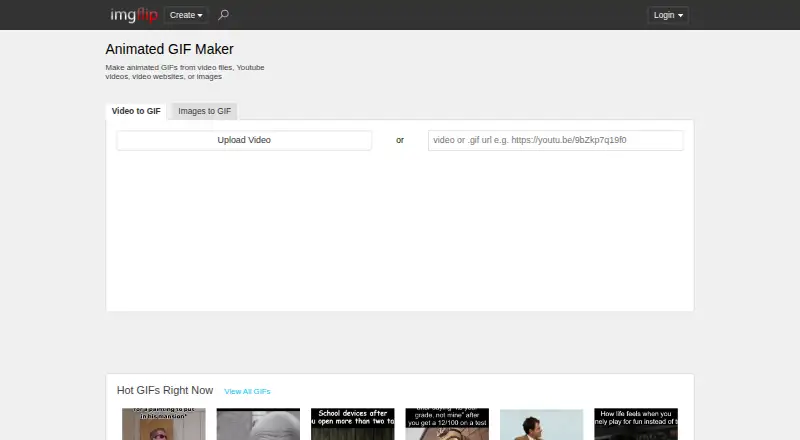
What Imgflip GIF Maker is
Imgflip GIF Maker is an online tool for making animated GIFs from images and video, including video files, URLs, YouTube, Vimeo, and Giphy. It supports image-to-GIF and video-to-GIF creation, but not prompt-to-GIF generation. Users can add text, stickers, drawings, sound, or motion, and crop, rotate, or resize media. The free plan allows video GIFs up to 24 seconds, with a maximum of 160 frames, 360x360 video dimensions, and 12M total resolution. Image-based GIFs can use up to 1600 frames and 500x500 image dimensions for free. Pro raises video limits to 1600 frames, 240 seconds, unlimited dimensions, and 240M total resolution; it also lists unlimited image frames and dimensions. Pro removes or customizes the imgflip.com watermark and disables ads. Pro costs $11.95 a month with yearly billing or $14.95 a month. Sound on video-based GIFs requires Pro. Logged-in users can save GIFs to an Imgflip account, or share them through links, downloads, apps, social media, and Imgflip communities.
Good
- Creates GIFs from images, video, and URLs.
- Includes text, stickers, drawings, cropping, and rotation.
- Free image-to-GIF creation supports up to 1600 frames.
- GIFs can be shared through links, apps, and social media.
Watch out
- Does not support prompt-to-GIF generation.
- Free video GIFs are limited to 24 seconds.
- Free video dimensions are limited to 360x360.
- Video GIF sound requires Pro.
Who it suits
Imgflip GIF Maker may suit people who want to turn images or video clips into GIFs and add text or other edits. It supports Windows, Mac, iPhone/iOS, and Android.
Verdict
Imgflip GIF Maker supports both image and video sources, with editing tools and free GIF creation. Check the free video limits and Pro requirements for sound, watermark controls, and larger outputs.
Plans and prices
From Imgflip GIF Maker's own pricing page, checked 28 Sep 2026.
| Plan | Price | What it gives you |
|---|---|---|
| Free | Free | 160 video frames · 360x360 maximum video dimensions · 12M maximum total resolution · 24-second maximum video segment · 1600 image frames · 500x500 maximum image dimensions |
| Pro | — | 1600 video frames · 240-second maximum video segment · Unlimited video dimensions · 240M maximum total resolution · Unlimited image frames · Unlimited image dimensions |
| Pro annual billing | $11.95 a month | save 20% · billed yearly at $11.95/month |
| Pro monthly | $14.95 a month | — |
The facts
Each one read from Imgflip GIF Maker's own pages, with the date it was checked.
The company
- Company identity
- The page identifies the company as Imgflip LLC in 2026.checked 28 Sep 2026
What it does
- Customization features
- Features include text, stickers, drawings, cropping, rotation, resizing, sound, and motion.checked 28 Sep 2026
- Feedback support
- Users can send feedback or suggestions about the GIF maker.checked 28 Sep 2026
- GIF sound support
- Sound works with video-based GIFs, but requires an Imgflip Pro account.checked 28 Sep 2026
- GIF templates
- Yeschecked 22 Sep 2026
- Image to GIF
- Yeschecked 22 Sep 2026
- Maximum GIF length
- 240checked 22 Sep 2026
- Media sources
- GIFs can be made from YouTube, Vimeo, Giphy, video files, URLs, and images.checked 28 Sep 2026
- Online saving
- Logged-in users can save created GIFs to their Imgflip account.checked 28 Sep 2026
- Pro ad removal
- Pro disables all ads.checked 28 Sep 2026
- Prompt to GIF
- Nochecked 22 Sep 2026
- Pro quality limits
- Pro raises video limits to 1600 frames, unlimited dimensions, 240M total resolution, and 240 seconds.checked 28 Sep 2026
- Pro watermark removal
- Pro can remove or customize the imgflip.com watermark.checked 28 Sep 2026
- Sharing options
- Users can share to social media, phone apps, links, downloads, and Imgflip communities.checked 28 Sep 2026
- Supported image formats
- Supported formats include PNG, JPG/JPEG, GIF, and browser-supported formats such as SVG, WebP, TIFF, and BMP.checked 28 Sep 2026
- Supported video formats
- Popular supported formats include FLV, AVI, MOV, MP4, MPG, MPEG, WMV, 3GP, ASF, SWF, OGG, H264, and RM.checked 28 Sep 2026
Money
- Free dimensions
- The free tier supports maximum video dimensions of 360x360.checked 28 Sep 2026
- Free GIF creation
- Users can make high quality animated GIFs online for free.checked 28 Sep 2026
- Free image dimensions
- The free tier supports maximum image dimensions of 500x500.checked 28 Sep 2026
- Free image frames
- The free tier allows up to 1600 frames for image-to-GIF creation.checked 28 Sep 2026
- Free plan
- Yeschecked 22 Sep 2026
- Free video frames
- The free tier allows 160 maximum frames per GIF from video.checked 28 Sep 2026
- Free video length
- The free tier supports video segments up to 24 seconds.checked 28 Sep 2026
Where it runs
- Supported platforms
- It supports Windows, Mac, iPhone/iOS, and Android.checked 28 Sep 2026
The full review of Imgflip GIF Maker
Imgflip GIF Maker is a source-based online editor for turning existing images and videos into GIFs. It suits people who want to edit and share conventional GIFs across desktop and mobile; its free tier handles short, small video clips, while larger video output and sound call for Pro.
Overview
Imgflip accepts images, video files, URLs, and media from YouTube, Vimeo, and Giphy. Editing tools cover text, stickers, drawings, cropping, rotation, resizing, and motion. That makes it a flexible choice for adapting existing media, but not for generating GIFs from a text prompt.
Users can save creations to an Imgflip account when logged in, or share through social media, phone apps, links, downloads, and Imgflip communities. The service supports common formats including PNG, JPG/JPEG, GIF, SVG, WebP, TIFF, BMP, MP4, MOV, AVI, and WMV. Watermark-free export is supported, while Pro adds the option to remove or customize the imgflip.com watermark.
Key features
- Video and image conversion: Free video creation is capped at 160 frames, 360x360 dimensions, 12M total resolution, and a 24-second segment. Those limits suit brief, modest-sized clips rather than detailed or extended footage. Image-to-GIF creation has more headroom on Free: up to 1,600 frames and 500x500 dimensions.
- Editing controls: Text, stickers, drawings, crop, rotate, resize, and motion allow useful adjustments before sharing. Sound works only with video-based GIFs and requires Pro, so Free is not the choice for GIFs that need audio.
- Pro output limits: Pro raises video capacity to 1,600 frames and 240 seconds, with unlimited video dimensions and 240M maximum total resolution. It also removes the frame and dimension caps for image GIFs. These increases matter for larger or longer projects, though Pro is required to reach them.
- Sharing and saving: Account holders can save creations online, and the range of sharing destinations makes it practical for moving finished GIFs into social apps or communities.
Pricing
Imgflip is freemium. Free costs nothing and includes 160 video frames, 360x360 maximum video dimensions, 12M maximum total resolution, 24-second video segments, 1,600 image frames, and 500x500 maximum image dimensions. It is a useful starting point for short video snippets or image sequences, but the video caps are restrictive for bigger exports.
Pro monthly costs $14.95 a month. Pro annual billing costs $11.95 a month, billed yearly at $11.95/month, with a 20% saving. Pro provides the higher video and image limits, disables all ads, and can remove or customize the watermark; sound for video-based GIFs also requires a Pro account. The annual rate is the cheaper paid option for ongoing use, while monthly billing avoids a yearly commitment. The Pro plan's price is custom pricing.
Platforms
Imgflip supports Windows, Mac, iPhone/iOS, and Android. Its online editor and account-based saving suit people who work across desktop and phone, though the same Free video limits apply when choosing a device.
Who it's for
Choose Imgflip for editing existing photos, image sequences, and short video clips into shareable GIFs, especially when stickers, text, or basic image adjustments are part of the job. It is less suitable for prompt-led creation, high-resolution free video exports, or sound without a Pro account.
Pros and cons
- Pro: Multiple source types, including URLs and major video platforms, make it useful for repurposing media without first limiting the workflow to local files.
- Pro: Free image creation supports up to 1,600 frames, substantially more than the Free video frame cap.
- Con: Free video output is limited to 360x360 and 24 seconds, which rules out larger or longer clips on the free tier.
- Con: Video sound requires Pro, and Pro is also needed to remove or customize the watermark.
- Con: There is no prompt-to-GIF generation for readers who want an image made from a written idea.
Alternatives
For prompt-based tools, browse AI GIF Makers. Choose Moxion if a free daily AI generation and gifted credits suit your workflow; its Free plan includes one shared AI generation per day, 150 gifted Credits, a 480p preview, and a watermark. GifCraft is a free alternative with no account, no watermark, and no export limit, though its AI generator allows only a few images per hour.
GifRun is a web-based option with anonymous clips capped at 10 seconds and 520px, or a free account tier capped at 20 seconds and 600px with a watermark. Kapwing may fit readers who want a broader editor: its Free plan includes 10 credits, exports up to four minutes, and 720p. Hagif offers local single-file tools without a required account or watermark.
Photo2GIF is a web alternative centered on AI vintage GIFs, with one free AI GIF and a watermark on its Free plan. Rewind.ai AI GIF Generator offers a free allowance of 5,000 tokens per day. Ezgif is a free web option with no signup or conversion limits stated, supporting uploads up to 200MB and up to 2,000 image files at 1920×1920px.
Verdict
Imgflip GIF Maker is a strong fit for people who want flexible, source-based GIF editing and can work within modest Free video limits. Its broad input options and generous image-frame allowance are the main reasons to choose it; look elsewhere for prompt-generated GIFs, or move to Pro if larger video output, watermark controls, or sound are essential.
Getting started
- Open https://imgflip.com/gif-maker.
- Choose images, a video, a URL, or a supported source such as YouTube, Vimeo, or Giphy.
- Customize the media with available text, stickers, drawings, or adjustments.
- Create the GIF within the limits of the Free plan, or use Pro for higher limits and its listed features.
- Log in to save a creation to an Imgflip account, or share it through an available option.
Limits worth knowing
The Free plan limits video GIFs to 160 frames, 360x360 dimensions, 12M total resolution, and 24 seconds. Free image-to-GIF creation is limited to 1600 frames and 500x500 dimensions. Video-based GIF sound requires Pro.
Questions
What does Imgflip GIF Maker cost?
The Free plan is free. Pro costs $11.95 a month with yearly billing or $14.95 a month with monthly billing.
What are the Free plan's video limits?
Free video GIFs can be up to 160 frames, 360x360 dimensions, 12M total resolution, and 24 seconds.
What are the Free plan's image limits?
Free image-to-GIF creation supports up to 1600 frames and 500x500 dimensions.
What does Pro add?
Pro raises video limits to 1600 frames, 240 seconds, unlimited dimensions, and 240M total resolution; image frames and dimensions are unlimited. It can remove or customize the watermark and disables ads.
Can it add sound to GIFs?
Sound works with video-based GIFs, but requires an Imgflip Pro account.
Which platforms does it support?
Supported platforms are Windows, Mac, iPhone/iOS, and Android.