
Moxion
Moxion is a browser-based service for creating, optimizing, and converting GIFs with AI.
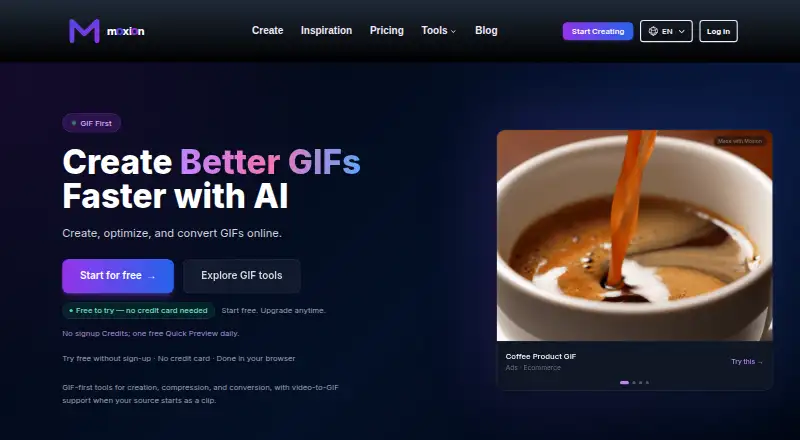
What Moxion is
Moxion is a browser-based service for creating, optimizing, and converting GIFs with AI. Start with text, an image, or a video; the tools include GIF generation, compression, resizing, cropping, and conversion to MP4. It also offers text-to-video and image-to-video generation. Finished assets can be used on Discord, social media, e-commerce, and ads. Moxion runs in a web browser and has no native desktop or mobile app. After sign-in, the free tier gives one shared GIF or video generation per day, limited to two seconds and 480p, with a watermark; new accounts receive 150 Credits. A trial allows one Pro access use within seven days. Paid options include the Starter Pack at $9 a month, one-time credit packs, and monthly subscriptions. The Starter subscription is $19 a month and Pro is $49 a month. Purchased Credits do not expire, while unused subscription Credits do not roll over.
Good
- Create from text, images, or video.
- Includes GIF compression, resizing, cropping, and MP4 conversion.
- Supports Android, iOS, macOS, web, and Windows access.
- Failed AI generations return reserved Credits.
- Purchased Credits never expire.
Watch out
- Free generation is limited to one shared output daily.
- Free output is watermarked and limited to two seconds and 480p.
- No native desktop or mobile app is available.
- Unused subscription Credits do not roll over.
Who it suits
Moxion suits creators, marketers, educators, and hobbyists who want browser-based tools for making or adapting GIFs and short videos. It may also suit people creating assets for social channels, e-commerce, or ads.
Verdict
Moxion combines AI GIF creation with practical editing and conversion tools in a browser workflow. Check the free output limit and subscription credit rules against the volume and quality you need.
Plans and prices
From Moxion's own pricing page, checked 28 Sep 2026.
| Plan | Price | What it gives you |
|---|---|---|
| Free | Free | Basic GIF tools · 1 shared free AI generation/day · 150 gifted Credits · 480p preview · watermark |
| Creator Pack | $29, paid once | 4000 Credits; no subscription; Credits never expire. · 4000 Credits · about 20 short 1080p videos or 40 Standard GIFs · Never expire |
| Studio Pack | $79, paid once | 12000 Credits; no subscription; Credits never expire. · 12000 Credits · about 60 short 1080p videos or 120 Standard GIFs · Never expire |
| Starter | $19 a month | 2000 monthly Credits; eligible GIF finishing and adapted exports at 0 Credits. · 2000 Credits/month · about 10 short video clips/month · about 20 Standard GIFs/month · Brand Kits · no watermark during subscription · $19 / month |
| Pro | $49 a month | 6000 monthly Credits and Pro GIF access; generation uses monthly Credits. · 6000 Credits/month · about 30 short video clips/month · about 60 Standard GIFs/month · Pro GIF access · Brand Kits · no watermark during subscription · $49 / month |
| Starter Pack | $9, paid once | 1000 Credits · about 5 short 1080p videos or 10 Standard GIFs · Never expire |
| Boost Pack | $9, paid once | 1000 Credits; no subscription; Credits never expire. · $9 one-time purchase |
The facts
Each one read from Moxion's own pages, with the date it was checked.
What it does
- Audience
- The maker says Moxion is intended for content creators, marketers, educators, and hobbyists.checked 28 Sep 2026
- Core product
- Moxion creates, optimizes, and converts GIFs online with AI.checked 28 Sep 2026
- Creation inputs
- Users can start from text, an image, or a video and generate GIFs or videos.checked 28 Sep 2026
- Creation Inputs
- Users can start from text, an image, or their own video.checked 27 Sep 2026
- Credit Expiry
- Purchased Credits never expire; unused subscription Credits do not roll over.checked 27 Sep 2026
- Failed Generation
- Reserved Credits are returned when AI generation fails.checked 27 Sep 2026
- GIF templates
- Yeschecked 22 Sep 2026
- GIF tools
- The site lists text-to-GIF, image-to-GIF, video-to-GIF, compression, resizing, cropping, and GIF-to-MP4 conversion.checked 28 Sep 2026
- GIF Tools
- Tools include Text to GIF, Image to GIF, Video to GIF, compressor, resizer, cropper, and GIF to MP4.checked 27 Sep 2026
- Image to GIF
- Yeschecked 22 Sep 2026
- Input formats
- The image workflow supports JPG, PNG, and WebP uploads up to 10MB.checked 28 Sep 2026
- Language support
- The About page says the platform is available in eight languages.checked 28 Sep 2026
- Maximum GIF length
- 15checked 22 Sep 2026
- Preview Limit
- GIF and Video share one free Quick Preview per day, and it is watermarked.checked 27 Sep 2026
- Pro GIF Duration
- The Pro generation tier supports GIF durations from 4 to 15 seconds.checked 27 Sep 2026
- Prompt to GIF
- Yeschecked 22 Sep 2026
- Quality Tiers
- Examples compare Free, Standard, and Pro quality levels.checked 27 Sep 2026
Where it runs
- Browser delivery
- Moxion runs entirely in the browser and has no native desktop or mobile app or download.checked 28 Sep 2026
- Browser Workflow
- Moxion runs in the browser for creating, optimizing, and converting GIFs.checked 27 Sep 2026
The company
- Company Identity
- Moxion is operated by Moxion Labs LLC, a Wyoming limited liability company.checked 27 Sep 2026
Money
- Free access
- After sign-in, GIF and Video share one free watermarked AI generation per day, and new accounts receive 150 gifted Credits.checked 28 Sep 2026
- Free output limit
- The free tier provides one shared 2-second, 480p, watermarked AI generation per day across GIF and Video.checked 28 Sep 2026
- Free plan
- Yeschecked 22 Sep 2026
- Free Trial
- Free to try without a credit card or signup, with one shared Quick Preview daily.checked 27 Sep 2026
The full review of Moxion
Overview
Moxion is an online GIF maker for people who want AI generation and practical finishing tools in one browser workflow. It is strongest for creators and marketers producing short assets for several channels; its shared daily free-generation cap makes it a poor fit for frequent use without a paid plan.
Text, images, and video can all be starting points, while video generation adds a second format to the toolkit. The trade-off is that browser access is the whole product: there is no native app or downloadable desktop or mobile software.
Key features
- Flexible creation: Text-to-GIF, Image-to-GIF, and Video-to-GIF cover three common starting points. Image uploads accept JPG, PNG, and WebP files up to 10MB.
- Useful finishing tools: Compression, resizing, cropping, and GIF-to-MP4 conversion make Moxion more than a prompt box. These tools suit people adapting assets for different placements, not just generating a first draft.
- Video generation: Text-to-Video and Image-to-Video default to 1080p and produce no audio. That is useful for silent visual clips, but not a complete video workflow when sound matters.
- Duration and quality: Pro GIF generation supports 4-to-15-second durations, and Moxion presents Free, Standard, and Pro quality tiers. The free generation itself is much narrower: 2 seconds at 480p.
- Reusable campaign assets: Active subscriptions include Brand Kits, saved workflows, one-click asset sets, and eligible GIF finishing and adapted exports at zero Credits. This favors ongoing channel work over occasional one-off creation.
- Sharing and access: Outputs are intended for Discord, social media, e-commerce, and ads. The service works in a browser and says it is available in eight languages, but offers no native app despite listing mobile and desktop platforms.
- Generation safeguards: A failed AI generation returns reserved Credits, and purchased Credits never expire. Subscription Credits do not roll over, so the subscription quotas reward regular use.
Pricing
Moxion is freemium, with paid options from $9 a month. After sign-in, the free tier gives one shared watermarked AI generation per day across GIF and Video, limited to 2 seconds and 480p, plus 150 gifted Credits. GIF and Video share that single daily allowance, so it is best treated as a way to evaluate the workflow rather than a reliable production quota. GIF and Video also share one free watermarked Quick Preview per day. The trial provides one Pro access use within seven days, not a week of unrestricted Pro access.
| Plan | Price and terms | What it suits |
|---|---|---|
| Free | free; one shared free AI generation daily, 150 gifted Credits, 480p preview, watermark | Trying basic GIF tools and a tightly limited daily generation. |
| Starter Pack | $9 a month; 1,000 Credits; Credits never expire; about 10 Standard GIFs (4 seconds) | Occasional generation where non-expiring Credits matter more than subscription workflows. |
| Boost Pack | $9, paid once; 1,000 Credits; no subscription; Credits never expire | A one-time top-up without an ongoing subscription. |
| Creator Pack | $29, paid once; 4,000 Credits; no subscription; about 20 short 1080p videos or 40 Standard GIFs | Intermittent use at a larger volume without monthly Credits expiring. |
| Studio Pack | $79, paid once; 12,000 Credits; no subscription; about 60 short 1080p videos or 120 Standard GIFs | Higher-volume bursts for buyers who prefer a one-time purchase. |
| Starter | $19 a month; 2,000 monthly Credits; about 10 short video clips or 20 Standard GIFs monthly; Brand Kits, eligible finishing and adapted exports at zero Credits, and no watermark during subscription | Regular creators who need repeatable branding and predictable monthly output. |
| Pro | $49 a month; 6,000 monthly Credits; about 30 short video clips or 60 Standard GIFs monthly; Pro GIF access, Brand Kits, and no watermark during subscription | Higher-volume work that needs Pro GIF access and the larger recurring quota. |
The cheaper packs trade away active-subscription benefits: Brand Kits, reusable workflows, included eligible finishing, and watermark-free subscription exports. Purchased-pack Credits do not expire, unlike unused subscription Credits. Moxion gives approximate output equivalents, so the relevant choice is whether a steady monthly quota or a larger non-expiring balance better fits the workload.
Platforms
Moxion runs entirely in the browser on web and has no native desktop or mobile app or download. Although Android, iOS, macOS, and Windows appear among its platform labels, the browser-only delivery means users should not expect an installed Moxion app.
Who it's for
Moxion makes the most sense for content creators and marketers who need to generate and adapt short GIFs, keep brand assets reusable, or produce both GIFs and silent video clips. Educators and hobbyists can use the free tier to explore, but one watermarked 2-second, 480p generation shared across GIF and Video each day is restrictive for sustained projects. Buyers who need sound, native apps, or a larger free allowance should look elsewhere.
Pros and cons
- Pro — broad input and output workflow: Text, image, and video creation sit alongside compression, crop, resize, and MP4 conversion, reducing the need to switch tools for basic GIF adaptation.
- Pro — flexible credit purchase: One-time packs keep unused Credits indefinitely, and failed AI generations return reserved Credits.
- Pro — subscription production benefits: Paid subscribers get Brand Kits and eligible finishing and adapted exports at zero Credits, useful for repeat multi-channel work.
- Con — severe free output ceiling: The one daily generation is shared across GIF and Video, watermarked, 2 seconds, and 480p.
- Con — subscription quotas expire: Unused monthly Credits do not roll over, disadvantaging uneven workloads compared with non-expiring packs.
- Con — browser only: No native app or download limits users who want an installed workflow.
- Con — silent video output: Text-to-Video and Image-to-Video produce no audio, so they cannot supply a finished sound-led clip.
Alternatives
Browse our AI GIF Makers category for more options. Imgflip GIF Maker is worth considering if you want a free option with Android, iOS, macOS, and Windows platform support and defined video and image frame limits. Choose GifRun for a web-based alternative with a free account allowance of up to 20 seconds and 600px resolution, accepting its watermark. Kapwing suits users who want a broader web and desktop-platform editor; its free plan includes 10 credits, exports up to four minutes, and 720p.
Hagif is an alternative. Photo2GIF is a focused alternative. Rewind.ai AI GIF Generator is another alternative. Ezgif is a free web alternative with no signup and a 200MB maximum upload size. GIPHY Create is another free option.
Verdict
Choose Moxion if you make short GIFs regularly and value AI creation, practical conversions, and subscription-based brand workflows in one browser tool. Its non-expiring one-time Credits offer a sensible alternative to monthly quotas for occasional bursts. Look elsewhere if the free tier must support real production, if you need native apps, or if generated video needs audio.
Getting started
- Visit https://moxion.ai/ in a browser.
- Sign in to access the free daily generation and gifted Credits.
- Start a GIF workflow with text, an image, or your own video.
- Use the browser tools to create, optimize, or convert an asset.
- Choose a monthly subscription or one-time credit pack for paid access.
- Use the trial for one Pro access use within seven days.
Limits worth knowing
The free tier allows one shared AI GIF or video generation per day, limited to two seconds and 480p with a watermark. The free Quick Preview is also shared between GIF and video and is watermarked. Unused subscription Credits do not roll over.
Questions
Is Moxion free?
Yes. The Free plan costs nothing and includes basic GIF tools, one shared AI generation per day, 150 gifted Credits, a 480p preview, and a watermark.
What does the trial include?
The trial provides one Pro access use within seven days.
What does Moxion cost?
The listed paid options include Starter at $19 a month, Pro at $49 a month, and the Boost Pack at $9, paid once-time purchase. Other one-time packs are Creator Pack at 29.00 USD and Studio Pack at 79.00 USD.
Which devices can I use Moxion on?
Moxion runs in a browser and is listed for Android, iOS, macOS, web, and Windows. It has no native desktop or mobile app or download.
Do Credits expire?
Purchased Credits never expire. Unused Credits from a subscription do not roll over.
Who operates Moxion?
Moxion is operated by Moxion Labs LLC, a Wyoming limited liability company.
Alternatives to Moxion
- 1

Pollo AI
Free planAndroidiOSWebAPI8.7Free plan - 2
Imgflip GIF Maker
Free planAndroidiOSmacOSWindows8.5Free plan - 3

Brush Ninja
Free planAndroidiOSWebLinux8.2From $48 a year - 4

Hagif
Free planWebAPI8.1Free plan - 5

Fotor
Free planAndroidiOSWebAPI8.1Free plan - 6

Kapwing
Free planWebmacOSWindows8.1From $16 a month