
Hagif
Hagif is a browser-first workshop for creating downloadable media files, with workflows for GIFs, video, images, audio, PDFs, SVGs and utilities.
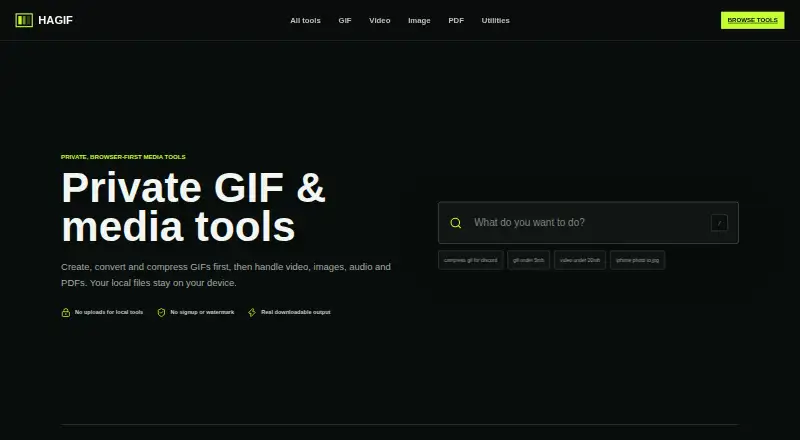
What Hagif is
Hagif is a browser-first workshop for creating downloadable media files, with workflows for GIFs, video, images, audio, PDFs, SVGs and utilities. Featured tasks include video to GIF, GIF compression, image to GIF and GIF to MP4; it also offers GIF templates and prompt-to-GIF. Core conversion and editing run locally in the browser, and standard single-file processing is free, requires no account and produces watermark-free downloads. Free batch GIF work is limited to one file at a time. The one-time 24-hour Power Pass costs 4.99 USD and adds batch processing, ZIP downloads, exact-target search and additional quality candidates for up to 10 selected GIFs; it does not renew automatically. Hagif says source files stay in the browser unless the AI GIF feature is used. That feature sends the text prompt to Cloudflare Workers AI, then creates the animation in the browser. Large files may run out of memory, and codec support varies by browser, source format and device. Chrome and Edge are listed as offering the broadest codec coverage.
Good
- Standard local single-file processing is free.
- Basic tools require no account.
- Standard local exports have no watermark.
- Power Pass supports up to 10 selected GIFs.
Watch out
- Free batch GIF processing is limited to one file at a time.
- Large files can run out of browser memory.
- Codec support varies by browser, format and device.
Who it suits
Hagif suits people who want to convert or edit media in a browser, especially for GIF workflows. Its free single-file tools fit occasional jobs, while the Power Pass is for batch GIF work.
Verdict
Hagif offers free local single-file media tools and a one-time pass for expanded GIF batch work. Consider browser memory and codec variation when handling larger or less common media files.
Plans and prices
From Hagif's own pricing page, checked 22 Sep 2026.
| Plan | Price | What it gives you |
|---|---|---|
| Hagif Power Pass | $4.99 a month | 24-hour access · one-time payment; no auto-renewal |
| Free | Free | Local single-file tools with no required account or watermark. · Single-file local processing · manual controls · clean downloads · no watermark · no account |
| 24-hour Hagif Power Pass | $4.99, paid once | Unlocks batch GIFs, ZIP downloads, exact-target search and quality candidates; no auto-renewal. · Batch GIF processing and ZIP download up to 10 files · exact-target search · additional quality candidates · 24 hours · no auto-renewal · $4.99 USD one-time |
The facts
Each one read from Hagif's own pages, with the date it was checked.
What it does
- Account and payments
- Account data uses Cloudflare KV and D1, messages may use Resend, and Dodo Payments handles checkout and payment details.checked 28 Sep 2026
- Additional Products
- The site lists Passport photo and a Developer API preview.checked 27 Sep 2026
- AI GIF
- AI GIF sends the text prompt to Cloudflare Workers AI, then creates the animation in the browser.checked 28 Sep 2026
- AI GIF Exception
- Files stay in the browser unless the AI GIF feature is used.checked 27 Sep 2026
- API operations
- The preview lists GIF inspect, compress, resize and transparent-background operations.checked 28 Sep 2026
- API preview
- The experimental API preview targets SaaS, CMS, ecommerce and community products, and public signup is not open.checked 28 Sep 2026
- Batch File Limit
- The Power Pass supports up to 10 selected GIFs.checked 27 Sep 2026
- Cloud retention
- Optional Pro cloud jobs store source and result temporarily in Cloudflare R2 for up to 24 hours.checked 28 Sep 2026
- Compatibility
- Hagif says Chrome and Edge offer the broadest codec coverage, while Safari and Firefox support depends on the source format and device.checked 28 Sep 2026
- Featured Tools
- Featured workflows include video to GIF, GIF compression, image to GIF and GIF to MP4.checked 27 Sep 2026
- GIF Length Limit
- The page search text references GIFs under 5 MB, not a duration limit.checked 27 Sep 2026
- GIF templates
- Yeschecked 22 Sep 2026
- Image to GIF
- Yeschecked 22 Sep 2026
- Local processing
- Core conversion and editing run on the user’s device in the browser.checked 28 Sep 2026
- Media workflows
- It provides GIF, video, image, audio, PDF, SVG and utility workflows.checked 28 Sep 2026
- No Account Required
- Basic single-file tools do not require an account.checked 27 Sep 2026
- No Local Uploads
- Local tools do not upload files to a server.checked 27 Sep 2026
Money
- Billing Model
- The Power Pass is a one-time payment and does not renew automatically.checked 27 Sep 2026
- Free plan
- Yeschecked 22 Sep 2026
- Free Plan Limits
- Free processing is limited to one file at a time for batch GIF work.checked 27 Sep 2026
- Free Single-File Tools
- Standard single-file local processing is free.checked 27 Sep 2026
Where it runs
- Browser limits
- Large files can run out of memory because browser tools decode media into memory, and device and browser limits differ.checked 28 Sep 2026
- Browser Processing
- Core GIF, video, image, audio and PDF tools process files in the browser.checked 27 Sep 2026
The company
- Company Positioning
- Hagif presents itself as fast media tools built for the open web.checked 27 Sep 2026
The full review of Hagif
Overview
Hagif is a browser-based toolkit for converting and editing GIFs and other media. It suits people who want quick, account-free local file work, especially single-file conversions. Its breadth is useful, but browser memory and format compatibility put a ceiling on demanding jobs.
Key features
Alongside video-to-GIF, GIF compression, image-to-GIF and GIF-to-MP4, Hagif offers prompt-to-GIF, templates, and workflows for video, images, audio, PDF, SVG and utilities. Specialist formats such as HEIC, JXL, MNG, FLI/FLC, ANI, Aseprite, BPG and FLIF are supported in some tools. That makes Hagif a handy general-purpose media workbench, though support depends on the particular workflow and source format.
Core tools process files on the device: select a file, let the browser handle it, then download the result. Source files are not sent to Hagif by these local workflows, and standard exports carry no watermark. Basic single-file tools require no account. Those are practical advantages for quick edits and privacy-conscious users. The trade-off is that browser tools decode media into memory, so large files can exhaust available capacity. Chrome and Edge offer the broadest codec coverage; Safari and Firefox support varies with the format and device.
Prompt-to-GIF is a separate case: the text prompt is sent to Cloudflare Workers AI, while the animation is made in the browser. Hagif says its product analytics do not record media contents, filenames, file hashes, payment email addresses or AI prompts. Optional Pro cloud jobs retain source and result files in Cloudflare R2 for up to 24 hours. These distinctions matter if keeping files local is a requirement; the local tools and AI workflow do not have the same data path.
Pricing
The Free plan costs nothing and covers local single-file processing, manual controls and clean, watermark-free downloads without an account. Its key restriction is one file at a time for batch GIF work, so it fits occasional conversions better than repetitive multi-file jobs.
The 24-hour Hagif Power Pass costs $4.99, paid once. It adds batch GIF processing and ZIP downloads for up to 10 files, exact-target search and additional quality candidates. The payment is one-time, lasts 24 hours and does not renew automatically. It is the more relevant option for a short, concentrated batch task; it is not a continuing subscription. Hagif also describes the pass as $4.99 USD billed one-time.
Platforms
Hagif is available on the web, with an API preview also listed. The preview targets SaaS, CMS, ecommerce and community products, and public signup is not open. Its listed operations include GIF inspection, compression, resizing and transparent-background processing. For browser use, device capacity and codec support can affect results; Hagif identifies Chrome and Edge as having the broadest coverage.
Who it's for
Choose Hagif for free, watermark-free, local single-file media conversions without an account, or for a one-day burst of GIF batching. It is less suitable for large files that strain browser memory, workflows dependent on a specific codec in Safari or Firefox, or recurring batch work that needs ongoing access.
Pros and cons
- Pros: Free local single-file tools need no account and produce watermark-free downloads, making quick conversions straightforward without sending source files to Hagif.
- Pros: The one-time pass unlocks batch work for up to 10 GIFs and ZIP downloads without automatic renewal.
- Cons: Free batch GIF processing is limited to one file at a time, which rules it out for free multi-file runs.
- Cons: Browser memory can be a bottleneck with large files, and codec coverage differs across browsers, devices and formats.
- Cons: Prompt-to-GIF sends prompts to Cloudflare Workers AI, so it does not follow the same local-only path as core file tools.
Alternatives
For AI-focused GIF creation, compare Moxion, which offers Android, iOS, macOS, web and Windows apps, a free AI generation each day, 150 gifted credits and a watermarked 480p preview on its free plan. Rewind.ai AI GIF Generator is another web option, with 5,000 free tokens per day and paid monthly token plans.
If you want a free option with no export limit, GifCraft is available on Android, iOS and web; its AI generator allows a few images per hour. Imgflip GIF Maker may suit users who can work within its free video and image frame and dimension caps.
GifGen is a paid Android and web alternative with a free trial and a monthly Creator plan. StudioUI AI GIF Generator offers a web free tier with hosted compute and pay-as-you-go credits. For a free, cross-device option, GIPHY Create is available on Android, iOS and web. If you need a free web GIF maker with a stated 200MB maximum upload size and support for up to 2,000 image files, consider Ezgif. Browse more options in AI GIF Makers.
Verdict
Hagif is a strong fit for people who want free, no-account, watermark-free local conversions, with a modest one-time pass for occasional GIF batches. Its main reason to choose it is the combination of broad media workflows and a local-processing default. Look elsewhere if your work depends on larger files, consistent codec support across browsers, or frequent batch processing beyond a 24-hour pass.
Alternatives to Hagif
- 1

Moxion
Free planAndroidiOSWebmacOS8.9From $19 a month - 2

Pollo AI
Free planAndroidiOSWebAPI8.7Free plan - 3
Imgflip GIF Maker
Free planAndroidiOSmacOSWindows8.5Free plan - 4

Brush Ninja
Free planAndroidiOSWebLinux8.2From $48 a year - 5

Fotor
Free planAndroidiOSWebAPI8.1Free plan - 6

Kapwing
Free planWebmacOSWindows8.1From $16 a month