GifRun
GifRun is a web tool for turning videos into GIFs and WebP animations.
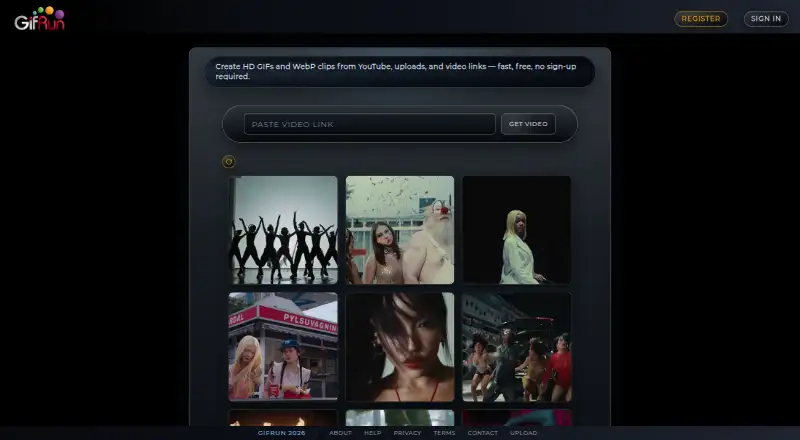
What GifRun is
GifRun is a web tool for turning videos into GIFs and WebP animations. It accepts YouTube, Vimeo, other supported video links and uploaded video; direct uploads support MP4, MOV and MKV files up to 200 MB. Its editor includes draggable text overlays, cropping, speed and frame-rate controls, filters and resolution selection. A free registered account allows clips up to 20 seconds and 600px, with watermarks and no ads. Anonymous use is limited to 10 seconds and 520px, with a watermark and possible ads. PRO subscriptions remove the duration limit and support up to 2K resolution without watermarks or ads, along with direct uploads. Monthly pricing is $5 a month, annual pricing is $50 a year, and a non-recurring pass costs $10, paid once for 60 days. PRO subscribers can also generate videos from text prompts using OpenAI Sora. Signed-in users can save creations to profiles and share image pages; public images support likes, comments, feeds and notifications. Monthly and yearly subscriptions qualify for a full refund within 14 days.
Good
- Creates GIF and WebP animations.
- Accepts YouTube, Vimeo and uploaded videos.
- Editor includes cropping, text overlays and filters.
- Free account allows clips up to 20 seconds.
- PRO exports support up to 2K resolution without watermarks.
Watch out
- Free account exports have watermarks.
- Anonymous clips are limited to 10 seconds and 520px.
- PRO monthly subscription costs $5 a month.
Who it suits
GifRun suits people who want to make animated images from online videos or uploaded clips in a browser. Its free account has short duration and resolution limits; PRO is an option for longer exports and higher resolution.
Verdict
GifRun offers a free route for short, watermarked animations and PRO options for longer, higher-resolution exports. Choose based on whether the free account's 20-second and 600px limits are sufficient.
Plans and prices
From GifRun's own pricing page, checked 22 Sep 2026.
| Plan | Price | What it gives you |
|---|---|---|
| Anonymous | — | 10 seconds · 520px maximum resolution |
| Free Account | Free | 20 seconds · 600px maximum resolution · Watermark applied |
| PRO Monthly | $5 a month | Unlimited GIF/WebP duration · Recurring monthly; cancel anytime |
| PRO Annual | $50 a year | Unlimited GIF/WebP duration · Recurring annual |
| PRO One-Time Pass | $10 a month | Unlimited GIF/WebP duration · 60 days of PRO access; non-recurring |
| Monthly Subscription | $5 a month | unlimited GIF/WebP duration · up to 2K resolution · no watermark · no advertisements · direct video uploads · billed on a recurring monthly basis |
| One-Time Pass | $10, paid once | unlimited GIF/WebP duration · up to 2K resolution · no watermark · no advertisements · direct video uploads · 60 days of Tier 3 access, non-recurring |
| Annual Subscription | $50 a year | unlimited GIF/WebP duration · up to 2K resolution · no watermark · no advertisements · direct video uploads · billed on a recurring annual basis |
| Monthly | $5 a month | Recurring; cancel anytime · $5 monthly |
| One-time pass | $10, paid once | 60 days of PRO access · $10 one-time |
| Annual | $50 a year | Recurring; saves $10/year · $50 annually |
The facts
Each one read from GifRun's own pages, with the date it was checked.
What it does
- AI generation
- PRO subscribers can generate videos from text prompts using OpenAI's Sora model.checked 28 Sep 2026
- Anonymous limits
- Without an account, creation is limited to 10 seconds and 520px resolution, with a watermark and possible advertisements.checked 28 Sep 2026
- Audience and history
- GifRun says it was launched in 2013 and is used by creators in over 150 countries, generating thousands of GIFs daily.checked 28 Sep 2026
- Built-in filters
- The GIF Maker includes eight built-in visual filters.checked 28 Sep 2026
- Copyright year
- The page footer identifies GifRun with the year 2026.checked 28 Sep 2026
- Core product
- GifRun is a free online tool for creating GIFs and WebP animations from YouTube, Vimeo, uploaded video files, and other supported video links.checked 28 Sep 2026
- Direct uploads
- Subscribers can upload MP4, MOV, and MKV videos directly, with a maximum file size of 200 MB.checked 28 Sep 2026
- Editing
- The editor supports draggable text overlays, cropping, speed changes, frame-rate controls, filters, and output resolution selection.checked 28 Sep 2026
- Integrations
- GifRun supports YouTube, Vimeo, many other direct video links, Google sign-in, Stripe payments, and OpenAI Sora video generation.checked 28 Sep 2026
- Maximum GIF length
- 20checked 22 Sep 2026
- Output formats
- GifRun creates both GIF and WebP animated images.checked 28 Sep 2026
- Paid from
- 5checked 22 Sep 2026
- Payment processor
- Stripe processes GifRun PRO payments and credit card transactions.checked 28 Sep 2026
- Privacy
- GifRun says it does not sell personal information or share it for cross-context behavioral advertising.checked 28 Sep 2026
- Private profiles
- Users can make profiles private so only approved followers see images.checked 28 Sep 2026
The company
- Founded
- 2013checked 28 Sep 2026
- Headquarters
- Wheeling, Illinois, United Stateschecked 28 Sep 2026
Money
- Free account ads
- Free accounts have ads, while PRO does not.checked 28 Sep 2026
- Free account limits
- Free registered accounts allow GIFs and WebPs up to 20 seconds and 600px resolution, with a watermark and no advertisements.checked 28 Sep 2026
- Free clip limit
- Free accounts can create GIFs up to 20 seconds long.checked 28 Sep 2026
- Free plan
- Yeschecked 22 Sep 2026
- Free resolution
- Free accounts support resolutions up to 600px.checked 28 Sep 2026
- Free tier
- GifRun offers a free account with no subscription payment.checked 28 Sep 2026
- Free watermark
- Watermarks are applied to free exports.checked 28 Sep 2026
The full review of GifRun
GifRun turns online video and uploaded clips into GIFs or WebP animations, with editing controls for trimming and styling the result. It is best suited to people making short loops from existing footage; its free tier works for casual sharing, while clean, higher-resolution exports require PRO.
Overview
GifRun runs in a browser and converts YouTube, Vimeo, other supported video links, and uploaded footage into animated images. Cropping, speed and frame-rate controls, draggable text, filters, and resolution selection give users useful ways to shape a clip rather than simply extract it. The trade-off is a sharp divide between modest, watermarked free exports and PRO’s higher-resolution output.
Key features
GIF and WebP output, plus eight built-in visual filters, suit users who want options for how a loop looks and is shared. The editor’s cropping, text, speed, and frame-rate controls are practical for focusing a clip and adding a caption. Direct uploads accept MP4, MOV, and MKV files up to 200 MB for subscribers.
PRO also offers video generation from text prompts using OpenAI’s Sora model. That goes beyond converting existing footage, but it is a paid addition and distinct from GifRun’s core video-to-animation workflow. Signed-in users can save creations to profiles, claim vanity URLs, use hashtags, and share image pages; public images support likes, comments, feeds, following, and notifications. Private profiles let users restrict image visibility to approved followers.
Pricing
The free account costs nothing and allows GIFs and WebPs up to 20 seconds and 600px. Exports carry a watermark, but the account has no ads. That is a reasonable fit for casual sharing when branding and resolution are not priorities. Anonymous use is limited to 10 seconds and 520px, with a watermark and possible ads, so registering gives a more useful free ceiling.
PRO subscriptions provide unlimited GIF/WebP duration, up to 2K resolution, no watermark, no ads, and direct video uploads. The Monthly Subscription is $5 a month, recurring and cancellable anytime; the Annual Subscription is $50 a year, recurring. The annual option saves $10/year compared with paying monthly, but commits the user to annual billing. Both monthly and yearly subscriptions qualify for a full refund within 14 days.
The One-Time Pass costs $10, paid once for 60 days of Tier 3 access and does not renew. It offers the same stated export benefits as the subscriptions, making it the fit for a short project or a limited period of heavier use rather than ongoing access. PRO Monthly and PRO Annual are also presented at $5 a month and $50 a year respectively, with unlimited duration; the One-Time Pass is shown at $10 a month for 60 days of non-recurring PRO access.
Platforms
GifRun is a web app, so it can be used through a browser without installing desktop software. It supports Google sign-in and Stripe payment processing.
Who it's for
GifRun fits people who want to make GIFs or WebP loops from online video, adjust the crop and timing, and add text without a desktop editor. The free account is most useful for short, casual exports at up to 600px. Creators who need a watermark-free result, 2K resolution, direct uploads, or longer animations have a clearer case for PRO. It is less suited to someone who needs prompt-to-GIF creation on the free tier or wants a native desktop or mobile app.
Pros and cons
- Pros: GIF and WebP output, with editing controls for crop, text, speed, frame rate, filters, and resolution.
- Pros: The free account permits 20-second, 600px creations without ads, giving casual users a useful step up from anonymous use.
- Pros: PRO removes the watermark and ads, raises resolution to 2K, and includes unlimited duration and direct uploads.
- Cons: Free exports retain a watermark and stop at 600px, limiting their suitability for polished or sharper work.
- Cons: Anonymous creation is tighter still, capped at 10 seconds and 520px, with possible ads.
- Cons: Text-prompt video generation is a PRO feature, not part of the free conversion workflow.
Alternatives
For broader device coverage and a free daily AI-generation allowance, consider Moxion: its free plan includes one shared free AI generation per day, 150 gifted credits, a 480p preview, and a watermark, with Android, iOS, macOS, web, and Windows support. Choose Imgflip GIF Maker if its stated free limits—160 video frames, 360x360 maximum video dimensions, a 24-second maximum video segment, and 1,600 image frames—better match your project; it supports Android, iOS, macOS, and Windows.
GifCraft is a free option for Android, iOS, or web users. Kapwing offers a free plan with 10 credits, four-minute export length, and 720p output, and a Pro plan at $16 a month billed annually. GIPHY Create is another free option for Android, iOS, and web.
Hagif is an alternative with web and API availability; its free plan provides local single-file tools without an account or watermark, and its Power Pass is $4.99 a month as a one-time, non-renewing payment for 24-hour access. Gemini GIF is a free desktop option for Linux, macOS, and Windows that requires Python 3.10 or later and a Google Gemini API key. Photo2GIF focuses on AI vintage GIFs: its free plan includes one AI GIF and a watermark, while its Starter Pack is $1.99 a month for five AI GIFs.
Browse AI GIF Makers for more options in that category.
Verdict
GifRun is a good fit for browser-based creators who want to turn existing video into a styled GIF or WebP without installing software. Its free account is useful for short, casual loops, but the watermark and 600px ceiling are meaningful constraints. Choose PRO when clean, higher-resolution exports or longer animations matter; look elsewhere if you need a native app or want prompt-based video generation without a subscription.
Alternatives to GifRun
- 1

Moxion
Free planAndroidiOSWebmacOS8.9From $19 a month - 2

Pollo AI
Free planAndroidiOSWebAPI8.7Free plan - 3
Imgflip GIF Maker
Free planAndroidiOSmacOSWindows8.5Free plan - 4

Brush Ninja
Free planAndroidiOSWebLinux8.2From $48 a year - 5

Hagif
Free planWebAPI8.1Free plan - 6

Fotor
Free planAndroidiOSWebAPI8.1Free plan