
HWMonitor
HWMonitor reads sensor data that helps track PC health, including temperatures, voltages, power, current, fan speed, utilization, and clock speeds.
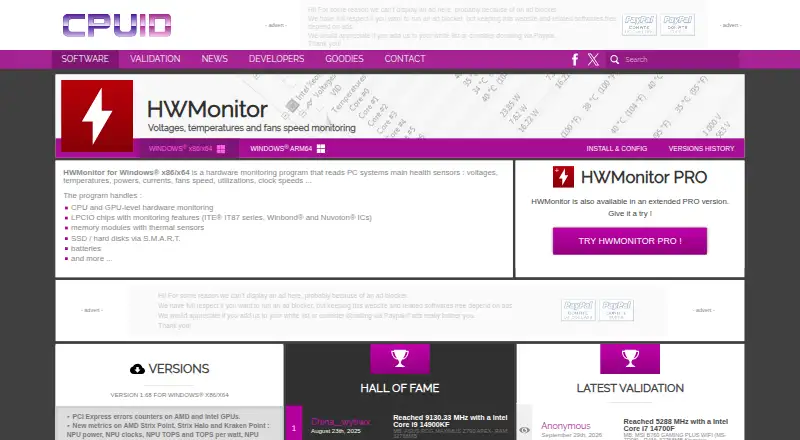
What HWMonitor is
HWMonitor reads sensor data that helps track PC health, including temperatures, voltages, power, current, fan speed, utilization, and clock speeds. It covers CPUs and GPUs, supported LPCIO chips, memory modules with thermal sensors, S.M.A.R.T. storage devices, and batteries. The listed Windows release is version 1.68 for x86/x64, with installer and ZIP downloads; a separate ARM64 download is also listed. Version 1.68 adds PCI Express error counters for AMD and Intel GPUs, NPU and platform metrics, HDD IOPS and average latency, and the ability to retain the device and sensor tree state. CSV logging is listed among its features. The free HWMonitor plan is for Windows x86/x64. HWMonitor PRO adds remote monitoring of distant PCs and Android devices over TCP/IP, plus saved monitoring data and bitmap logging graphs. The Android PRO app reports device temperatures, battery details, CPU clock and utilization, and GPU clock on supported devices. Android remote connections require local Wi-Fi, and monitoring is limited to 10 devices. PRO Standard is $19.95, paid once; PRO Extended is $34.95, paid once.
Good
- Free Windows x86/x64 version is available.
- Installer and ZIP downloads are listed.
- Separate Windows ARM64 download is available.
- PRO supports remote monitoring over TCP/IP.
- Portable version and command-line interface are listed.
Watch out
- Free plan is listed for Windows x86/x64.
- Android remote connections require local Wi-Fi.
- Android app monitors up to 10 devices.
- PRO Standard and Extended require one-time purchases.
Who it suits
HWMonitor suits people who want to check PC sensor readings, including temperatures, fan speed, and clock speeds. PRO may suit users who also need remote monitoring or Android device readings.
Verdict
HWMonitor provides broad sensor readings, with version 1.68 adding several device and storage metrics. Remote monitoring and Android reporting are part of PRO, rather than the free Windows plan.
Plans and prices
From HWMonitor's own pricing page, checked 19 Sep 2026.
| Plan | Price | What it gives you |
|---|---|---|
| HWMonitor Free | Free | Local hardware sensor monitoring |
| HWMonitor | Free | Windows x86/x64; monitors PC hardware sensors |
| HWMonitor PRO Standard | $19.95, paid once | Up to 10 remote connections · Unlimited usage; one year of unlimited updates |
| HWMonitor PRO Extended | $34.95, paid once | Up to 20 remote connections · Unlimited usage; two years of unlimited updates |
The facts
Each one read from HWMonitor's own pages, with the date it was checked.
Where it runs
- Android app
- HWMonitor PRO for Android reports device temperatures, battery voltage, temperature and charge level, CPU clock and utilization, and—in supported devices—GPU clock.checked 3 Oct 2026
- Android network limit
- The Android app can monitor up to 10 Windows PCs or Android devices, and Android remote connections require a local Wi-Fi network.checked 3 Oct 2026
- Windows ARM64
- CPUID lists a separate Windows ARM64 HWMonitor download.checked 3 Oct 2026
- Windows versions
- The current listed Windows release is version 1.68 for x86/x64, with installer and ZIP downloads.checked 3 Oct 2026
What it does
- Hardware coverage
- It handles CPU and GPU monitoring, supported LPCIO chips, memory modules with thermal sensors, S.M.A.R.T. storage devices, and batteries.checked 3 Oct 2026
- Logging
- The version history lists CSV logging as a feature added to HWMonitor.checked 3 Oct 2026
- PRO graphs
- HWMonitor PRO can save monitoring data and generate logging graphs as bitmap files.checked 3 Oct 2026
- PRO interface
- HWMonitor PRO supports sensor tray icons and editable sensor labels.checked 3 Oct 2026
- PRO remote monitoring
- HWMonitor PRO can monitor distant PCs and Android devices over a TCP/IP connection.checked 3 Oct 2026
- Purpose
- HWMonitor reads PC system health sensors, including voltages, temperatures, power, current, fan speed, utilization, and clock speeds.checked 3 Oct 2026
- Recent features
- Version 1.68 adds PCI Express error counters for AMD and Intel GPUs, new NPU and platform metrics, HDD IOPS and average latency, and saved device and sensor tree state.checked 3 Oct 2026
- Support
- CPUID directs users to a bug report form for inconsistent readings and to contact support for registration issues.checked 3 Oct 2026
The company
- Headquarters
- Dunkerque, Francechecked 28 Sep 2026
Money
- Trial
- The PRO registration page says the trial period is 30 days, with the delay potentially varying, and that trial includes all registered features.checked 3 Oct 2026
The full review of HWMonitor
HWMonitor is a focused sensor reader for Windows PCs, with an Android companion and paid PRO editions. It suits users diagnosing temperatures, power, fans, clocks, storage, or battery behavior rather than cataloguing every installed program. The free Windows edition covers routine checks, while PRO is aimed at people who need remote screens, longer-term records, or a larger device set.
Overview
HWMonitor brings voltage, temperature, power, current, fan-speed, utilization, and clock-speed readings into a single hardware view. It covers CPUs, GPUs, supported LPCIO chips, memory modules that expose thermal sensors, S.M.A.R.T. storage devices, and batteries. That breadth is valuable when troubleshooting a component or watching a machine under load, but readings naturally depend on the sensors and hardware your system exposes.
Windows version 1.68 is offered for x86/x64 as an installer or ZIP archive, and CPUID provides a separate ARM64 download. The release adds PCI Express error counters for AMD and Intel GPUs, NPU and platform metrics, HDD IOPS and average latency, and retention of the device and sensor-tree state. CSV logging is included, extending the utility beyond a momentary glance.
Key features
- Broad component coverage: CPU and GPU telemetry sits alongside battery, memory-thermal, storage, and motherboard-controller readings, making the app useful for hardware fault-finding and thermal checks.
- Storage and graphics diagnostics: HDD IOPS, average latency, and GPU PCI Express error counters add context that basic temperature-only monitors miss, particularly for investigating storage slowdowns or link errors.
- Retained views and logs: Saved device and sensor-tree state keeps a preferred view intact, while CSV logging lets you preserve readings for later review.
- PRO remote monitoring: PRO can watch distant Windows PCs and Android devices over TCP/IP. It also saves monitoring data and creates bitmap logging graphs, with tray icons and editable sensor labels for a more persistent desktop workflow.
- Android reporting: The PRO Android app reports device temperatures, battery voltage, battery temperature and charge level, CPU clock and utilization, and GPU clock on supported hardware. Android remote connections require a local Wi-Fi network and the app can monitor up to 10 Windows PCs or Android devices.
- Portable and command-line options: A ZIP distribution supports portable use, and a command-line interface is available. HTML report export is listed for users who need a shareable summary.
Pricing
The HWMonitor plan costs free and covers Windows x86/x64 PC hardware sensors. It is the sensible choice for one-off checks, routine maintenance, and anyone who does not need remote access.
HWMonitor PRO Standard costs $19.95, paid once. It includes unlimited usage, one year of unlimited updates, and up to 10 remote connections. This fits a home lab or small group of machines, although the update entitlement is limited to that first year.
HWMonitor PRO Extended costs $34.95, paid once, with two years of unlimited updates and up to 20 remote connections. It is the better buy for a larger set of systems or a longer refresh cycle. PRO registration includes a trial of all registered features for 30 days, although the registration page notes that the exact delay can vary.
Platforms
HWMonitor supports Windows and Android. Windows has x86/x64 and ARM64 downloads, plus installer and ZIP formats. Android monitoring is delivered through HWMonitor PRO; remote Android connections operate on a local Wi-Fi network.
Who it's for
Choose HWMonitor if your priority is live, component-level telemetry on a Windows machine, especially when investigating heat, fan behavior, power draw, storage latency, or GPU link errors. The free edition is well matched to individual PC owners and technicians who need readings without a recurring fee. PRO is justified when several PCs or Android devices must be watched remotely, or when saved graphs and labeled tray sensors matter. It is a poor fit if your main need is installed-software inventory or a Linux-first monitoring tool.
Pros and cons
Pros
- Wide sensor scope: CPU, GPU, storage, battery, memory-thermal, and controller readings support varied troubleshooting tasks.
- Useful recent additions: NPU, platform, PCI Express error, IOPS, and latency metrics deepen diagnostics in version 1.68.
- Flexible Windows delivery: Installer, ZIP, and ARM64 downloads cover conventional and portable setups.
- Clear PRO upgrade path: Remote connections, graphs, labels, and tray icons address monitoring beyond a single local screen.
Cons
- Hardware-dependent coverage: Unsupported sensors or devices will limit what appears, so it cannot guarantee a complete picture on every PC.
- Remote features are paid: The free plan does not provide PRO’s remote monitoring or saved-graph workflow.
- Android remote use is network-bound: Connections require local Wi-Fi, reducing usefulness away from the same network.
- Not an inventory suite: Its emphasis is hardware telemetry, not installed-software reporting.
Alternatives
For a broader system-information directory, see System Information Software; for a focused comparison of sensor tools, browse Hardware Monitoring Software.
- Fastfetch is the better pick for a free, MIT-licensed command-line tool with more than 75 system-information modules across Android, Linux, macOS, and Windows.
- Facter suits cross-platform or self-hosted inventory, with a free plan for fewer than 25 nodes.
- ASTRA32 is a Windows alternative with a free non-commercial plan.
- hw-probe fits Linux or self-hosted users who want hardware details collected for collaborative debugging.
- SIW offers Windows system-information editions, including a free viewer and a 14-day trial version.
- EtreCheckPro is the macOS choice, with free basic reports and diagnostics plus a paid power-user package.
- htop is a free Linux/macOS process monitor rather than a full sensor reader.
- Speccy is a Windows freemium option for advanced PC insights, with a free home-use edition and a paid professional tier.
Verdict
HWMonitor is the right recommendation for Windows users who want broad, direct hardware-sensor readings at no cost. Choose PRO when remote device access, retained logs, graphs, or more than one monitored system are central to the job. Look elsewhere for software inventories, Linux-centric workflows, or monitoring that must work beyond a local Wi-Fi network on Android.
Alternatives to HWMonitor
- 1

Checkmk
Free planOpen sourceAndroidiOSWebAPI8.8From $275 a month - 2
Netdata
Free planOpen sourceAndroidiOSWebAPI8.7From $4.50 a month - 3

Centreon
Free planOpen sourceWebAPILinuxSelf-hosted8.3From €2.27 a year - 4

ManageEngine OpManager
Free planAndroidiOSWebAPI8.3From $95 a year - 5
Telegraf
Free planOpen sourceWebAPILinuxmacOS8.3From $18,000 a year - 6

Nagios XI
Free planWebAPILinuxmacOS8.1$2,595 one-time