
Argus Monitor
Argus Monitor is Windows software for controlling fans and monitoring system hardware.
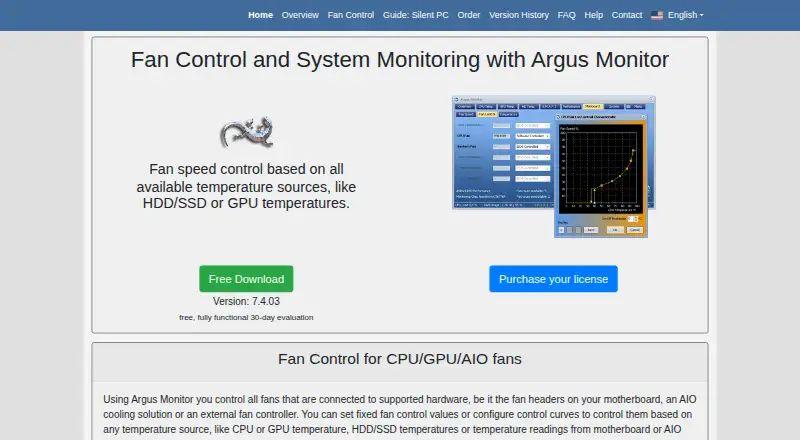
What Argus Monitor is
Argus Monitor is Windows software for controlling fans and monitoring system hardware. It can base fan control on CPU, GPU, HDD or SSD, motherboard, and AIO temperatures, with fixed settings, curves, profiles, hysteresis, averaging, and rate limits. On supported devices, it also controls RGB effects, static colors, and temperature-based colors; RGB coverage is limited to listed hardware, with additional device support depending on user assistance. Monitoring includes almost all available HDDs and SSDs through S.M.A.R.T., and a sidebar gadget and configurable tray icons can display hardware information on the desktop. Supported hardware includes motherboards, external fan controllers, AIO coolers, CPUs, GPUs, storage, RAM, power supplies, and sensors. Windows 10 version 22H2 or later and Windows 11 are listed as supported. A fully functional 30-day evaluation is available. A one-year license costs $16.45 a year and a three-year license costs $35.95 a year; each covers two concurrent installations. There is no subscription, and an expired license retains access to versions released previously.
Good
- Fan curves can use several temperature sources.
- Monitors nearly all available drives through S.M.A.R.T.
- License covers two concurrent installations.
- Expired licenses retain access to previously released versions.
Watch out
- Available for Windows only.
- RGB control is limited to listed hardware.
- Additional active installations incur a fee.
Who it suits
Argus Monitor suits Windows users who want to manage fan behavior using temperatures from multiple hardware components and monitor storage health. It may also suit users with supported RGB devices or custom sensors.
Verdict
Argus Monitor combines fan control with hardware monitoring and offers a 30-day fully functional evaluation. Check hardware support and the two-installation license limit before choosing a license.
Plans and prices
From Argus Monitor's own pricing page, checked 28 Sep 2026.
| Plan | Price | What it gives you |
|---|---|---|
| 1-year license | $16.45 a year | Valid for new versions released during the next year and two concurrent installations. · 2 concurrent installations · Valid for all new versions released within the next 1 year after purchase |
| 3-year license | $35.95 a year | Valid for new versions released during the next three years and two concurrent installations. · 2 concurrent installations · Valid for all new versions released within the next 3 years after purchase |
| 1-year renewal | $11.95 a year | Reduced-price update-maintenance renewal · Renewal of update maintenance |
| 3-year renewal | $24.95 a year | Reduced-price update-maintenance renewal · Renewal of update maintenance |
| 30-day evaluation | Free | Fully functional evaluation for Windows. |
The facts
Each one read from Argus Monitor's own pages, with the date it was checked.
The company
- Company name
- Argus Monitor is associated with Argotronic eGbR.checked 28 Sep 2026
- Headquarters
- Munich, Germanychecked 28 Sep 2026
What it does
- Concurrent installations
- Each license supports two concurrent installations.checked 28 Sep 2026
- Core product
- Fan control and system monitoring software for Windows.checked 28 Sep 2026
- Custom sensors
- The open Argus Controller hardware project adds custom temperature sensors and fan-control channels.checked 28 Sep 2026
- Desktop visibility
- A sidebar gadget and configurable tray icons expose hardware information on the desktop.checked 28 Sep 2026
- Extra installation fee
- Each additional active installation adds $12.45 for three years or $5.45 for one year.checked 28 Sep 2026
- Fan control modes
- Supports fixed values, control curves, multiple controllers, profiles, hysteresis, averaging, and rate limits.checked 28 Sep 2026
- License delivery
- The license key is emailed after payment confirmation.checked 28 Sep 2026
- License model
- There is no subscription; expired licenses retain access to previously released versions.checked 28 Sep 2026
- Renewal window
- Existing licenses can be renewed up to three months before or after expiration.checked 28 Sep 2026
- RGB control
- Controls RGB effects, static colors, and temperature-controlled colors on supported devices.checked 28 Sep 2026
- RGB support limit
- RGB support is limited to listed hardware and more devices depend on user assistance.checked 28 Sep 2026
- S.M.A.R.T. monitoring
- Monitors almost all available HDDs and SSDs through S.M.A.R.T.checked 28 Sep 2026
- Supported hardware
- Supports motherboard SuperIO chips, external fan controllers, AIO coolers, CPUs, GPUs, HDDs, SSDs, RAM, PSUs, and sensors.checked 28 Sep 2026
- Technical support
- Bug reports and technical questions are directed to the contact page.checked 28 Sep 2026
- Temperature sources
- Controls fans using CPU, GPU, HDD/SSD, motherboard, and AIO temperatures.checked 28 Sep 2026
Money
- Free evaluation
- The download is fully functional for 30 days.checked 28 Sep 2026
- Free plan
- Nochecked 20 Sep 2026
Where it runs
- Supported platforms
- windowschecked 20 Sep 2026
- Supported Windows
- Supported Windows versions include Windows 11 and Windows 10 version 22H2 or later.checked 28 Sep 2026
The full review of Argus Monitor
Overview
Argus Monitor is Windows software for controlling fans and monitoring system hardware. Its inputs span CPU, GPU, HDD and SSD, motherboard, and AIO temperatures, letting users base fan behavior on more than one component. It also monitors almost all available HDDs and SSDs through S.M.A.R.T. data.
The scope reaches beyond cooling: supported devices can use Argus Monitor to change RGB effects and colors, while desktop tools expose selected hardware information. Compatibility is tied to supported hardware rather than guaranteed for every component, and RGB support is limited to listed devices. The software is associated with Argotronic eGbR, based in Munich, Germany.
Key features
Fan control
Users can set fixed fan values or build control curves, and manage multiple controllers and profiles. Hysteresis, averaging, and rate limits provide additional ways to shape how fan control responds to temperature changes. Supported hardware includes motherboard SuperIO chips, external fan controllers, and AIO coolers.
Monitoring and visibility
Argus Monitor supports monitoring across CPUs, GPUs, HDDs, SSDs, RAM, PSUs, and sensors, with motherboard details depending on supported chips. A sidebar gadget and configurable tray icons make hardware information available on the desktop. S.M.A.R.T. monitoring covers almost all available hard drives and solid-state drives.
RGB and custom sensors
On supported devices, the software can set RGB effects, static colors, or colors that respond to temperature. RGB compatibility is limited to listed hardware, with additional devices depending on user assistance. For expanded sensor and fan-control options, the open Argus Controller hardware project adds custom temperature sensors and control channels.
Pricing
Argus Monitor is paid software with a fully functional 30-day evaluation. No price is listed for the evaluation. There is no subscription: a license covers new versions released during its specified update period, and an expired license retains access to versions released previously.
| Plan | Price | Terms |
|---|---|---|
| 1-year license | $16.45 a year | New versions released within one year after purchase; two concurrent installations. |
| 3-year license | $35.95 a year | New versions released within three years after purchase; two concurrent installations. |
| 1-year renewal | $11.95 a year | Reduced-price renewal of update maintenance. |
| 3-year renewal | $24.95 a year | Reduced-price renewal of update maintenance. |
| 30-day evaluation | Price not listed | Fully functional evaluation for Windows. |
Each license supports two concurrent installations. Each additional active installation costs $12.45 for three years or $5.45 for one year. The license key is emailed after payment confirmation. Existing licenses can be renewed up to three months before or after expiration.
Platforms
Argus Monitor runs on Windows, including Windows 11 and Windows 10 version 22H2 or later. Its hardware coverage is multi-vendor, but support depends on the specific components and controllers. Users can direct bug reports and technical questions to the contact page.
Who it's for
Argus Monitor suits Windows users who want to coordinate cooling with temperatures from several system components, keep an eye on drive health, or bring hardware readings onto the desktop. Its support for profiles, multiple controllers, and response-shaping settings also makes it relevant to users managing more involved fan setups. Check hardware compatibility before relying on a particular fan controller or RGB device; custom sensor needs may call for the Argus Controller project.
Pros and cons
- Pros: Fan behavior can use temperatures from CPUs, GPUs, drives, motherboards, and AIO systems.
- Pros: Offers fixed values, curves, profiles, multiple controllers, hysteresis, averaging, and rate limits.
- Pros: Includes S.M.A.R.T. monitoring, desktop visibility options, and RGB controls for supported hardware.
- Pros: No subscription, and expired licenses retain access to previously released versions.
- Cons: Windows-only, with Windows 10 support requiring version 22H2 or later.
- Cons: RGB support is limited to listed devices, and some additional support depends on user assistance.
- Cons: The 30-day evaluation is fully functional, but its price is not listed.
Alternatives
For adjacent software categories, browse Hardware Monitoring Software, System Information Software, and PC Overclocking Software. Other options in the broader hardware-software landscape include OCCT, Quick CPU, ASUS GPU Tweak III, RyzenAdj, and Universal x86 Tuning Utility. For different diagnostic needs, consider HCI MemTest, MemTest86+, or Intel VTune Profiler.
Verdict
Argus Monitor brings fan control, hardware monitoring, drive S.M.A.R.T. checks, desktop readings, and supported-device RGB control into one Windows utility. Its range of fan-control options and multi-component temperature inputs are its clearest strengths. The main caveats are platform and hardware compatibility, plus the distinction between a paid license and the included 30-day evaluation. For users whose components are supported and who want configurable cooling alongside monitoring, it offers a focused set of tools without a subscription model.
Alternatives to Argus Monitor
- 1
MSI Afterburner
Free planAndroidWindows7.2Free plan - 2
Macs Fan Control
Free planmacOSWindows6.4Free plan - 3

NZXT CAM
Free planWindows6.2Free plan - 4

EVGA Precision X1
Free planWindows6.1Free plan - 5
SpeedFan
Free planWindows6.1Free plan - 65.1Free plan