MemTest86+
MemTest86+ is a free, open-source stand-alone memory tester for x86, x86-64, ARM AArch64, and LoongArch64 computers.
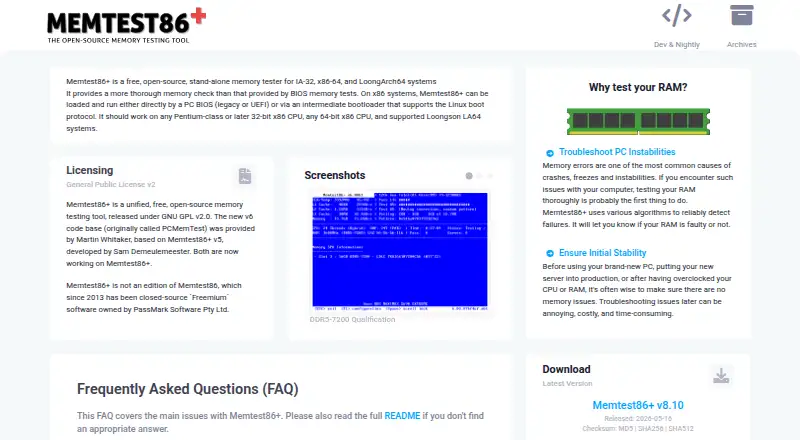
What MemTest86+ is
MemTest86+ is a free, open-source stand-alone memory tester for x86, x86-64, ARM AArch64, and LoongArch64 computers. It uses algorithms such as moving inversions and Modulo-20 to look for memory failures that may contribute to crashes, freezes, or system instability. The tester can access almost all computer memory without operating-system memory or UEFI library restrictions. It can start from legacy or UEFI BIOS, use Linux boot protocols, or run from a FAT32 USB flash drive, CD-ROM, or PXE network boot. The project documents memtest.bin for BIOS PXE and memtest.efi for UEFI PXE as iPXE or PXELINUX payloads. Testing runs indefinitely, and the pass counter advances after all selected tests complete. The software is licensed under GNU GPL version 2, with no additional restrictions on private or commercial use. Stable and nightly binaries are available, but nightly builds are generated automatically and are untested and unsupported. Secure Boot must be temporarily disabled because the binary is not signed by Microsoft.
Good
- Free and open source under GPL version 2.
- Tests several computer architectures.
- Can boot from USB, CD-ROM, or PXE.
- Runs outside normal operating-system memory restrictions.
- Supports legacy and UEFI boot modes.
Watch out
- Secure Boot must be temporarily disabled.
- USB drivers are still work in progress.
- Not all USB devices are supported.
- Nightly builds are untested and unsupported.
Who it suits
MemTest86+ suits users diagnosing possible memory failures or instability on supported computer architectures. It can be booted from removable media or configured for network boot.
Verdict
MemTest86+ provides a bootable way to investigate memory problems across several architectures. Account for its Secure Boot requirement and USB-device limitations when choosing how to run it.
Plans and prices
From MemTest86+'s own pricing page, checked 1 Oct 2026.
| Plan | Price | What it gives you |
|---|---|---|
| Free and open-source | Free | stand-alone memory tester · GPLv2 · private or commercial use |
The facts
Each one read from MemTest86+'s own pages, with the date it was checked.
What it does
- Algorithms
- Its documented algorithms include moving inversions and Modulo-20 testing.checked 1 Oct 2026
- Architectures
- The README says it supports x86, x86-64, ARM AArch64, and LoongArch64 computers.checked 1 Oct 2026
- Boot modes
- It can run directly from legacy or UEFI BIOS or through Linux boot protocols.checked 1 Oct 2026
- Build environment
- The build is tested on Linux and uses the GNU toolchain, including GCC, binutils, and make.checked 1 Oct 2026
- Execution
- Memtest86+ executes indefinitely, and the pass counter increments after all selected tests have run.checked 1 Oct 2026
- License
- Memtest86+ is released under GNU GPL version 2 with no restrictions beyond the GPL for private or commercial use.checked 1 Oct 2026
- Memory access
- It can access almost all computer memory without being restricted by operating-system memory or UEFI libraries.checked 1 Oct 2026
- Network boot
- For PXE, memtest.bin can be used with BIOS PXE and memtest.efi with UEFI PXE as an iPXE or PXELINUX payload.checked 1 Oct 2026
- Purpose
- Memtest86+ is a free, open-source, stand-alone memory tester for IA-32, x86-64, and LoongArch64 systems.checked 1 Oct 2026
- Release support
- Stable and nightly binaries are available, but nightly builds are automatically generated, fully untested, and unsupported.checked 1 Oct 2026
- Secure Boot
- The binary is not signed by Microsoft, so Secure Boot must be temporarily disabled.checked 1 Oct 2026
- Support channel
- The project asks users to submit bug reports on its official GitHub page with hardware and reproduction details.checked 1 Oct 2026
- Supported media
- It can run from a FAT32 USB flash drive, CD-ROM, or network boot using PXE.checked 1 Oct 2026
- Testing purpose
- It uses various algorithms to detect memory failures and troubleshoot crashes, freezes, and system instability.checked 1 Oct 2026
- USB limitation
- The USB drivers are still work in progress and not all USB devices are supported.checked 1 Oct 2026
The full review of MemTest86+
Overview
MemTest86+ is a free, open-source diagnostic that boots separately from a computer’s operating system to check memory. It suits people investigating crashes, freezes or instability who can boot from removable media or a network.
Its focused memory tests and broad architecture support make it a useful specialist tool, but Secure Boot and incomplete USB support can complicate setup.
Key features
Memory testing
MemTest86+ uses several algorithms, including moving inversions and Modulo-20 testing, to look for memory failures. It can access almost all computer memory without relying on operating-system memory management or UEFI libraries, a practical advantage when the operating system itself may be part of the problem.
Testing continues indefinitely. The pass counter advances after all selected tests have run, so users can see completed cycles while deciding when to stop. The tool handles memory stress testing, not disk health checks or GPU testing; choose a broader diagnostic suite if those are part of the job.
Boot options
It can start from legacy or UEFI BIOS, or through Linux boot protocols. Run it from a FAT32 USB flash drive or CD-ROM, or configure PXE network boot: memtest.bin works as a BIOS PXE payload, while memtest.efi is for UEFI PXE, including iPXE or PXELINUX setups. These options suit both individual troubleshooting and configured network-boot environments.
The README describes support for x86, x86-64, ARM AArch64 and LoongArch64 computers. That range is a strength for users working across architectures, though the listed platform categories—Linux, macOS and Windows—should not be mistaken for conventional desktop applications: MemTest86+ runs as a standalone bootable tester.
Pricing
Free and open-source
The sole plan costs nothing and includes a standalone memory tester under GPLv2, for private or commercial use. There are no paid tiers to weigh against a reduced free version. The license places no restrictions beyond the GPL for those uses.
Stable and nightly binaries are available. Nightly builds are automatically generated, untested and unsupported, so users who need a dependable release should choose a stable binary rather than treating a nightly build as equivalent.
Platforms
MemTest86+ supports Linux, macOS and Windows systems in the multi-platform sense, with architecture support spanning x86, x86-64, ARM AArch64 and LoongArch64. It boots independently of those operating systems, using legacy or UEFI BIOS, Linux boot protocols, removable media or PXE.
There are two important setup constraints. The binary is not signed by Microsoft, so Secure Boot must be temporarily disabled. USB drivers remain a work in progress and some USB devices are unsupported; a CD-ROM or PXE boot may be a better route when a USB device is incompatible.
Who it's for
Choose MemTest86+ when you need a dedicated, no-cost memory check outside the operating system, including when troubleshooting system instability or preparing a network-boot diagnostic setup. Its GPLv2 license also permits private and commercial use.
Look elsewhere if you need GPU or disk checks in the same tool, cannot temporarily disable Secure Boot, or depend on a USB device that it does not support. Building the software is a separate, Linux-tested process using the GNU toolchain, including GCC, binutils and make; that matters to people working from source, not those simply running a binary.
Pros and cons
- Pros: Runs outside the operating system and can access almost all computer memory, useful when diagnosing system instability.
- Pros: Free for private or commercial use under GPLv2, with no paid tier required for its memory-testing purpose.
- Pros: Supports multiple architectures and boot routes, including FAT32 USB, CD-ROM and PXE.
- Cons: Secure Boot must be disabled temporarily because the binary is not Microsoft-signed.
- Cons: USB support is incomplete, which can rule out some devices.
- Cons: It checks memory, not disk health or GPUs, and testing does not stop automatically.
Alternatives
MemTest86 is worth considering if you want a freemium option with a free edition and a separately priced Pro Download at $116, paid once; MemTest86+ instead offers its tester free for private or commercial use under GPLv2.
HCI MemTest may suit Windows users seeking a Windows program with a free version and a one-time MemTest Pro option at $5, paid once. Choose MemTest86+ when standalone booting is the priority.
OCCT offers a free personal-use plan with core features and a Supporter plan at €4.50 a month; it is an alternative to consider if that plan structure fits your needs better than a standalone memory tester.
RyzenAdj is a free, LGPL-3.0 command-line tool for Linux and Windows, rather than MemTest86+’s bootable memory-testing approach.
Universal x86 Tuning Utility is a free Windows option distributed as an installer or portable download; consider it instead if you want that form of Windows software rather than a bootable tester.
ASUS GPU Tweak III is a free Windows alternative to consider if you are looking for another tool in the PC software category.
Intel VTune Profiler is a free download for Linux, Windows and self-hosted use, with commercial and non-commercial use permitted; consider it if those platform and licensing options better suit your needs.
Quick CPU has a free Windows plan. It is another option to consider if a Windows alternative is preferable.
For other tools by category, see Hardware Diagnostic Software and PC Overclocking Software.
Verdict
MemTest86+ is the right pick for users who need a free, architecture-spanning memory diagnostic that runs outside the operating system, especially when removable-media or PXE boot suits their setup. Its focused scope, Secure Boot requirement and unfinished USB support are real constraints; choose another tool if you need broader component checks or cannot work around those boot limitations.
Alternatives to MemTest86+
- 1
MemTest86
Free planLinuxmacOSSelf-hostedWindows7.5From $76 a year - 2
Hard Disk Sentinel
Free planLinuxWindows6.9$22 one-time - 3
smartmontools
Free planLinuxmacOSWindows6.8Free plan - 4

GSmartControl
Free planLinuxmacOSWindows6.7Free plan - 5

Speccy
Free planWindows6.6$19.95 one-time - 6
Intel VTune Profiler
Free planLinuxSelf-hostedWindows6.5Free plan