
GSmartControl
GSmartControl is a free desktop application for viewing drive health through smartctl, part of the smartmontools package.
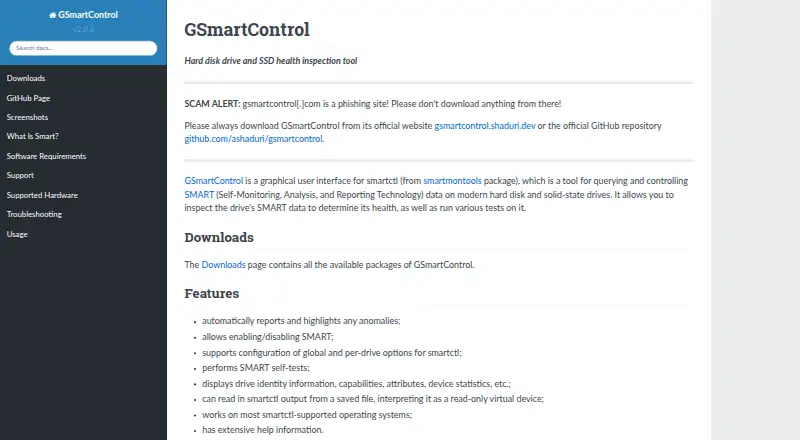
What GSmartControl is
GSmartControl is a free desktop application for viewing drive health through smartctl, part of the smartmontools package. It displays drive identity, capabilities, SMART attributes, and device statistics, and highlights reported anomalies. Users can run drive tests, enable or disable SMART, and adjust global or per-drive smartctl options. Saved smartctl output can be opened as a read-only virtual device for inspection. Supported drives include ATA (SATA and PATA) and NVMe, plus some drives connected through USB bridges or selected RAID controllers. SCSI and SAS drives are unsupported, though the application may show some information about them. GSmartControl runs on Linux, Windows, macOS, FreeBSD, NetBSD, OpenBSD, DragonFlyBSD, and Solaris; QNX support is described as untested. It is GPLv3 free software. Downloads include Linux packages, Windows installers and portable archives, FreeBSD ports, macOS packages, and source code. smartmontools is a runtime requirement, but the official Windows packages include the required software. Root or Administrator privileges are needed for useful operations because operating systems restrict direct hardware access. Immediate Offline Tests are unsupported. Its SMART information can help with inspection, but good SMART data does not guarantee a drive will avoid failure.
Good
- Displays drive identity, capabilities, attributes, and device statistics.
- Automatically reports and highlights anomalies.
- Runs drive tests and configures SMART options.
- Opens saved smartctl output as a read-only virtual device.
- Supports Linux, Windows, macOS, BSD systems, and Solaris.
- Free software licensed under GPLv3.
Watch out
- SCSI and SAS drives are unsupported.
- Useful operations require root or Administrator privileges.
- Immediate Offline Tests are unsupported.
- smartmontools is a runtime requirement outside the official Windows packages.
Who it suits
GSmartControl suits desktop users who want to inspect SMART attributes, device statistics, and drive-test results on supported drives. It is also useful for viewing saved smartctl output or adjusting SMART and smartctl options, provided the user can run it with root or Administrator privileges.
Verdict
Choose GSmartControl if you need a free graphical way to inspect SMART data and run tests on supported drives. Look elsewhere if you need SCSI or SAS support, or Immediate Offline Tests; SMART data also cannot guarantee a drive will not fail.
Plans and prices
From GSmartControl's own pricing page, checked 9 Oct 2026.
| Plan | Price | What it gives you |
|---|---|---|
| Free | Free | GPLv3 software · desktop drive health inspection |
The facts
Each one read from GSmartControl's own pages, with the date it was checked.
What it does
- Anomaly alerts
- It automatically reports and highlights anomalies.checked 8 Oct 2026
- Anomaly reporting
- The software automatically reports and highlights anomalies.checked 9 Oct 2026
- Availability
- The downloads page lists Linux distribution packages, Windows installers and portable archives, FreeBSD ports, macOS packages, and source code.checked 8 Oct 2026
- Drive compatibility
- It supports ATA (SATA and PATA) and NVMe drives, plus some drives behind USB bridges and RAID controllers.checked 8 Oct 2026
- Drive controls
- Users can enable or disable SMART and configure global and per-drive smartctl options.checked 9 Oct 2026
- Drive information
- It displays drive identity, capabilities, attributes, and device statistics.checked 9 Oct 2026
- Drive limitation
- SCSI and SAS drives are not supported, though the application may display some information about them.checked 8 Oct 2026
- Integration
- GSmartControl is a graphical interface for smartctl from the smartmontools package; smartmontools is a runtime requirement.checked 8 Oct 2026
- License
- GSmartControl is licensed under GNU General Public License version 3.checked 9 Oct 2026
- Operating systems
- The site lists Linux, Windows, FreeBSD, NetBSD, OpenBSD, DragonFlyBSD, macOS, Solaris, and untested QNX support.checked 8 Oct 2026
- Privileges
- Root or Administrator privileges are needed to perform useful operations because operating systems restrict direct hardware access.checked 9 Oct 2026
- Purpose
- GSmartControl is a graphical interface for smartctl that lets users inspect SMART data and run drive tests.checked 9 Oct 2026
- Runtime dependency
- GSmartControl uses smartmontools, while official Windows packages include the required software.checked 9 Oct 2026
- Saved output
- It can load smartctl output from a saved file as a read-only virtual device.checked 9 Oct 2026
- SMART caveat
- The documentation cautions that good SMART data does not guarantee a drive will not fail.checked 9 Oct 2026
- SMART controls
- It can enable or disable SMART and configure global and per-drive smartctl options.checked 8 Oct 2026
- Support
- Users are directed to report bugs through the GitHub issue tracker after consulting the troubleshooting page.checked 9 Oct 2026
- Supported hardware
- It supports ATA drives, NVMe drives, some USB bridges, and selected RAID controllers; SCSI and SAS drives are not supported.checked 9 Oct 2026
- Supported operating systems
- The requirements page lists Linux, Windows Vista SP2 or later, FreeBSD, NetBSD, OpenBSD, DragonFlyBSD, macOS, Solaris, and untested QNX support.checked 9 Oct 2026
- Testing limit
- Immediate Offline Tests are unsupported because they are described as mostly obsolete.checked 9 Oct 2026
Where it runs
- Windows requirement
- The official Windows packages require no additional software.checked 8 Oct 2026
The full review of GSmartControl
Overview
GSmartControl is a graphical front end for smartctl that lets desktop users inspect SMART data and run tests on supported drives. It suits people who want drive-health information and controls without relying on a command line. Its free price and broad operating-system support make it a practical utility, though useful hardware access requires administrator privileges.
Key features
GSmartControl displays a drive’s identity, capabilities, attributes and device statistics, and automatically flags anomalies. That makes potential warning signs easier to find during a health check, but the readings need perspective: good SMART data cannot guarantee a drive will not fail.
The app can enable or disable SMART and configure smartctl options globally or for individual drives. It can also open saved smartctl output as a read-only virtual device, which is useful for reviewing a captured report but does not provide controls for the drive represented in that file.
Drive support covers ATA devices, including SATA and PATA, and NVMe, as well as some drives connected through USB bridges or RAID controllers. SCSI and SAS are outside its supported range, even though the app may show some information for those devices. Immediate Offline Tests are also unavailable; they are described as mostly obsolete.
Pricing
There is one plan: Free, at no cost. It includes desktop SMART monitoring and drive-health inspection under the GNU General Public License version 3. With no paid tier to unlock, GSmartControl is a straightforward choice for individual users and organizations that need its supported features. There are no seat counts or usage quotas to weigh.
Platforms
GSmartControl is offered for Linux, Windows and macOS, as well as FreeBSD, NetBSD, OpenBSD, DragonFlyBSD and Solaris. QNX support is described as untested. The downloads include Linux distribution packages, Windows installers and portable archives, FreeBSD ports, macOS packages and source code. Official Windows packages need no additional software; on other systems, smartmontools is a runtime requirement.
Root or Administrator privileges are needed for useful operations because operating systems restrict direct access to drive hardware. That requirement can make the app less convenient on locked-down or shared computers, even when the software itself is free.
Who it's for
GSmartControl fits desktop users who want to inspect SMART attributes, check for anomalies or run drive tests through a graphical interface. It is particularly suitable when a supported ATA or NVMe drive is attached to a system where the user can obtain the required privileges. It is a poor fit for SCSI or SAS hardware, or for anyone who needs Immediate Offline Tests.
Pros and cons
- Pros: Free GPLv3 software provides SMART monitoring and drive tests without a paid plan.
- Pros: Automatic anomaly highlighting and a detailed view of drive attributes and statistics help users identify issues worth investigating.
- Pros: Saved smartctl output can be opened for read-only review, and the app supports several desktop operating systems.
- Cons: Useful hardware operations require root or Administrator privileges, which may not be available on managed computers.
- Cons: SCSI and SAS drives are unsupported, and Immediate Offline Tests cannot be run.
- Cons: SMART data is not a guarantee against failure, so the app cannot make drive health certain.
Alternatives
smartmontools is the natural alternative for users comfortable with command-line tools: it is also free and provides the smartctl and smartd utilities, including the command-line foundation GSmartControl uses.
Consider Hard Disk Sentinel if you want to compare paid software with a limited free trial and Linux or Windows support. DiskMaster, nvm, DRevitalize, Active@ Hard Disk Monitor, CrystalDiskMark and HDAT2 are other listed alternatives.
For related comparisons, see Disk Diagnostic Software, Hardware Diagnostic Software and Disk Health Monitoring Software.
Verdict
Choose GSmartControl if you want a no-cost graphical way to inspect SMART data and run tests on supported desktop drives, and you can access the necessary hardware privileges. Its clear anomaly reporting and wide OS reach make it a useful drive-checking utility. Look elsewhere if your drives are SCSI or SAS, you need Immediate Offline Tests, or you need certainty that a reassuring SMART report rules out failure.
Getting started
- Open the GSmartControl website and choose a download for your operating system.
- Install or unpack the available package, installer, or portable archive.
- Ensure smartmontools is available; the official Windows packages include the required software.
- Run GSmartControl with root or Administrator privileges for useful drive operations.
- Select a drive to inspect its information, SMART data, or available tests.
Limits worth knowing
SCSI and SAS drives are unsupported, and Immediate Offline Tests cannot be run. Useful operations require root or Administrator privileges. The free software is licensed under GPLv3.
Questions
How much does GSmartControl cost?
The listed Free plan costs nothing. GSmartControl is GPLv3 free software.
Which operating systems does it support?
The listed systems include Linux, Windows, macOS, FreeBSD, NetBSD, OpenBSD, DragonFlyBSD, and Solaris. QNX support is described as untested.
Which drives can it inspect?
It supports ATA drives, including SATA and PATA, and NVMe drives, plus some drives behind USB bridges and selected RAID controllers. SCSI and SAS drives are unsupported, though some information may appear.
Does it need another program to run?
smartmontools is a runtime requirement. The official Windows packages include the required software.
Can SMART data confirm that a drive will not fail?
No. The documentation cautions that good SMART data does not guarantee a drive will avoid failure.
What privileges are needed?
Root or Administrator privileges are needed for useful operations because operating systems restrict direct hardware access.
Alternatives to GSmartControl
- 1
MemTest86
Free planLinuxmacOSSelf-hostedWindows7.5From $76 a year - 2
Hard Disk Sentinel
Free planLinuxWindows6.9$22 one-time - 3
smartmontools
Free planLinuxmacOSWindows6.8Free plan - 4

Speccy
Free planWindows6.6$19.95 one-time - 5
Intel VTune Profiler
Free planLinuxSelf-hostedWindows6.5Free plan - 6
HD Tune Pro
Windows6.4