DiskMaster
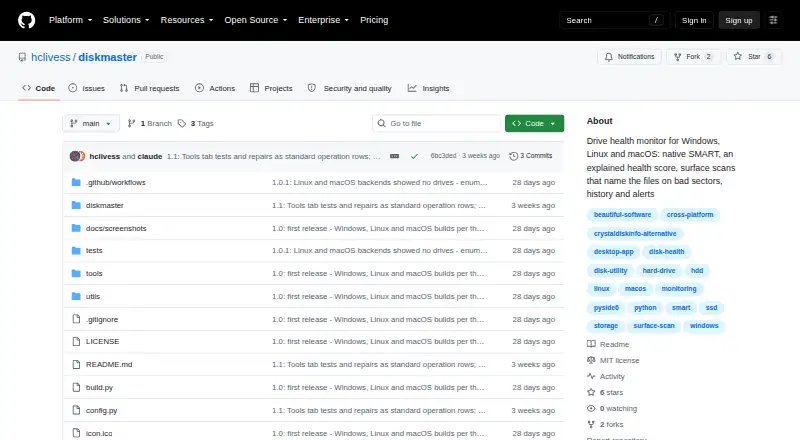
DiskMaster is a free desktop tool for monitoring drive health on Windows, Linux, and macOS.
What DiskMaster is
DiskMaster is a free desktop tool for monitoring drive health on Windows, Linux, and macOS. It reads SMART attributes, self-tests, and test logs, then calculates a health score from 100 with deductions tied to source attributes; performance is scored separately. Readings are kept in SQLite and presented in charts, with alerts for changes such as rising drive counters. Its read-only surface scan times blocks, checks unreadable sectors with a second read, and maps them to sectors. DiskMaster can identify files associated with unreadable sectors and try to rescue a copy while skipping unreadable bytes. Optional tools cover sector repair, filesystem repair, zero-fill, and sanitizing bad sectors shown as free by the filesystem. Alerts can be sent through Slack, Discord, ntfy, email, desktop notifications, commands, or JSON webhooks. The command-line tool exports text, HTML, JSON, and CSV reports. SATA and USB monitoring needs no third-party tools; NVMe logs and macOS use optional smartmontools. Raw SMART access requires administrator or sudo privileges.
Good
- Monitors Windows, Linux, and macOS.
- Health-score deductions identify their source attributes.
- Stores reading history and provides change alerts.
- Exports text, HTML, JSON, and CSV reports.
Watch out
- Remote monitoring is not supported.
- Raw SMART access requires administrator or sudo privileges.
- NVMe logs and macOS use optional smartmontools.
- Windows builds are unsigned.
Who it suits
DiskMaster suits someone who wants detailed drive-health monitoring on one machine, or wants JSON output to feed a fleet tool. Users should be comfortable granting administrator or sudo access for raw SMART readings.
Verdict
DiskMaster combines health readings, history, scans, alerts, and optional repair tools in a free desktop package. Check its access requirements and platform-specific smartmontools dependency before relying on all monitoring functions.
Plans and prices
From DiskMaster's own pricing page, checked 29 Sep 2026.
| Plan | Price | What it gives you |
|---|---|---|
| DiskMaster | Free | Free / open-source; local desktop drive health monitoring |
The facts
Each one read from DiskMaster's own pages, with the date it was checked.
What it does
- CLI and exports
- The CLI exports text, HTML, JSON and CSV reports and returns exit codes 0 for healthy, 1 for warning, and 2 for critical.checked 29 Sep 2026
- Dependencies and access
- SATA and USB monitoring needs no third-party tools, while NVMe health logs and macOS use optional smartmontools; raw SMART access requires administrator or sudo privileges.checked 29 Sep 2026
- Download formats
- The latest release provides Windows x64 ZIP, Linux x64 tar.gz, and macOS arm64 tar.gz builds that do not require Python.checked 29 Sep 2026
- Health score
- It calculates a health score from 100 and lists each deduction and its source attribute; performance is scored separately.checked 29 Sep 2026
- History and alerts
- It stores readings in SQLite and provides charts and alerts for changes such as rising drive counters.checked 29 Sep 2026
- Integrations
- Alerts can be sent through Slack, Discord, ntfy, email, desktop notifications, or a user-specified command; webhooks can also target JSON endpoints.checked 29 Sep 2026
- Purpose
- DiskMaster monitors drive health on Windows, Linux and macOS.checked 29 Sep 2026
- Repair tools
- Optional repair tools include sector repair, sanitizing bad sectors proven free by the filesystem, filesystem repair, and zero-fill, each with confirmations and safeguards described in the README.checked 29 Sep 2026
- Security and integrity
- The project says Windows builds are unsigned and each release archive includes a SHA-256 checksum.checked 29 Sep 2026
- SMART monitoring
- It reads SMART attributes, self-tests and drive self-test logs, using native ATA pass-through for SATA and USB drives.checked 29 Sep 2026
- Surface scans
- Its read-only surface scan times blocks, confirms unreadable sectors with a second read, and maps them to sectors.checked 29 Sep 2026
- Who it is for
- The README describes DiskMaster as suited to monitoring one machine deeply and says its JSON output is designed to feed a fleet tool.checked 29 Sep 2026
Where it runs
- File mapping and rescue
- It can identify files associated with unreadable sectors and rescue a copy while skipping unreadable bytes.checked 29 Sep 2026
The company
- Maker
- The maker profile identifies Jan Kučera, lists Ostrava, Czechia, and describes a family of single-purpose desktop tools.checked 29 Sep 2026
The full review of DiskMaster
Overview
DiskMaster is a free desktop utility for checking drive health across Windows, Linux, and macOS. It is best suited to people who want detailed insight into the disks in one machine, rather than remote oversight of a fleet. Its mix of explainable health scoring, recorded readings, alerts, and diagnostic scans makes it more than a SMART status viewer, but some monitoring functions depend on smartmontools.
Key features
DiskMaster reads SMART attributes, self-tests, and drive self-test logs. SATA and USB monitoring uses native ATA pass-through, while NVMe health logs require optional smartmontools. Raw SMART access also requires administrator or sudo privileges, so setup and permissions matter for readers who expect monitoring to work immediately on every drive.
The health score begins at 100 and identifies the SMART attributes behind each deduction; performance gets its own score. This makes the result easier to interpret than a single unexplained rating. Readings are stored in SQLite and displayed in charts, while alerts can flag changes such as rising drive counters. SSD wear tracking, temperature alerts, and failure warnings cover useful ongoing checks.
Alerts can go to Slack, Discord, ntfy, email, desktop notifications, or a user-specified command, and webhooks can target JSON endpoints. The CLI exports text, HTML, JSON, and CSV reports, with exit codes of 0 for healthy, 1 for warning, and 2 for critical. That gives technically minded users ways to route results into scripts or other tooling, though DiskMaster itself does not offer remote monitoring.
The read-only surface scan times blocks, confirms unreadable sectors with a second read, and maps them to sectors. DiskMaster can associate those sectors with files and attempt to rescue a copy while skipping unreadable bytes. Optional repair tools include sector repair, sanitizing bad sectors the filesystem has confirmed free, filesystem repair, and zero-fill. These operations broaden its diagnostic reach, but are consequential tools rather than routine monitoring features; the project describes confirmations and safeguards for them.
Pricing
DiskMaster costs nothing. Its free, open-source plan provides local desktop drive-health monitoring, with no free trial. There is no paid tier to add remote monitoring, so users who need centralized oversight should choose another tool or use DiskMaster's JSON output with a separate fleet tool.
Platforms
DiskMaster supports Windows, Linux, and macOS. The latest release offers a Windows x64 ZIP, Linux x64 tar.gz, and macOS arm64 tar.gz build, each requiring no Python installation. macOS uses optional smartmontools, as do NVMe health logs; SATA and USB monitoring does not require third-party tools. Windows builds are unsigned, and each release archive includes a SHA-256 checksum.
Who it's for
Choose DiskMaster if you want to monitor one computer closely, retain local health history, investigate surface problems, or feed structured output into another system. Its broad platform support and export options suit users comfortable with elevated access and platform-specific dependencies. It is a poor fit for anyone who needs remote monitoring built in.
Pros and cons
- Pro: A 100-point health score explains deductions by source attribute, making warnings more actionable.
- Pro: History, charts, flexible alerts, CLI reports, and exit codes support both desktop checks and automation.
- Pro: Surface scans, file mapping, rescue, and optional repair tools extend beyond routine SMART monitoring.
- Con: Raw SMART access requires administrator or sudo privileges, and macOS monitoring and NVMe health logs depend on optional smartmontools.
- Con: There is no remote monitoring, limiting its usefulness as a standalone fleet-management tool.
- Con: Windows builds are unsigned, so users must weigh that distribution detail when deciding whether to install them.
Alternatives
Disk Diagnostic Software and Disk Health Monitoring Software are category directories for comparing other options.
smartmontools is a free option for readers who want the underlying smartctl and smartd utilities across Windows, Linux, and macOS rather than DiskMaster's integrated scoring, history, and scan workflow.
Hard Disk Sentinel is another option for readers comparing drive-monitoring software with a free Linux version and a limited trial.
Victoria HDD/SSD is a free Windows alternative.
HDAT2 is a free Windows utility offered for one or more machines, with redistribution limited to non-profit use and no warranty.
Active@ Hard Disk Monitor may suit readers seeking a Windows tool with a personal-use freeware plan and a professional option that can monitor up to three PCs remotely.
Ariolic Disk Scanner is a free Windows disk-scanning utility.
GSmartControl is a free alternative for Windows, macOS, and Linux.
HD Tune Pro is a paid Windows alternative with a trial and a single-user license option.
Verdict
DiskMaster is a strong choice for users who want free, detailed local drive monitoring with history, alerts, and tools for investigating bad sectors. Its explainable score and export support are persuasive reasons to choose it. Look elsewhere if you need remote monitoring built in, or if elevated access and the smartmontools dependency on macOS or for NVMe logs are a poor fit.
Getting started
- Open the DiskMaster GitHub website
- Download the build for Windows x64, Linux x64, or macOS arm64
- Run it with administrator or sudo privileges for raw SMART access
- Configure drive monitoring, scans, charts, and alerts
- Use the CLI when you need text, HTML, JSON, or CSV reports
Limits worth knowing
DiskMaster is free. It does not provide remote monitoring, and raw SMART access requires elevated privileges.
Questions
Is DiskMaster free?
Yes. The DiskMaster plan costs nothing and is described as free and open-source.
Which platforms are supported?
DiskMaster supports Windows, Linux, and macOS. Release archives include Windows x64 ZIP, Linux x64 tar.gz, and macOS arm64 tar.gz builds.
Does it monitor SSD wear and temperature?
Yes. SSD wear tracking and temperature alerts are listed, along with failure warnings.
Can it send alerts to other services?
Alerts can go to Slack, Discord, ntfy, email, desktop notifications, a user-specified command, or JSON webhook endpoints.
Is remote monitoring available?
No. The listed capabilities cover local desktop monitoring; remote monitoring is marked no.
Alternatives to DiskMaster
- 1
nvm
Free planOpen sourceLinuxmacOSSelf-hostedWindows7.4Free plan - 2
Active@ Hard Disk Monitor
Free planWindows7.3$49.95 one-time - 3
Avidemux
Free planOpen sourceWebLinuxmacOSWindows7.3Free plan - 4
Hard Disk Sentinel
Free planLinuxWindows6.9$22 one-time - 5
smartmontools
Free planLinuxmacOSWindows6.8Free plan - 6
DRevitalize
Free planWindows6.7Free plan