Harbor
The facts below are what the maker publishes about Harbor, checked and dated. Our editors have not written about it yet.
Plans and prices
From Harbor's own pricing page, checked 12 Oct 2026.
| Plan | Price | What it gives you |
|---|---|---|
| Harbor | Free | Free download · 11 MB · Apple Silicon build · macOS 14 Sonoma or later |
The facts
Each one read from Harbor's own pages, with the date it was checked.
What it does
- Backups and sync
- It can keep a copy of a folder or server location current on a schedule and sync a local folder with a server folder with conflict handling.checked 12 Oct 2026
- Credential handling
- Server passwords and keys are excluded from exported configuration files.checked 12 Oct 2026
- Diagnostics
- Remote diagnostics are off by default and limited to read-only checks that the user approves.checked 12 Oct 2026
- Dual-pane browsing
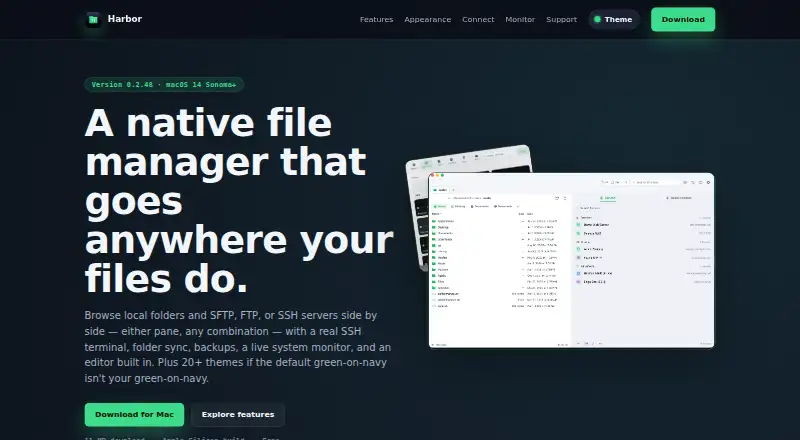
- Local and remote panes can be displayed side by side, with file transfer actions next to the file list.checked 12 Oct 2026
- Dual-pane view
- Yeschecked 20 Sep 2026
- Editor and diff
- Harbor includes tools to edit files and compare two versions without exporting them to another app.checked 12 Oct 2026
- Purpose
- Harbor is a native Mac file manager for browsing local folders and remote servers side by side.checked 12 Oct 2026
- Remote connections
- It supports SFTP, FTP, and SSH connections, with FTPS also shown in its server list.checked 12 Oct 2026
- Server organization
- Users can group saved servers into Favorites and Clients, search saved servers, or use Quick Connect.checked 12 Oct 2026
- SSH terminal
- Harbor includes a full SSH terminal with colors, vim, and tab completion, docked beside files or in a separate window.checked 12 Oct 2026
- Support
- The site links to support, bug reporting, and contact pages.checked 12 Oct 2026
- System monitor
- Its monitor displays CPU, memory, disk, network, battery, processes, and connections, and can show data for a connected remote machine.checked 12 Oct 2026
- Themes
- Harbor includes more than 20 built-in themes for the app and terminal.checked 12 Oct 2026
Money
- Free plan
- Yeschecked 20 Sep 2026
Where it runs
- Platform requirement
- The download page lists macOS 14 Sonoma or later and an Apple Silicon build.checked 12 Oct 2026
- Supported platforms
- macoschecked 20 Sep 2026
Alternatives to Harbor
- 1

Filestash
Free planOpen sourceAndroidiOSWebAPI9.2From $50 a month - 2

Owlfiles
Free planAndroidiOSExtensionmacOS8.7From $12.99 a year - 3

WinSCP
Free planOpen sourceWindows7.9Free plan - 4

Dolphin
Free planOpen sourceLinuxWindows7.8Free plan - 5
FileRun
AndroidiOSWebAPI7.8From €9.90 a year - 6

OneCommander
Free planWindows7.8$30 one-time