Guac
Guac is a savings app for people who want to set money aside toward goals.
What Guac is
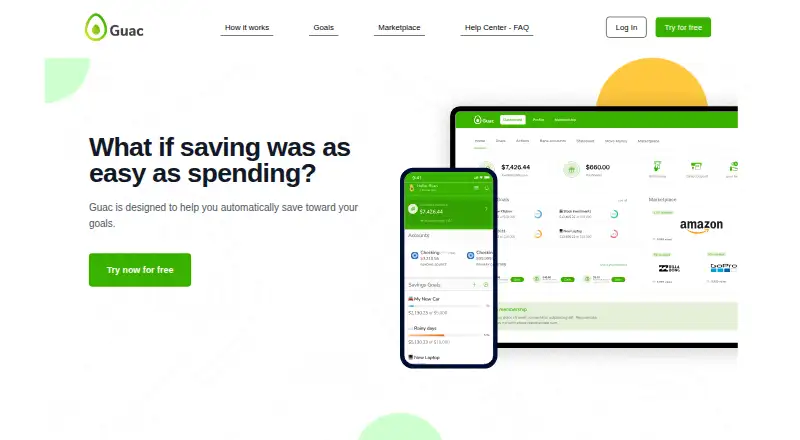
Guac is a savings app for people who want to set money aside toward goals. It connects to a user’s checking account to synchronize transactions, then uses auto-tip technology and percentage-based savings to help save in relation to spending. Users can create goals for purposes such as a trip, a car, groceries, or another future aim, and apply custom savings rules. Money can be moved between a savings goal and a connected checking account, with withdrawals made manually. The app also has a Marketplace where purchases may earn cashback, as well as side hustles. Guac is available on Android, iOS, and the web. Guac’s homepage says the company does not hold customer funds, is not a bank, and is not FDIC-insured. The Google Play listing says Guac accounts are FDIC insured up to $250,000 through FFBKC Bank, Member FDIC; coverage applies to the failure of an insured bank. Guac is listed under New World Savings, Inc., based in Dana Point, California. Its privacy policy says it does not sell or rent personal information and encrypts communications between a user’s device and Guac.
Good
- Creates savings goals for trips, cars, groceries, or other purposes.
- Uses auto-tips and percentage-based savings tied to spending.
- Supports custom savings rules.
- Offers a free version with savings tools and Marketplace access.
- Available on Android, iOS, and the web.
- Privacy policy says personal information is not sold or rented.
Watch out
- A checking-account connection is used to synchronize transactions.
- Withdrawals are manual.
- The maker advertises a one-month Premium trial.
Who it suits
Guac suits people who want to save toward named goals using spending-linked savings and custom rules. It may also appeal to users interested in a savings Marketplace or side hustles, provided they are comfortable connecting a checking account and making withdrawals manually.
Verdict
Pick Guac if you want to direct spending-linked savings toward goals and use custom rules, with a free version available. Look elsewhere if you need automatic withdrawals or want a stated Premium price before evaluating the plan.
Plans and prices
From Guac's own pricing page, checked 7 Oct 2026.
| Plan | Price | What it gives you |
|---|---|---|
| Free Version of App | Free | Free version; Savings Tools and Marketplace |
| Premium | — | Premium features; limits not stated · One-month free trial; price not stated |
The facts
Each one read from Guac's own pages, with the date it was checked.
What it does
- Auto-saving
- Guac says its auto-tip technology and percentage-based savings help users save based on spending.checked 7 Oct 2026
- Availability
- The maker describes Guac as a web app and mobile app and links to the App Store and Google Play.checked 7 Oct 2026
- Bank connection
- Guac says it synchronizes transactions by connecting to a user’s checking account.checked 7 Oct 2026
- FDIC coverage
- The Google Play listing says Guac accounts are FDIC insured up to $250,000 through FFBKC Bank, Member FDIC.checked 7 Oct 2026
- Funds and FDIC
- The homepage states Guac does not hold customer funds, is not a bank, and is not FDIC-insured; FDIC insurance applies to the failure of an insured bank.checked 7 Oct 2026
- Limits
- The FAQ includes questions about daily savings and spending limits but does not state the limits in the page content opened.checked 7 Oct 2026
- Marketplace
- The Marketplace offers cashback shopping, with cashback delivered toward savings goals.checked 7 Oct 2026
- Money transfers
- Users can move money between a Savings Goal and a connected checking account.checked 7 Oct 2026
- Privacy
- Guac’s privacy policy says it does not sell or rent personal information.checked 7 Oct 2026
- Purpose
- Guac is designed to help users automatically save toward their goals.checked 7 Oct 2026
- Savings goals
- Users can create savings goals and rules for aims such as a trip, a car, groceries, or another future purpose.checked 7 Oct 2026
- Savings method
- Its Auto-Tip and percentage-based savings let users save based on their spending.checked 7 Oct 2026
- Security
- Guac’s privacy policy says communications between a user’s device and Guac are encrypted.checked 7 Oct 2026
- Support
- The FAQ lists [email protected] and the phone number +1 (949) 992-5707.checked 7 Oct 2026
Money
- Free access
- The maker advertises a free version of the app.checked 7 Oct 2026
- Premium trial
- The maker advertises a one-month free trial of Premium.checked 7 Oct 2026
The company
- Headquarters
- Dana Point, California, United Stateschecked 28 Sep 2026
- Maker
- The app is listed under New World Savings, Inc.; Google Play lists its address as Dana Point, California, United States.checked 7 Oct 2026
Where it runs
- Platforms
- The maker lists web and mobile apps; its download links point to the App Store and Google Play.checked 7 Oct 2026
The full review of Guac
Overview
Guac is a savings app that links checking-account activity to savings goals through Auto-Tip and percentage-based contributions. It suits people who want to set custom savings rules and keep several goals in view, rather than rely on card roundups. The free version makes it possible to start without a subscription, but withdrawals are manual and Premium’s price is custom pricing.
Key features
Guac connects to a checking account to synchronize transactions, then lets users create goals for aims such as a trip, a car, groceries, or another future expense. Auto-Tip and percentage-based savings tie contributions to spending; custom rules give goal-oriented savers more control over how that happens. This is a better fit for someone who wants to shape savings around spending than for someone looking specifically for card roundups, which Guac does not offer.
Users can move money between a Savings Goal and a connected checking account, but withdrawals are manual. That keeps transfers under the user’s control, at the cost of making Guac a poor choice for anyone who expects savings to move out automatically. The Marketplace offers purchases that may earn cashback, and the app also offers side hustles; those additions may appeal to users seeking more than goal tracking, but cashback is not guaranteed.
Guac’s privacy policy says it does not sell or rent personal information and that communications between a user’s device and Guac are encrypted. Google Play says Guac accounts are FDIC insured up to $250,000 through FFBKC Bank, Member FDIC. The homepage also says Guac does not hold customer funds, is not a bank, and is not FDIC-insured; FDIC insurance applies to the failure of an insured bank. Users should distinguish the account coverage described on Google Play from Guac itself.
Pricing
| Plan | Price | What it includes |
|---|---|---|
| Free Version of App | free | Free version; Savings Tools and Marketplace |
| Premium | Custom pricing | Premium features; one-month free trial |
The free plan is the sensible starting point for users who want the savings tools and Marketplace without paying. The FAQ raises daily savings and spending limits without giving the amounts. There is no card-roundup feature to weigh against those plan differences.
Platforms
Guac is available on Android, iOS, and the web, making it a reasonable option for users who want to manage goals across mobile and browser access. Support is available at [email protected] and +1 (949) 992-5707.
Who it's for
Choose Guac if spending-linked savings, custom rules, and multiple future goals matter more than automatic withdrawals. It is less suitable for people who want card roundups, hands-off transfers, or a stated Premium price before trying the paid features.
Pros and cons
- Pros: A free version includes Savings Tools and the Marketplace, so users can begin without a paid plan.
- Pros: Custom rules and spending-linked Auto-Tip or percentage-based savings suit users who want contributions shaped around their goals.
- Pros: Marketplace purchases may earn cashback, and the app also offers side hustles.
- Cons: Withdrawals are manual, which rules out fully automatic movement of funds.
- Cons: Card roundups are unavailable, so roundup-focused savers need another app.
Alternatives
For a broader starting point, browse Automated Savings Apps. Consider Betterment if its Digital plan’s $200 monthly recurring deposits and $24,000 eligible balance, or Premium’s $100,000 minimum eligible investment balance, match your needs; its prices are also custom pricing. finbee is an Android and iOS alternative with free plans, including a Japanese-language plan whose saved-history access is limited to two years and excludes completed-goal history.
Piggo is another free alternative, with its plan described as free while the app is in beta. PiggyVest may suit users looking for free services without transaction charges or monthly fees, though some products have processing fees and early withdrawals may incur penalties. SavingsBox offers a free plan with personal savings boxes, a limited AI coach, bank and ACH payments, a wallet, and manual contributions; its Premium plan costs $4.99 a month.
Tunzi is free to use with no monthly charge or maintenance cost, though withdrawal fees apply. Chip may appeal to users seeking savings accounts and recurring deposits; its Basic plan is free, while autosaves cost 45p per save. Goin offers automatic saving, investment options, and rewards on its free plan, with Goin Pro at €1.33 a month.
Verdict
Guac is a good fit for goal-focused savers who want contributions tied to spending and the flexibility of custom rules, with a free version to get started. Its Marketplace and side hustles add scope, but manual withdrawals are a meaningful drawback for anyone seeking a hands-off routine. Look elsewhere if automatic withdrawals or card roundups are essential, or if you need to know Premium’s price before committing to a trial.
Getting started
- Open Guac on the web or use its Android or iOS app.
- Connect a checking account to synchronize transactions.
- Create a savings goal for a purpose such as a trip, a car, or groceries.
- Set custom savings rules and use auto-tip or percentage-based savings.
- Move money between a savings goal and the connected checking account manually.
Limits worth knowing
The free version includes savings tools and Marketplace access.
Questions
Is there a free plan or trial?
The maker advertises a free version and a one-month free trial of Premium.
Which platforms can I use Guac on?
Guac is available on Android, iOS, and the web.
How does Guac help users save?
It connects to a checking account to synchronize transactions and uses auto-tip and percentage-based savings tied to spending. Users can create goals and custom rules.
Does Guac offer cashback?
Its Marketplace offers purchases that may earn cashback.
Is money in a Guac account FDIC insured?
Guac’s homepage says it does not hold customer funds, is not a bank, and is not FDIC-insured. The Google Play listing says accounts are insured up to $250,000 through FFBKC Bank, Member FDIC, with coverage applying to the failure of an insured bank.
Alternatives to Guac
- 1

Betterment
Free planAndroidiOSWeb8.1From $0.65 a year - 2

SavingsBox
Free planAndroidiOSWeb7.9From $4.99 a month - 3

Chip
Free planAndroidiOS7.2From £5.99 a month - 4

finbee
Free planAndroidiOS7.2From ¥3,000 a year - 5

Plum
Free planAndroidiOS7.1From €3.99 a month - 6

Goin
Free planAndroidiOSExtension6.9From €1.33 a month