
Gemini
Gemini is a software service with web search, file uploads, image generation, mobile apps, app integrations, and a team workspace.
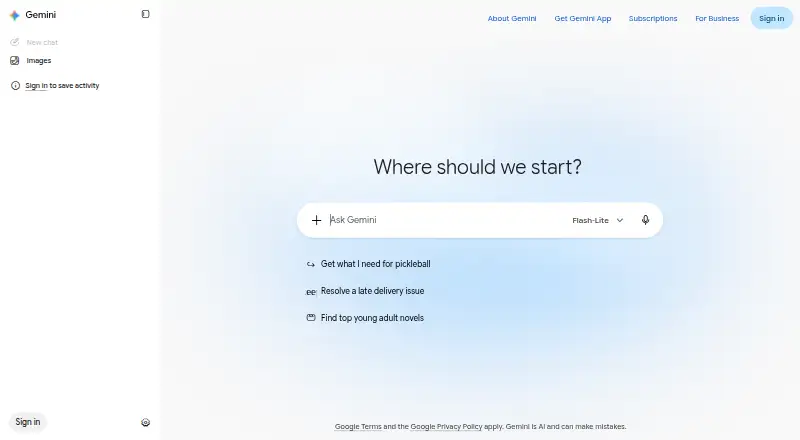
What Gemini is
Gemini is a software service with web search, file uploads, image generation, mobile apps, app integrations, and a team workspace. It is available on the web, Windows, macOS, iOS, and Android. Its Free plan costs nothing and includes Gemini app access, image generation and editing, Deep Research, Gemini Live, Canvas, and Gems. Google AI Plus includes 400 GB of storage, while Google AI Pro includes 5 TB of storage and 1,000 Google Flow credits. Google AI Ultra includes 20 TB of storage and 10,000 Google Flow credits; prices for those three plans are not listed. Gemini's maker is headquartered in Mountain View, California, United States, and was founded in 1998. The listed website is gemini.google.com.
Good
- Free plan includes Gemini app access and Deep Research.
- Image generation and editing are included in the Free plan.
- Available on web, Windows, macOS, iOS, and Android.
- Includes app integrations and a team workspace.
Watch out
- Google AI Plus, Pro, and Ultra prices are not listed.
- Only the Free plan has a listed price.
Who it suits
Gemini suits people looking for an AI service across desktop and mobile platforms, with web search, file uploads, image generation, or team workspace features. The Free plan may suit those seeking access without a listed charge.
Verdict
Gemini combines web search, file uploads, image generation, and team workspace features across desktop and mobile platforms. Check the plan details against the storage and Google Flow credits you need, since prices for the paid tiers are not listed.
Plans and prices
From Gemini's own pricing page, checked 20 Sep 2026.
| Plan | Price | What it gives you |
|---|---|---|
| Google AI Ultra | — | 20 TB storage · 10,000 Google Flow credits |
| Free | Free | Flash-Lite model · image generation/editing · Deep Research · Gemini Live · Canvas · Gems · 15 GB storage · $0/month with a Google Account |
| Gemini API Free tier | Free | Limited model access · free input/output tokens · Google AI Studio · free-tier data may improve Google products · Free of charge |
| Google AI Plus | $4.99 a month | 2x Free usage · Flash model · video generation · 200 Flow credits · 400 GB storage · Gemini in Gmail/Vids · $4.99/month |
| Google AI Pro | $19.99 a month | 4x Free usage · Pro and Flash models · 1,000 Flow credits · Gemini in Gmail/Docs/Vids · 5 TB storage · Chrome auto browse · $19.99/month |
| Gemini Enterprise Business | $21 a month | Up to 300 seats · 25 GiB pooled storage/indexing per seat · connectors · no-code Workflow Builder · built-in security/governance · Starting at $21 per seat per month |
| Gemini Enterprise Standard/Plus | $30 a month | Unlimited seats · higher Gemini quotas · third-party agents · VPC-SC · customer-managed encryption keys · sovereign data boundaries · 75 GiB pooled storage/indexing per seat · Starting at $30 per seat per month |
| Google AI Ultra (5x) | $99.99 a month | 5x Pro usage · highest Pro/Flash access · 10,000 Flow credits · 20 TB storage · YouTube Premium · Project Genie · Starting at $99.99/month |
| Google AI Ultra (20x) | $199.99 a month | 20x Pro usage · highest Pro/Flash access · 25,000 Flow credits · 20 TB storage · YouTube Premium · Project Genie · $199.99/month |
| Gemini API Paid tier | Priced on request | Higher rate limits · context caching · Batch API · advanced models · paid data not used to improve products · Pay-as-you-go per token/request |
The facts
Each one read from Gemini's own pages, with the date it was checked.
What it does
- API and SDKs
- Google's production GenAI SDKs support Python, JavaScript/TypeScript, Go, Java and C#.checked 19 Oct 2026
- API data policy
- Free-tier API inputs and outputs may be reviewed to improve products, while paid-tier data is excluded from that use.checked 19 Oct 2026
- API documentation
- The API reference documents unary, streaming and real-time interfaces, including REST access.checked 19 Oct 2026
- Availability
- Gemini mobile apps are offered in more than 150 countries and require users to be at least 13 or the applicable local age.checked 19 Oct 2026
- Built-in API tools
- The API offers Google Search, Maps, URL Context, File Search and Code Execution tools in one call.checked 19 Oct 2026
- Coding
- Gemini can generate code blocks and unit tests and reason across repositories of up to 30,000 lines.checked 19 Oct 2026
- Creative generation
- The consumer plans include image generation/editing and video creation through Google's creative tools.checked 19 Oct 2026
- Custom tools
- Developers can combine built-in tools with custom function-calling tools on supported Gemini 3 models.checked 19 Oct 2026
- Deep Research
- Deep Research can examine hundreds of live sources and produce a research report.checked 19 Oct 2026
- Developer news
- Google announced AI Studio project spend caps, usage-tier changes and billing dashboards on March 16, 2026.checked 19 Oct 2026
- Document analysis
- The subscription page says Gemini can analyze uploads of up to 1,500 document pages and create charts.checked 19 Oct 2026
- Enterprise connectors
- Gemini Enterprise lists Microsoft 365, Google Workspace, HubSpot and Jira connectors.checked 19 Oct 2026
- File uploads
- Yeschecked 20 Sep 2026
- Image generation
- Yeschecked 20 Sep 2026
- Integrations
- Connected Apps let Gemini work with selected apps, but availability varies by device, country, account and Gemini surface.checked 19 Oct 2026
- Launch news
- Google announced Gemini on December 6, 2023 and said Gemini Pro API access would begin December 13 through AI Studio and Vertex AI.checked 19 Oct 2026
- Licence
- Gemini itself is a proprietary Google service; the developer documentation separately licenses code samples under Apache 2.0.checked 19 Oct 2026
- Limit: accuracy and context
- G2 reviewers report inconsistent or overconfident answers, context problems and the need to verify generated code and facts.checked 19 Oct 2026
- Limit: extensibility and output quality
- TrustRadius reviewers cite hallucinations, generic responses, basic code generation, buggy image generation and weak multi-cloud connectors.checked 19 Oct 2026
Where it runs
- App integrations
- Yeschecked 20 Sep 2026
The company
- Company owner
- Alphabet's annual report identifies Google as its largest business and reports Google Services and Google Cloud segments.checked 19 Oct 2026
- Founded
- 1998checked 23 Sep 2026
- Headquarters
- Mountain View, California, United Stateschecked 23 Sep 2026
Money
- Free plan
- Yeschecked 20 Sep 2026
The full review of Gemini
Gemini is a Google AI assistant for people who want search, file uploads and image tools alongside workspace features on desktop and mobile. Its free plan offers a substantial starting set; paid tiers distinguish themselves through storage and Google Flow credits.
Overview
Gemini brings web search, file uploads, image generation and editing, and app integrations into one assistant. Deep Research, Gemini Live, Canvas and Gems also feature in the free plan, making it a capable place to start without a subscription. The trade-off is that the paid tiers' prices are custom, so it is harder to judge their cost against their storage and credit allowances.
Key features
- Web search: Useful when questions call for information from the web rather than only a conversational response.
- File uploads: Lets users bring their own files into the assistant, broadening its usefulness beyond standalone chat.
- Image generation and editing: Supports visual creation and changes as well as text-based assistance.
- Workspace tools: App integrations and a team workspace make Gemini relevant beyond individual use, though the plan details do not define collaboration limits.
- Free-plan extras: Deep Research, Gemini Live, Canvas and Gems give free users more than basic app access.
Pricing
Gemini uses a freemium model. The Free plan costs nothing and includes Gemini app access, image generation and editing, Deep Research, Gemini Live, Canvas and Gems. It is the clearest fit for individuals who want to explore these tools without paying; no storage allowance or Google Flow credits are included in its stated benefits.
Google AI Plus has custom pricing and includes 400 GB of storage. It suits someone whose priority is more storage, but its cost cannot be weighed against that allowance from price alone.
Google AI Pro also has custom pricing, with 5 TB of storage and 1,000 Google Flow credits. It offers a larger storage allocation and a defined Flow credit balance for users who need both. Google AI Ultra increases those figures to 20 TB and 10,000 Flow credits, making it the top allowance for users with heavier storage or Flow needs. Both paid plans require readers to assess the value against custom pricing.
Platforms
Gemini is available on web, Windows, macOS, iOS and Android. That breadth makes it a practical option for people who move between computers and mobile devices.
Who it's for
Gemini is a strong fit for people looking for one assistant that combines web search, file uploads and image tools, especially if the free plan's research and creative features are enough. The paid tiers are worth considering for users who need their larger storage allowances or Google Flow credits. Readers who need to compare paid costs before committing may find the custom pricing a drawback.
Pros and cons
- Pro: The free plan includes Deep Research, Gemini Live, Canvas and Gems, offering several tools without a paid tier.
- Pro: Support across five desktop and mobile platforms helps users keep Gemini within reach across devices.
- Pro: Paid plans state clear storage and Flow credit allowances, which helps match tiers to capacity needs.
- Con: Paid tiers use custom pricing, so readers cannot readily compare their cost with the storage and credits offered.
- Con: The stated paid-plan benefits focus on storage and Flow credits, making the reason to upgrade less clear for users who do not need either.
Alternatives
For a broader comparison of assistants, see AI chatbots and assistants or AI Personal Assistants. Readers focused on browser or computer-use automation can browse AI Browser Agents and AI Computer Use Agents; developers comparing coding tools can look at AI Coding Assistants.
Choose Claude in Chrome instead if its free plan's web, desktop and mobile chat, web search, file creation and code execution, memory, and app and tool connections better match your workflow.
Genspark AI Browser is a fit for readers who want on-device access to 169 open-weight models without internet or subscription limits; its Team plan is $30 a month.
If token allowances matter, Muse offers a Power plan at $20 a month with 500M Muse tokens per week, while its free usage limit refreshes periodically.
Skyvern is an alternative for API, self-hosted or web use, with its Free plan offering 5,000 credits and one concurrent run, and Hobby at $29 a month offering 30,000 credits per month and 10 concurrent runs.
Strawberry Browser is another option for macOS and Windows users.
Consider UseAgent if Linux or self-hosted access matters; its Cloud plan is free during early access, with provider and computer spend billed to users' own accounts.
Fellou is a macOS alternative with a free plan that includes a 1,000 Sparks new-user bonus, described as approximately four tasks.
Retriever AI offers a free plan with 100 one-time welcome credits and no subscription.
Verdict
Gemini is a strong choice for users who want web search, file uploads, image tools and a wide set of assistant features across desktop and mobile, with a free plan that goes beyond basic access. Its main limitation is the custom pricing on every paid tier: choose it if the free offer meets your needs or the stated storage and Flow credits justify an upgrade, and look elsewhere if transparent paid pricing is essential.
Getting started
- Visit https://gemini.google.com/.
- Choose the Free plan or one of the listed Google AI plans.
- Use Gemini on the web, Windows, macOS, iOS, or Android.
Questions
Is Gemini free?
Yes. The Free plan costs nothing and includes Gemini app access, image generation and editing, Deep Research, Gemini Live, Canvas, and Gems.
Which platforms can I use?
Gemini is available on the web, Windows, macOS, iOS, and Android.
What do the listed paid plans include?
Google AI Plus includes 400 GB of storage. Google AI Pro includes 5 TB of storage and 1,000 Google Flow credits, and Google AI Ultra includes 20 TB of storage and 10,000 Google Flow credits.
What capabilities are listed?
They include web search, file uploads, image generation, app integrations, and a team workspace.
Who makes Gemini?
The maker is identified as Gemini, headquartered in Mountain View, California, United States. It was founded in 1998.
Alternatives to Gemini
- 1

Microsoft Copilot
Free planAndroidiOSWebWindows9.0From $99.99 a year - 2

Perplexity
Free planAndroidiOSWebAPI9.0From $20 a month - 3

Amazon Q
Free planAndroidiOSWebAPI9.0Free plan - 4

Claude
Free planAndroidiOSWebAPI8.8Free plan - 5
Onyx
Free planOpen sourceWebAPIExtensionLinux8.6From $20 a month - 6

AnythingLLM
Free planAndroidWebAPILinux8.4From $50 a month