
Garden
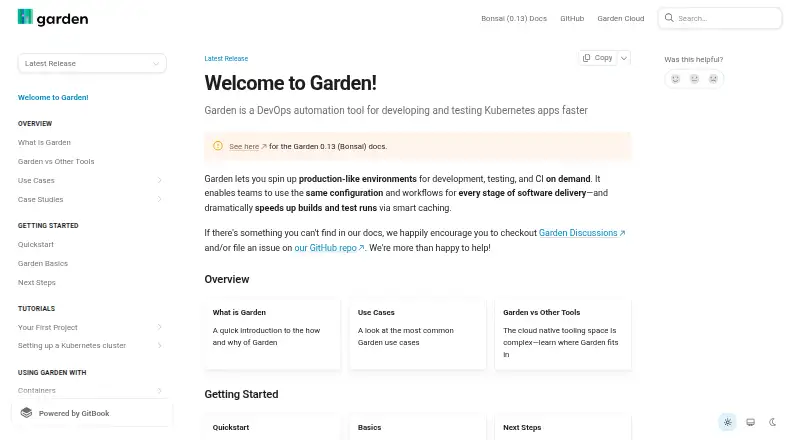
Garden is a DevOps automation tool for developing and testing Kubernetes applications.
What Garden is
Garden is a DevOps automation tool for developing and testing Kubernetes applications. It creates production-like environments on demand for development, testing and continuous integration, then models infrastructure, builds, services and tests as a dependency-aware action graph. Graph-aware caching prevents unchanged images and tests from running again. Garden Core uses YAML declarations so workflows remain reproducible and portable across developer machines and CI systems. Sync mode live-syncs changes to running deployments for faster development feedback. Garden Cloud’s Remote Container Builder provides managed remote compute and shared Docker layer caches. Plugins are available for Kubernetes, Helm, Terraform, Pulumi and local scripts. The Terraform provider validates and provisions infrastructure and exposes stack outputs to Garden actions; the Pulumi plugin is experimental and deploys Pulumi stacks in dependency order. Garden supports Linux, macOS, Windows, web and self-hosted deployments, with local Kubernetes and compose workflows available. Local service builds require a local Kubernetes installation, and Git 2.14 or newer is required. Garden Enterprise is a self-hosted Garden Cloud distribution installed in a customer’s Kubernetes infrastructure. The free tier is available, while Team and Enterprise plans add capacity or enterprise controls.
Good
- Creates production-like development, test and CI environments
- Dependency-aware caching skips unchanged images and tests
- YAML workflows are reproducible and portable
- Live-sync mode speeds deployment feedback
- Plugins cover Kubernetes, Helm, Terraform and Pulumi
- Supports Linux, macOS, Windows and self-hosted use
Watch out
- Free tier limits build minutes, cache hits and cache retention
- Local service builds require a local Kubernetes installation
- Git 2.14 or newer is required
- Pulumi plugin is experimental
Who it suits
Garden is designed for platform engineers, DevOps engineers and application developers running workloads on Kubernetes. It suits teams that need reproducible workflows, on-demand environments, dependency-aware caching or live synchronization during development.
Verdict
Choose Garden if your team develops Kubernetes workloads and wants automated environments, cached dependency graphs and reproducible YAML workflows. Consider another tool if you cannot provide local Kubernetes for service builds or need Pulumi support beyond an experimental plugin.
Plans and prices
From Garden's own pricing page, checked 14 Oct 2026.
| Plan | Price | What it gives you |
|---|---|---|
| Free | Free | Garden Core CLI · limited monthly remote-cache hits via Garden Cloud |
| Free tier | Free | limited build minutes · cache hits · cache retention |
| Team | $50 a month | 1,000 remote build minutes per user monthly, pooled organization-wide · extra compute available à la carte · per user |
| Enterprise | Priced on request | higher cache-hit limits · self-hosted or single-tenant cloud · enhanced security features |
The facts
Each one read from Garden's own pages, with the date it was checked.
What it does
- Action graph
- Its dependency-aware action graph tracks infrastructure, builds, deployments and tests to avoid unnecessary reruns.checked 14 Oct 2026
- Audience
- Garden is intended for platform engineers, DevOps engineers and application developers running workloads on Kubernetes.checked 1 Oct 2026
- Caching
- Garden uses graph-aware caching so unchanged images and tests do not run again.checked 1 Oct 2026
- Changelog
- Release 0.14.18 dated February 25, 2026 added custom-command improvements and bundled Traefik ingress support.checked 14 Oct 2026
- CI portability
- The same workflows can run on developer machines, CI servers and cloud environments.checked 14 Oct 2026
- Configuration
- Garden Core uses YAML declarations to make workflows reproducible and portable across developer machines and CI.checked 1 Oct 2026
- Dashboard
- Garden Cloud's dashboard visualizes CI/CD flows, logs and command history.checked 14 Oct 2026
- Docker requirement
- The quickstart requires Docker running, while local Kubernetes is optional for the introductory deployment.checked 14 Oct 2026
- Documentation
- Documentation includes quickstarts, conceptual guides, workflow guides, provider references and a large CLI command reference.checked 14 Oct 2026
- Enterprise deployment
- Garden Enterprise is a self-hosted Garden Cloud distribution installed into a customer's Kubernetes infrastructure.checked 1 Oct 2026
- Environments
- Garden creates production-like environments for development, testing and CI on demand.checked 1 Oct 2026
- Extensibility
- Garden is plugin-based and its repository includes an SDK area for building provider and action integrations.checked 14 Oct 2026
- Infrastructure integrations
- The project identifies Kubernetes, Terraform and Pulumi as its principal plugins.checked 14 Oct 2026
- Integrations
- Garden provides plugins for Kubernetes, Helm, Terraform, Pulumi and local scripts.checked 1 Oct 2026
- Kubernetes integration
- Garden uses the Kubernetes API and kubectl, supports Helm and Kubernetes actions, and isolates work with namespaces.checked 14 Oct 2026
- License
- The Garden repository is open source under the Mozilla Public License 2.0.checked 14 Oct 2026
- Limit: documentation
- Reviewers say the documentation can be overwhelming or difficult to read, especially during initial setup.checked 14 Oct 2026
- Limit: learning curve
- G2 reviewers describe a steep learning curve for people new to Kubernetes, microservices or DevOps.checked 14 Oct 2026
- Limit: multi-project complexity
- A G2 reviewer reports difficulty managing dependencies across complex multi-project configurations.checked 14 Oct 2026
- Limit: shared files
- A G2 reviewer reports no convenient deployment mechanism for sharing files or libraries, leading to duplicated code or external resources.checked 14 Oct 2026
- Live synchronization
- Sync mode live-syncs code changes into running services for faster development feedback.checked 14 Oct 2026
- Praise: automation and integration
- Reviewers praise automated testing and deployment plus integration with existing CI pipelines and version-control systems.checked 14 Oct 2026
The company
- Company profile
- LinkedIn lists Garden.io as a privately held software-development company founded in 2018, headquartered in Berlin, with 11–50 employees.checked 14 Oct 2026
- Ownership news
- Incredibuild announced its acquisition of Garden on November 4, 2024, combining Garden's cloud-native CI capabilities with Incredibuild's acceleration platform.checked 14 Oct 2026
The full review of Garden
Garden is a DevOps automation platform for teams developing and testing Kubernetes applications. It fits platform engineers, DevOps engineers and application developers who already operate Kubernetes-based workflows. The central benefit is a single, dependency-aware workflow that can coordinate environments, builds, services and tests while avoiding repeated work.
Overview
Garden creates production-like environments on demand for development, testing and continuous integration. Its action graph models infrastructure, builds, services and tests together, so dependencies determine what runs and in what order. This approach is most valuable in projects with multi-step Kubernetes workflows; a simpler container project may not gain enough from introducing the graph.
Garden Core stores workflow declarations in YAML. That gives teams a portable definition they can use across developer machines and CI, rather than relying on undocumented local sequences. Garden requires Git 2.14 or newer, and local service builds require a local Kubernetes installation, an important constraint for contributors who cannot run Kubernetes locally.
Key features
Graph-aware caching skips unchanged image builds and tests. On repetitive development or CI runs, that can reduce duplicate work and make the dependency graph more useful over time. The cache is not unlimited on the free tier, however, so larger teams may need a paid plan to retain the benefit consistently.
Sync mode live-syncs source changes to running deployments, shortening the edit-to-feedback cycle. It is aimed at active Kubernetes development rather than one-off image creation. Garden Cloud’s Remote Container Builder adds managed remote compute and shared Docker layer caches, which can help teams that want remote build capacity instead of relying solely on local machines.
Plugins cover Kubernetes, Helm, Terraform, Pulumi and local scripts. The Terraform provider validates and provisions infrastructure, then exposes stack outputs to Garden actions, making infrastructure values usable in subsequent workflow steps. The Pulumi plugin deploys stacks in dependency order, but it is experimental; teams that require a mature Pulumi-first workflow should treat Garden as a secondary option.
Compose workflows and resource controls are supported, alongside local Kubernetes operation. Garden Enterprise is a self-hosted Garden Cloud distribution installed in a customer’s Kubernetes infrastructure, giving organizations that deployment model rather than a hosted-only service.
Pricing
Garden uses a freemium model. The Free tier costs nothing and includes limited build minutes, cache hits and cache retention. It is suitable for individual evaluation and smaller workloads, but those caps can restrict teams with frequent builds or large dependency graphs.
The Team plan has custom pricing and raises cache limits, provides more build minutes and adds more layer caching. It is the practical step for growing development groups that have outgrown free usage. The Enterprise plan also uses custom pricing and adds secrets management, RBAC and the self-hosted distribution. Those controls suit organizations that need centralized access policies or must run Garden Cloud inside their own Kubernetes infrastructure.
Platforms
Garden runs on macOS, Windows and Linux, and is also offered as web, self-hosted software. Local Kubernetes support and resource controls make it adaptable to developer workstations and controlled internal environments. The local service-build requirement means platform support alone does not remove the need to install and operate Kubernetes.
Who it's for
Garden is a strong match for platform and DevOps teams standardizing Kubernetes development and CI, and for application developers whose services already run in Kubernetes. It is particularly useful when reproducible YAML workflows, environment creation on demand, dependency-aware caching and live synchronization address daily bottlenecks.
It is a weaker fit for teams without Kubernetes expertise or local Kubernetes capacity, and for organizations seeking a fully mature Pulumi integration. Teams wanting only a lightweight container runtime may find Garden’s workflow model more infrastructure than they need.
Pros and cons
- Pros: Dependency-aware graphs coordinate infrastructure, builds, services and tests in one workflow.
- Pros: Graph-aware caching and shared Docker layer caches can avoid repeated builds and tests.
- Pros: YAML declarations and sync mode support reproducible workflows with rapid development feedback.
- Pros: Terraform integration can provision infrastructure and pass stack outputs into actions.
- Cons: Local service builds require a local Kubernetes installation.
- Cons: Free-tier build minutes, cache hits and retention are limited.
- Cons: Pulumi support is experimental rather than a mature core integration.
Alternatives
For a broad directory of comparable environments, see Container Development Environments. Teams comparing Kubernetes-focused deployment workflows can browse Kubernetes Deployment Tools, while build-specific options are collected in Container Build Tools.
Docker Desktop is a better choice when you want a familiar desktop package combining Docker Engine, Kubernetes and related tools; its Personal plan is free and Pro costs $9 a month.
Choose Kool instead when a small managed or bring-your-own-cloud setup is preferable, with a free one-cluster BYOC tier and a Managed Cloud Micro plan at $5 a month.
Tokaido suits users seeking fully open-source Docker-based local environments, while kind is the focused free, open-source option for running Kubernetes clusters in Docker.
Testcontainers Desktop is aimed at individual developers needing containerized test workflows, with 300 minutes of cloud runtime per month on its free plan. Tilt is a free Apache-2.0 project for teams that want an open-source development tool. Coasts offers a free local open-source approach, and Colima is a free MIT-licensed container runtime for macOS and Linux.
Verdict
Choose Garden when your team develops Kubernetes workloads and needs reproducible environments, dependency-aware caching and coordinated build-and-test workflows. Its strongest reason to adopt is the graph-based automation with sync and infrastructure integrations. Look elsewhere if local Kubernetes is not practical, if free-tier limits are too restrictive, or if your organization depends on production-ready Pulumi support.
Getting started
- Open https://garden.io/
- Install Garden on macOS, Windows or Linux, or use self-hosted deployment
- Ensure Git 2.14 or newer is available
- Install a local Kubernetes environment for local service builds
- Define workflows with Garden Core YAML
- Connect Kubernetes, Helm, Terraform, Pulumi or local-script plugins
- Choose the Free tier, Team or Enterprise plan
Limits worth knowing
The Free tier costs nothing and is limited by build minutes, cache hits and cache retention. Team provides higher cache limits, more build minutes and more layer caching; Enterprise adds secrets management, RBAC and a self-hosted distribution.
Questions
Is Garden free?
Yes. The Free tier costs nothing, with limits on build minutes, cache hits and cache retention.
Which platforms does Garden support?
Garden supports Linux, macOS, Windows, web and self-hosted deployments. Desktop support includes macOS, Windows and Linux.
What does Garden require?
Garden requires Git 2.14 or newer. Local service builds require a local Kubernetes installation.
Does Garden support Terraform and Pulumi?
Yes. Its Terraform provider validates and provisions infrastructure and exposes stack outputs. Garden also has an experimental Pulumi plugin that deploys stacks in dependency order.
What is Garden Enterprise?
Garden Enterprise is a self-hosted Garden Cloud distribution installed into a customer’s Kubernetes infrastructure. The plan lists secrets management and RBAC.
Where can users get support?
Garden directs users to Garden Discussions and its GitHub repository for help and issue reporting.
Alternatives to Garden
- 1

DevPod
Free planOpen sourceLinuxmacOSSelf-hostedWindows7.4Free plan - 2
Docker Desktop
Free planWebLinuxmacOSWindows7.2From $9 a month - 3

OrbStack
Free planAPImacOS7.2From $8 a month - 4

Testcontainers Desktop
Free planWebAPILinuxmacOS7.2Free plan - 5
Kool
Free planWebLinuxmacOSWindows7.1From $49 a month - 6
Rancher Desktop
Free planAPILinuxmacOSWindows6.7Free plan