FORM
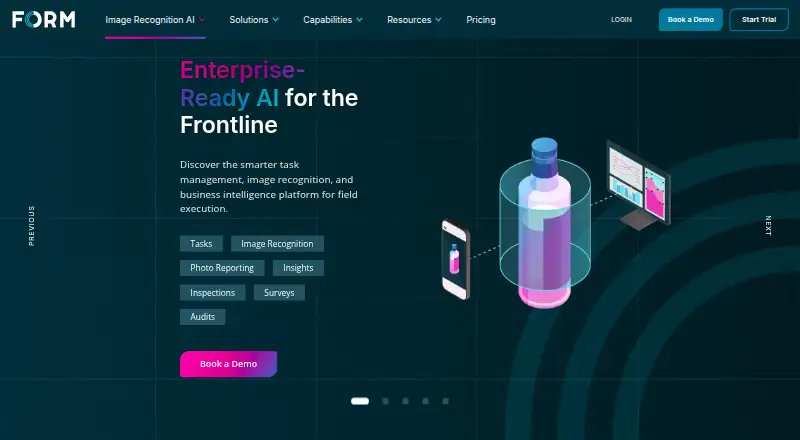
FORM is a digital assistant and field execution platform for frontline teams.
What FORM is
FORM is a digital assistant and field execution platform for frontline teams. It brings together daily tasks, data collection, communication, and real-time intelligence, with offerings for market execution and operational excellence. GoSpotCheck by FORM focuses on market execution, with a no-code task builder, mobile app, photo capture and reporting, alerts, and business intelligence dashboards. Its image recognition AI analyzes products and prices in photos of shelves, displays, menus, back bars, and coolers. FORM OpX serves leaders in safety, compliance, manufacturing, and facilities management. Its features include customizable workflows, escalation and alerts, tracking and reporting, photo markup, and business intelligence dashboards. The mobile app can collect information offline and upload responses and completed tasks after it synchronizes. FORM OpX is available on iOS, Android, Windows, and the web; listed platform support also includes API, self-hosted, and web options. Integrations for OpX include REST, SOAP, and JavaScript APIs, plus SAML and OAuth-based single sign-on. FORM lists ISO 27001 and ISO 27701 security certifications and says it is GDPR compliant. The product is paid, with no free plan. Its operational excellence plan costs $21 a month and has a 10-user minimum; its market execution plan costs $35 a month and has a 20-user minimum. Trials or proofs of concept are typically tied to one use case and require internal approvals.
Good
- Collect field data offline and synchronize completed work later.
- Use a no-code task builder for market execution.
- Analyze product and price images with mobile AI.
- Connect OpX through APIs and SAML or OAuth-based SSO.
- Access listed ISO 27001 and ISO 27701 certifications.
Watch out
- There is no free plan.
- FORM OpX has a 10-user minimum.
- GoSpotCheck by FORM has a 20-user minimum.
- Trials or proofs of concept require internal approvals.
Who it suits
FORM suits frontline teams that need to collect field data, complete tasks, and share operational information, including teams working without a reliable internet connection. FORM OpX is aimed at safety, compliance, manufacturing, and facilities leaders, while GoSpotCheck by FORM is for market execution teams that use photo-based reporting and image recognition.
Verdict
Choose FORM when field teams need mobile task execution, offline data collection, and photo-based reporting or analysis. FORM OpX is suited to operational excellence teams, while GoSpotCheck by FORM targets market execution. Look elsewhere if you need a free plan or cannot meet the relevant minimum user count.
Plans and prices
From FORM's own pricing page, checked 14 Oct 2026.
| Plan | Price | What it gives you |
|---|---|---|
| FORM OpX | $21 a month | 10-user minimum · customizable workflows · escalation alerts · tracking/reporting · photo markup · BI dashboards · per user per month |
| GoSpotCheck by FORM | $35 a month | 20-user minimum · no-code task builder · mobile app · photo capture/reporting · notifications · BI dashboards · per user per month |
| Image Recognition | Priced on request | mobile image-recognition AI · integrated task management · photo capture · on-device reporting · automated insights · Let's Connect |
| For Operational Excellence | $21 a month | Customizable Workflows · Automated Escalation & Alerts · Real-Time Tracking & Reporting · Photo Capture & Markup · Business Intelligence Dashboards · 10-user minimum · $21 user month |
| For Market Execution | $35 a month | No-Code Task Builder · Top-Rated Mobile App · Real-Time Photo Capture & Reporting · Automated Notifications & Alerts · Business Intelligence Dashboards · 20-user minimum · $35 user month |
The facts
Each one read from FORM's own pages, with the date it was checked.
What it does
- API
- FORM documents Web Services, JavaScript and SOAP APIs for account, user and form integration, and a REST API for sending audit data and triggering notifications.checked 14 Oct 2026
- API release
- The REST API was announced in December 2022 for exporting inspection or audit results and event-triggered notifications.checked 14 Oct 2026
- Data privacy
- FORM's AI information page states that it is GDPR compliant.checked 12 Oct 2026
- Data protection
- Terms state annual security-standard audits, administrative, physical and technical safeguards, and CCPA/CPRA obligations.checked 14 Oct 2026
- Developer extensibility
- The JavaScript API can manipulate form appearance and structure, while the Web Services API supplies business logic and data integration.checked 14 Oct 2026
- Documentation
- The help center contains installation, application guides, API material, browser support, privacy guidance, product tours, videos and course books.checked 14 Oct 2026
- Image recognition
- AI detects products, prices and point-of-sale materials from in-store photos.checked 14 Oct 2026
- Insights
- Configurable business-intelligence dashboards are powered by Looker.checked 14 Oct 2026
- Integrations
- GetApp lists Salesforce Platform, Microsoft Azure, Looker, Microsoft 365 and Microsoft Teams as integrations.checked 14 Oct 2026
- Licence
- FORM is proprietary subscription software; its terms prohibit copying, reverse engineering, decompiling and creating derivative works.checked 14 Oct 2026
- Limit: FORM OpX usability
- FORM OpX Google Play reviews complain about poor usability, missing map/address conveniences, delayed assignments and erased data after restarting.checked 14 Oct 2026
- Limit: missing barcode feature
- A Capterra/Software Advice reviewer said barcode reading and other features were still awaited.checked 14 Oct 2026
- Limit: mobile reliability
- Google Play reviewers report crashes, lost mission uploads, slow loading and difficulty operating with weak Wi-Fi.checked 14 Oct 2026
- Limit: outages and slowness
- A G2 reviewer reported that the product sometimes went down or ran slowly and disrupted work.checked 14 Oct 2026
- Market execution features
- The market execution offering includes a no-code task builder, mobile app, real-time photo capture and reporting, automated alerts, and business intelligence dashboards.checked 12 Oct 2026
- Offline mobile use
- The FORM mobile application can collect data without internet access and uploads responses and completed tasks when synchronized.checked 12 Oct 2026
- Offline mode
- Yeschecked 20 Sep 2026
- Offline operation
- The mobile applications support offline data collection and synchronize when connectivity returns.checked 14 Oct 2026
- Operational excellence audience
- FORM OpX is described for leaders in safety, compliance, manufacturing, and facilities management.checked 12 Oct 2026
Where it runs
- Browser support
- Supported browsers include current Edge, Chrome, Firefox, Opera and Safari versions; Internet Explorer is unsupported.checked 14 Oct 2026
The company
- Company legal name
- The app listings identify the developer as WorldAPP Inc.checked 14 Oct 2026
- Founded
- FORM says its journey began in 2001.checked 14 Oct 2026
- Headquarters
- FORM lists its headquarters at 859 Willard Street, Suite 400, Quincy, Massachusetts.checked 14 Oct 2026
Money
- Free plan
- Nochecked 20 Sep 2026
The full review of FORM
FORM is a field-work platform with separate products for operational excellence and market execution. It is best suited to frontline teams that need structured mobile tasks and reporting and can meet the relevant seat minimum. Its strongest case is pairing offline collection with workflows designed for field operations; small teams and buyers seeking a free option should look elsewhere.
Overview
FORM brings task execution, data collection, communication, and real-time intelligence together for frontline teams. FORM OpX serves operational excellence work, while GoSpotCheck by FORM is aimed at market execution. That division makes it easier to identify the relevant product, but the 10-user minimum for OpX and 20-user minimum for GoSpotCheck make team size an early buying consideration.
Key features
GoSpotCheck combines a no-code task builder, mobile photo capture and reporting, automated alerts, and business-intelligence dashboards. Its image-recognition AI analyzes products and prices in photos of shelves, displays, menus, back bars, and coolers. That makes it a more targeted choice for market teams that need visual checks alongside task execution, rather than only a way to digitize forms.
FORM OpX is designed for leaders in safety, compliance, manufacturing, and facilities management. Its published capabilities include customizable workflows, automated escalation and alerts, real-time tracking and reporting, photo capture and markup, and corrective actions. These features connect inspection and field findings to follow-up, which is more useful for operational teams than collecting data without an action process.
The mobile app can collect data and completed tasks without an internet connection, then upload them when synchronized. That helps teams working in areas with unreliable connectivity continue their work, though collected information does not reach the platform until syncing occurs. FORM also supports custom inspection forms and API access. OpX integrations include REST, SOAP, and JavaScript APIs, plus SAML and OAuth-based single sign-on options. FORM lists ISO 27001 and ISO 27701 security certifications and states that it is GDPR compliant.
Pricing
FORM has no free plan, and its trials or proofs of concept are typically tied to one use case and require internal approvals. That makes it less suitable for a small team wanting to explore the product without a sales-led commitment.
- For Operational Excellence: $21 a month, billed $21 user month, with a 10-user minimum. It includes customizable workflows, automated escalation and alerts, real-time tracking and reporting, photo capture and markup, and business-intelligence dashboards. This is the lower published tier and fits qualifying operations teams; the minimum still means a commitment for at least 10 users.
- For Market Execution: $35 a month, billed $35 user month, with a 20-user minimum. It includes a no-code task builder, mobile app, real-time photo capture and reporting, automated notifications and alerts, and business-intelligence dashboards. The higher price and larger minimum are relevant for teams needing retail or market execution workflows, but make this a poor fit for smaller deployments.
- Image Recognition: custom pricing. It combines mobile image-recognition AI, integrated task management, real-time photo capture, on-device reporting, and automated insights.
FORM OpX and GoSpotCheck by FORM are also offered with custom pricing; their minimums are 10 users and 20 users respectively. Buyers should confirm which product and pricing structure applies to their use case before comparing the published per-user tiers.
Platforms
FORM is available on Android, iOS, Windows, and the web, with API and self-hosted options also listed. Its mobile app is particularly relevant for field teams because it supports offline data collection and synchronization after connectivity returns.
Who it's for
FORM OpX is the better fit for organizations managing safety, compliance, manufacturing, or facilities workflows. GoSpotCheck is aimed at market execution teams that need task management, photo-based reporting, and shelf or display analysis. Both are paid products with minimum user counts, so neither is an obvious choice for a small team or an individual seeking a lightweight mobile form tool.
Pros and cons
- Pros: Offline mobile collection lets teams complete work without a live connection.
- Pros: GoSpotCheck pairs field tasks with photo reporting and image recognition for products and prices, a useful combination for visual market checks.
- Pros: OpX supports workflows, alerts, reporting, and corrective actions, helping operational teams carry findings through to follow-up.
- Cons: There is no free plan, and trials or proofs of concept require internal approval and are typically limited to one use case.
- Cons: Minimums of 10 users for OpX and 20 for GoSpotCheck exclude many small teams, even before custom-priced options are considered.
Alternatives
For retail execution, compare Retail Execution Software, Retail Store Operations Software, and Inspection Management Software to assess the category options. Teams focused on digitizing forms can also review Form Automation Software and Mobile Forms Software; organizations managing field-service work can browse Field Service Management Software.
Movista is another paid option with Android, iOS, web, and API platforms. Repsly may suit teams seeking representative management: its Core plan includes a representative database, account management, scheduling, basic forms, standard reporting, and API access, with no free plan or trial. ZenOwn Shelf Compliance AI is a paid alternative available on Android, iOS, and web.
BeatRoute may fit teams needing territory and channel partner management, GPS-based market coverage, order collection, stock reporting and returns, and a campaign form. FieldAssist is an option for field sales and distribution workflows, including offline-first mobile operations, order capture, invoicing, collections, returns, and route planning. StayinFront TouchCG is a paid option for Android and iOS. Trax Retail is another paid alternative, available through API, iOS, and web. Bizom may suit teams looking for sales force automation and distributor management, with a Basic plan that includes 100 users and retail execution and merchandising.
Verdict
Choose FORM when an established frontline operation needs mobile task execution, offline data collection, and photo-based reporting or analysis. OpX is the more relevant product for safety, compliance, manufacturing, and facilities teams; GoSpotCheck fits market execution. Its focused workflows and offline capability are compelling, but the paid-only model and 10- or 20-user minimums make FORM a poor choice for smaller teams.
Getting started
- Visit https://www.form.com/ to explore the offerings.
- Choose FORM OpX for operational excellence or GoSpotCheck by FORM for market execution.
- Check the applicable 10-user or 20-user minimum and plan pricing.
- Contact FORM about a trial or proof of concept, which typically requires internal approval.
- Use the mobile app on a supported device; collect information offline and synchronize it later.
Limits worth knowing
FORM has no free plan. FORM OpX requires at least 10 users, and its listed operational excellence plan costs $21 a month; GoSpotCheck by FORM requires at least 20 users, and its listed market execution plan costs $35 a month.
Questions
Does FORM have a free plan?
No. FORM is paid and has no free plan.
How much do the listed plans cost?
For Operational Excellence is $21 a month with a 10-user minimum. For Market Execution is $35 a month with a 20-user minimum.
Which platforms does FORM support?
Listed platforms include Android, iOS, web, Windows, API, and self-hosted. FORM OpX is listed for iOS, Android, Windows, and a web portal.
Can FORM collect data offline?
Yes. The mobile application can collect data without internet access and uploads responses and completed tasks when synchronized.
What integrations does FORM OpX offer?
Its help portal lists REST API, SOAP API, JavaScript API, and single sign-on options including SAML and OAuth-based SSO.
Who makes FORM?
FORM is the maker. It was founded in 2001 and is headquartered in Quincy, Massachusetts, United States.
Alternatives to FORM
- 1

Amply
Free planAndroidiOSWeb7.8From $39 a month - 2
VisitBasis
AndroidiOSWebAPI7.5From 150 RUB a month - 3
Field2Base
AndroidiOSWebAPI7.4From $20 a month - 4

Bindy
AndroidiOSWebAPI7.0From $129 a month - 5

GoAudits
AndroidiOSWebAPI7.0From $10 a month - 6
NextTask
AndroidiOSWeb6.9From 200 ZAR a month