
Field2Base
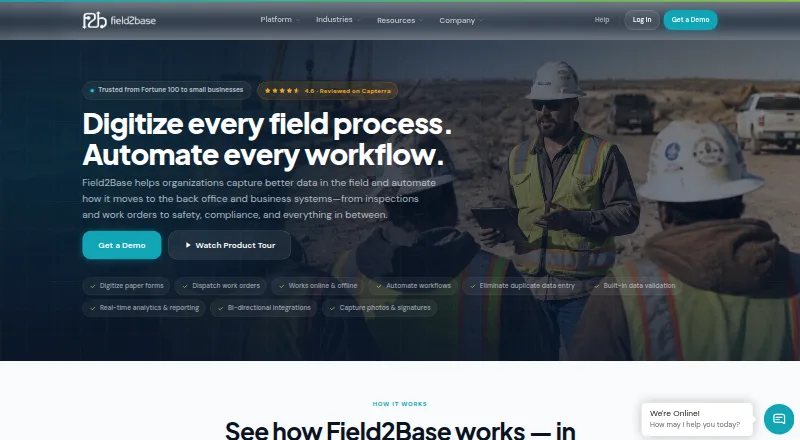
Field2Base digitizes field processes and transfers field data to back-office and business systems.
What Field2Base is
Field2Base digitizes field processes and transfers field data to back-office and business systems. Teams can create digital forms with drag-and-drop fields, validation and conditional logic without developers. Its Mobile Forms feature supports offline capture and syncs submissions when connectivity returns. Forms can collect photos, videos, electronic signatures, GPS coordinates, timestamps, barcodes and voice-to-text. The platform routes forms for review and approval; Enterprise adds custom multi-step workflows and automatic routing based on form data. It describes two-way connections with ERP, CRM and GIS systems through plugins, CSV, ODBC, XML, APIs and web services. Field2Base is available on Android, iOS, web and Windows. All license plans require a five-license minimum. Essentials costs $20 a month per license, Small Business $30 a month per license, and Enterprise $45 a month per license. The company lists SOC 2 Type II and TX-RAMP certifications, NIST 800-53 and HIPAA/HITECH alignment, and AES-256 stored-data encryption with TLS 1.2-or-higher transmission security.
Good
- Supports offline capture and later syncing.
- Forms capture photos, signatures, GPS and barcodes.
- Enterprise includes multi-step workflows and automatic routing.
- Connects with ERP, CRM and GIS systems.
- Available on Android, iOS, web and Windows.
Watch out
- All license plans require a five-license minimum.
- Essentials costs $20 a month per license.
- Small Business costs $30 a month per license.
- Enterprise costs $45 a month per license.
Who it suits
It suits organizations that need field teams to collect information offline and route forms for review or approval. The five-license minimum makes it a less direct fit for a single-user requirement.
Verdict
Field2Base combines configurable forms, offline collection and approval workflows for field operations. Compare the per-license plan costs and five-license minimum against the number of users who need access.
Plans and prices
From Field2Base's own pricing page, checked 15 Oct 2026.
| Plan | Price | What it gives you |
|---|---|---|
| Essentials | $20 a month | unlimited form templates · photos/GPS/barcodes/signatures · work orders/invoices · iOS/Android/Web · unlimited online/offline submissions · admin portal · training and support · per license per month; 5-license minimum |
| Small Business | $30 a month | Everything in Essentials · workflow review/edit/approval · full audit trail · indexed searchable document storage · per license per month; 5-license minimum |
| Enterprise | $45 a month | Everything in Small Business · multi-step conditional workflows · analytics dashboards · third-party integrations · white-label options · SLAs · per license per month; 5-license minimum |
| Professional Services | $150, paid once | form design · business logic/workflow configuration · analytics dashboards · administrator training · per hour; scoped hours do not expire |
| Onsite support/training | $1,000, paid once | onsite support and training · per day plus direct travel expenses |
The facts
Each one read from Field2Base's own pages, with the date it was checked.
What it does
- Access controls
- The security page lists SSO, MFA, role-based permissions, and remote device controls; the help page says SSO is available to Enterprise-tier customers.checked 28 Sep 2026
- Analytics
- Analytics provides charts, pivot tables, heat maps, trend analysis and exportable compliance reports.checked 15 Oct 2026
- API authentication
- API calls use a company, username, password and API Sync Key, with OAuth 2.0 client-credentials authentication available by arrangement.checked 15 Oct 2026
- API extensibility
- Developers can use REST endpoints to replicate Data Integration Module and Enterprise Dispatch Module behavior, including retrieving sent-form JSON/XML/PDF/media and creating work orders.checked 15 Oct 2026
- Capture tools
- Forms can capture photos, videos, electronic signatures, GPS coordinates, timestamps, barcodes, and voice-to-text.checked 28 Sep 2026
- Data protection
- The security page states that stored data uses AES-256 encryption, transmissions use TLS 1.2 or higher, and data centers are US-based.checked 28 Sep 2026
- Desktop requirements
- The desktop apps require Windows 7 or higher and Microsoft .NET Framework 4.7.2 or higher.checked 28 Sep 2026
- Documentation and support
- The vendor provides a searchable Help Center, online training, instructor-led training, email support and U.S.-based phone support.checked 15 Oct 2026
- Form design
- Forms Designer uses drag-and-drop tools to reproduce existing paper forms with business rules, validations, calculations and data sources.checked 15 Oct 2026
- Install model
- Forms Designer is downloaded from the Field2Base Portal and installed as a Windows executable, with Ghostscript and the Microsoft Access Database Engine optionally added for specific functions.checked 15 Oct 2026
- Integration methods
- The Data Integration Module can output CSV/text, PDFs/images, ODBC/OLEDB database updates and API or web-service calls through plugins.checked 15 Oct 2026
- Integrations
- Field2Base describes two-way data integration with ERP, CRM, and GIS systems using plugins, CSV, ODBC, XML, APIs, and web services.checked 28 Sep 2026
- License model
- Field2Base is proprietary commercial software distributed through paid licenses rather than an open-source license.checked 15 Oct 2026
- Limit: administration
- Reviewers reported that changing forms can be time-consuming, workflow creation is complicated for administrators and some changes require vendor assistance.checked 15 Oct 2026
- Limit: documentation and formatting
- A Software Advice reviewer reported gaps in advanced documentation and said regions cannot conditionally change font or color and use static backgrounds.checked 15 Oct 2026
- Limit: form builder
- A G2 reviewer found form creation cumbersome, iteration restricted and advanced photo handling dependent on special plugins.checked 15 Oct 2026
- Limit: mobile reliability
- Google Play reviewers reported crashes, lost drafts or invoices and cases where attached photos failed to send.checked 15 Oct 2026
- Offline capture
- Mobile Forms works without connectivity and synchronizes queued submissions when a connection returns.checked 15 Oct 2026
The company
- Company facts
- LinkedIn lists Field2Base as a privately held software-development company founded in 2002 with 11–50 employees and headquarters in Morrisville, North Carolina.checked 15 Oct 2026
- Company legal name
- Crunchbase identifies the legal entity as Field2Base, Inc.checked 15 Oct 2026
- Founded
- 2002checked 23 Sep 2026
- Headquarters
- Morrisville, North Carolina, United Stateschecked 23 Sep 2026
- Ownership leadership
- The company site identifies Ed White as CEO and chairman; Crunchbase lists David Lea as co-founder and board member.checked 15 Oct 2026
Money
- Plan minimum
- All license plans require a five-license minimum, and the page says volume and term discounts are available.checked 28 Sep 2026
The full review of Field2Base
Overview
Field2Base is field-operations software for organizations replacing paper processes with digital forms and connected back-office data. It is best suited to teams that need structured data capture in the field, including when devices are offline. Its tiered plans add review and approvals, then deeper workflow and integration capabilities, but the five-license minimum makes it a poor fit for very small teams.
Key features
Forms and field capture
Forms Designer lets teams build forms with drag-and-drop fields, validation, and conditional logic without developers. Mobile Forms captures submissions offline and syncs them when connectivity returns, a practical advantage for work in areas with unreliable service. Forms can also collect photos, videos, signatures, GPS coordinates, timestamps, barcodes, and voice-to-text, giving teams multiple ways to document work and completion.
Review, approvals, and integrations
Forms can be routed for review and approval; Small Business adds editing and a full audit trail, while Enterprise adds custom multi-step workflows and automatic routing based on form data. Enterprise also includes integrations, and Field2Base describes two-way data exchange with ERP, CRM, and GIS systems through plugins, CSV, ODBC, XML, APIs, and web services. These capabilities suit operations that need field records to move into business systems, though the integration package sits behind the most expensive plan.
Security and support
Field2Base states that it is SOC 2 Type II and TX-RAMP certified and aligned with NIST 800-53 and HIPAA/HITECH. It says stored data is encrypted with AES-256, transmissions use TLS 1.2 or higher, and its data centers are US-based. SSO, MFA, role-based permissions, and remote device controls are listed; SSO is available to Enterprise customers. Essentials includes email and U.S.-based phone support, with support hours Monday through Friday, 8am–6pm ET.
Pricing
Every license plan requires at least five licenses, and volume and term discounts are available. That minimum means even Essentials starts at $100 a month for five licenses, before any discounts.
| Plan | Price | What it includes | Best fit |
|---|---|---|---|
| Essentials | $20 a month per license | Unlimited form templates and submissions; photos, GPS, barcodes, signatures, dropdowns, and validations; email and U.S.-based phone support. | Teams that need digital forms and field capture but can manage without built-in review and approval. |
| Small Business | $30 a month per license | Everything in Essentials, plus form review, editing and approval, a full audit trail, and indexed, searchable online document storage. | Teams that need a documented approval process and searchable records. |
| Enterprise | $45 a month per license | Everything in Small Business, plus advanced workflows and analytics, integrations, white-label options, and SLAs. | Organizations needing custom routing, system integration, or the additional enterprise provisions. |
The lower tiers give up the more advanced routing, analytics, and integrations in Enterprise; Essentials also lacks the review, approval, audit trail, and searchable storage included in Small Business. Professional Services cost $150 per hour, and purchased hours do not expire.
Platforms
Field2Base supports Android, iOS, web, Windows, and API access. Desktop apps require Windows 7 or higher and Microsoft .NET Framework 4.7.2 or higher.
Who it's for
Field2Base is a strong fit for field teams that need configurable forms, offline collection, proof of completion, audit checklists, approval workflows, and a route for operational data into back-office systems. It is less compelling for a small operation needing only a few seats: the five-license minimum raises the entry cost even on Essentials.
Pros and cons
- Pros: Offline capture with later syncing supports work beyond reliable coverage.
- Pros: Form validation, conditional logic, and varied capture options help standardize field records without developer-built forms.
- Pros: Plan tiers make approvals and audit trails available before the Enterprise tier, with integrations and advanced routing available for more complex operations.
- Cons: The five-license minimum sets a meaningful floor on spending for small teams.
- Cons: Integrations and advanced workflows require Enterprise at $45 a month per license.
Alternatives
Retail Store Operations Software is a category starting point for readers comparing tools for store operations.
- Wooqer is a paid Android, iOS, and web alternative with pricing tailored to locations and workflows.
- Proceso is a paid Android, iOS, and web alternative, with configurable users and plans spanning pilots to multi-store operations.
- Movista is a paid option for Android, iOS, web, and API.
- Amply is worth considering for a smaller store operation: its free Starter plan supports up to two stores and includes offline mobile access, a communication feed, task scheduler, and no-code SOP builder.
- Pazo is a paid Android, iOS, and web alternative with a 15-day free trial on its Gold plan.
- YOOBIC is a paid Android, iOS, and web alternative.
- Zipline offers paid, scalable pricing tailored to the selected modules and business.
- OPSCENTER is a paid option for web, iOS, and Android.
Verdict
Choose Field2Base if field teams need offline-capable forms, structured review, and a progression from basic capture to integrations and custom workflows. Its strongest case is the joined-up path from data collection to approval and business systems; the main reason to look elsewhere is the five-license minimum, especially if only a handful of users need access.