Focusd
Focusd is a free native Windows screen-time tracker for app and browser-tab usage.
What Focusd is
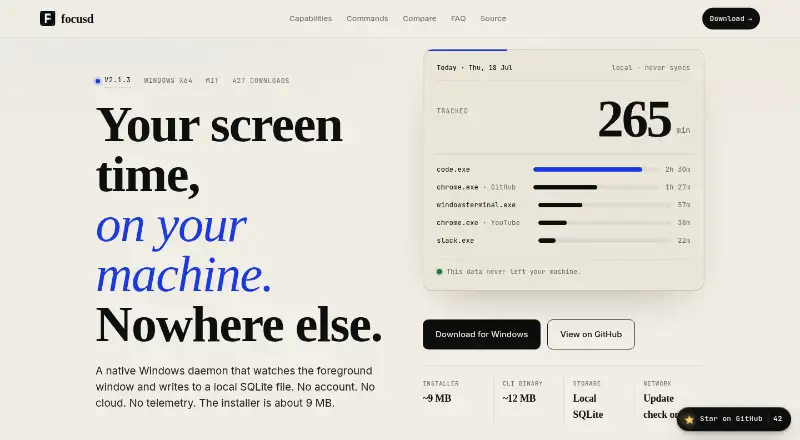
Focusd is a free native Windows screen-time tracker for app and browser-tab usage. It stores activity in a local SQLite database and does not sync data to the cloud. A background daemon checks the foreground window at a configurable interval, defaulting to five seconds. Browser titles are organized into 74 built-in categories, and custom browsers can be registered. Daily time ceilings can be set for individual executables, with Windows toast notifications when limits are crossed. Focusd also includes a configurable Pomodoro timer with a 25-minute default and break reminders. Tracking history can be exported as CSV or JSON from the TUI Settings tab. The site says there are no accounts, cloud sync or telemetry; the only network request is an optional update check. Focusd is MIT licensed with source on GitHub. The installer is about 9 MB and the CLI binary about 12 MB.
Good
- Stores usage data in local SQLite
- No account, cloud sync or telemetry
- Groups browser titles into 74 categories
- Exports reports as CSV or JSON
- Includes limits and a Pomodoro timer
Watch out
- Only supports Windows 10/11 x64
- macOS and Linux are not supported yet
- Usage history retention is 30 days
Who it suits
It suits Windows users who want local screen-time reports, application limits and focus sessions without sending usage data to a SaaS service. It supports Windows 10 or 11 on x64.
Verdict
Focusd offers private, local tracking with reports, limits and timed focus sessions. Its Windows-only support and 30-day history are the main constraints.
Plans and prices
From Focusd's own pricing page, checked 7 Oct 2026.
| Plan | Price | What it gives you |
|---|---|---|
| Free | Free | Free alternative; Windows x64 |
The facts
Each one read from Focusd's own pages, with the date it was checked.
Where it runs
- App limits
- Users can set daily time ceilings per executable, with Windows toast notifications when a limit is crossed.checked 7 Oct 2026
- Browser grouping
- Browser titles are grouped into 74 built-in categories, and users can register custom browsers.checked 7 Oct 2026
What it does
- Distribution size
- The installer is about 9 MB and the CLI binary is about 12 MB.checked 7 Oct 2026
- Export
- Tracking data can be exported as CSV or JSON from the TUI Settings tab.checked 7 Oct 2026
- Focus timer
- Focusd includes a configurable Pomodoro timer with a 25-minute default and break reminders.checked 7 Oct 2026
- Integrations
- Focusd lists no external integrations; it groups browser tab titles and supports custom browser executables.checked 7 Oct 2026
- Intended users
- The maker describes Focusd as a free alternative to RescueTime, StayFree, and Toggl Track for people who prefer not to send their usage data to a SaaS service.checked 7 Oct 2026
- License
- Focusd is MIT licensed, and its source code is available on GitHub.checked 7 Oct 2026
- Local storage
- Usage data is stored in a local SQLite database and is not synced to the cloud.checked 7 Oct 2026
- Privacy
- The site states that Focusd has no account, cloud sync, or telemetry, and that its only network request is an optional update check.checked 7 Oct 2026
- Purpose
- Focusd is a native Windows screen-time tracker that records app and browser-tab usage.checked 7 Oct 2026
- Supported system
- The download is for Windows 10 or 11, x64; the site says macOS and Linux are not supported yet.checked 7 Oct 2026
- Tracking
- The daemon polls the foreground window at a configurable interval that defaults to five seconds.checked 7 Oct 2026
Alternatives to Focusd
- 1

Freedom
Free planAndroidiOSWebExtension8.2From $40 a year - 2

Opal
Free planAndroidiOSExtensionmacOS8.0From $8.29 a month - 3

ScreenZen
Free planAndroidiOSmacOSWindows7.3$49 one-time - 4
one sec
AndroidiOSExtensionLinux7.2From $19.99 a year - 5

FocusMe
AndroidiOSExtensionLinux7.1$249 one-time - 6
YourHour
Free planAndroidiOS7.1From $12.99 a year