
Flowjin
Flowjin turns uploaded or linked audio and video into short, branded clips and platform-specific social copy.
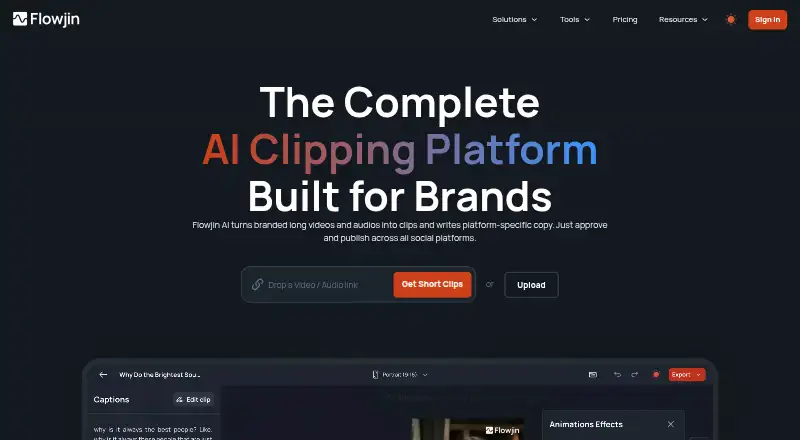
What Flowjin is
Flowjin turns uploaded or linked audio and video into short, branded clips and platform-specific social copy. Its AI identifies shareable moments and drafts 6–12 captioned clips, with each clip limited to 3 minutes. Editing tools include smart crop, speaker tracking, captions, titles, B-roll and trimming or extending. Flowjin generates titles, descriptions, hashtags and calls to action for LinkedIn, YouTube and X. It accepts uploads and media links, with imports from YouTube, Apple Podcasts, Google Drive, Vimeo and other media links. Seven media languages are listed: English, Spanish, Portuguese, French, Dutch, German and Italian. Exports support all aspect ratios and reach 1080p, with custom artwork and a brand kit available. A free plan provides 60 minutes of one-time credit at 720p; its projects expire after five days. Starter costs $19 a month and Creator $29 a month, with higher allowances and different retention terms. Flowjin runs on Android, iOS and the web.
Good
- AI drafts 6–12 captioned clips from source media
- Supports smart crop and speaker tracking
- Generates copy for LinkedIn, YouTube and X
- Accepts uploads and links from several media services
- Offers seven listed media languages
- Includes custom artwork and a brand kit
Watch out
- Free projects expire after five days
- Free credit is limited to 60 minutes once
- Maximum clip length is three minutes
- Social publishing is marked coming soon in pricing
Who it suits
Flowjin is aimed at founders, CEOs, marketing leads, social media managers and marketing agencies producing branded clips. It suits users who need automated highlights, captions and social copy from audio or video sources.
Verdict
Pick Flowjin if you want automated short clips and accompanying social copy from video or audio. Creator suits larger monthly processing needs and keeps projects without expiration. Consider another option if you require currently available social publishing or longer clips.
Plans and prices
From Flowjin's own pricing page, checked 14 Oct 2026.
| Plan | Price | What it gives you |
|---|---|---|
| Free | Free | 60 minutes of video/audio processing · 720p · unlimited clip exports on plan card · projects expire after 5 days · $0 |
| Starter | — | 150 minutes of video/audio per month · 1080p export · projects expire after 60 days · unused credits roll over for one month · $114.00 billed yearly |
| Creator | — | 3,600 minutes per month on plan card · 5 hours per month in comparison table · projects never expire · priority project processing · $174.00 billed yearly |
The facts
Each one read from Flowjin's own pages, with the date it was checked.
What it does
- AI clip generation
- The homepage says Flowjin automatically drafts 6–12 captioned clips from uploaded media.checked 14 Oct 2026
- Audience
- The product is presented for founders and CEOs, marketing leads, social media managers, and marketing agencies.checked 8 Oct 2026
- Audio clips
- The product can turn podcasts into audiograms and quote clips.checked 14 Oct 2026
- Captions, titles, and B-roll
- Flowjin lists automatic captions, titles, and B-roll as video clip features.checked 14 Oct 2026
- Clip generation
- Its AI identifies shareable moments and drafts 6–12 captioned clips automatically.checked 8 Oct 2026
- Developer API and SDKs
- The official product pages and help center reviewed here describe no public developer API or SDK; the product is presented as a browser service.checked 14 Oct 2026
- Documentation depth
- Flowjin’s help center documents importing, clip generation, transcript editing, framing, B-roll, branded captions, animations, and publishing.checked 14 Oct 2026
- Editing
- The editor supports transcript-based clip changes, caption corrections, scene framing adjustments, visual layers, and animated text.checked 14 Oct 2026
- File upload limit
- Direct uploads support video and audio files up to 1 GB.checked 14 Oct 2026
- Funding news
- DMZ reported on June 17, 2024 that Flowjin received a CAD 75,000 investment at its Insiders event.checked 14 Oct 2026
- Imports and integrations
- The help center lists imports from more than 50 sources, including social/video platforms, podcast services, cloud drives, and Twitter/X Spaces.checked 14 Oct 2026
- Input formats
- Flowjin accepts audio and video uploads and media links.checked 8 Oct 2026
- Integrations
- The maker says users can import from sources including YouTube, Apple Podcasts, Google Drive, Vimeo, and media links.checked 8 Oct 2026
- Languages
- The pricing FAQ lists English, Spanish, Portuguese, French, Dutch, German, and Italian as supported media languages.checked 8 Oct 2026
- License and hosting
- Flowjin is proprietary subscription software; no open-source license or self-hosting instructions are published on its product pages.checked 14 Oct 2026
- Limit: clip and project management
- G2 reviews mention clips that cannot be edited, missing subfolder organization, and generated clips that can feel choppy.checked 14 Oct 2026
- Limit: editing depth
- G2’s review summary says some users find the editing options limiting for advanced needs.checked 14 Oct 2026
- Limit: loading delays
- G2 reviewers mention lag and long parsing or loading times.checked 14 Oct 2026
- Limit: no refunds
- Flowjin’s pricing FAQ says subscription sales are final and it does not offer refunds.checked 14 Oct 2026
Where it runs
- App store availability
- The searches and pages reviewed did not establish a current Flowjin listing in Apple App Store, Google Play, Chrome Web Store, or Microsoft Store.checked 14 Oct 2026
The company
- Company identity
- The privacy policy identifies the provider as Flowjin Inc.checked 8 Oct 2026
- Company name
- The current privacy policy identifies the service provider as Flowjin Inc.checked 14 Oct 2026
- Founded
- LinkedIn lists Flowjin as founded in 2020.checked 14 Oct 2026
- Headquarters and size
- LinkedIn lists Flowjin’s headquarters as Toronto, Ontario, and company size as 2–10 employees.checked 14 Oct 2026
The full review of Flowjin
Flowjin is a repurposing workspace that turns long video and audio into branded short clips and the copy to accompany them. It is aimed at founders, marketing leads, social managers, and agencies that need a repeatable way to package recordings for several networks. The strongest case is automated first drafts plus a capable editor; the main caution is the three-minute clip ceiling and an unfinished publishing workflow.
Overview
Upload audio or video, or bring in a media link from sources such as YouTube, Apple Podcasts, Google Drive, or Vimeo. Flowjin’s AI identifies likely shareable moments and produces six to 12 captioned clip candidates. That batch approach is useful when a team is repurposing interviews, podcasts, webinars, or branded recordings at volume, although the generated selections still need editorial judgment.
The product covers more than clipping. Smart crop and speaker tracking help maintain framing as subjects move or speakers change, while captions, titles, B-roll, and controls to trim or extend a clip support a finishing pass. All aspect ratios, custom artwork, and a brand kit suit organizations with established visual rules. Exports are limited to 1080p, and no clip can exceed three minutes, so it is not a fit for longer-form highlights.
Key features
Automated clips and editing
Automatic moment detection saves the tedious first search through a long recording and gives creators several options to compare. The editor’s crop, tracking, captions, titles, B-roll, and duration controls make those options workable for publication rather than merely illustrative. The three-minute maximum remains a practical constraint for tutorials, talks, or narrative segments that need more room.
Social copy and publishing
Flowjin writes titles, descriptions, hashtags, and calls to action tailored to LinkedIn, YouTube, and X. That reduces the copywriting step for each destination, though teams should still review tone and claims before posting. The homepage describes cross-channel scheduling from one calendar, but the pricing page says social publishing is “coming soon.” Treat Flowjin as a preparation tool rather than a dependable publishing hub until that feature is delivered.
Languages and inputs
Media can be uploaded in audio or video form or supplied through links. The pricing FAQ supports English, Spanish, Portuguese, French, Dutch, German, and Italian media. Caption output is therefore most relevant to teams working in those seven languages.
Pricing
Free
The free plan costs nothing and provides a one-time 60-minute credit at 720p. Its card says unlimited clip exports, while the comparison table allows up to five; either way, the one-time allowance and five-day project expiration make it a short evaluation tier, not an ongoing production plan.
Starter
Starter is $19 a month, or $114.00 billed yearly. It includes 150 minutes per month, live chat support, and 1080p export on the plan card (the comparison table shows 720p). The table lists unlimited clip exports, but projects expire after 60 days. This is the sensible choice for an individual or small team with a modest, recurring queue that can archive finished work before expiration.
Creator
Creator costs $29 a month, or $174.00 billed yearly. It raises processing to 3,600 minutes per month on the plan card, while the comparison table states five hours, and adds priority processing, a dedicated account manager, and projects that never expire. Confirm the quota before purchase because those two published limits conflict. Creator suits agencies or high-volume teams that need preferential processing and persistent project storage.
Flowjin is paid software with a free plan; the published plans do not describe multi-seat allowances. Support is available by email at [email protected] or through website live chat.
Platforms
Flowjin runs on Android, iOS, and the web, giving distributed teams access across mobile devices and browsers.
Who it's for
Founders and CEOs can turn a single recording into a social package without handing every step to a specialist. Marketing leads and social media managers benefit from batch clip generation, brand controls, and network-specific copy. Agencies are the best match for Creator’s higher processing allowance, priority handling, and non-expiring projects. Choose another tool if your workflow depends on clips longer than three minutes, exports above 1080p, or confirmed in-app scheduling today.
Pros and cons
- Pro: Six to 12 AI-selected captioned clips provide a useful starting batch from one recording.
- Pro: Smart crop, speaker tracking, B-roll, brand kits, and custom artwork support consistent branded variations.
- Pro: Generated titles, descriptions, hashtags, and calls to action cover LinkedIn, YouTube, and X.
- Con: Three-minute maximum clips rule out longer highlights.
- Con: Free projects expire after five days and Starter projects after 60, requiring disciplined archiving.
- Con: Publishing is presented inconsistently, and the plan pages disagree about Starter resolution and Creator minutes.
Alternatives
For a wider survey of repurposing products, see AI Video Repurposing Tools; for audiogram-focused choices, see AI Audiogram Makers.
EchoWave Podcast Editor is the better pick when you need broader desktop and mobile platform coverage and a freemium plan with 720p exports and up to 60 minutes per video.
Choose WizCut if a browser editor with free upload, editing, and downloads during beta is more important than a defined recurring quota.
CapsAI suits buyers seeking a low-cost one-time starter purchase with 20 minutes of upload and 1080p export.
Pick Headliner for a permanent free tier built around unlimited video and captioned clips, including one unwatermarked audiogram each month.
reap is preferable when a free-forever plan with one hour of monthly clipping and captions is enough, even with watermarked 720p output and seven-day project retention.
Waveloop is an alternative for users seeking a different audio-production-oriented tool.
Choose SLOVO if you want a free service with no account, no video limit, up to 4K output, and no watermark.
VIDRA is another web-based audiogram option with a monthly free-credit allowance.
Verdict
Choose Flowjin when you want AI to find several short moments, polish them with branding controls, and draft social copy in one workflow. Its strongest value is for recurring marketing repurposing, especially on Creator. Look elsewhere if three-minute clips, expiring projects, uncertain publishing, or the plan-page quota discrepancies create operational risk.
Getting started
- Visit Flowjin on the web or use its Android or iOS app
- Create an account and choose Free, Starter or Creator
- Upload audio or video, or provide a supported media link
- Import from sources such as YouTube, Apple Podcasts, Google Drive or Vimeo
- Let Flowjin identify moments and draft captioned clips
- Edit crops, speakers, captions, titles, B-roll and clip length
- Export clips and prepare platform-specific social copy
Limits worth knowing
The free plan provides 60 minutes of one-time credit at 720p, and free projects expire after five days. Starter provides 150 minutes per month with projects expiring after 60 days; Creator provides 3,600 minutes per month on its plan card and projects never expire.
Questions
Is Flowjin free?
Flowjin has a Free plan with 60 minutes of one-time credit at 720p. Free projects expire after five days.
What are the paid prices?
Starter costs $19 a month, and Creator costs $29 a month. The pricing page lists yearly billed amounts for Starter and Creator.
Which platforms can I use?
Flowjin is available on Android, iOS and the web.
What languages are supported?
The pricing FAQ lists English, Spanish, Portuguese, French, Dutch, German and Italian as supported media languages.
What sources can I import?
You can upload audio or video and use media links, including imports from YouTube, Apple Podcasts, Google Drive and Vimeo.
Does it publish to social channels?
The homepage describes scheduling across channels from one calendar, while the pricing information marks social publishing as coming soon.
Alternatives to Flowjin
- 1
ScreenApp AI Meeting Notes
Free planAndroidiOSWebAPI8.2From $19 a month - 2
Vizard
Free planAndroidiOSWebAPI8.2From $29 a month - 3

Headliner
Free planAndroidiOSWebAPI8.1Free plan - 4

OpusClip
Free planAndroidiOSWebAPI8.1From $15 a month - 5

reap
Free planAndroidiOSWebAPI8.0From $9.99 a month - 6

Choppity
Free planWebAPImacOSWindows7.8From $13.30 a month