FileVoyager
FileVoyager is free Windows file-manager software built around a dual-panel, tabbed interface.
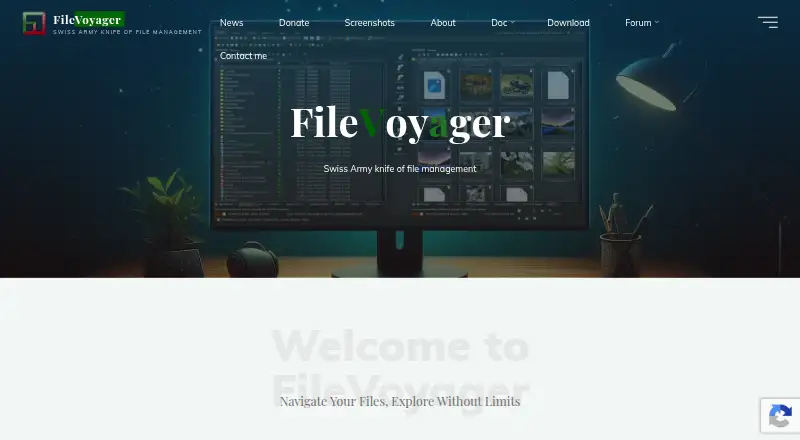
What FileVoyager is
FileVoyager is free Windows file-manager software built around a dual-panel, tabbed interface. It brings disks, virtual folders, shares, archives, and FTP or FTPS locations into one browsing workspace. Users can rename, copy, move, link, delete, and recycle files, compare files or folders, and synchronize folders. The program can create or extract ZIP, 7Zip, GZip, BZip2, XZ, Tar, and WIM archives, while also unpacking formats such as RAR, CAB, ISO, and LZH. Quick preview handles multimedia, ebooks, comic books, source code, and Preview Handler formats, with flat or hexadecimal display available. A hash tool provides a VirusTotal-powered malware report. Downloads include setup or portable editions, 32-bit or 64-bit builds, and Lite or Full versions that differ in VLC codecs. The maker says it runs on Windows 10 and 11; older listed versions are untested. The unsigned freeware may trigger Microsoft SmartScreen.
Good
- Freeware for Windows
- Dual-pane and tabbed interface
- Portable and setup downloads
- Broad archive packing and extraction
- Folder comparison and synchronization
Watch out
- Windows-only platform
- Older Windows versions are untested
- Unsigned software may trigger SmartScreen
- Support services may not be provided
Who it suits
It suits Windows users who want portable or installed dual-pane file management with archive handling and previews. It is useful for organizing files across local, network, archive, and FTP locations.
Verdict
FileVoyager offers a wide range of file operations, archive formats, previews, and portable distribution at no charge. Users should account for its Windows focus and unsigned-download warning.
Plans and prices
From FileVoyager's own pricing page, checked 9 Oct 2026.
| Plan | Price | What it gives you |
|---|---|---|
| FileVoyager | Free | Freeware; install and use any number of copies on your devices |
The facts
Each one read from FileVoyager's own pages, with the date it was checked.
What it does
- Archives
- It can pack and unpack ZIP, 7Zip, GZip, BZip2, XZ, Tar, and WIM formats, and unpack many others including RAR, CAB, ISO, and LZH.checked 9 Oct 2026
- Archive support
- Yeschecked 24 Sep 2026
- Compare and sync
- The product can compare files or folders and synchronize folders.checked 9 Oct 2026
- Download formats
- Downloads are offered as setup or portable editions, in 32-bit and 64-bit versions, with Lite and Full options that differ in whether they include VLC codecs.checked 9 Oct 2026
- Dual-pane view
- Yeschecked 24 Sep 2026
- File access
- It can browse disks, real or virtual folders, shares, archives, and FTP/FTPS in one unified interface.checked 9 Oct 2026
- File operations
- It supports renaming, copying, moving, linking, deleting, and recycling files across supported containers.checked 9 Oct 2026
- License limit
- The license permits use on any number of devices but prohibits renting, leasing, lending, transferring the software, or using it for commercial software hosting services.checked 9 Oct 2026
- Malware reporting
- The hash tool includes a malware report powered by VirusTotal.checked 9 Oct 2026
- Portable version
- Yeschecked 24 Sep 2026
- Preview
- Its quick preview can render multimedia, ebooks, comic books, source code, and formats supported by Preview Handlers, and can display files in flat or hexadecimal form.checked 9 Oct 2026
- Purpose
- FileVoyager is a freeware dual-panel file manager for Microsoft Windows for navigating, organizing, and transferring files.checked 9 Oct 2026
- Security notice
- The maker says the freeware application is not digitally signed by a trusted certificate authority and may trigger a Microsoft SmartScreen warning.checked 9 Oct 2026
- Support
- The maker recommends its forum for feature requests, questions, and bug reports, and says support services may not be provided because the software is supplied “As Is.”checked 9 Oct 2026
- Tabbed interface
- Yeschecked 24 Sep 2026
Money
- Free plan
- Yeschecked 24 Sep 2026
Where it runs
- Supported platforms
- Windowschecked 24 Sep 2026
- Windows support
- The maker says FileVoyager runs on Windows 10 and Windows 11; Windows Vista, 7, and 8.x are untested but should also run it.checked 9 Oct 2026
Alternatives to FileVoyager
- 1

Filestash
Free planOpen sourceAndroidiOSWebAPI9.2From $50 a month - 2

Owlfiles
Free planAndroidiOSExtensionmacOS8.7From $12.99 a year - 3

WinSCP
Free planOpen sourceWindows7.9Free plan - 4

Dolphin
Free planOpen sourceLinuxWindows7.8Free plan - 5
FileRun
AndroidiOSWebAPI7.8From €9.90 a year - 6

OneCommander
Free planWindows7.8$30 one-time