
ExpoCut
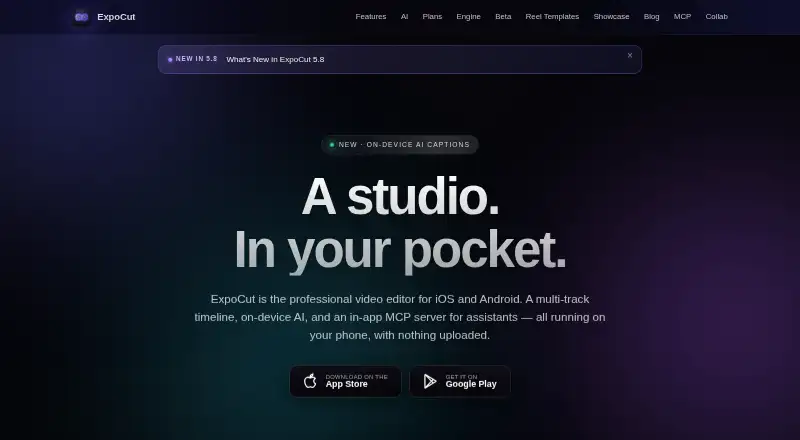
ExpoCut is a mobile video editor from ExpoCut with a multi-track timeline, on-device AI, and an optional in-app MCP server for assistants.
What ExpoCut is
ExpoCut is a mobile video editor from ExpoCut with a multi-track timeline, on-device AI, and an optional in-app MCP server for assistants. Its timeline accepts unlimited video, audio, image, text, sticker, and shape tracks, with frame-accurate trimming and splitting. On-device tools include background removal, chroma key, auto reframe, speech-to-text captions, and text-to-speech voiceover. Automatic captions, silence removal, and AI audio cleanup are also provided. Hardware encoding exports up to 3840×2160 at 60 frames per second in H.264 or HEVC. Projects, media, editing, rendering, captions, and export stay on the device by default. Cloud AI is opt-in, and API keys are stored in the iOS Keychain or Android Keystore. Firebase Analytics and Crashlytics start enabled but can be disabled in Settings. The app includes royalty-free Pexels video and photos plus sound effects. The Free plan needs no account, includes the full timeline editor, and exports up to 4K with a three-second ExpoCut outro. Pro and Elite add broader effects, AI tools, templates, and clean exports at local store prices. Mobile downloads are available through Apple’s App Store and Google Play.
Good
- Unlimited video, audio, image, text, sticker, and shape tracks
- On-device editing and rendering by default
- Exports up to 4K at 60 fps
- Automatic captions, silence removal, and audio cleanup
- Optional MCP connections to Claude and ChatGPT
- Pexels stock media and built-in sound effects
Watch out
- Free exports include a three-second ExpoCut outro
- Pro and Elite prices vary by local store
- Analytics and crash reporting are enabled by default
- Cloud AI requires opt-in
Who it suits
ExpoCut suits mobile editors who want extensive timeline tracks, on-device processing, and exports up to 4K. It also fits users seeking optional assistant connections through MCP, while desktop users can use the command-line renderer on macOS, Windows, or Linux.
Verdict
Choose ExpoCut if you want a capable mobile timeline with on-device AI and high-resolution hardware exports. The free tier offers the full editor without an account, but its outro remains on exports. Consider a paid tier when clean exports, advanced effects, or Elite-only tools are required.
Plans and prices
From ExpoCut's own pricing page, checked 9 Oct 2026.
| Plan | Price | What it gives you |
|---|---|---|
| Free | Free | No account needed · Full timeline editor · Export up to 4K · Exports end with a 3-second ExpoCut outro · $0 forever |
| Pro | — | Full effects, shaders and transitions · AI voiceover and stem separation · Auto captions, Clean Audio, Auto-Cut and stabilization · Keyframes and custom templates · Clean exports · Local store price; weekly through annual options |
| Elite | — | Everything in Pro · Motion paths and video-inside-text · AI background remover · Template import/export and commercial license · Local store price; weekly through annual options |
The facts
Each one read from ExpoCut's own pages, with the date it was checked.
What it does
- AI assistant integrations
- The optional in-app MCP server can connect to Claude, ChatGPT, or any MCP-compatible client to edit and export projects.checked 9 Oct 2026
- AI audio cleanup
- Yeschecked 21 Sep 2026
- AI features
- On-device AI includes background removal, chroma key, auto reframe, speech-to-text captions, and text-to-speech voiceover.checked 9 Oct 2026
- Analytics controls
- Firebase Analytics and Crashlytics are enabled by default and can be turned off in Settings.checked 9 Oct 2026
- Automatic captions
- Yeschecked 21 Sep 2026
- Desktop renderer
- A command-line renderer can process projects on macOS, Windows, or Linux and produce MP4, HLS, frame sequences, or a preview stream.checked 9 Oct 2026
- Downloads
- The app is available for iOS and Android through the Apple App Store and Google Play.checked 9 Oct 2026
- Editing
- The editor supports unlimited video, audio, image, text, sticker, and shape tracks with frame-accurate trimming and splitting.checked 9 Oct 2026
- Export
- On-device hardware encoding supports exports up to 3840×2160 at 60 fps in H.264 or HEVC.checked 9 Oct 2026
- Maximum export resolution
- 4kchecked 21 Sep 2026
- Privacy
- Editing, rendering, captions, and export run on-device, and projects and media are not uploaded by default.checked 9 Oct 2026
- Product
- ExpoCut is a mobile video editor with a multi-track timeline, on-device AI, and an in-app MCP server for assistants.checked 9 Oct 2026
- Security
- Cloud AI is opt-in, and API keys are stored in the iOS Keychain or Android Keystore.checked 9 Oct 2026
- Silence removal
- Yeschecked 21 Sep 2026
- Stock media
- The app offers royalty-free Pexels stock video and photos plus a built-in sound-effects library.checked 9 Oct 2026
The company
- Company location
- The site lists Valley Stream, NY as the company location.checked 9 Oct 2026
- Headquarters
- Valley Stream, New York, United Stateschecked 28 Sep 2026
- Team offering
- The maker describes a private-beta toolkit with SDK modules, remote rendering, white-label branding, custom AI providers, audit logs, and private support.checked 9 Oct 2026
Money
- Free plan
- Yeschecked 21 Sep 2026
Where it runs
- Supported platforms
- iOS,iPadOS,Androidchecked 21 Sep 2026
The full review of ExpoCut
ExpoCut is a mobile editor for creators who need a genuinely layered timeline, local AI processing, and high-resolution exports from a phone or tablet. It is a strong fit for precise social, presentation, and creator work when projects should stay on-device. The main reservation is practical: unbranded delivery requires a paid plan because the free tier adds an outro.
Overview
ExpoCut builds its workflow around unlimited video, audio, image, text, sticker, and shape tracks. Frame-accurate trimming and splitting make it suitable for edits where timing and compositing matter, rather than only quick clip assembly. Device hardware encoding produces H.264 or HEVC files up to 3840×2160 at 60 fps, a level of output that is unusually useful for a mobile-first editor.
Royalty-free Pexels video and photos and a built-in sound-effects library reduce the need to leave the app for basic assets. Editing, captions, rendering, and export run on-device, with projects and media not uploaded by default. Cloud AI is opt-in, while API keys are kept in the iOS Keychain or Android Keystore. Firebase Analytics and Crashlytics start enabled but can be switched off in Settings, giving privacy-conscious users a meaningful control.
Key features
Timeline and AI tools
The unlimited-track model gives complex edits room for multiple layers, overlays, titles, and audio beds without an artificial track ceiling. On-device AI handles background removal, chroma key, automatic reframing, speech-to-text captions, and text-to-speech voiceover. Automatic captions, silence removal, and AI audio cleanup target routine post-production jobs. Pro adds stabilization, Auto-Cut, and stem separation, so the upgrade is relevant to creators who regularly process spoken footage or imperfect handheld video.
Assistant and desktop workflows
An optional in-app MCP server can connect Claude, ChatGPT, or another MCP-compatible client to edit and export projects. That is potentially valuable for repeatable or assistant-driven workflows, but it is an integration choice rather than a requirement for normal editing. A command-line renderer extends projects to macOS, Windows, and Linux, producing MP4, HLS, frame sequences, or a preview stream. Teams can also consider the maker’s private-beta toolkit, which includes SDK modules, remote rendering, white-label branding, custom AI providers, audit logs, and private support.
Pricing
Free
The Free plan costs 0.00 USD forever, requires no account, includes the full timeline editor, and exports up to 4K. Every export ends with a three-second ExpoCut outro. It is a capable way to learn the editor or publish work where a brief brand mark is acceptable, but it is not the right choice for client delivery or polished personal branding.
Pro
Pro uses local store pricing with weekly through annual billing options. It adds the full effects, shaders, and transitions set; AI voiceover and stem separation; auto captions, Clean Audio, Auto-Cut, and stabilization; keyframes and custom templates; and clean exports. This is the sensible tier for regular creators who need finished files without the outro and want broader automation, effects, and animation controls.
Elite
Elite is also billed at the local store price with weekly through annual options. It includes everything in Pro, plus motion paths, video-inside-text, AI background remover, template import and export, and a commercial license. Those additions justify Elite for commercial production, advanced typography, or reusable template workflows; casual editors gain less from it than from Pro.
Platforms
The mobile app is available on iOS, iPadOS, and Android through the Apple App Store and Google Play. The desktop command-line renderer runs on macOS, Windows, and Linux, and an API platform is also supported. This combination suits mobile capture with desktop or automated rendering, although the primary editing experience remains mobile.
Who it's for
Choose ExpoCut for layered mobile editing, local processing, 4K/60 export, and creators who value control over whether media leaves the device. It is especially appropriate for captioned talking-head content, composited social videos, and projects that benefit from precise track-based timing. Look elsewhere if a completely free, unbranded export is essential, or if you need a desktop-first visual editor rather than a mobile timeline supplemented by a renderer.
Pros and cons
- Pros: Unlimited tracks support genuinely complex compositions.
- Pros: On-device editing and optional cloud AI provide a privacy-oriented workflow.
- Pros: Hardware-encoded H.264/HEVC exports reach 4K at 60 fps.
- Pros: MCP assistant connectivity and a cross-platform command-line renderer broaden automation options.
- Cons: The free plan places a three-second ExpoCut outro on every export.
- Cons: Clean exports, advanced effects, and several useful AI tools require a paid tier.
- Cons: Analytics and crash reporting are enabled by default until disabled in Settings.
Alternatives
CapCut is the better fit for mobile-focused editing with cloud storage and free templates. Pick Adobe Firefly when generative creation and daily generation allowances are more important than a conventional multi-track editor. FlexClip suits browser-oriented projects with online project and duration limits. Wondershare Filmora is worth considering for a broader desktop-and-web product with a free tier that watermarks exports. Descript is the alternative for text-based editing and AI tools on macOS, Windows, and the web. Diffusion Studio is a choice for an open-source web, desktop, and CLI workflow. OpenReel Video fits users who want all features with no subscription. OpenScene is another free option for users comfortable with model providers billing them directly. For a wider category browse AI Video Editors and Video Editing Software.
Verdict
ExpoCut is a compelling choice for mobile creators who want an unrestricted timeline, on-device AI, and serious 4K exports without creating an account. Pro is the practical recommendation for clean, repeatable publishing; Elite is reserved for commercial and template-heavy work. Look elsewhere when a free export must be unbranded or when your workflow depends on a desktop-first editor.
Getting started
- Install ExpoCut from the Apple App Store or Google Play
- Use the Free plan without creating an account, or select Pro or Elite
- Import media and build a project on the multi-track timeline
- Use on-device editing, captions, cleanup, or other AI tools
- Export up to 4K from the mobile app
- Optionally connect Claude, ChatGPT, or another MCP-compatible client through the in-app MCP server
Limits worth knowing
The Free plan adds a three-second ExpoCut outro to exports. Pro and Elite pricing is billed at local store prices, with weekly through annual options.
Questions
Is ExpoCut free?
Yes. The Free plan costs nothing, is billed at $0 forever, and needs no account.
What does the free plan include?
It includes the full timeline editor and exports up to 4K, but exported videos end with a three-second ExpoCut outro.
Which devices and platforms are supported?
The mobile app supports iOS, iPadOS, and Android through the Apple App Store and Google Play. A command-line renderer runs on macOS, Windows, and Linux.
Are projects uploaded to the cloud?
Editing, rendering, captions, and export run on-device, and projects and media are not uploaded by default. Cloud AI is opt-in.
What do Pro and Elite add?
Pro adds full effects, shaders, transitions, AI voiceover, stem separation, captions, cleanup, Auto-Cut, stabilization, keyframes, custom templates, and clean exports. Elite adds motion paths, video-inside-text, AI background removal, template import and export, and a commercial license.
Alternatives to ExpoCut
- 1

CyberLink PowerDirector
Free planAndroidiOSmacOSWindows9.0From $59.99 a year - 2

Captions
Free planAndroidiOSWebAPI9.0From $4.99 a month - 3
Vizard
Free planAndroidiOSWebAPI8.9From $29 a month - 4

InVideo AI
Free planAndroidiOSWebAPI8.9From $4 a month - 5
FlexClip
Free planAndroidiOSWebWindows8.8From $143.88 a year - 6

Simplified
Free planAndroidiOSWebAPI8.8From $19 a month