
Emma
Emma is a personal finance and budgeting app available on the web, iOS, and Android.
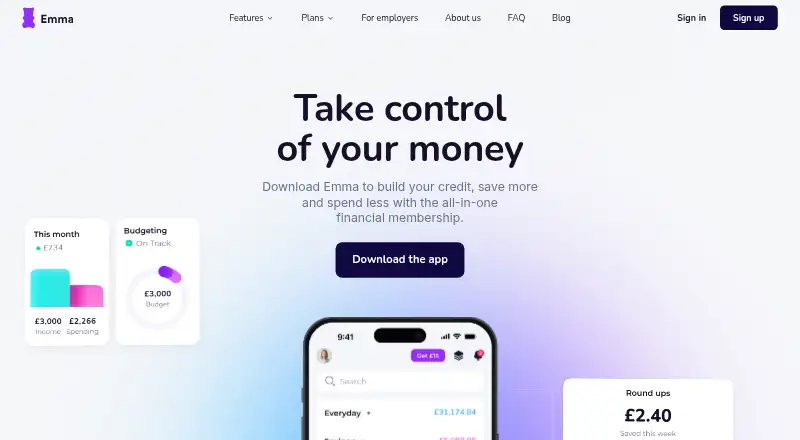
What Emma is
Emma is a personal finance and budgeting app available on the web, iOS, and Android. Its listed tools include budgeting, bill tracking, net-worth tracking, account syncing, and report export. The free Basic plan includes account connections, budgeting, and subscription tracking. Plus costs £4.99 per month and adds bill reminders, cashback, and enhanced tracking. Pro costs £9.99 per month and includes custom categories, offline accounts, net-worth tracking, and CSV export. Ultimate costs £14.99 per month and adds unlimited bank logins and Spaces, along with Plus and Pro features. These plans offer different combinations of tracking tools, account access, and reporting options. Emma was founded in 2017 and is headquartered in London, United Kingdom.
Good
- Free Basic plan includes budgeting
- Bill tracking and net-worth tracking are listed
- Available on web, iOS, and Android
- Pro includes CSV export
Watch out
- Basic plan does not list bill reminders
- Net-worth tracking is listed with Pro
- Unlimited bank logins are listed with Ultimate
Who it suits
Emma suits people who want budgeting and account tracking tools on web or mobile. Its plans range from basic budgeting to options with offline accounts, net-worth tracking, or unlimited bank logins.
Verdict
Emma offers a free entry plan and paid tiers with additional tracking and account features. Compare the plan details to find the tools and account capacity you need.
Plans and prices
From Emma's own pricing page, checked 19 Sep 2026.
| Plan | Price | What it gives you |
|---|---|---|
| Basic | Free | Account connections · Budgeting · Subscription tracking · billed monthly |
| Plus | £4.99 a month | Bill reminders · Cashback · Budgeting and enhanced tracking · billed monthly |
| Pro | £9.99 a month | Custom categories · Offline accounts · Net-worth tracking · CSV export · billed monthly |
| Ultimate | £14.99 a month | Unlimited bank logins · Spaces · All Plus and Pro features · billed monthly |
The facts
Each one read from Emma's own pages, with the date it was checked.
What it does
- Account sync
- bothchecked 19 Sep 2026
- Bill tracking
- Yeschecked 19 Sep 2026
- Budgeting tools
- Yeschecked 19 Sep 2026
- Net-worth tracking
- Yeschecked 19 Sep 2026
- Report export
- Yeschecked 19 Sep 2026
The company
- Founded
- 2017checked 28 Sep 2026
- Headquarters
- London, United Kingdomchecked 28 Sep 2026
Money
- Free plan
- Yeschecked 19 Sep 2026
Where it runs
- Mobile apps
- bothchecked 19 Sep 2026
The full review of Emma
Overview
Emma is a personal-finance app for people who want to organize budgets, bills and connected accounts across web and mobile. It is best for individuals who want to start free and add more tracking tools as their needs grow. The trade-off is a tiered feature set: several useful account and reporting tools require a paid plan.
Key features
Basic combines account connections, budgeting and subscription tracking at no charge, giving new users a practical starting point for managing everyday finances. Plus adds bill reminders, cashback and enhanced tracking, a better fit for users who want more than basic budgeting and subscription oversight.
Pro adds custom categories, offline accounts, net-worth tracking and CSV export. These features suit people who want more control over how they classify and review finances, but net-worth tracking and export sit behind a £9.99 monthly subscription. Ultimate includes all Plus and Pro features, plus Spaces and unlimited bank logins. Its strongest case is for users who need many bank connections; users who do not need that capacity may find the lower tiers more appropriate.
Emma also supports bill tracking, account sync and report export, alongside budgeting and net-worth tools. That breadth makes it more than a budgeting-only option, though the plan split means users should check which tier covers the tools they intend to use.
Pricing
Emma offers four monthly plans. Basic is free and includes account connections, budgeting and subscription tracking. It suits users who want those core functions without a subscription, but does not include the Plus and Pro additions.
Plus costs £4.99 per month and adds bill reminders, cashback, budgeting and enhanced tracking. It is the lower-cost upgrade for users who want bill prompts and broader tracking, but it does not include Pro’s custom categories, offline accounts, net-worth tracking or CSV export.
Pro costs £9.99 per month and includes custom categories, offline accounts, net-worth tracking and CSV export. It is the more suitable tier for users who need those organizational and review tools; its higher price is harder to justify if the Plus additions are enough.
Ultimate costs £14.99 per month and includes all Plus and Pro features, Spaces and unlimited bank logins. It is the clearest fit for users who need unlimited bank connections and the full feature set; otherwise, the lower tiers avoid paying for capacity they may not use. The paid plans are billed monthly, and a 7-day trial is offered.
Platforms
Emma is available on web, iOS and Android, so users can access it through a browser or mobile app. The combination is useful for people who want their personal-finance tools across desktop and phone.
Who it's for
Emma suits individuals who want budgeting and account connections in a single app, with a free starting tier and a clear path to more advanced tracking. Basic is enough for users focused on budgeting and subscriptions; people who need bill reminders can consider Plus, while net-worth tracking and CSV export call for Pro. Users with many bank logins have the strongest reason to choose Ultimate. It is less compelling for someone who needs only a basic budget and does not want to pay for capabilities beyond Basic.
Pros and cons
- Pros: A free Basic tier includes account connections, budgeting and subscription tracking, allowing users to start without a subscription.
- Pros: The paid tiers add capabilities in distinct steps, from bill reminders on Plus to net-worth tracking and CSV export on Pro.
- Pros: Ultimate includes unlimited bank logins, a meaningful advantage for users connecting many accounts.
- Cons: Net-worth tracking and CSV export require Pro at £9.99 per month, so users needing either must move beyond the lower tiers.
- Cons: Unlimited bank logins are reserved for Ultimate at £14.99 per month, which may be unnecessary for users with fewer connections.
Alternatives
For a workplace-focused choice, Saventh has a free workplace financial wellness programme and runs on web, iOS and Android. FinFit may suit registered members seeking educational content, a financial assessment and dashboard; availability depends on the employer, and it has a free plan across web and mobile. OneEleven LaunchPad is another workplace option, with a free plan and up to three complimentary coaching sessions per employee.
BrightDime is worth considering for enterprise accounts with at least 5,000 users; its free Essentials plan is limited to that audience. Best Money Moves is a paid alternative available on web and mobile, while Floatr is a paid option on Android, iOS and web. Chime Workplace is a free workplace platform with employer-demo access, and My Money Matters has no joining or monthly employer fee, though employee On-Demand Pay costs £1.95 per transaction.
Readers comparing workplace-focused products can browse Employee Financial Wellness Software; those looking for individual finance tools can compare the Personal Finance Software category.
Verdict
Emma is a strong fit for individuals who want a free starting point for budgeting and account connections, with paid upgrades for bill reminders, deeper tracking and reporting. Its main advantage is a graduated set of plans that lets users pay for more specific capabilities as needed. Look elsewhere if the tools you need fall behind a tier whose monthly price you cannot justify, or if your priority is a workplace financial wellness programme rather than personal-finance management.
Getting started
- Visit https://emma-app.com/.
- Choose web, iOS, or Android access.
- Start with Basic, which is free and includes account connections, budgeting, and subscription tracking.
- Consider the listed 7-day trial.
- Choose Plus at £4.99 a month, Pro at £9.99 a month, or Ultimate at £14.99 a month if you need their listed features.
Limits worth knowing
Basic includes account connections, budgeting, and subscription tracking. Net-worth tracking and CSV export are included in Pro; unlimited bank logins are included in Ultimate.
Questions
Does Emma have a free plan?
Yes. Basic is free and includes account connections, budgeting, and subscription tracking.
Which devices can I use Emma on?
Emma is available on the web, iOS, and Android.
How much do Emma's paid plans cost?
Plus costs £4.99 a month, Pro costs £9.99 a month, and Ultimate costs £14.99 a month.
Which plan includes net-worth tracking and CSV export?
Both are included in Pro.
What does Ultimate add?
Ultimate includes unlimited bank logins and Spaces, along with all Plus and Pro features.
Who makes Emma?
Emma is the maker. The company was founded in 2017 and is headquartered in London, United Kingdom.