
DuckDB UI
DuckDB UI is a browser-based interface for working with a local DuckDB instance, added through the ui extension.
What DuckDB UI is
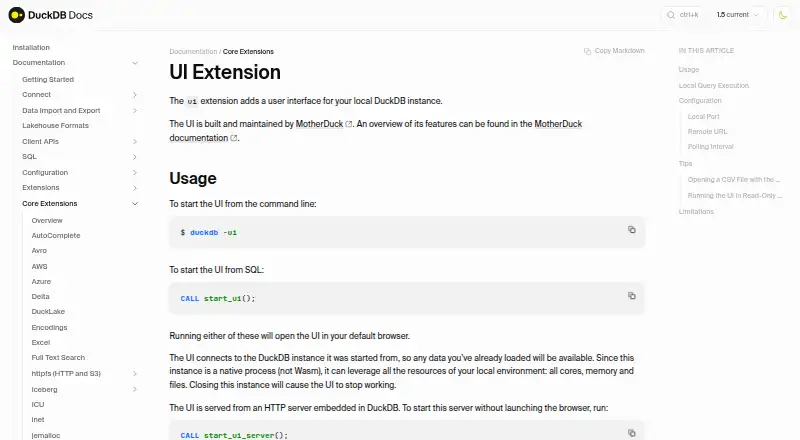
DuckDB UI is a browser-based interface for working with a local DuckDB instance, added through the ui extension. It includes a SQL notebook with autocomplete and keyboard shortcuts, a catalog browser, a table explorer with column-level statistics, and a results viewer with sorting and filtering. Start it with `duckdb -ui` or `CALL start_ui()`; the interface opens in the default browser and is served by an HTTP server embedded in DuckDB, normally at `http://localhost:4213`. By default, queries run locally and the data and queries stay on the computer. The native DuckDB process gives the interface access to local cores, memory, and files. Connecting to MotherDuck requires opting in and signing in. The UI is free. Direct use with a read-only database is not supported, and the UI does not currently support windows_arm64. The local server fetches interface files from ui.duckdb.org, so configured alternate URLs should be trusted because the application can access loaded DuckDB data.
Good
- Queries run locally by default
- SQL notebook has autocomplete and keyboard shortcuts
- Table explorer shows column-level statistics
- Results viewer supports sorting and filtering
Watch out
- Direct use with read-only databases is unsupported
- windows_arm64 is not supported
- Configured alternate UI URLs should be trusted
Who it suits
DuckDB UI suits people who want a browser-based way to explore local DuckDB data and run SQL queries. It may also suit users who want to opt in to a MotherDuck connection.
Verdict
DuckDB UI offers local SQL and data exploration in a browser, with MotherDuck connection available by explicit opt-in. Check its read-only database and windows_arm64 limitations before choosing it.
Plans and prices
From DuckDB UI's own pricing page, checked 1 Oct 2026.
| Plan | Price | What it gives you |
|---|---|---|
| Free local DuckDB UI | Free | browser-based interface · local SQL notebook · optional MotherDuck connection |
The facts
Each one read from DuckDB UI's own pages, with the date it was checked.
Where it runs
- Browser launch
- Starting the UI opens it in the default browser.checked 1 Oct 2026
- Platform limitation
- The UI currently does not support windows_arm64.checked 1 Oct 2026
What it does
- Cloud security
- MotherDuck has completed SOC 2 Type II attestation and has been GDPR verified.checked 1 Oct 2026
- Data exploration
- The UI includes a catalog browser, table explorer with column-level statistics, and a results viewer with sorting and filtering.checked 1 Oct 2026
- Embedded server
- The UI is served by an HTTP server embedded in DuckDB, available by default at http://localhost:4213.checked 1 Oct 2026
- Launch options
- You can start the UI with duckdb -ui or CALL start_ui().checked 1 Oct 2026
- Local execution
- By default, queries run fully locally and queries and data never leave the computer.checked 1 Oct 2026
- Local resources
- The native DuckDB process lets the UI use all local cores, memory and files.checked 1 Oct 2026
- Maintainer
- The UI is built and maintained by MotherDuck.checked 1 Oct 2026
- MotherDuck integration
- Using MotherDuck through the UI requires explicit opt-in and signing in to MotherDuck.checked 1 Oct 2026
- Notebook features
- The interface includes a SQL notebook with autocomplete and keyboard shortcuts.checked 1 Oct 2026
- Purpose
- The ui extension adds a user interface for a local DuckDB instance.checked 1 Oct 2026
- Read-only limitation
- Running the UI directly on a read-only database is not supported.checked 1 Oct 2026
- Remote asset security
- The local server fetches UI files from ui.duckdb.org, and configured alternate URLs should be trusted because the application can access loaded DuckDB data.checked 1 Oct 2026
The full review of DuckDB UI
DuckDB UI is a browser interface for querying and exploring a local DuckDB instance, maintained by MotherDuck. It is best for analysts, developers, and data-focused teams who want SQL work to stay on a local machine. The trade-off is a focused local workflow with a read-only database restriction and no windows_arm64 support.
Overview
Start the interface with duckdb -ui or CALL start_ui(); it opens in the default browser. DuckDB serves the UI through an embedded HTTP server, normally at http://localhost:4213. The native DuckDB process gives it access to local cores, memory, and files, and queries run locally by default, so data does not need to leave the computer.
MotherDuck connectivity is optional rather than automatic. Using it requires explicit opt-in and a MotherDuck sign-in, preserving a purely local workflow for users who do not need cloud access. The local server fetches interface files from ui.duckdb.org; alternate configured URLs should be treated as trusted because the application can access loaded DuckDB data.
Key features
The SQL notebook provides autocomplete and keyboard shortcuts, which makes repeated query writing more efficient than working from a bare command line. A catalog browser and table explorer provide database navigation and column-level statistics, while the results viewer adds sorting and filtering for inspecting returned data. CSV export is supported, and data editing is available for workflows that need changes rather than read-only inspection.
Those capabilities form a compact query-and-exploration environment rather than a broad database administration suite. The important constraint is operational: the UI cannot run directly on a read-only database, so it is unsuitable when the database must remain mounted read-only or when inspection is deliberately separated from write-capable access.
Pricing
Free local DuckDB UI — free. The free plan includes a browser-based interface, a local SQL notebook, and an optional MotherDuck connection. There are no paid tiers or seat charges stated, making it appropriate for individual users, prototypes, and teams standardizing on DuckDB without a software subscription. Its value depends on accepting the local DuckDB deployment model and the platform and database-access limitations.
Platforms
DuckDB UI is offered as an extension across Linux, macOS, Windows, web, and self-hosted deployments. Windows on ARM64 is explicitly unsupported, so users of that architecture need another client or platform. The browser presentation does not make it a hosted service by itself: the interface runs against a local DuckDB process unless you opt in to MotherDuck.
Who it's for
Choose DuckDB UI for local analysts, developers, and data teams that want a browser notebook and visual inspection tools while keeping queries and files on the machine. It also suits users who occasionally need MotherDuck access but want that connection to be deliberate. Look elsewhere if you require direct operation on read-only databases, Windows ARM64 support, or a service-first deployment with capabilities beyond this local DuckDB workflow.
Pros and cons
Pros
- Local-first execution: queries and data stay on the computer by default, while DuckDB can use local cores, memory, and files.
- Useful exploration set: autocomplete, shortcuts, catalog browsing, column statistics, and sortable, filterable results support a complete basic analysis loop.
- Optional cloud path: MotherDuck integration is available without making sign-in or data transfer mandatory.
- No software charge: the free plan includes the core browser interface and notebook.
Cons
- Read-only incompatibility: the UI cannot run directly on a read-only database, limiting locked-down inspection workflows.
- No Windows ARM64 support: that architecture is excluded despite broader Windows availability.
- Trust requirement for alternate asset hosts: configured alternate UI URLs can access loaded DuckDB data.
Alternatives
Pick Exasol instead when a freemium analytical database with paid, metered XS and S plans and web or API access fits better. CrateDB is a better choice when you need a distributed-style service with a free shared tier and Windows support. Choose Apache Druid for an open-source, downloadable analytics database intended for self-hosting. QuestDB suits users seeking an Apache 2.0, self-managed single-instance database with community support. Teradata VantageCloud is the alternative for a commercial cloud data platform built around Teradata Database and ClearScape Analytics. Apache Kylin provides an open-source OLAP engine with source and binary packages under Apache License 2. MonetDB is another free, open-source database option under the Mozilla Public License 2.0. Choose Oracle Autonomous AI Lakehouse when an always-free autonomous cloud lakehouse with capacity limits is preferable.
For broader comparison, browse OLAP Databases, Columnar Databases, OLAP Software, Spatial Databases, Database Client Software, and Embedded Databases.
Verdict
DuckDB UI is a strong choice for anyone who wants a free, browser-based SQL and data-exploration layer over local DuckDB, with optional MotherDuck connectivity and no default data transfer. Choose it for that local-first simplicity; look elsewhere if read-only databases, Windows ARM64, or a broader hosted database platform are requirements.
Alternatives to DuckDB UI
- 1

Outerbase Studio
Free planOpen sourceAndroidiOSWebAPI8.5From $9 a month - 2
DBeaver
Free planOpen sourceWebAPIExtensionLinux8.2From $113 a year - 3

Beekeeper Studio
Free planOpen sourceAPIExtensionLinuxmacOS8.0From $18 a month - 4

MySQL
Free planAPILinuxmacOSSelf-hosted7.9Free plan - 5
Database Workbench
Free planLinuxmacOSWindows7.5€199 one-time - 6
dbForge Studio for PostgreSQL
Free planLinuxmacOSWindows7.5From $89.95 a year