Database Workbench
Database Workbench is a desktop database IDE for designing, implementing, documenting, and maintaining databases.
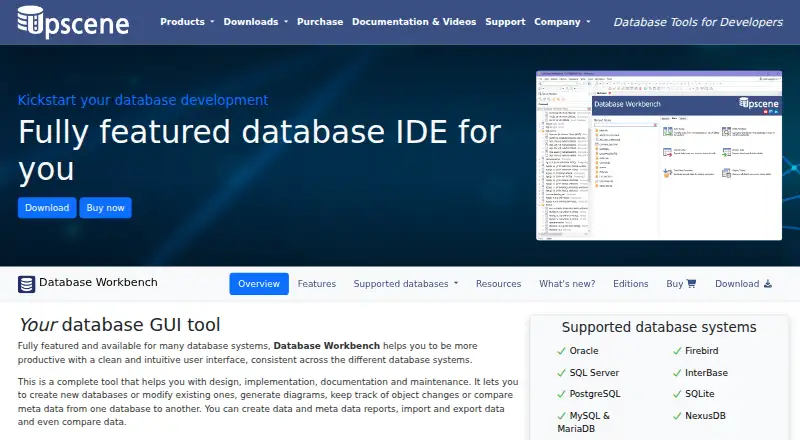
What Database Workbench is
Database Workbench is a desktop database IDE for designing, implementing, documenting, and maintaining databases. It lists Oracle, Firebird, SQL Server, InterBase, PostgreSQL, SQLite, MySQL, MariaDB, and NexusDB among its supported systems. Design tools include logical and physical diagrams, reverse engineering, visual object editors, database migration, and schema comparison. SQL Insight adds join completion in the SQL and code editors, and a drag-and-drop Visual Query Builder is also available. Users can view and edit data, import and export it, transfer it between sources, compare data, and work with BLOBs. Other tools cover test data generation, query profiling, stored procedure debugging, and custom reports through Report Manager. Professional adds ODBC and ADO connections and data pumping from those sources. Enterprise adds shared servers and databases, non-local workspaces, team to-do lists, shared SQL and code catalogs, and built-in version control. The product is described as a 64-bit Windows application that can run under Linux via Wine. Free Lite editions are listed for Firebird and MySQL, and the downloads page lists a Trial Pro Edition. Pro and Enterprise without a SQLite module license can open SQLite databases only in metadata read-only mode without full tool support.
Good
- Supports a broad list of database systems.
- Includes diagrams, reverse engineering, and schema comparison.
- Provides query building and SQL join completion.
- Enterprise includes shared catalogs and version control.
- Free Lite editions are available for Firebird and MySQL.
Watch out
- Linux use is via Wine for the Windows application.
- SQLite access is metadata read-only without a module license in Pro and Enterprise.
- Listed plan prices are not provided.
Who it suits
Database Workbench may suit developers working across its listed database systems, from individual projects to team environments. Enterprise adds collaboration features for development teams.
Verdict
Database Workbench brings database design, data editing, SQL tooling, and optional team features into a Windows desktop IDE. Check edition requirements for ODBC or ADO connectivity, collaboration, and full SQLite support.
Plans and prices
From Database Workbench's own pricing page, checked 15 Oct 2026.
| Plan | Price | What it gives you |
|---|---|---|
| Database Workbench Lite | Free | Personal use · Limited functionality · MySQL or Firebird editions |
| Lite | Free | Free Lite editions are listed for Firebird and MySQL |
| Database Workbench module | €199, paid once | One selected database-system module · VAT excluded · Perpetual licence; one year of updates and support included |
| Database Workbench Pro for SQLite | €259, paid once | Windows desktop · 21-day trial before purchase |
| Database Workbench Pro for NexusDB | €289, paid once | Windows desktop · 21-day trial before purchase |
| Database Workbench Pro for MySQL/MariaDB | €299, paid once | Windows desktop · 21-day trial before purchase |
| Database Workbench Pro for PostgreSQL | €299, paid once | Windows desktop · 21-day trial before purchase |
| Database Workbench Pro for Firebird | €299, paid once | Windows desktop · 21-day trial before purchase |
| Database Workbench Pro for InterBase | €309, paid once | Windows desktop · 21-day trial before purchase |
| Database Workbench Pro for Microsoft SQL Server | €469, paid once | Windows desktop · 21-day trial before purchase |
| Database Workbench Pro for Oracle | €489, paid once | Windows desktop · 21-day trial before purchase |
| Professional | — | At least 1 database module · price excludes VAT · stored routine debugging available for Firebird, MySQL, InterBase, Oracle and PostgreSQL · Perpetual license; one year of free updates and support included. |
| Enterprise | — | At least 1 database module · price excludes VAT · team features include shared servers, workspaces, to-do lists and built-in VCS · Perpetual license; one year of free updates and support included. |
| Basic | — | At least 1 database module · price excludes VAT · Perpetual license; one year of free updates and support included. |
The facts
Each one read from Database Workbench's own pages, with the date it was checked.
What it does
- BLOB handling
- The BLOB viewer/editor supports images, hexadecimal data, HTML, PDF and several document formats.checked 15 Oct 2026
- Connectivity
- Professional adds connections to ODBC and ADO sources and data pumping from those sources.checked 4 Oct 2026
- Database design
- Its design tools create logical and physical diagrams and can reverse-engineer existing databases.checked 15 Oct 2026
- Database systems
- The product lists Oracle, Firebird, SQL Server, InterBase, PostgreSQL, SQLite, MySQL/MariaDB and NexusDB as supported database systems.checked 4 Oct 2026
- Data comparison
- Data Compare maps source and destination tables and produces scripts to synchronize changed data.checked 15 Oct 2026
- Data migration
- The migration tool converts data types and defaults while moving between supported database systems or ODBC and ADO sources.checked 15 Oct 2026
- Data Pump
- Data Pump transfers data between supported engines and from ODBC or ADO data sources.checked 15 Oct 2026
- Data tools
- It can view and edit data, import and export data, transfer data between sources, compare data, and view or edit BLOBs.checked 4 Oct 2026
- Design and migration
- It supports logical and physical diagrams, reverse engineering, visual object editors, database migration and schema comparison.checked 4 Oct 2026
- Documentation
- Upscene lists documentation for Database Workbench versions 6, 5, 4 and 3.checked 15 Oct 2026
- Enterprise collaboration
- Enterprise adds a central server and database repository, shared workspaces, to-do lists and metadata version control.checked 15 Oct 2026
- Independent classification
- Firebird’s third-party-tools directory classifies Database Workbench as a commercial GUI tool for SQL development.checked 15 Oct 2026
- Intended users
- The maker describes editions for individual projects and entire teams, and calls Enterprise a special edition for development teams.checked 4 Oct 2026
- Licence model
- Wikipedia identifies Database Workbench as trialware rather than open-source software.checked 15 Oct 2026
- License and support
- The purchase page says the license is perpetual and includes one year of free updates and support.checked 4 Oct 2026
- Notable module limit
- Pro and Enterprise editions without a SQLite module license can open SQLite databases only in metadata read-only mode and without full tool support.checked 4 Oct 2026
- Operating system
- The current application is a 64-bit Windows program; Wine is used for Linux, FreeBSD or macOS operation.checked 15 Oct 2026
The company
- Company focus
- LinkedIn says Upscene focuses on tools for database developers and supports the nine database systems listed above.checked 15 Oct 2026
- Company founding
- LinkedIn states that Upscene Productions was founded in 2002.checked 15 Oct 2026
- Company headquarters
- LinkedIn gives the company headquarters as Oss, Netherlands.checked 15 Oct 2026
- Company size
- LinkedIn lists Upscene Productions as a privately held software company with 2–10 employees.checked 15 Oct 2026
- Headquarters
- The Netherlandschecked 28 Sep 2026
Money
- Limit: trial restriction
- The unregistered Softpedia download is limited to a 21-day trial and displays nag screens.checked 15 Oct 2026
Where it runs
- Platform
- Database Workbench is described as a 64-bit Windows application that can run under Linux via Wine.checked 4 Oct 2026
The full review of Database Workbench
Database Workbench is a desktop database IDE for developers who need schema design, SQL work, data handling, and maintenance tools together. It suits Windows-based individuals and teams working across several database engines; Linux users can run it through Wine. The trade-off is that edition and module choices determine connectivity, collaboration, and SQLite depth.
Overview
Database Workbench covers the database lifecycle from logical modeling through implementation, documentation, migration, comparison, troubleshooting, and reporting. Its broad engine support makes it more adaptable than a single-database utility, but the package is fundamentally a 64-bit Windows application. Linux support is therefore indirect rather than a native desktop build.
Key features
Oracle, Firebird, SQL Server, InterBase, PostgreSQL, SQLite, MySQL, MariaDB, and NexusDB are supported. Logical and physical diagrams, reverse engineering, visual object editors, forward engineering, migration, schema comparison, and SQL export give developers practical control over both new schemas and existing installations.
The SQL and code editors include SQL Insight with join completion, while a drag-and-drop Visual Query Builder offers an alternative to writing every query manually. These aids are useful for developers who move between exploratory querying and more deliberate SQL authoring, though users seeking a narrowly focused client may find the wider toolset more than they need.
Data features include record viewing and editing, import and export, transfers between sources, data comparison, and BLOB viewing or editing. Test-data generation, query profiling, stored-procedure debugging, and Report Manager add development and diagnostic coverage. This combination is well suited to projects where data preparation, troubleshooting, and custom reports sit alongside schema work.
Connectivity expands in Professional with ODBC and ADO connections and data pumping from those sources. Enterprise is aimed at development teams, adding shared servers and databases, non-local workspaces, team to-do lists, shared SQL and code catalogs, and built-in version control. SQLite requires particular care: Pro and Enterprise without a SQLite module license are limited to metadata read-only access and do not provide the full toolset.
Pricing
Database Workbench uses a freemium model. Lite costs nothing and is offered as separate free editions for Firebird and MySQL, making it the sensible starting point for individuals working solely with one of those engines. Basic, Professional, and Enterprise each support at least one database system, but pricing is custom rather than published.
The Trial Pro Edition provides a way to assess the broader professional feature set before purchase. A purchased license is perpetual and includes one year of free updates and support; ongoing access to later updates or support after that period is not covered by the stated terms. Basic is the entry choice for an individual project, Professional is the relevant step for ODBC or ADO work, and Enterprise is for teams that need shared infrastructure and built-in collaboration. Confirm the required database modules, especially SQLite, before committing.
Platforms
Database Workbench is deployed as desktop software on 64-bit Windows. It can run on Linux through Wine, but that is a compatibility layer rather than native Linux packaging.
Who it's for
Choose it when one developer or team needs design diagrams, SQL editing, data operations, migration, debugging, profiling, and reporting across multiple database systems. Enterprise is the most appropriate fit for development teams coordinating shared workspaces and catalogs. It is less compelling for users who need native Linux software, only a browser-based modeler, or a free multi-engine edition without module restrictions.
Pros and cons
- Pros: unusually broad database coverage; schema, SQL, data, testing, and reporting tools in one IDE; reverse engineering, migration, and comparison support; perpetual licensing with a year of updates and support; Enterprise collaboration and version control.
- Cons: Windows-first deployment; Linux depends on Wine; Lite is restricted to Firebird and MySQL; Professional connectivity and Enterprise collaboration require higher editions; SQLite functionality can be reduced to metadata read-only without its module license.
Alternatives
Database Design Tools is the broader category to consult when modeling is the priority. For a general-purpose connection and query application, compare Database Client Software.
- MySQL is the better fit when you specifically need the MySQL database platform, its GPL-licensed Community Edition, and components for SQL or NoSQL applications, replication, and high availability.
- Hackolade Studio suits teams wanting cross-platform modeling, including web and macOS access, with a 50-object Community Edition cap.
- DbSchema is worth choosing for cross-platform schema design with Community, Pro synchronization, and Architect tiers.
- pgModeler is the focused alternative for PostgreSQL modeling with single-user and team licensing options.
- Schemity fits browser-based collaboration, with a free Lite plan for schema design and link sharing.
- SQL Power Architect is a free GPL v.3 option for users comfortable with Java Runtime 8.
- ChartDB is suited to web or self-hosted diagramming, with a free tier limited to one user, one database, 10 tables per diagram, and two private diagrams.
- DB Designer is a web-based choice, including a free Starter tier capped at two models and 10 tables per model.
Verdict
Database Workbench is a strong choice for database developers who want a wide, integrated Windows toolkit rather than separate modeling, client, and diagnostic applications. Its main reasons to choose it are engine breadth and lifecycle coverage; look elsewhere if native Linux, browser delivery, or unrestricted SQLite and multi-engine access on a free plan are essential.
Alternatives to Database Workbench
- 1

Outerbase Studio
Free planOpen sourceAndroidiOSWebAPI8.5From $9 a month - 2
DBeaver
Free planOpen sourceWebAPIExtensionLinux8.2From $113 a year - 3

Beekeeper Studio
Free planOpen sourceAPIExtensionLinuxmacOS8.0From $18 a month - 4

MySQL
Free planAPILinuxmacOSSelf-hosted7.9Free plan - 5
dbForge Studio for PostgreSQL
Free planLinuxmacOSWindows7.5From $89.95 a year - 6
dotConnect
Free planAPILinuxmacOSWindows7.4$219.95 one-time